Introduction
This manual provides essential information for the installation, operation, and maintenance of the Main Roller Brush Replacement for the Ultenic AC1 Wet Dry Vacuum Cleaner. This high-quality replacement part is designed to restore and enhance the cleaning performance of your vacuum.
Key features include:
- Long-lasting Material: Crafted from durable material for high performance and excellent cleaning results.
- Efficient Cleaning: Innovative design and powerful bristles effectively remove dirt, dust, and debris.
- Easy Installation: Designed for effortless attachment to your Wet Dry Vacuum Cleaner.
- Long-lasting Durability: Built to withstand regular use and heavy-duty cleaning tasks.
- Enhanced Cleaning Performance: Specifically designed to optimize the cleaning capability of your vacuum.
Product Overview
The Main Roller Brush is a critical component for effective vacuuming, designed to agitate and collect debris from various surfaces. Below are images illustrating the product and its key features.

Figure 1: The Main Roller Brush, a replacement part for the Ultenic AC1 Wet Dry Vacuum Cleaner, shown in its complete form.

Figure 2: Dimensions of the Main Roller Brush, indicating an approximate length of 250mm and a handle width of 113mm, crucial for compatibility.
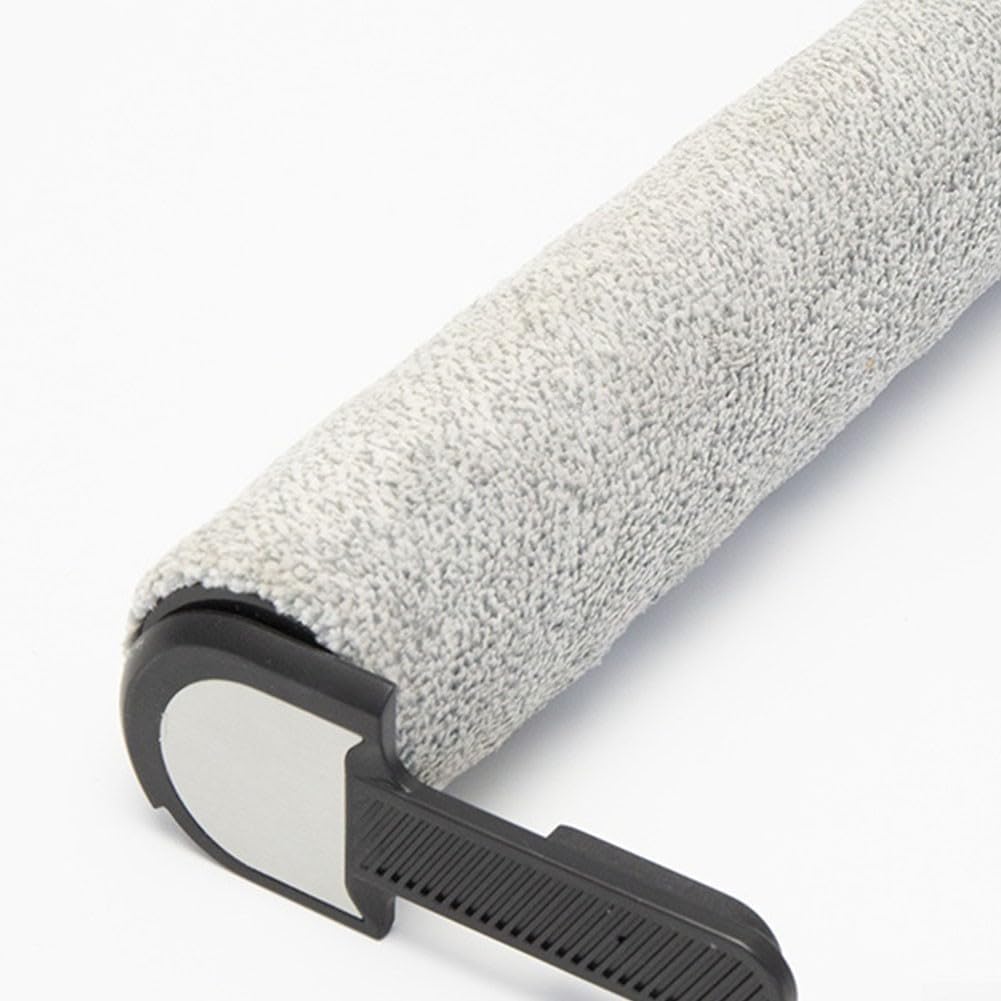
Figure 3: Close-up view of the brush's textured surface, designed for effective debris collection and scrubbing.

Figure 4: Detailed view of the roller brush end cap, showing the connection points that securely fit into the vacuum cleaner's brush housing.
Installation (Setup)
Replacing the main roller brush is a straightforward process. Always ensure the vacuum cleaner is turned off and unplugged before attempting any installation or maintenance.
- Prepare the Vacuum: Turn off and unplug your Ultenic AC1 Wet Dry Vacuum Cleaner.
- Access the Brush Compartment: Locate the brush compartment cover on the underside of your vacuum cleaner. Refer to your vacuum cleaner's user manual for specific instructions on how to open this compartment.
- Remove the Old Brush: Carefully unlatch or slide out the worn or damaged main roller brush. Dispose of the old brush responsibly.
- Insert the New Brush: Align the new Main Roller Brush with the slots or guides in the brush compartment. Gently push it into place until it clicks securely. Ensure both ends of the brush are properly seated.
- Close Compartment: Close the brush compartment cover, ensuring it is latched securely.
- Test: Plug in and turn on your vacuum cleaner to confirm the new brush operates correctly.
Operation
Once installed, the Main Roller Brush operates automatically as part of your Ultenic AC1 Wet Dry Vacuum Cleaner's cleaning system. It is designed to rotate at high speed, agitating dirt and debris from surfaces and directing them into the vacuum's suction path.
- Ensure the brush spins freely before and after each use.
- Avoid vacuuming large, hard objects that could damage the brush bristles or the vacuum cleaner.
Maintenance
Regular maintenance of your Main Roller Brush will ensure optimal cleaning performance and extend its lifespan. It is recommended to inspect the brush periodically, especially after cleaning heavily soiled areas.
- Inspect for Debris: Regularly check the roller brush for tangled hair, threads, or other debris. These can reduce cleaning efficiency and put strain on the vacuum motor.
- Clean the Brush: If debris is present, carefully remove the roller brush (refer to the "Installation" section for removal steps). Use scissors or a brush cleaning tool to cut and remove tangled hair and fibers from the bristles.
- Rinse (if applicable): If your vacuum cleaner model allows for wet cleaning of the roller brush, rinse it under running water. Ensure it is completely dry before re-installing to prevent mold or damage to the vacuum.
- Check for Wear: Over time, bristles may become worn or flattened. If the brush is no longer effectively agitating surfaces, it may be time for a replacement.
Troubleshooting
If you encounter issues with your Main Roller Brush, consider the following common troubleshooting steps:
| Problem | Possible Cause | Solution |
|---|---|---|
| Brush not spinning | Tangled debris; Improper installation; Worn brush. | Remove and clean the brush; Re-install correctly, ensuring it clicks into place; Replace the brush if severely worn. |
| Poor cleaning performance | Clogged bristles; Worn bristles; Incorrect brush type. | Clean the brush thoroughly; Replace the brush if bristles are flattened; Ensure you are using the correct replacement brush for Ultenic AC1. |
| Unusual noise from brush area | Debris caught in brush mechanism; Damaged brush. | Remove and inspect the brush and compartment for foreign objects; Replace the brush if it appears damaged. |
If problems persist after following these steps, consult the main user manual for your Ultenic AC1 Wet Dry Vacuum Cleaner or contact the vacuum cleaner manufacturer's support.
Specifications
| Attribute | Detail |
|---|---|
| Product Name | Main Roller Brush |
| Compatibility | For Ultenic AC1 Wet Dry Vacuum Cleaner |
| Material | High-quality, long-lasting material (specific composition not provided) |
| Color | Gray |
| Product Dimensions | 9.84 x 4.33 x 19.69 inches (approx. 250mm length, 113mm width at handle) |
| Item Weight | 4.08 pounds |
| Manufacturer | Lioaeust |
| Model Number | 4OSBXUFT3OS384XAW07D543X34PZ6Z |
| Country of Origin | China |
Warranty and Support
Information regarding specific warranty terms for this replacement roller brush is not provided in the product details. For warranty inquiries or technical support, please refer to the documentation included with your original Ultenic AC1 Wet Dry Vacuum Cleaner or contact the manufacturer of the vacuum cleaner directly.
For support related to this specific replacement part, please contact the seller, Lioaeust, through the platform where the purchase was made.