
isinwheel M10 Plus/Pro
User Manual for isinwheel M10 Plus/Pro Electric Bike
Model: M10 Plus/Pro
1. Introduction
This manual provides essential information for the safe and efficient operation, assembly, and maintenance of your isinwheel M10 Plus/Pro Electric Bike. Please read this manual thoroughly before your first ride and keep it for future reference. The isinwheel M10 Plus/Pro is a versatile electric bicycle designed for adults, featuring a powerful 1000W peak motor, a long-range removable battery, 7-speed shifting, and 26x4.0 fat tires, suitable for various terrains from city streets to mountain trails.
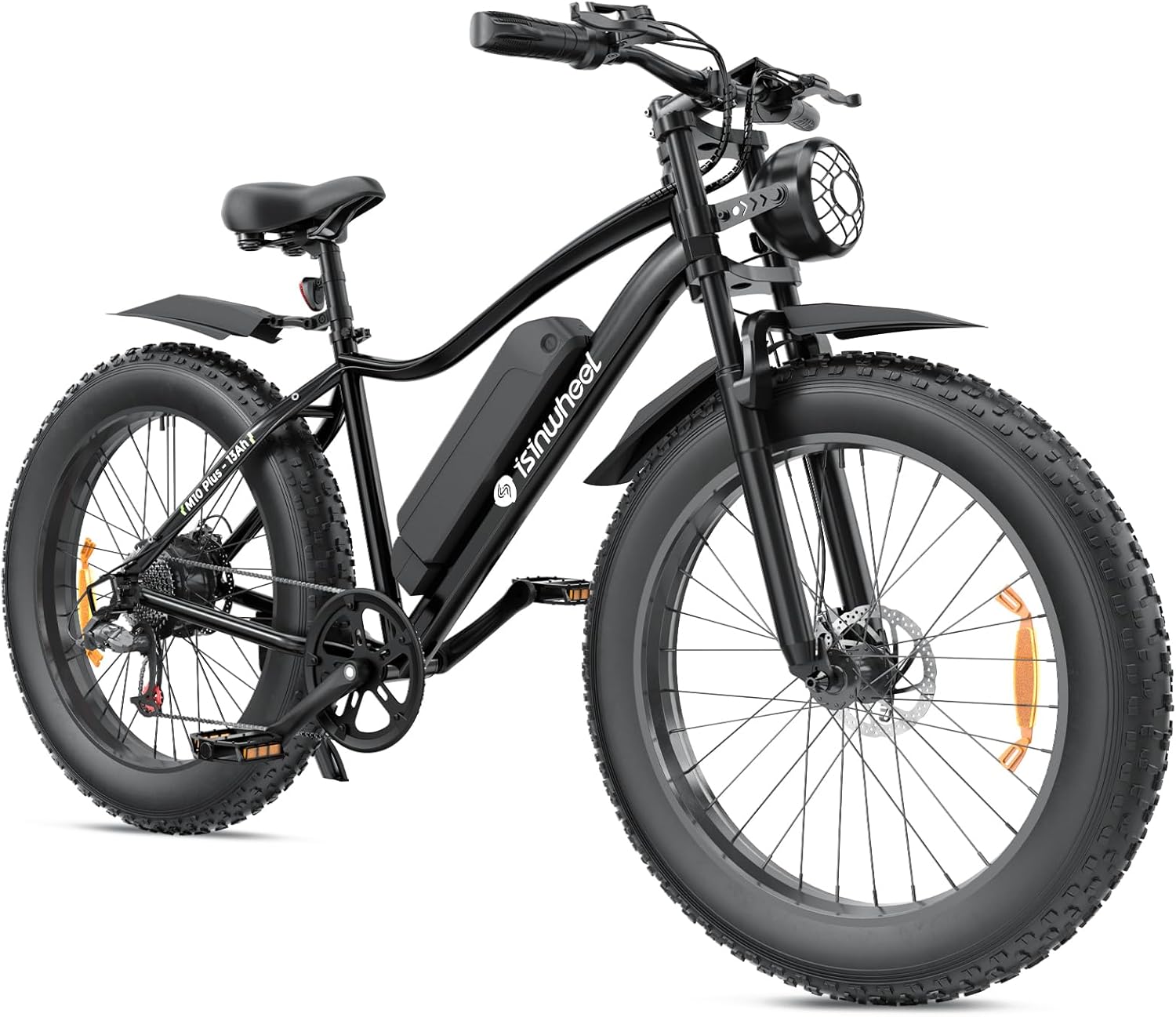
Image: The isinwheel M10 Plus/Pro Electric Bike, showcasing its robust design and fat tires.
2. Safety Information
Your safety is paramount. Always wear a helmet and appropriate safety gear when riding. Adhere to all local traffic laws and regulations. Perform a pre-ride inspection before each use, checking brakes, tires, battery level, and all connections. Avoid riding in adverse weather conditions or on excessively rough terrain if you are not experienced. The M10 Plus/Pro is equipped with dual front and rear disc brakes for reliable stopping power, but always maintain a safe distance from other vehicles and pedestrians.
- Always wear a certified helmet.
- Familiarize yourself with local e-bike laws.
- Perform pre-ride checks: brakes, tires, battery, lights.
- Do not exceed the maximum weight recommendation of 330 pounds.
- Be aware of your surroundings and ride defensively.
3. Package Contents
Upon unboxing your isinwheel M10 Plus/Pro Electric Bike, please verify that all components are present and undamaged. The package should include:
- isinwheel M10 Plus/Pro Electric Bike (partially assembled)
- 48V 13Ah Removable Battery
- Battery Charger
- Basic Tool Kit
- Bell
- Front and Rear Fenders
- Pedals
- Headlight
- User Manual (this document)

Image: All components included in the isinwheel M10 Plus/Pro Electric Bike package.
4. Setup and Installation
Follow these steps to assemble your isinwheel M10 Plus/Pro Electric Bike. It is recommended to have two people for certain steps to ensure stability and safety.
- Unboxing: Carefully remove the bike and all components from the packaging. Remove all protective wrapping and zip ties.
- Front Wheel Installation: Align the front wheel with the fork. Ensure the disc brake rotor slides correctly into the brake caliper. Secure the wheel using the quick-release skewer or axle nuts provided.
- Handlebar Installation: Loosen the bolts on the stem clamp. Insert the handlebar into the stem, ensuring it is centered and the brake levers and shifters are in a comfortable position. Tighten the stem bolts securely.
- Headlight Installation: Attach the retro headlight to the designated mounting point on the front fork or handlebar stem. Connect the headlight cable to the corresponding connector on the bike's wiring harness.
- Fender Installation: Attach the front and rear fenders to their respective mounting points on the fork and rear frame using the provided screws and brackets.
- Seat Post and Saddle Installation: Insert the seat post with the saddle attached into the seat tube. Adjust the height to your comfort and secure it with the quick-release clamp.
- Pedal Installation: Identify the left (L) and right (R) pedals. The left pedal screws counter-clockwise, and the right pedal screws clockwise. Apply a small amount of grease to the threads before installation. Tighten securely with a wrench.
- Battery Installation: Ensure the battery is fully charged before installation. Slide the battery into its compartment on the frame until it clicks securely into place. Use the key to lock it if applicable.
Video: Detailed step-by-step guide for the assembly and initial setup of the isinwheel M10 Plus Electric Bike. This video covers unboxing, installing the front wheel, handlebars, headlight, fenders, seat, and pedals, and securing the battery.
5. Operating Instructions
Your isinwheel M10 Plus/Pro Electric Bike offers multiple riding modes and features for a customized experience.
5.1 Power On/Off
To power on the bike, ensure the battery is securely installed and turned on (if it has a separate switch). Then, press and hold the power button on the LCD display for a few seconds until the screen illuminates. To power off, press and hold the power button again until the display turns off.
5.2 Riding Modes
- Pure Electric Mode (Throttle Mode): Use the thumb throttle to accelerate without pedaling. This mode provides instant power from the 1000W peak motor.
- Pedal Assist Mode (PAS): The motor provides assistance as you pedal. Use the '+' and '-' buttons on the display to adjust the assist level (1-5). Higher levels provide more assistance.
- Manual Mode: Ride the bike like a traditional bicycle without any motor assistance.
- Walk Assist Mode: For walking the bike, hold the '-' button on the display. The motor will provide a low-speed assist (approx. 3.7 mph) to help you push the bike.
5.3 Gear Shifting
The bike features a 7-speed transmission. Use the twist grip shifter on the right handlebar to change gears. Shift to lower gears for climbing hills and higher gears for flat terrain or downhill riding to maintain efficient pedaling.

Image: The 7-speed twist grip shifter, allowing for efficient gear changes.
5.4 LCD Display
The smart LCD display provides real-time riding data, including current speed, battery level, pedal assist level, and odometer/trip distance. Use the buttons on the display to navigate through different information screens and adjust settings.

Image: The LCD display showing speed, battery bar, PAS level, and ODO/TRIP information.
Video: A short demonstration of the bike's display and power-on sequence.
6. Maintenance
Regular maintenance ensures the longevity and optimal performance of your isinwheel M10 Plus/Pro Electric Bike.
- Battery Care: Charge the battery regularly, even if not in use, to maintain its health. Avoid fully discharging the battery. Store the battery in a cool, dry place.
- Tire Pressure: Check tire pressure before each ride. The recommended pressure for the 26x4.0 fat tires is typically between 5-30 PSI, depending on terrain and rider weight. Refer to the tire sidewall for specific recommendations.
- Brakes: Regularly inspect brake pads for wear and ensure brake levers provide firm and responsive stopping power. Adjust or replace as needed.
- Chain Lubrication: Keep the chain clean and lubricated to ensure smooth shifting and prevent rust.
- General Cleaning: Clean the bike regularly with a damp cloth. Avoid high-pressure washing directly on electrical components.
- Fasteners: Periodically check all bolts and nuts for tightness, especially on critical components like handlebars, wheels, and seat post.
6.1 Charging Operation
To charge the 48V 13Ah removable battery, connect the charger to the battery's charging port, then plug the charger into a standard wall outlet. The charger's indicator light will show the charging status (e.g., red for charging, green for fully charged). It is recommended to charge the battery in a well-ventilated area. Do not cover the charger during use.
Video: A demonstration of charging the isinwheel M10 Plus/Pro Electric Bike battery.
7. Troubleshooting
If you encounter any issues with your isinwheel M10 Plus/Pro Electric Bike, refer to the following common troubleshooting tips:
| Problem | Possible Cause | Solution |
|---|---|---|
| Bike does not power on. | Battery not installed correctly, battery switch off, low battery, loose connections. | Ensure battery is fully inserted and locked. Turn on battery switch. Charge battery. Check all electrical connections. |
| Motor not assisting or weak assistance. | Low battery, PAS level set to 0, loose motor cable, brake lever engaged. | Charge battery. Increase PAS level on display. Check motor cable connection. Ensure brake levers are fully released. |
| Display not working. | Loose display cable, power off. | Check display cable connection. Press and hold power button to turn on. |
| Brakes are squealing or not effective. | Worn brake pads, dirty rotors, misaligned caliper. | Inspect and clean brake pads/rotors. Adjust brake caliper alignment. Replace worn pads. |
If the issue persists after attempting these solutions, please contact customer support for further assistance.
8. Specifications
| Feature | Detail |
|---|---|
| Bike Type | Electric Bike, Commuting Bike, Mountain Bike |
| Age Range (Description) | Adult |
| Brand | isinwheel |
| Number of Speeds | 7 |
| Color | Black |
| Wheel Size | 26 Inches |
| Frame Material | Aluminum |
| Suspension Type | Dual (Front and Rear) |
| Special Feature | Dual Disc Brake |
| Included Components | Charger, Basic Tools, Bell |
| Brake Style | Disc |
| Specific Uses For Product | Mountain, Commuting, Leisure |
| Style | Standard-26"x4.0" Tire |
| Power Source | Electric motor (rechargeable battery) |
| Wattage | 900W (Peak) |
| Wheel Material | Aluminum |
| Seat Material Type | Leather |
| Warranty Type | Limited |
| Maximum Weight Recommendation | 330 Pounds |
| Assembly Required | No (Partial assembly required) |
| Bicycle Gear Shifter Type | Twist Grip |
| Skill Level | Intermediate |
9. Warranty and Support
Your isinwheel M10 Plus/Pro Electric Bike comes with a limited warranty. For detailed warranty terms and conditions, please refer to the warranty card included in your package or visit the official isinwheel website. For any technical assistance, troubleshooting not covered in this manual, or warranty claims, please contact isinwheel customer support.
Contact Information:
- Call Center: 1(888) 293-5788
- Live Chat/Email Support: support@isinwheel.com
- Online Store: isinwheel Store on Amazon
isinwheel is dedicated to smart mobility since 2010, providing quality electric bikes and scooters. They aim to bring convenience and fun to your travel.
Ask a question about this manual
Ask about setup, troubleshooting, compatibility, parts, safety, or missing instructions. Manuals+ will review the question and use this page’s manual context to help answer it.