
BOYA BY-V10
BOYA BY-V10 Wireless Microphone User Manual
Model: BY-V10 V2.0
Introduction
The BOYA BY-V10 V2.0 is a compact and lightweight wireless lavalier microphone system designed for high-quality audio recording. It offers features such as one-click noise cancellation, a stable 328ft transmission range, and extended battery life, making it suitable for various recording scenarios including vlogging, interviews, and live streaming.
This manual provides detailed instructions on how to set up, operate, and maintain your BY-V10 wireless microphone system. Please read it carefully before use to ensure optimal performance and longevity of your device.
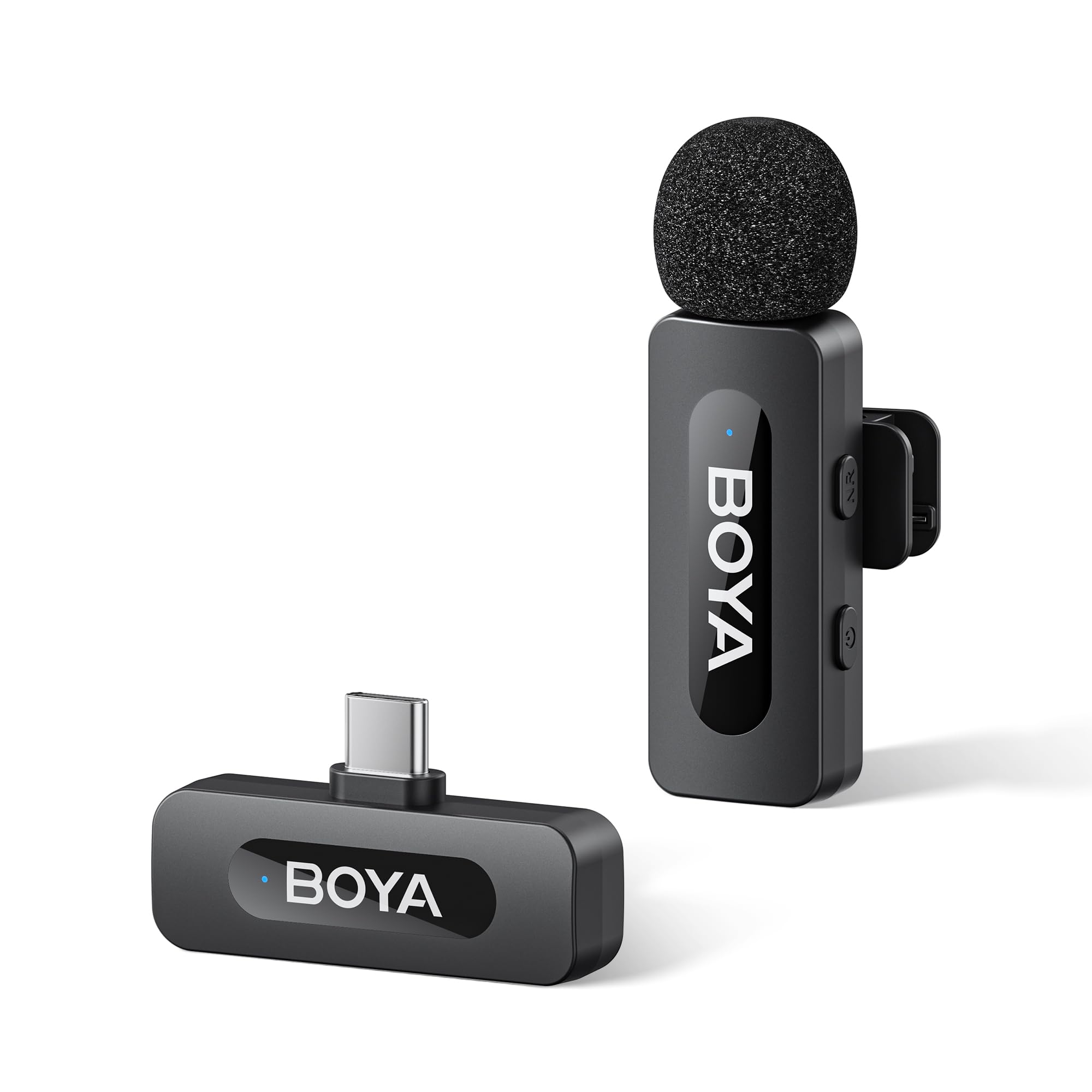
Image: The BOYA BY-V10 wireless microphone system, showing the transmitter and USB-C receiver.
What's in the Box
Verify that all the following components are included in your package:
- BY-V10 Transmitter x 1
- BY-V10-RXU Receiver x 1
- Foam Windscreen x 1
- USB-A to USB-C Charging Cable x 1
- Carrying Bag x 1
- User Manual x 1

Image: All included components of the BOYA BY-V10 system, including the transmitter, receiver, windscreen, charging cable, carrying bag, and user manual.
Product Overview
The BY-V10 system consists of a transmitter (TX) and a receiver (RX). The transmitter is a mini clip-on microphone, and the receiver connects directly to your recording device.
Transmitter (TX) Features:
- Omnidirectional Microphone: Captures clear audio from all directions.
- NR Button: Activates or deactivates the noise reduction function.
- Power Button: Press and hold for 2 seconds to power on/off. Press to mute/unmute.
- Belt Clip: 360° rotatable clip for easy attachment to clothing.
- Lightweight Design: Weighs only 10.5g for comfortable wear.

Image: Close-up of the BY-V10 transmitter highlighting its 360° rotatable clip, auto-connect feature, lightweight design, and HiFi sound capabilities.
Receiver (RX) Features:
- USB-C Connector: Direct plug-in to compatible smartphones, tablets, and laptops.
- USB-C Charging Port: Allows continuous charging of your device while recording.
- Plug and Play: Automatic pairing with the transmitter upon connection.

Image: The BY-V10 receiver connected to a smartphone, demonstrating its ability to charge the phone simultaneously during use.
Setup Guide
- Charge the Transmitter: Before first use, ensure the transmitter is fully charged using the provided USB-A to USB-C charging cable. The indicator light will show charging status.
- Enable OTG Function (Android devices only): For Android smartphones, navigate to your device's settings and ensure the "OTG" function is enabled. This is crucial for the microphone to be recognized.
- Connect the Receiver: Plug the BY-V10-RXU receiver directly into the USB-C port of your smartphone, tablet, or laptop.
- Power On the Transmitter: Press and hold the power button on the transmitter for 2 seconds until the indicator light turns on. The transmitter and receiver will automatically pair.
- Attach the Transmitter: Clip the transmitter onto your clothing, ensuring the microphone is facing towards your mouth for optimal sound capture. The 360° rotatable clip allows for flexible positioning.
- Install Foam Windscreen: For outdoor use or in windy conditions, place the foam windscreen over the microphone head to reduce wind noise and plosives.
The system is now ready for use. You can begin recording using your preferred audio or video recording application.
Operating Instructions
Power On/Off and Mute
- Power On: Press and hold the power button on the transmitter for 2 seconds.
- Power Off: Press and hold the power button on the transmitter for 2 seconds.
- Mute/Unmute: Briefly press the power button on the transmitter to mute or unmute the microphone.
Noise Cancellation
The BY-V10 features a one-click noise cancellation function to reduce ambient noise and enhance voice clarity.
- Activate Noise Cancellation: Press the "NR" button on the transmitter. The indicator light will change to confirm activation.
- Deactivate Noise Cancellation: Press the "NR" button again to turn off the noise reduction mode.

Image: Diagram illustrating the effect of one-click noise cancellation on the BOYA BY-V10 microphone, showing reduced background noise.
Battery Life and Charging
The transmitter provides up to 9 hours of battery life. The receiver does not require charging itself but can charge your connected device.
- Transmitter Charging: Use the provided USB-A to USB-C cable. A full charge takes approximately 2 hours.
- Receiver Pass-through Charging: The receiver's USB-C port allows you to charge your phone or recording device simultaneously while the microphone is in use. This is ideal for extended recording sessions.

Image: Visual representation of the BOYA BY-V10's battery life (9 hours usage, 2 hours charging) and the receiver's pass-through charging capability.
Transmission Range
The BY-V10 offers a stable audio signal transmission range of up to 328 feet (100 meters) in open environments without obstacles or interference. This extended range supports flexible recording setups both indoors and outdoors.

Image: A visual demonstrating the 328ft (100m) transmission distance of the BOYA BY-V10 wireless microphone system in an open outdoor setting.
Compatibility
The BY-V10-RXU receiver is compatible with a wide range of devices featuring a USB-C port, including:
- Android smartphones with a Type-C interface
- iPhone 15-17 Series
- iPads with a Type-C interface
- Macbooks/Laptops with a Type-C interface

Image: A graphic illustrating the wide compatibility of the BOYA BY-V10 with various Type-C smartphones, tablets, and laptops, including iPhone 15-17 series.
Sound Quality
The BY-V10 captures audio at 48kHz/16-bit, ensuring high-fidelity sound with exceptional clarity and accuracy for your recordings.
Image: An illustration detailing the HiFi sound quality of the BY-V10, emphasizing its 48kHz/16-bit audio format.
Official Product Video
Video: An official overview of the BOYA BY-V Wireless Lavalier Microphone system, demonstrating its key features and ease of use.
Maintenance
- Cleaning: Use a soft, dry cloth to clean the microphone and receiver. Avoid using liquids or abrasive cleaners.
- Storage: Store the microphone system in the provided carrying bag when not in use to protect it from dust and physical damage.
- Battery Care: For optimal battery longevity, avoid fully discharging the transmitter frequently. Charge it regularly, especially if storing for extended periods.
- Environmental Conditions: Avoid exposing the device to extreme temperatures, humidity, or direct sunlight.
Troubleshooting
| Problem | Solution |
|---|---|
| No sound recorded / Microphone not detected. |
|
| Poor audio quality / Excessive background noise. |
|
| Transmitter not charging. |
|
| Intermittent connection or signal drops. |
|
Specifications
| Feature | Detail |
|---|---|
| Model Name | BY-V10 |
| Connectivity Technology | Wireless 2.4GHz |
| Connector Type | USB Type-C |
| Microphone Form Factor | Lavalier |
| Polar Pattern | Omnidirectional |
| Frequency Response | 20Hz-16kHz |
| Signal-to-Noise Ratio | 80 dB |
| Transmission Range | Up to 328 feet (100 meters) |
| Battery Life (Transmitter) | Up to 9 hours |
| Charging Time (Transmitter) | Approx. 2 hours |
| Item Weight | 50 g |
| Item Dimensions | 1.97 x 1.57 x 3.94 inches |
| Compatible Devices | Android smartphones, iPhone 15-17 Series, iPads, Macbooks/Laptops with USB-C |
Warranty Information
The BOYA BY-V10 Wireless Microphone comes with a 2-year manufacturer's warranty. This warranty covers defects in materials and workmanship under normal use. Please retain your proof of purchase for warranty claims.
For detailed warranty terms and conditions, please refer to the official BOYA website or contact customer support.
Customer Support
If you encounter any issues or have questions regarding your BOYA BY-V10 Wireless Microphone, please refer to the troubleshooting section of this manual first.
For further assistance, you can visit the official BOYA store or contact their customer service:
- BOYA Official Store: Visit BOYA Store on Amazon
- Manufacturer Contact: Refer to the packaging or official website for direct contact information.
Ask a question about this manual
Ask about setup, troubleshooting, compatibility, parts, safety, or missing instructions. Manuals+ will review the question and use this page’s manual context to help answer it.