Introduction
This manual provides comprehensive instructions for the setup, operation, and maintenance of your UYXOERA DX 9800 Arcade Game Console. Designed for an immersive retro gaming experience, this console offers a vast library of games and versatile connectivity options. Please read this manual thoroughly before using the product to ensure proper function and safety.
Package Contents
Verify that all items listed below are included in your package:
- 1 x 3D Game Box Arcade Console
- 1 x Power Adapter
- 1 x HDMI Data Cable
- 1 x VGA Data Cable
- 1 x User Manual
- 2 x Replacement Control Buttons
- 1 x Original Packaging Box

Figure 1: Package contents of the DX 9800 Arcade Game Console.
Product Features
- Extensive Game Library: Access a collection of 9800 classic arcade games, including 3D titles, with a 1280x720p HD display resolution.
- Multiplayer Support: Supports 1-4 players simultaneously for social gaming.
- Intuitive Interface: Navigate through a user-friendly menu system with game categorization by genre (3D, Fighting, Sports, Action, Shooting, Puzzle).
- Advanced Functions: Includes features such as game search, recent games list, save progress, hide games, and pause functionality.
- Dual Joystick Design: Equipped with a professional arcade-style control panel featuring dual joysticks and multiple buttons for an authentic arcade feel.

Figure 2: The DX 9800 Arcade Game Console and its display interface.
Setup Instructions
- Connect to Display: Use the provided HDMI or VGA cable to connect the console to a TV, PC monitor, or projector.
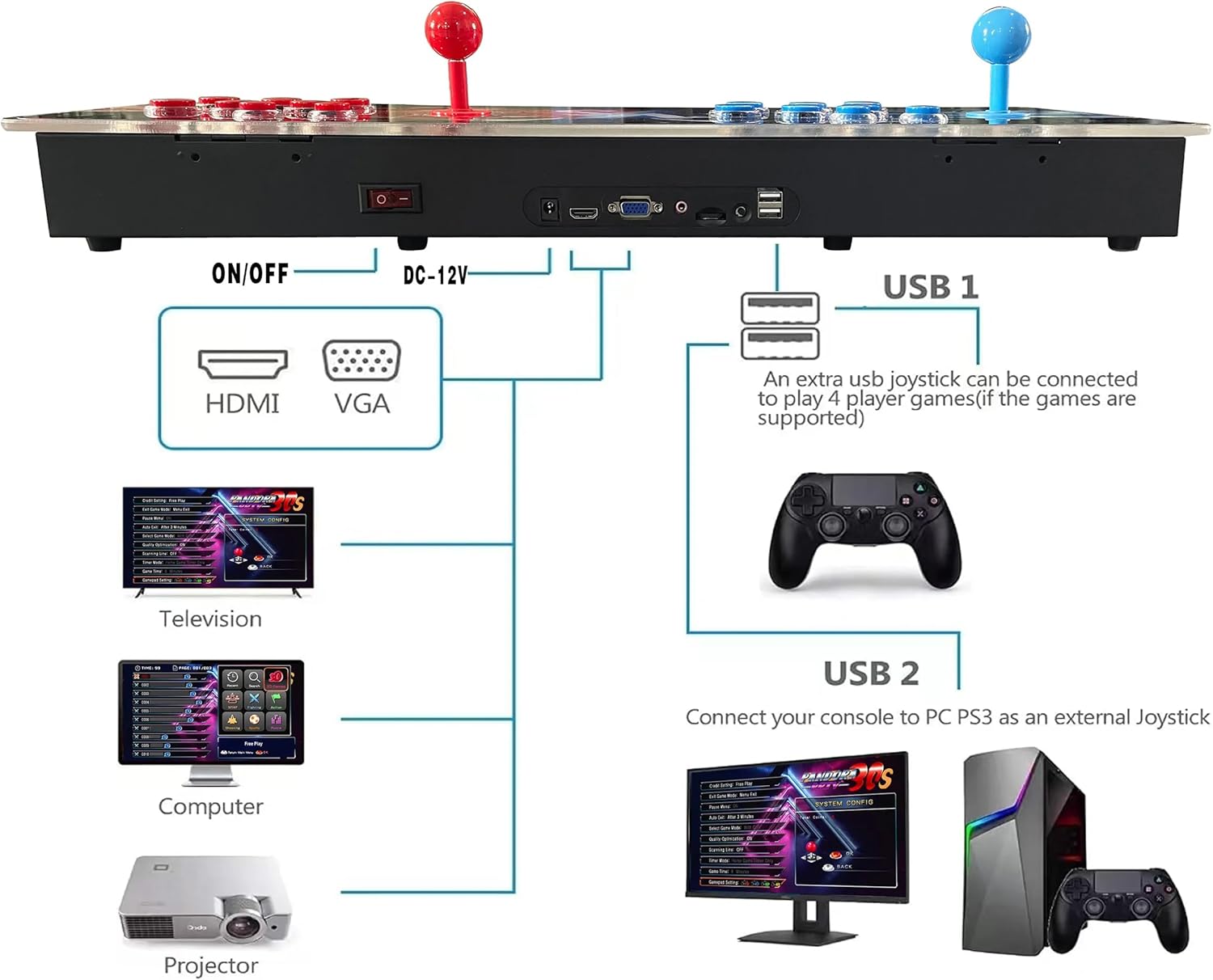
Figure 3: Connectivity options for the DX 9800 console.
- Power Connection: Connect the power adapter to the DC 12V input port on the console and then plug it into a power outlet.
- Power On: Flip the ON/OFF switch located on the rear of the console to the 'ON' position. The console will power on and display the main menu on your connected screen.
- External Controllers (Optional): For 3 or 4 player games, connect additional USB joysticks or gamepads to the USB ports on the console. Ensure the games support additional players.
- PC/PS3 External Joystick Mode: To use the arcade console as an external joystick for a PC or PS3, connect the console via a USB cable to your computer or PS3.
Operating Instructions
Navigating the Menu
- Use the joysticks to move the cursor and select options.
- Press the A button (typically the blue button on the left player side, or red on the right) to confirm selections.
- Press the B button to go back to the previous menu.
Game Selection and Play
- From the main menu, you can browse games by category (e.g., 3D Games, Fighting, Action, Shooting, Sports, Puzzle).
- Use the "Search" function to find specific games.
- The "Recent" section displays recently played games for quick access.
- Select a game and press the A button to start.

Figure 4: Game selection interface.
In-Game Functions
- Pause Game: During gameplay, press the "Pause" button (usually labeled "PAUSE" or a dedicated button) to access the in-game menu.

Figure 5: In-game pause menu.
- Save/Load Progress: From the pause menu, select "Save State" to save your current game progress or "Load State" to resume from a previously saved point.
- Hide Games: The console supports a "Hide Games" feature to manage your game list. Refer to the on-screen instructions for details.
- Favorite List: Add your preferred games to a "Favorite List" for quick access.
LED Lighting Effects
The console features dynamic LED lighting effects that enhance the gaming atmosphere. These lights cycle through various colors during operation.

Figure 6: Console with various LED lighting effects.
Maintenance
- Cleaning: Use a soft, dry cloth to clean the console's surface. Avoid abrasive cleaners or solvents.
- Ventilation: Ensure the console is placed in a well-ventilated area to prevent overheating. Do not block any ventilation openings.
- Storage: When not in use for extended periods, store the console in a cool, dry place away from direct sunlight and extreme temperatures.
- Power Off: Always turn off the console using the ON/OFF switch and unplug the power adapter when not in use or during electrical storms.
Troubleshooting
| Problem | Possible Cause | Solution |
|---|---|---|
| No power | Power adapter not connected or faulty; power switch off. | Ensure power adapter is securely connected and plugged into a working outlet. Check if the ON/OFF switch is in the 'ON' position. |
| No display on screen | Incorrect video cable connection; wrong input selected on display. | Verify HDMI/VGA cable is securely connected to both console and display. Select the correct input source (HDMI/VGA) on your TV/monitor. |
| Controls unresponsive | Console frozen; loose internal connection. | Restart the console. If the issue persists, contact customer support. |
| Game performance issues (lag, stutter) | Overheating; software glitch. | Ensure adequate ventilation around the console. Restart the console. |
Specifications
- Model Number: DX 9800
- Controller Type: Joystick
- Display Resolution: 1280x720p
- Power Source: 12V DC
- Hardware Interface: 2.5mm Audio, HDMI, USB 2.0, VGA
- Material: Acrylic panels, Metal cabinets
- Memory Storage Capacity: 64 GB
- Product Dimensions: 25.2 x 8.66 x 2.75 inches
- Item Weight: 11 pounds
- Manufacturer: UYXOERA
Safety Information
To ensure safe operation and prolong the life of your console, please observe the following:
- Always ensure proper ventilation and heat dissipation around the console during use.
- Do not expose the console to water, moisture, or extreme temperatures.
- Avoid dropping or subjecting the console to strong impacts.
- Use only the provided power adapter.
- Keep out of reach of small children.
Official Product Video
Watch this official video for a visual overview of the UYXOERA DX 9800 Arcade Game Console and its components.
Video: Unboxing and product display of the UYXOERA DX 9800 Arcade Game Console.
Warranty and Support
For warranty information, technical support, or service inquiries, please refer to the contact details provided in your product packaging or visit the official UYXOERA store on Amazon: