
1. Introduction and Product Overview
Thank you for choosing the Wellsle 40 Pint Dehumidifier, Model YDL12P. This appliance is designed to efficiently remove excess moisture from your indoor environment, improving air quality and comfort. It is suitable for areas up to 2500 sq.ft, such as basements, bedrooms, bathrooms, and garages. Please read this manual thoroughly before operation to ensure safe and effective use.
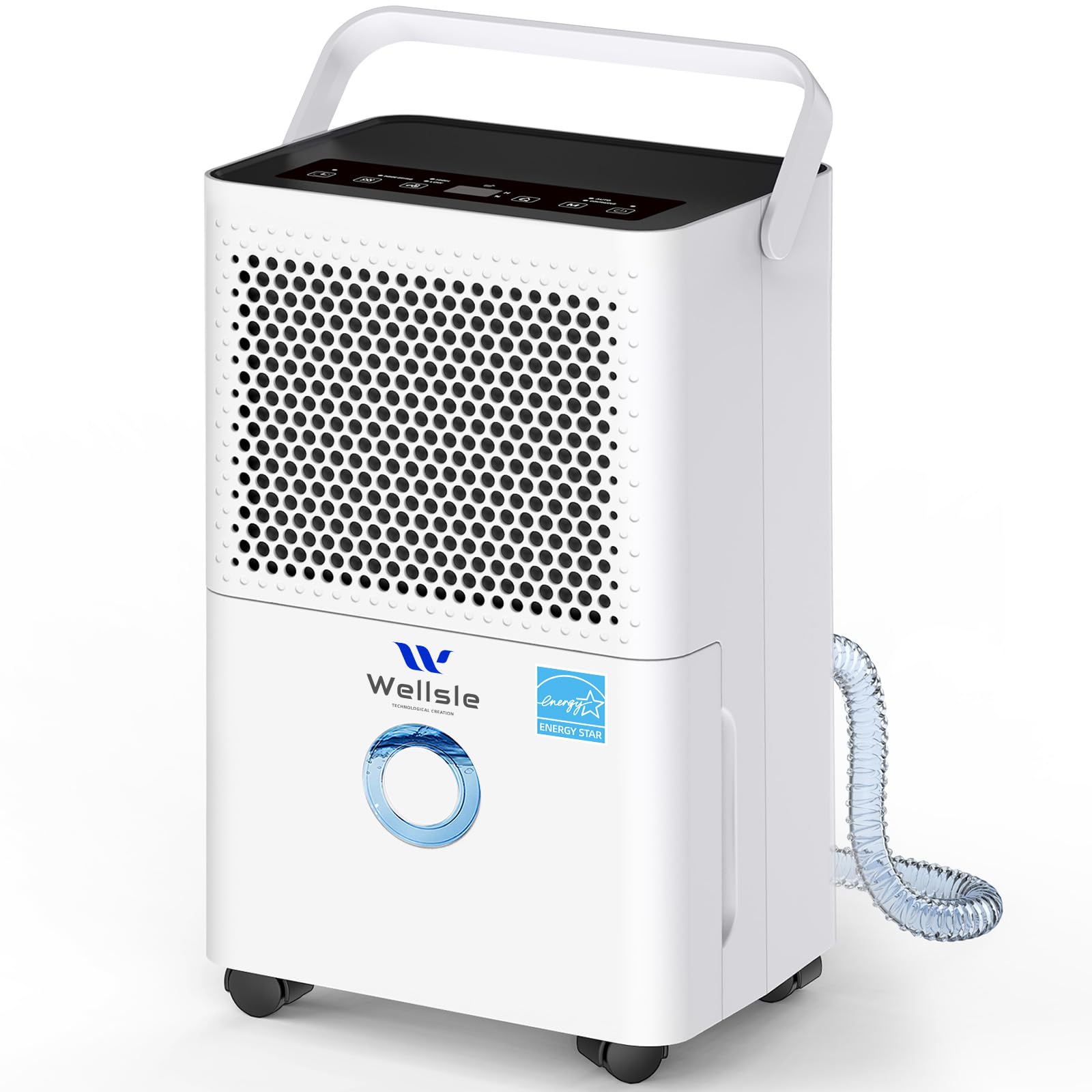
Figure 1: Wellsle 40 Pint Dehumidifier, Model YDL12P. This image shows the overall design of the dehumidifier, highlighting its compact and modern appearance.
2. Safety Instructions
To prevent injury to the user or others and property damage, the following instructions must be followed. Incorrect operation due to ignoring instructions may cause harm or damage.
- Electrical Safety: Always plug the unit into a grounded 110V/60Hz outlet. Do not use extension cords or adapter plugs. Do not operate with a damaged power cord or plug.
- Placement: Place the dehumidifier on a firm, level surface. Ensure at least 8 inches (20 cm) of clearance around the unit for proper airflow. Do not block air inlets or outlets.
- Water Tank: Never drink the water collected from the dehumidifier. Empty the water tank regularly to prevent overflow and mold growth.
- Children and Pets: Keep children and pets away from the unit. The child safety lock feature should be activated when children are present.
- Maintenance: Always unplug the unit before cleaning or performing any maintenance. Do not attempt to repair the unit yourself. Contact qualified service personnel.
- Transportation: After transportation, allow the unit to stand upright for at least 24 hours before plugging it in to allow refrigerants to settle.
3. Product Components
Familiarize yourself with the main parts of your Wellsle Dehumidifier:
- Control Panel: Located on the top, with digital display and touch buttons for settings.
- Air Inlet/Filter: Located on the back, where air enters the unit. Contains a washable filter.
- Air Outlet: Located on the top/front, where dry air is expelled.
- Water Tank: Removable bucket at the bottom front for collecting condensed water.
- Continuous Drain Port: Located on the back, for connecting the included drain hose.
- Foldable Handle: For easy portability.
- 360° Rotating Wheels: For effortless movement.

Figure 2: User-Friendly Design. This image illustrates the foldable handle, washable filter, and 360° rotating wheels, highlighting the unit's portability and ease of maintenance.
4. Setup Instructions
- Unpacking: Carefully remove the dehumidifier from its packaging. Retain packaging for future storage or transport.
- Initial Placement: Place the unit upright on a stable, level floor in the desired location. Ensure there is at least 8 inches (20 cm) of space around the unit for proper air circulation.
- Power Connection: If the unit was transported horizontally, allow it to stand upright for 24 hours before plugging it into a grounded 110V/60Hz electrical outlet.
- Drainage Options:
- Manual Drainage (Water Tank): The unit will collect water in the internal 0.4-gallon water tank. When the tank is full, the unit will automatically shut off and an indicator light will illuminate. Empty the tank by pulling it out, discarding the water, and reinserting it.
- Continuous Drainage (Drain Hose): For continuous operation without emptying the tank, attach the included 6-ft drain hose to the continuous drain port on the back of the unit. Ensure the hose is sloped downwards to a floor drain or suitable receptacle to allow gravity drainage.

Figure 3: Two Ways to Drain. This image demonstrates both manual drainage using the water tank and continuous drainage via the included hose, with instructions for correct hose placement.
5. Operating Instructions
The Wellsle Dehumidifier features a user-friendly digital control panel.

Figure 4: Control Panel. This image displays the digital control panel with various buttons and the humidity display, illustrating the one-touch dehumidification feature.
Control Panel Functions:
- Power Button (U): Press to turn the unit ON or OFF.
- Mode Button (M): Cycle through operating modes: DEHU (Auto), CONT (Continuous), and DRY (Drying).
- Humidity Setting Buttons (^ / v): Adjust the desired humidity level (30%-80% RH) in DEHU mode.
- Timer Button (Clock icon): Set the 1-24 hour ON/OFF timer.
- Fan Speed Button (Fan icon): Select High or Low fan speed.
- Child Lock: Press and hold the Mode button for 3 seconds to activate/deactivate the child lock. This prevents accidental changes to settings.
Operating Modes:

Figure 5: Three Modes for Every Need. This image visually explains the Auto, Drying, and Continuous modes and their typical applications in different areas of a home.
- DEHU Mode (Auto): The unit will automatically turn on and off to maintain your set humidity level (between 30% and 80% Relative Humidity). This is the most energy-efficient mode for general use.
- CONT Mode (Continuous): The unit will run continuously regardless of the humidity level until manually turned off or the water tank is full (if not using continuous drainage). Ideal for very damp environments like basements or after heavy rain.
- DRY Mode (Drying): This mode operates at high fan speed to quickly dry clothes or a specific area.
Additional Features:
- Auto Shut-off: The unit automatically turns off when the water tank is full or the set humidity level is reached.
- Auto Defrost: If frost builds up on the evaporator coils, the compressor will cycle off and the fan will continue to run until the frost disappears.
- Power Outage Memory: The unit will automatically resume operation with the last settings after a power interruption.
6. Maintenance
Regular maintenance ensures optimal performance and extends the lifespan of your dehumidifier.
Cleaning the Air Filter:
The air filter should be cleaned every two weeks or more frequently depending on usage and air quality.
- Unplug the dehumidifier from the power outlet.
- Remove the air filter from the back of the unit.
- Wash the filter with warm, soapy water. Rinse thoroughly.
- Allow the filter to air dry completely before reinserting it. Do not use a dryer or direct heat.

Figure 6: Washable Filter. This image shows the removable and washable air filter, emphasizing its easy-to-clean design for maintaining air quality.
Cleaning the Water Tank:
Clean the water tank periodically to prevent mold and mildew growth.
- Unplug the dehumidifier.
- Remove the water tank and empty any collected water.
- Wash the tank with warm water and a mild detergent. Rinse thoroughly.
- Dry the tank completely before placing it back into the unit.
External Cleaning:
Wipe the exterior of the unit with a soft, damp cloth. Do not use harsh chemicals or abrasive cleaners.
Storage:
If storing the unit for an extended period:
- Clean the air filter and water tank.
- Ensure the unit is completely dry.
- Wrap the power cord and secure it.
- Store the unit upright in a cool, dry place, preferably in its original packaging.
7. Troubleshooting
Before contacting customer service, please refer to the following troubleshooting guide for common issues:
| Problem | Possible Cause | Solution |
|---|---|---|
| Unit does not turn on | No power; Power cord loose; Water tank full or not properly inserted; Child lock activated. | Check power supply; Ensure cord is firmly plugged in; Empty and reinsert water tank correctly; Deactivate child lock (hold Mode button for 3 seconds). |
| No water collected | Humidity level too low; Room temperature too low; Air filter clogged; Unit in continuous drain mode with hose connected. | Adjust target humidity lower; Ensure room temperature is above 5°C (41°F); Clean air filter; Check if continuous drain hose is properly installed and not blocked. |
| Unit is noisy | Unit not on a level surface; Air filter clogged; Fan speed set to High. | Place on a flat, stable surface; Clean air filter; Select Low fan speed for quieter operation. |
| Frost on coils | Room temperature too low. | The unit has an auto-defrost function. If frost persists, increase room temperature or move the unit to a warmer area. |
| Water leakage | Water tank not properly inserted; Continuous drain hose loose or blocked. | Reinsert water tank correctly; Check drain hose connection and ensure it is not kinked or blocked. |
8. Specifications
| Feature | Specification |
|---|---|
| Brand | Wellsle |
| Model Name | YDL12P |
| Capacity | 40 Pints/Day (at 90°F/80% RH) |
| Coverage Area | Up to 2500 Square Feet |
| Water Tank Volume | 0.4 Gallons (approx. 1.5 Liters) |
| Voltage | 110 Volts |
| Wattage | 150 Watts |
| Number of Speeds | 2 (High/Low) |
| Item Dimensions (D x W x H) | 48.4D x 10.5W x 29.9H Centimetres |
| Item Weight | 9.5 Kilograms |
| Special Features | Adjustable Humidity Control, Automatic Moisture Removal, Continuous Draining, Removable Tank, Timer, Child Lock, Auto Defrost |
| Included Components | Drain Hose |

Figure 7: Product Dimensions. This image provides a visual representation of the dehumidifier's height, width, and depth in centimeters.
9. Warranty and Support
Wellsle products are manufactured to the highest quality standards. This product comes with a standard manufacturer's warranty against defects in materials and workmanship. Please refer to the warranty card included in your product packaging for specific terms and conditions.
For technical support, troubleshooting assistance, or warranty claims, please contact Wellsle customer service. Contact information can typically be found on the Wellsle official website or on the product packaging.
When contacting support, please have your model number (YDL12P) and purchase date available.
