
1. Important Safety Instructions
Please read and save these safety instructions before using the humidifier. Failure to follow these instructions may result in electric shock, fire, or serious injury.
- Always place the humidifier on a firm, flat, and level surface.
- Do not place the humidifier near heat sources such as stoves, radiators, or direct sunlight.
- Ensure the power cord is not damaged and is properly plugged into a suitable electrical outlet.
- Do not immerse the main unit, power cord, or plug in water or other liquids.
- Unplug the humidifier before filling, cleaning, or moving it.
- Do not add essential oils directly into the water tank. Use the designated aroma tray.
- Keep out of reach of children and pets.
- Use only clean, cool tap water. Do not use hot water.
- Do not block the mist outlet or air inlets.
2. Product Overview
The AILINKE Smart Humidifier is designed to provide efficient and customizable humidification for large rooms, featuring smart control options and an extended mist tube.
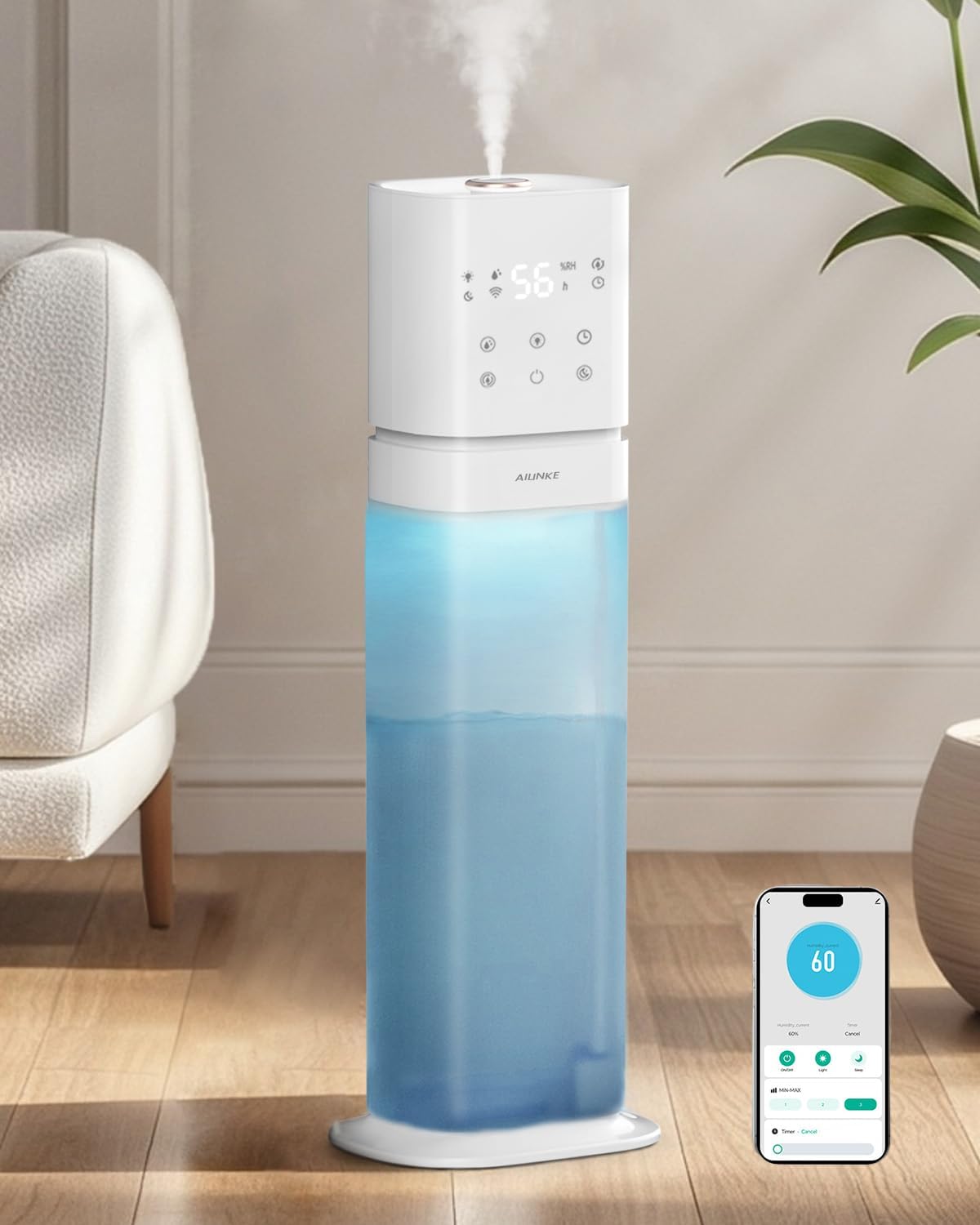
Image: AILINKE Smart Humidifier, showcasing its tall design with a transparent water tank and an intuitive control panel.
Components:
- Main Body (Control Panel & Mist Outlet)
- Water Tank (2.1 Gallon / 8 Liter capacity)
- Extended Mist Tube
- Aroma Tray
- Remote Control
- Power Adapter
3. Setup
3.1 Initial Assembly
- Unpack all components from the box.
- Place the water tank securely onto the base.
- Connect the water pump hose to the main body and ensure it is firmly attached.
- Place the main body onto the water tank, aligning the connections.
- If desired, insert the extended mist tube into the mist outlet on the main body.
Video: Usage Instruction for AILINKE Humidifier Model K20. This video demonstrates the assembly process, including attaching the main body to the water tank and installing the extended mist tube.
3.2 Filling the Water Tank
The humidifier features a convenient top-filling design.
- Ensure the humidifier is unplugged before filling.
- Pour clean, cool tap water directly into the top mist outlet opening.
- Do not exceed the maximum water line indicated on the tank.
- Avoid filling water into the mist outlet itself if the extended tube is not installed.

Image: Demonstrates the top-filling design of the humidifier, allowing for easy water replenishment without removing the tank.
3.3 Adding Essential Oils
To use the aroma diffuser function:
- Locate the aroma tray at the back of the main unit.
- Pull out the tray.
- Add 1-2 drops of your favorite essential oil onto the aroma pad within the tray.
- Slide the tray back into its slot.
4. Operating Instructions
Once assembled and filled, plug the humidifier into a suitable power outlet. The unit can be controlled via the touch panel on the device or the included remote control.
4.1 Power On/Off
- Press the power button (⏻) on the touch panel or remote control to turn the humidifier on or off.
4.2 Mist Level Adjustment
- Press the mist button (💧) to cycle through 3 adjustable mist levels (Low, Medium, High).
4.3 Humidity Control (Humidistat)
- Press the humidity button (RH%) to set a target humidity level between 40% and 90%. The humidifier will automatically adjust its mist output to maintain the set humidity.
4.4 Timer Function
- Press the timer button (🕒) to set an operating time from 1 to 24 hours. The humidifier will automatically turn off after the set time.
4.5 Night Light
- Press the light button (💡) to activate the 5-color LED night light. Cycle through colors or set to a cyclic lighting mode.

Image: The humidifier displaying its 5-color LED night light feature, creating a calming ambiance in a bedroom setting.
4.6 Sleep Mode
- Press the sleep mode button (☾) to turn off all lights and operate at the lowest noise level (below 35dB) for undisturbed sleep.
4.7 Smart Control (Wi-Fi App & Voice Control)
The humidifier can be controlled via the Smart Life app or voice commands (Alexa compatible).
- Download the Smart Life app from your device's app store.
- Follow the in-app instructions to connect your humidifier to your Wi-Fi network.
- Once connected, you can adjust settings such as mist volume, timer, and ambient lighting remotely.
- For voice control, enable the Smart Life skill in your Alexa app and link your accounts.
Video: AILINKE Large Room Humidifier Experience Ultimate Comfort. This video highlights the smart features, including app and voice control capabilities.
5. Maintenance
Regular cleaning is essential to ensure optimal performance and hygiene of your humidifier.
5.1 Cleaning the Water Tank and Base
- Turn off and unplug the humidifier.
- Disassemble the main body from the water tank.
- Pour out any remaining water from the tank and base.
- Fill the water tank with a mixture of warm water and a small amount of citric acid solution (or white vinegar).
- Let it soak for 15-30 minutes to loosen mineral deposits.
- Pour out the solution and rinse the tank thoroughly with clean water.
- Use a soft cloth or brush to gently scrub the inside of the water tank and the atomizer in the base.
- Wipe all surfaces dry before reassembling.
Video: AILINKE Humidifier Cleaning Guide. This video provides a step-by-step demonstration of how to clean the humidifier effectively.
5.2 Cleaning the Aroma Tray
- Remove the aroma tray and wipe the aroma pad with a clean, damp cloth.
- Ensure the tray is dry before reinserting.
6. Troubleshooting
Refer to the table below for common issues and their solutions.
| Problem | Possible Cause | Solution |
|---|---|---|
| No mist or low mist output | Low water level Mineral buildup on atomizer Mist outlet blocked | Refill water tank Clean the atomizer as per maintenance instructions Check and clear any obstructions from the mist outlet |
| Unusual odor | Stagnant water New unit odor | Clean the water tank and replace with fresh water The odor should dissipate after initial use |
| Water leakage | Water tank not properly seated Damaged water tank | Ensure the water tank is correctly positioned on the base Contact customer support for replacement |
| Humidifier not turning on | No power Power button not pressed | Check power connection and outlet Press the power button on the unit or remote |
| App/Voice control not working | Wi-Fi connectivity issue Incorrect app setup | Ensure humidifier is connected to 2.4GHz Wi-Fi Re-pair the device in the Smart Life app; check Alexa skill linking |
7. Specifications
| Feature | Detail |
|---|---|
| Model Name | ALK-KH-K20SMAW |
| Brand | AILINKE |
| Capacity | 2.1 Gallons / 8 Liters |
| Coverage Area | Up to 1000 sq.ft. |
| Max Mist Output | 350 mL/h |
| Operation Mode | Ultrasonic |
| Noise Level | Below 35dB (Sleep Mode) |
| Voltage | 120 Volts |
| Wattage | 23 Watts |
| Dimensions | 7"D x 8"W x 25"H |
| Special Features | Adjustable Humidity Control, Aroma Diffuser, Auto Shut Off, Digital Display, Humidistat, Wi-Fi App & Voice Control, 5-Color Night Light, Extended Mist Tube |
8. Warranty and Support
AILINKE stands behind its products and provides a 1-YEAR warranty. For any questions, refunds, returns, or technical assistance, please contact customer support.
You may also apply for a 6-month extended warranty by registering on the official website.
Contact Information:
- Email: service@keeccoon.com
- Website for Extended Warranty: https://keeccoon.com/pages/customer-instruction-manual
