
1. Introduction
This manual provides essential instructions for the safe and efficient operation, setup, and maintenance of your SainSmart Genmitsu 3020-PRO Ultra CNC Router Machine. Please read this manual thoroughly before using the machine to ensure proper functionality and to prevent damage or injury.

Image: The SainSmart Genmitsu 3020-PRO Ultra CNC Router Machine, showcasing its capabilities with carved wood and metal samples.
2. Safety Information
Always prioritize safety when operating the CNC router. Failure to follow safety guidelines can result in serious injury or damage to the equipment.
- Personal Protective Equipment (PPE): Always wear safety glasses or a face shield to protect against flying debris. Consider hearing protection, especially during prolonged operation.
- Work Area: Ensure your work area is clean, well-lit, and free from obstructions. Keep children and unauthorized personnel away from the machine during operation.
- Material Securing: Always securely clamp your workpiece to the spoilboard to prevent movement during carving. Loose material can cause tool breakage and machine damage.
- Tooling: Use sharp, appropriate tooling for the material being cut. Dull or incorrect tools can lead to poor results, excessive force, and potential hazards.
- Emergency Stop: Familiarize yourself with the location and operation of the emergency stop button.
- Power Disconnection: Disconnect power to the machine before performing any maintenance, adjustments, or tool changes.
- Ventilation: Ensure adequate ventilation, especially when cutting materials that produce dust or fumes.
3. Setup
3.1 Unpacking and Initial Inspection
Carefully unpack all components and verify against the packing list. Inspect for any shipping damage. If any components are missing or damaged, contact customer support immediately.
3.2 Assembly
The SainSmart Genmitsu 3020-PRO Ultra is designed for quick assembly, typically within 15 minutes, as many components come pre-assembled.

Image: An exploded view diagram illustrating the simple, pre-assembled nature of the Genmitsu 3020-PRO Ultra, emphasizing its quick 15-minute assembly.
- Place the main frame on a stable, level surface.
- Attach any remaining pre-assembled modules as per the included quick-start guide.
- Connect all cables securely, ensuring they are not pinched or strained.
3.3 Driver and Software Installation
To operate the CNC machine, you will need to install the necessary drivers and control software. The machine typically uses Candle software for control.
- Insert the provided TF card (or USB drive) into your computer.
- Locate and install the drivers for your operating system.
- Open the Candle software executable from the TF card.
Video: A tutorial demonstrating how to install drivers, open Candle software, and perform basic operations like jogging and setting the work origin. This video is provided by SainSmart Official.
4. Operating Instructions
4.1 Basic Controls (Jogging)
Once Candle software is open and connected to your machine, you can manually move the spindle using the jogging controls.
- Use the blue arrow buttons to move the X-axis (left/right) and Y-axis (forward/backward).
- Use the white arrow buttons to move the Z-axis (up/down).
- Adjust the Step value to control the distance of each movement. A larger step value results in greater movement.
- Adjust the Feed value to control the speed of movement. A higher feed value results in faster movement.
4.2 Loading G-Code
G-code files contain the instructions for the CNC machine to carve your design.
- In Candle, go to File > Open.
- Navigate to your G-code file (e.g., .nc, .gcode) and open it.
- Observe the origin position of the G-code in the software's preview to understand where the project's origin is set relative to your material.
4.3 Setting Work Origin (Zeroing)
Setting the work origin is crucial for accurate carving. This tells the machine where the (0,0,0) point of your material is.
- Manually jog the spindle using the controls until the tip of your carving bit is positioned at the desired X and Y origin point on your workpiece.
- Lower the Z-axis until the bit just touches the surface of your material.
- In Candle, click the ZERO XY button to set the X and Y origin.
- Click the ZERO Z button to set the Z origin.
4.4 Starting a Project
Once the G-code is loaded and the work origin is set, you can begin carving.
- Ensure your workpiece is securely clamped and the area is clear.
- Click the Send button in Candle to start the carving process.
- Monitor the machine during operation. Be prepared to use the emergency stop if any issues arise.

Image: A close-up view of the Genmitsu 3020-PRO Ultra CNC router carving into an aluminum block, demonstrating its capability to achieve a 1.5mm cut depth in a single pass.

Image: A carved wooden piece demonstrating the high precision and detailed results achievable with the CNC router.
5. Maintenance
Regular maintenance ensures the longevity and optimal performance of your CNC router.
- Cleaning: After each use, clean the machine thoroughly to remove dust, chips, and debris. Use a vacuum cleaner or compressed air. Avoid using liquids directly on electronic components.
- Lubrication: Periodically lubricate the lead screws and linear rails with appropriate grease or oil to ensure smooth movement. Refer to the manufacturer's recommendations for specific lubricants.
- Tightness Check: Regularly check all screws, bolts, and connections for tightness. Vibrations during operation can cause fasteners to loosen over time.
- Spindle Care: Inspect the spindle and collet for wear or damage. Ensure the collet is clean and free of debris before inserting a bit.
- Cable Management: Ensure all cables are properly routed and secured to prevent snagging or damage.
6. Troubleshooting
This section addresses common issues you might encounter.
- Machine Not Connecting:
- Ensure USB cable is securely connected to both the machine and computer.
- Verify that the correct drivers are installed and the software is configured for the correct COM port.
- Restart the software and the machine.
- Motors Not Moving:
- Check power supply connection to the machine.
- Ensure emergency stop button is not engaged.
- Verify motor cables are securely connected.
- Poor Carving Quality:
- Check if the carving bit is sharp and appropriate for the material.
- Ensure the workpiece is securely clamped.
- Adjust feed rates and depth of cut in your G-code generation software.
- Check for loose components or excessive play in the machine's axes.
- Spindle Not Spinning:
- Check spindle power connection.
- Ensure the spindle is enabled in the control software.
- Verify spindle speed settings.
7. Specifications
Key technical specifications for the SainSmart Genmitsu 3020-PRO Ultra CNC Router Machine:
| Feature | Specification |
|---|---|
| Brand | SainSmart |
| Model Number | 3020PU |
| Material | Metal |
| Power Source | Corded Electric |
| Product Dimensions | 11.8"W x 3.1"H (Work Area: 11.8"x8.1"x3.1") |
| Voltage | 230 Volts |
| Item Weight | 15.3 Kilograms (33.7 pounds) |
| Maximum Rotational Speed | 30000 RPM |
| Spindle Power | 710W |
| Stepper Motors | 60mm, 7.3 Nm torque (XYZ-axis) |
| Spindle Collet | 1/8" ER11 |
| Assembly Time | Approx. 15 minutes (pre-assembled) |
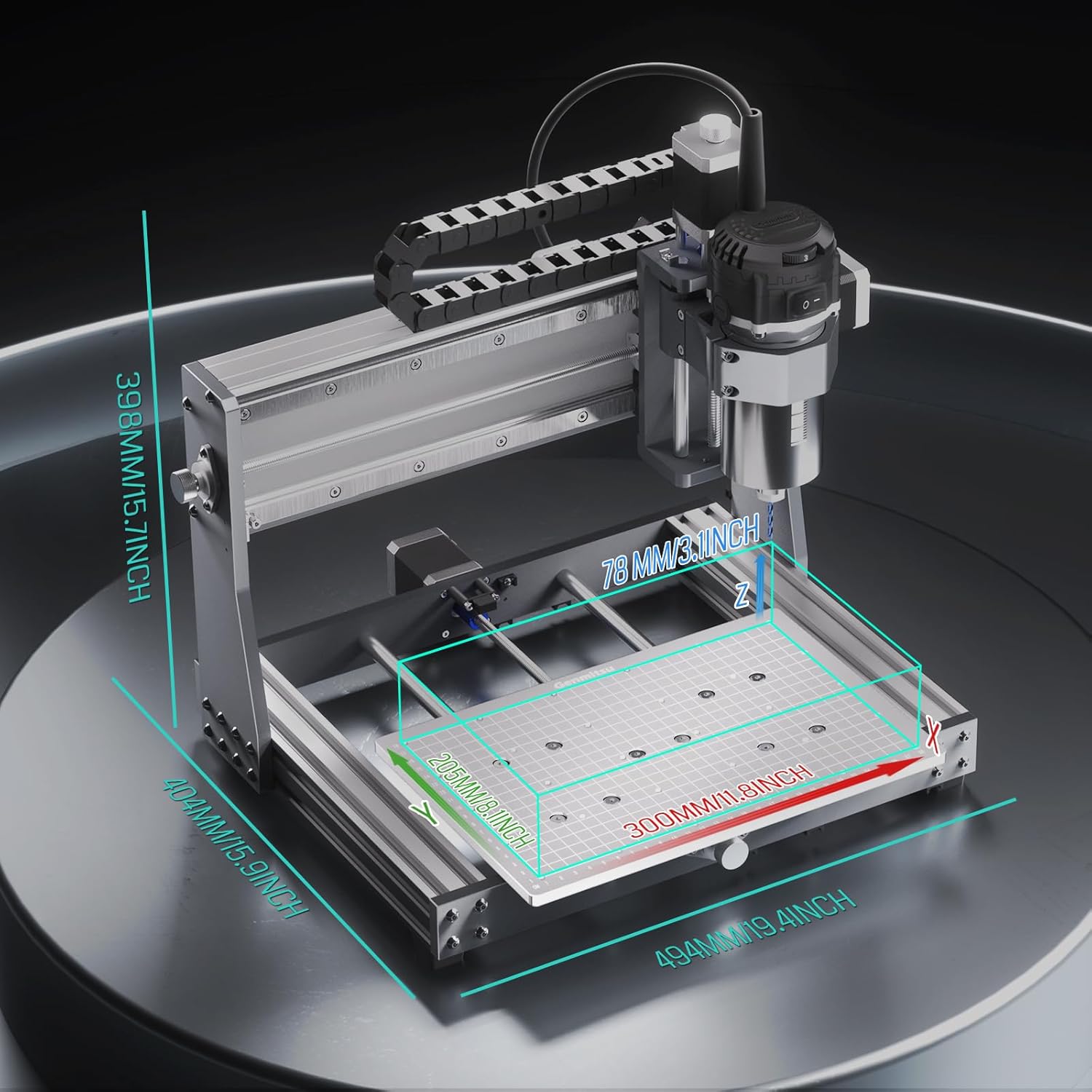
Image: A detailed diagram illustrating the physical dimensions and work area of the Genmitsu 3020-PRO Ultra CNC Router Machine.

Image: A close-up of the upgraded 60mm NEMA17 stepper motors for the XYZ-axis, highlighting their 7.3 N.m torque for enhanced cutting power.

Image: A detailed diagram of the 710W spindle motor, showing its adjustable speed range (6500-30000 RPM), ON/OFF switch, and ER-11 collet.

Image: A diagram illustrating the wide spindle compatibility of the machine, showing options for a Φ65mm compact router, Φ69mm trim router (with separate holder), and a laser module.
8. Warranty Information
SainSmart products typically come with a manufacturer's warranty covering defects in materials and workmanship. For specific warranty terms, duration, and claim procedures, please refer to the warranty card included with your product or visit the official SainSmart website. Keep your proof of purchase for warranty claims.
9. Customer Support
If you encounter any issues not covered in this manual, require technical assistance, or have questions regarding your SainSmart Genmitsu 3020-PRO Ultra CNC Router Machine, please contact SainSmart customer support. You can typically find contact information on the official SainSmart website or through the retailer where you purchased the product.
Online Resources:
- Visit the SainSmart Store on Amazon for product information and accessories.
- Check the official SainSmart website for updated manuals, FAQs, and community forums.


