
Apowking E300
Apowking Portable Power Station E300 User Manual
Model: E300 | Brand: Apowking
1. Introduction
This manual provides essential instructions for the safe and efficient operation of your Apowking Portable Power Station E300. Please read this manual thoroughly before using the product and retain it for future reference.
The Apowking E300 is a versatile portable power station featuring a 256Wh LiFePO4 battery, capable of delivering 300W rated (600W peak) AC output. It is designed to provide reliable power for various devices during outdoor activities, emergencies, or as a home backup solution.
2. Safety Instructions
- Do not disassemble, repair, or modify the unit.
- Keep the unit away from fire or direct heat sources.
- Avoid exposure to water or high humidity.
- Do not use or store the unit in environments with high temperatures or direct sunlight.
- Ensure proper ventilation during use and charging.
- Keep out of reach of children and pets.
- Use only recommended accessories and charging methods.
- This generator is designed to support devices with a power consumption lower than 300 Watt Hours. It may not be suitable for high-capacity products such as Electric Grills, Induction Cookers, Microwaves, and Refrigerators.
- Store the battery in a dry environment within the temperature range of 40°F~100°F (4°C~35°C) or in moisture-proof packaging. Keep it away from heat sources and avoid direct sunlight exposure.
3. Package Contents
Verify that all items are included in your package:
- Apowking 256Wh/300W Portable Power Station (E300) x 1
- AC Power Adapter x 1
- Car Charging Cable x 1
- User Manual x 1
4. Product Overview
Familiarize yourself with the components and ports of your Apowking E300 Portable Power Station.
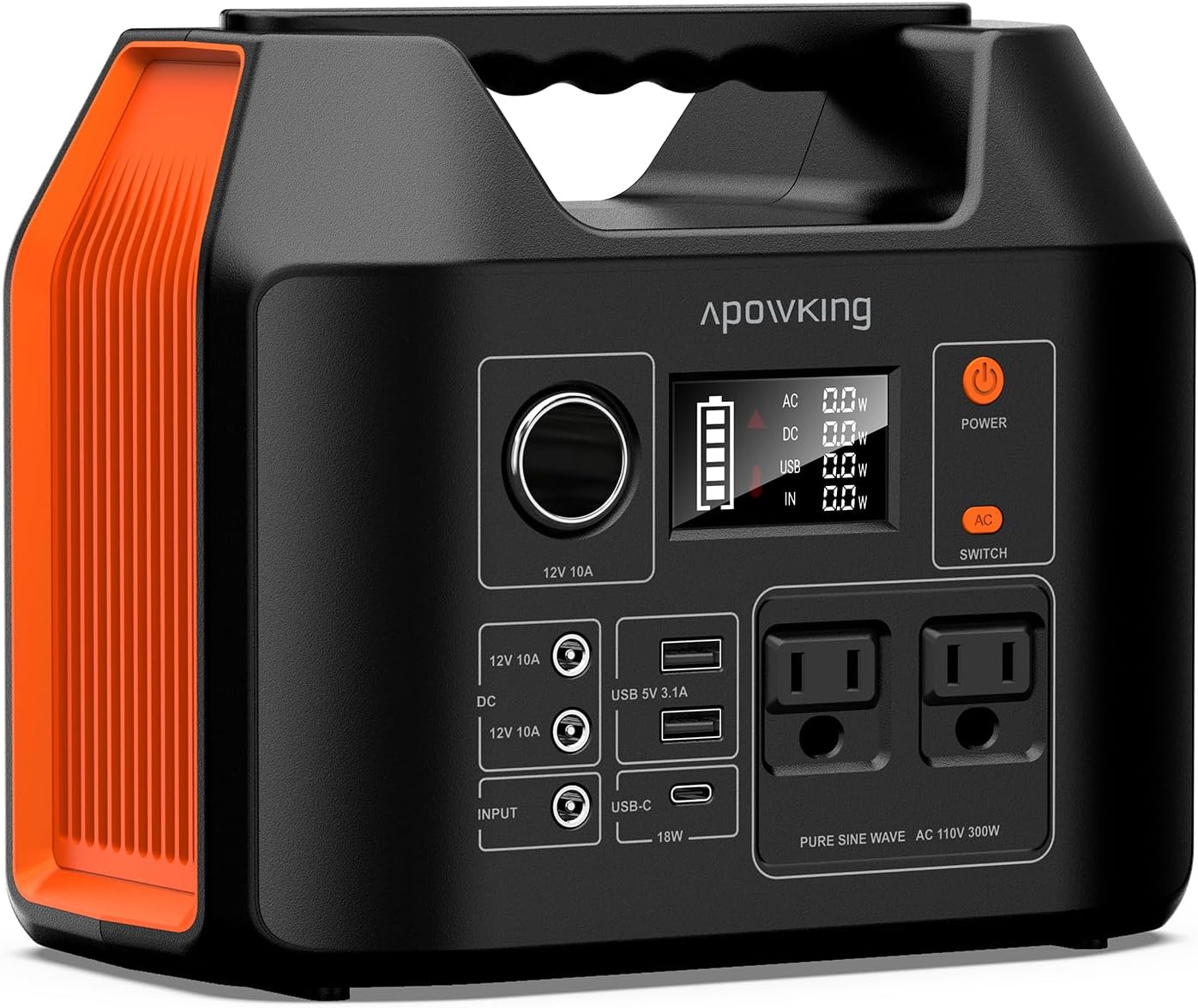
Figure 1: Front view of the Apowking E300 Portable Power Station, showing the display, AC outlets, USB ports, DC ports, and control buttons.
4.1 Ports and Buttons
- Power Button: Turns the unit on/off.
- AC Output Switch: Activates/deactivates the AC outlets.
- DC Output Switch: Activates/deactivates the DC output ports.
- LED Light Button: Controls the built-in LED light (SOS, Strobe, Flashlight modes).
- LCD Display: Shows battery level, input/output wattage, and status indicators.
- AC Outlets (x2): 110V Pure Sine Wave, 300W Rated (600W Peak).
- USB-A Ports (x2): 5V/3.1A Max.
- USB-C Port (x1): 5V/3A, 9V/2A, 12V/1.5A (18W).
- DC Vehicle Output Ports (x3): 12V/10A.
- Input Port: For AC adapter, car charger, or solar panel.
5. Setup and Initial Use
5.1 Initial Charging
Before first use, fully charge the power station. This ensures optimal battery performance and longevity.
- Connect the provided AC power adapter to the input port of the power station.
- Plug the AC adapter into a standard wall outlet.
- The LCD display will show the charging status. The unit is fully charged when the battery indicator shows 100%.
- Charging typically takes 5-7 hours via the 19V/3.42A power adapter.
Figure 2: Charging the power station from a standard wall outlet.
6. Operating Instructions
6.1 Turning On/Off
- To turn on: Press and hold the Power Button for a few seconds until the LCD display illuminates.
- To turn off: Press and hold the Power Button for a few seconds until the LCD display turns off.
6.2 Using AC Outlets
- Ensure the power station is turned on.
- Press the AC Output Switch button to activate the AC outlets. The AC indicator on the display will light up.
- Plug your AC device (up to 300W continuous, 600W peak) into one of the 110V AC outlets.
- When you activate the AC output function, it is normal to see a red triangle indicator for AC output verification, which will disappear within 3-5 seconds.
- To turn off AC output: Press the AC Output Switch button again.

Figure 3: The power station providing AC power for outdoor activities.
6.3 Using DC and USB Ports
- Ensure the power station is turned on.
- Press the DC Output Switch button to activate the DC and USB ports. The DC and USB indicators on the display will light up.
- Connect your USB or DC devices to the appropriate ports.
- To turn off DC and USB output: Press the DC Output Switch button again.

Figure 4: The power station simultaneously charging a laptop, phone, and other small devices.
6.4 Using the LED Light
- Ensure the power station is turned on.
- Press the LED Light Button once for constant illumination (Flashlight mode).
- Press again for Strobe mode.
- Press a third time for SOS mode.
- Press a fourth time to turn off the LED light.

Figure 5: The power station's LED light providing illumination in a dark environment.
7. Charging the Power Station
The Apowking E300 offers multiple charging options:
7.1 AC Wall Charging
Use the included AC power adapter. Full charge in 5-7 hours.
Figure 6: Charging the power station from a standard wall outlet.
7.2 Car Charging
Use the included car charging cable. Full charge in 10-12 hours via a 12V car socket.
Figure 7: Charging the power station using a car's 12V outlet.
7.3 Solar Charging (Solar Panel Not Included)
The power station can be recharged using a compatible solar panel (recommended 40W-100W, input voltage range: DC13V-24V). Full charge in 7-10 hours depending on solar panel wattage and sunlight conditions.
- Connect the solar panel to the input port of the power station.
- Position the solar panel in direct sunlight for maximum efficiency.
- The LCD display will indicate charging status.
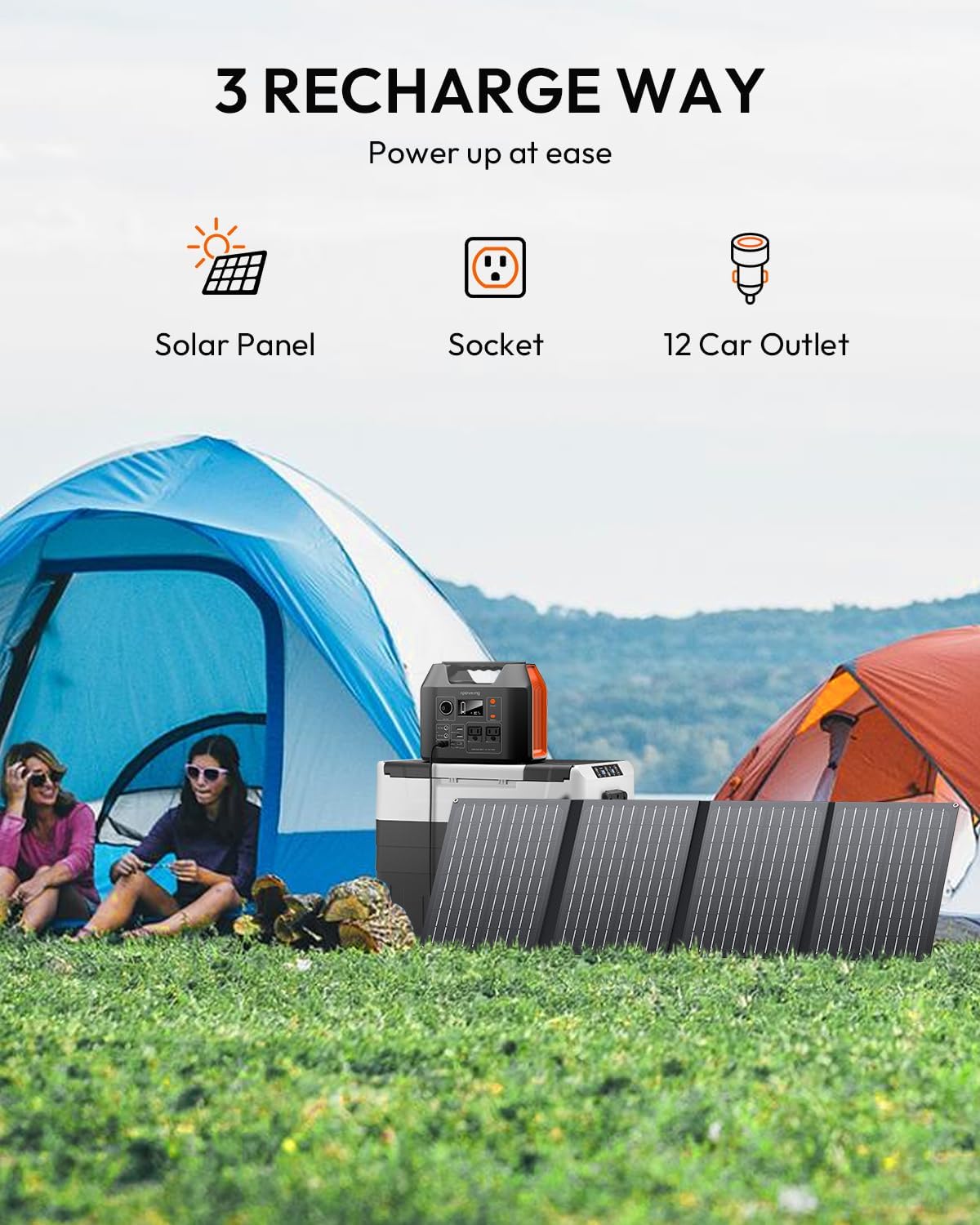
Figure 8: The power station being recharged by solar panels outdoors.
8. Maintenance and Storage
- Regular Recharging: If not in use for an extended period, recharge the stored battery every 2-3 months and maintain it between 40%-70% capacity. Recharge the battery before it is completely depleted.
- Storage Conditions: Store the battery in a dry environment within the temperature range of 40°F~100°F (4°C~35°C) or in moisture-proof packaging. Keep it away from heat sources and avoid direct sunlight exposure.
- Cleaning: Use a dry, soft cloth to clean the exterior of the unit. Do not use liquids or abrasive cleaners.
- Battery Longevity: The high-quality LiFePO4 batteries are capable of supporting over 3500 charge cycles, ensuring long-term battery performance, reliability, and safety.
9. Troubleshooting
| Problem | Possible Cause | Solution |
|---|---|---|
| Unit does not turn on. | Battery is completely depleted. | Charge the unit using the AC adapter. |
| AC output not working. | AC output switch is off; device exceeds 300W. | Press the AC output switch; check device wattage. |
| Charging slowly or not at all via solar. | Insufficient sunlight; incompatible solar panel; panel not connected properly. | Reposition panel in direct sunlight; ensure panel meets specifications (DC13V-24V); check connections. |
| Red triangle indicator on AC output. | Normal AC output verification. | This indicator will disappear within 3-5 seconds. No action required. |
10. Specifications
| Feature | Detail |
|---|---|
| Model | E300 |
| Battery Type | LiFePO4 |
| Capacity | 256Wh / 80000mAh |
| AC Output | 2 x 110V Pure Sine Wave, 300W Rated (600W Peak) |
| USB-A Output | 2 x 5V/3.1A Max |
| USB-C Output | 1 x 5V/3A, 9V/2A, 12V/1.5A (18W) |
| DC Output | 3 x 12V/10A |
| Charging Input (AC Adapter) | 19V/3.42A (5-7 hours) |
| Charging Input (Car) | 12V (10-12 hours) |
| Charging Input (Solar) | DC13V-24V (7-10 hours with 40W-100W panel) |
| Dimensions | 9 x 7.5 x 5.5 inches |
| Weight | 6.5 lbs |
| Operating Temperature | -4°F~104°F (-20°C~40°C) |
| Charging Temperature | 32°F~104°F (0°C~40°C) |
11. Warranty and Support
Your Apowking Portable Power Station E300 is covered by a 12-month warranty from the date of purchase. This warranty covers manufacturing defects and workmanship.
For technical support, warranty claims, or any questions regarding your product, please contact Apowking Customer Service. Our team is available 7*24 Hours to provide assistance.
Please refer to the contact information provided in your purchase documentation or visit the official Apowking website for the most up-to-date support details.

Figure 9: Apowking customer support details, including warranty, return policy, and availability.