1. Introduction
The AGM Wolf-14 NW1 is a high-performance night vision monocular designed for various applications, including security, hunting, and recreation. This device features a durable and versatile design, offering excellent performance. It can be used handheld or mounted on headgear for hands-free operation. The Wolf-14 includes a single operating knob for ease of use, bright light shut-off circuitry, and a built-in IR illuminator. It is equipped with Gen 2+ image intensifier tubes, available in white phosphor.
2. Key Features
- Compact and rugged design for durability.
- Head mountable for hands-free operation.
- Bright light cut-off feature to protect the image intensifier tube.
- Ergonomic, simple, and easy-to-operate controls.
- Utilizes a single CR123A Lithium (3V) or AA (1.5V) battery.
- Built-in Infrared (IR) illuminator for operation in total darkness.
3. Package Contents
Upon unpacking, please verify that all items are present and in good condition:
- AGM Wolf-14 NW1 Night Vision Monocular
- Rhino mount
- J-Arm
- Soft bag
- Lens paper
- Safety/hard case
- User Manual (this document)
4. Setup
4.1. Battery Installation
- Locate the battery compartment cap, typically on the side or top of the device.
- Unscrew the cap counter-clockwise.
- Insert one CR123A (3V) or AA (1.5V) battery, ensuring correct polarity (+/-).
- Screw the battery compartment cap back on clockwise until secure.

Figure 1: Side view of the Wolf-14 monocular, showing the battery compartment and controls.
4.2. Mounting (Optional)
The Wolf-14 can be mounted on compatible headgear or helmets using the included Rhino mount and J-Arm for hands-free operation.
- Attach the J-Arm to the monocular's mounting interface.
- Connect the J-Arm assembly to the Rhino mount on your headgear or helmet.
- Adjust the position and angle for optimal viewing comfort and field of view.
- Ensure the flip-up turn-off function engages correctly when the device is stowed.

Figure 2: Side view of the Wolf-14 monocular, highlighting the mounting interface.
5. Operating Instructions
5.1. Powering On/Off
- To power on the device, rotate the single operating knob clockwise from the "OFF" position to the "ON" position.
- To power off, rotate the knob counter-clockwise back to the "OFF" position.
- If mounted on headgear, the device may automatically turn off when flipped up and out of the line of sight.
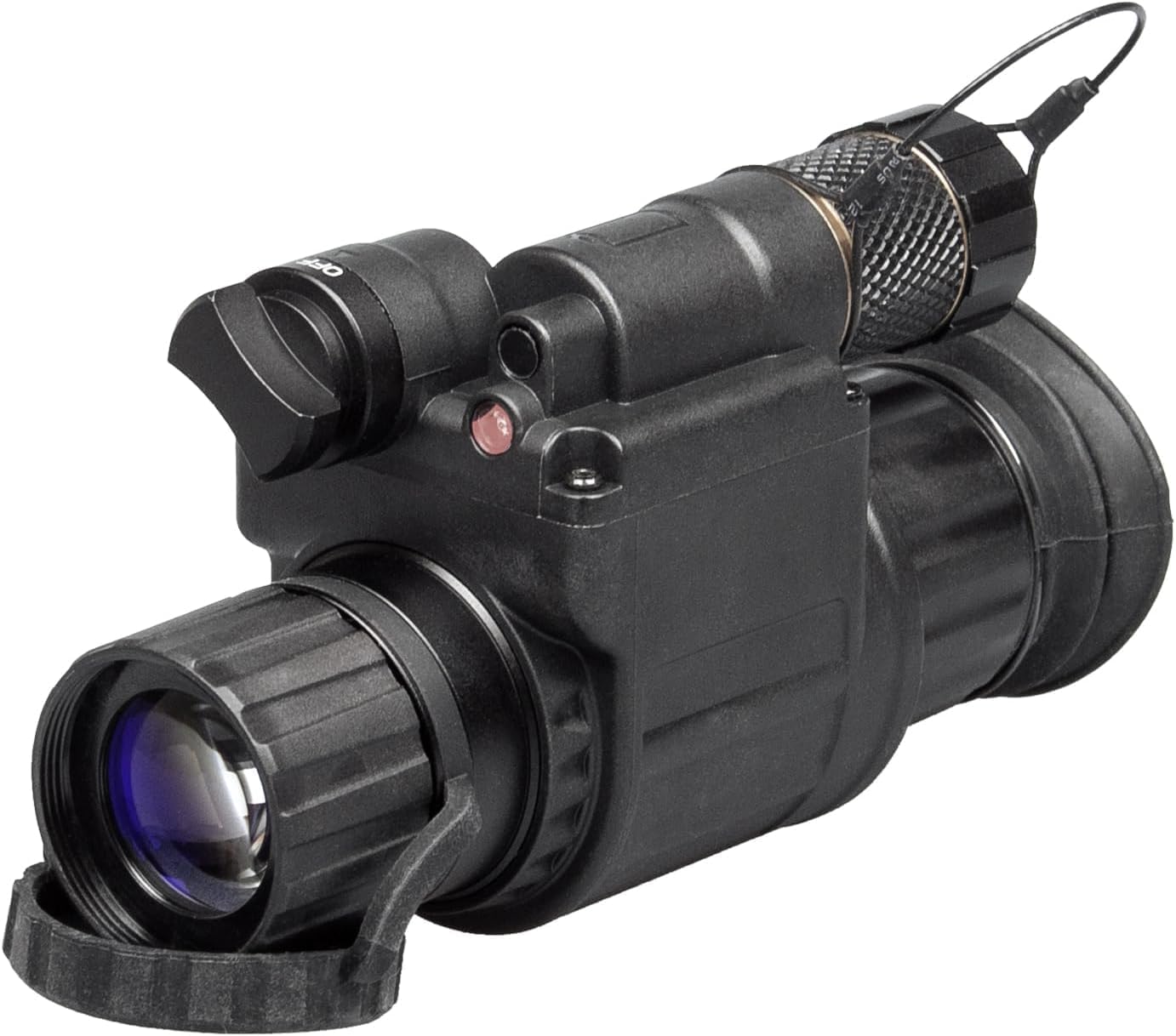
Figure 3: Front view of the Wolf-14 monocular, showing the main operating knob and objective lens.
5.2. Focus Adjustment
- Objective Lens Focus: Rotate the objective lens ring (front lens) to focus on objects at different distances. The focus range is 0.25 meters to infinity.
- Diopter Adjustment: Rotate the eyepiece diopter ring (rear lens) to achieve a sharp image for your individual eyesight. Adjust until the image appears clear and crisp.
5.3. Using the IR Illuminator
The built-in IR illuminator provides additional illumination in conditions of absolute darkness where ambient light is insufficient.
- To activate the IR illuminator, rotate the operating knob further past the "ON" position to the "IR" or "AUTO" setting, depending on the model.
- The "IR" setting typically provides continuous IR light.
- The "AUTO" setting may automatically adjust IR intensity based on ambient light.
- A small red indicator light may illuminate when the IR is active.
- To deactivate, rotate the knob back to the "ON" or "OFF" position.

Figure 4: Side view of the Wolf-14 monocular, indicating the IR illuminator and control knob positions.
5.4. Bright Light Cut-Off
The device features a bright light cut-off circuit designed to protect the image intensifier tube from damage due to excessive light exposure. If the ambient light becomes too bright, the device will automatically shut down or reduce gain to prevent damage. This is a protective feature and normal operation will resume when light levels decrease.
6. Maintenance
6.1. Cleaning
- Lenses: Use the provided lens paper or a soft, lint-free cloth specifically designed for optical surfaces. Gently wipe the lenses to remove dust or smudges. Avoid using abrasive materials or harsh chemicals.
- Body: Wipe the exterior of the monocular with a soft, damp cloth. Do not use solvents or abrasive cleaners.
6.2. Storage
- When not in use for extended periods, remove the battery to prevent leakage and potential damage to the device.
- Store the monocular in its safety/hard case or soft bag in a cool, dry place, away from direct sunlight and extreme temperatures.
7. Troubleshooting
| Problem | Possible Cause | Solution |
|---|---|---|
| Device does not power on. | Dead or incorrectly installed battery. | Check battery polarity, replace with a fresh battery. |
| Image is dim or flickering. | Low battery, insufficient ambient light, or bright light cut-off engaged. | Replace battery. Activate IR illuminator in very dark conditions. Move to a darker area if bright light cut-off is active. |
| Image is blurry. | Incorrect focus or diopter setting. | Adjust objective lens focus and diopter until the image is sharp. |
| IR illuminator not working. | IR not activated, or battery low. | Ensure the operating knob is set to "IR" or "AUTO". Replace battery if low. |
8. Specifications
| Feature | Detail |
|---|---|
| Image Intensifier Tube | Gen 2+ "White Phosphor Level 1" |
| Resolution | 51-64 lp/mm |
| Magnification | 1x |
| Lens System | 25 mm; F/1.2 |
| Field of View (FOV) | 42° |
| Focus Range | 0.25 m to Infinity |
| Diopter Adjustment | -5 to +5 diopters |
| Infrared Illuminator | Yes (Built-in) |
| Bright Light Cut-Off | Yes |
| Battery Type | One CR123A (3V) or one AA (1.5V) |
| Battery Life (Operating) | Up to 40 hours at 20°C (IR off) |
| Environment Rating | IP65 |
| Operating Temperature Range | -40°C to +50°C |
| Storage Temperature Range | -50°C to +70°C |
| Dimensions | 4.5" × 2.7" × 2.1" |
| Weight | 290 g (0.64 lb) |
9. Warranty and Support
For information regarding warranty coverage, terms, and conditions, please refer to the warranty card included with your product or visit the official AGM Global Vision website. For technical support, service, or any inquiries not covered in this manual, please contact AGM Global Vision customer service directly.
It is recommended to register your product to receive updates and support.