
De'Longhi EC890.WI
De'Longhi Dedica EC890.WI Espresso and Cold Brew Coffee Machine
User Manual
Model: EC890.WI | Brand: De'Longhi
1. Introduction
This manual provides comprehensive instructions for the De'Longhi Dedica EC890.WI coffee machine, a compact and powerful appliance designed for preparing espresso, cold brew, and milk-based beverages with ease. Learn how to set up, operate, and maintain your machine for optimal performance and delicious results.
The Dedica EC890.WI features a sleek metallic finish and an elegant embossed logo, making it a stylish addition to any kitchen. Despite its small footprint, it delivers powerful performance, allowing you to enjoy delicious coffee every morning, including fine, silky foam for your milk-based drinks. Its user-friendly design ensures ease of use for all your coffee preparation needs.
2. Safety Instructions
Please read all safety instructions carefully before using the appliance. Keep this manual for future reference.
- Electrical Safety: Ensure the voltage matches your power supply. Do not immerse the appliance, cord, or plug in water or other liquids.
- Hot Surfaces: The appliance surfaces, especially the brew head and steam wand, become very hot during operation. Avoid direct contact.
- Children and Pets: Keep the appliance out of reach of children and pets. Supervise children if they are near the appliance.
- Maintenance: Unplug the appliance before cleaning and when not in use. Do not attempt to repair the appliance yourself; contact qualified service personnel.
- Water Quality: Use fresh, cold drinking water. Do not use hot water or other liquids in the water tank.
3. Setup and First Use
3.1 Unpacking
Carefully remove all packaging materials from the coffee machine and its accessories. Retain the packaging for future transport or storage.
3.2 Initial Cleaning
Before first use, wash the water tank, portafilter, filter baskets, and drip tray with warm water and mild detergent. Rinse thoroughly and dry.
3.3 Filling the Water Tank
Remove the water tank from the back of the machine. Fill it with fresh, cold drinking water up to the MAX level indicator. Replace the tank securely.
3.4 Priming the Machine
Plug in the machine. Place a container under the coffee spout and steam wand. Turn on the machine. Follow the instructions in the quick start guide or on the machine's display to prime the system by running water through both the coffee spout and the steam wand until water flows smoothly.

Figure 1: The De'Longhi Dedica EC890.WI coffee machine, showcasing its compact design and the ability to brew two espressos simultaneously. The machine is white with chrome accents, and two glass espresso cups are positioned on the drip tray.
4. Operating Instructions
4.1 Making Espresso
- Ensure the water tank is filled.
- Insert the desired filter basket (single or double shot) into the portafilter.
- Add ground coffee to the filter basket. For a single shot, use approximately 7g; for a double shot, use approximately 14g. Tamp the coffee evenly with the included tamper.
- Attach the portafilter to the brew head by aligning it and twisting it to the right until secure.
- Place your cup(s) under the portafilter spouts. The machine accommodates cups up to 13 cm in height.
- Select the desired espresso button (single or double) on the touch screen. The machine will automatically brew the espresso.

Figure 2: The De'Longhi Dedica EC890.WI actively brewing espresso into a glass cup, demonstrating the machine's brewing process. The transparent cup allows visibility of the coffee extraction.
4.2 Using the My Latte Art Steam Wand
The My Latte Art steam wand allows you to create rich, creamy milk foam for cappuccinos, lattes, and other milk-based beverages.
- Fill a metal milk pitcher (included) with cold milk.
- Press the steam button on the control panel to activate the steam function. Wait for the steam indicator light to become steady.
- Submerge the tip of the steam wand just below the surface of the milk. Open the steam knob slowly to release steam.
- Move the pitcher up and down to incorporate air and create foam. Once desired foam consistency is achieved, close the steam knob and remove the pitcher.
- Immediately clean the steam wand with a damp cloth to prevent milk residue from drying.
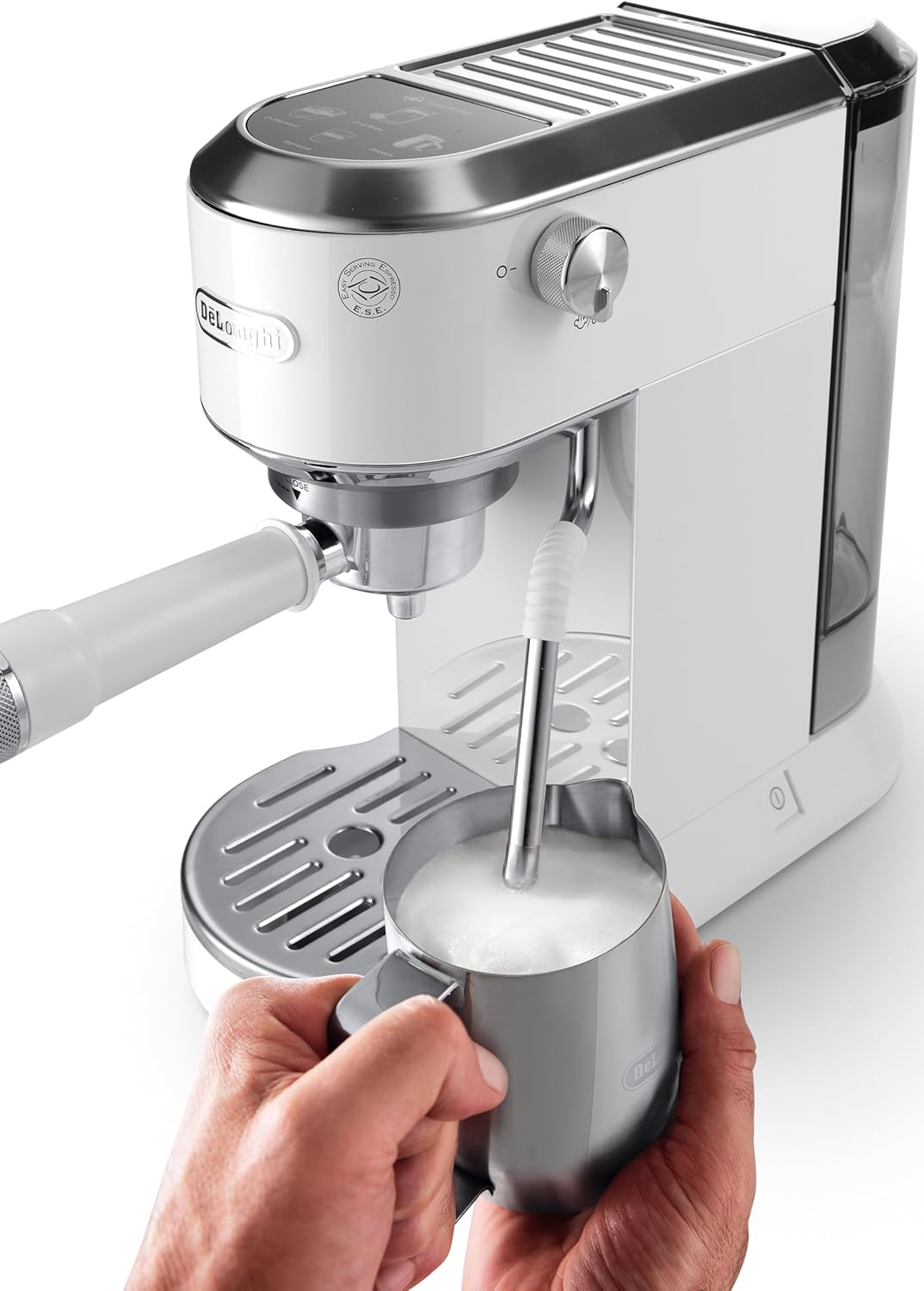
Figure 3: A hand holding a metal pitcher under the steam wand of the De'Longhi Dedica EC890.WI, demonstrating the milk frothing process for latte art. The steam wand is actively producing steam to create creamy foam.
4.3 Cold Brew Function
The Dedica EC890.WI features a dedicated Cold Brew function for refreshing cold coffee beverages.
- Ensure the water tank is filled.
- Insert the appropriate filter basket for cold brew into the portafilter.
- Add coarse ground coffee suitable for cold brew.
- Attach the portafilter to the brew head.
- Place a glass with ice under the portafilter spouts.
- Select the "Cold Brew" button on the touch screen. The machine will initiate the cold extraction process.

Figure 4: A close-up, top-down view of the De'Longhi Dedica EC890.WI's control panel, highlighting the touch-sensitive buttons for Espresso, 2x Espresso, Cold Brew, and Steam functions. The "Cold Extraction Technology" logo is visible.
Note: No official product videos were available from the seller in the provided data to embed in this section.
5. Maintenance and Cleaning
Regular cleaning and maintenance ensure the longevity and optimal performance of your De'Longhi Dedica EC890.WI.
5.1 Daily Cleaning
- Drip Tray: Empty and clean the drip tray daily. It has a red indicator that floats up when full.
- Portafilter and Filter Baskets: After each use, remove spent coffee grounds and rinse the portafilter and filter baskets under hot water.
- Steam Wand: Immediately after frothing milk, wipe the steam wand with a damp cloth. Purge a small amount of steam to clear any internal milk residue.
5.2 Weekly Cleaning
- Water Tank: Wash the water tank with warm water and mild detergent. Rinse thoroughly.
- Brew Head: Use a damp cloth to wipe the brew head and remove any coffee residue.
5.3 Descaling
The machine will indicate when descaling is required. Use a De'Longhi descaler solution and follow the instructions provided with the descaler or in the machine's full manual. Descaling is crucial for maintaining machine performance and coffee quality.
6. Troubleshooting
| Problem | Possible Cause | Solution |
|---|---|---|
| No coffee dispenses. | Water tank empty; machine not primed; clogged filter. | Fill water tank; prime the machine; clean filter basket. |
| Coffee is too weak. | Coffee grounds too coarse; not enough coffee; insufficient tamping. | Use finer grind; increase coffee amount; tamp more firmly. |
| No steam from wand. | Steam wand clogged; machine not ready for steam. | Clean steam wand hole; wait for steam indicator light to stabilize. |
| Water leaking from machine. | Water tank not seated correctly; drip tray full. | Reseat water tank; empty drip tray. |
For more complex issues, please refer to the full product manual or contact De'Longhi customer support.
7. Specifications
| Feature | Detail |
|---|---|
| Brand | De'Longhi |
| Model Number | EC890.WI |
| Color | White |
| Product Dimensions (LxWxH) | 38.7 x 19.7 x 36.7 cm |
| Item Weight | 4.37 Kilograms |
| Water Tank Capacity | 1 Liter |
| Power/Wattage | 1450 Watts |
| Voltage | 240 Volts |
| Material | Metal |
| Special Features | Milk Frother, Cold Brew Function |
| Coffee Maker Type | Espresso Machine |
| Specific Uses | Espresso, Cappuccino, Macchiato, Flat White, Cold Brew |
8. Warranty and Support
For detailed warranty information, please refer to the warranty card included with your product or visit the official De'Longhi website. Keep your proof of purchase for warranty claims.
If you encounter any issues not covered in the troubleshooting section or require further assistance, please contact De'Longhi customer support. Contact details can typically be found on the manufacturer's website or in the product packaging.