Introduction
The NIGOGOR Smart Wireless Meat Thermometer with 4 Probes is designed to provide precise temperature monitoring for various cooking methods, both indoors and outdoors. Utilizing Bluetooth 5.2 technology, it allows remote tracking of up to four meat temperatures simultaneously via a dedicated smartphone application. This manual provides detailed instructions for setup, operation, maintenance, and troubleshooting to ensure optimal performance and perfect cooking results.

The NIGOGOR Smart Wireless Meat Thermometer system, showing the charging base, four probes, and the accompanying smartphone application.
What's in the Box
Your NIGOGOR Smart Wireless Meat Thermometer package includes the following components:
- 1 x Thermometer Base
- 4 x Wireless Probes
- 1 x USB Charging Cable
- 1 x User Manual

The complete set of the NIGOGOR Smart Wireless Meat Thermometer, featuring the charging base and four probes.
Setup
Follow these steps to set up your NIGOGOR Smart Wireless Meat Thermometer for first-time use:
- Charge the Probes: Before initial use, ensure all four probes are fully charged. Place them into the charging base and connect the base to a USB power source using the provided cable. A full charge takes approximately 6 hours and provides up to 300 hours of use.
- Download the App: Search for and download the "PROBE TEMP" application from your smartphone's app store (compatible with iOS and Android).
- Pair the Device:
- Open the "PROBE TEMP" app on your smartphone.
- Remove the probes from the charging base to activate them.
- The app will automatically search for and display available devices. Select your device (e.g., "FM2 Series") and click "Add" to pair.
- Once paired, the app will display the current temperature and battery level of each probe.
- Adjust Settings: Within the app's settings, you can switch between Celsius (°C) and Fahrenheit (°F), select from 8 languages, and customize alarm sounds and vibration duration.
Official video demonstrating the pairing process and initial settings for the NIGOGOR Smart Wireless Meat Thermometer.

The thermometer base with probes and the smartphone app during the pairing process.
Operating Instructions
Using your NIGOGOR Smart Wireless Meat Thermometer for precise cooking:
- Insert the Probe: Carefully insert the probe into the thickest part of the meat, ensuring the entire metal shaft up to the safety line (notch) is inside the meat. This prevents damage and ensures accurate internal temperature readings.
- Select Meat Type and Doneness:
- In the "PROBE TEMP" app, select the desired probe (e.g., Probe 1).
- Click "Click Start" and then choose the type of meat (e.g., Beef, Poultry, Pork, Lamb, Seafood) from the predefined options.
- Select your preferred doneness level (e.g., Rare, Medium Rare, Medium, Well Done). The app provides USDA recommendations.
- Alternatively, you can click "CUSTOM" to manually set a target temperature.
- Monitor Cooking Progress: The app displays the real-time internal temperature of the meat and the set target temperature. A graph shows the temperature trend over time.
- Receive Alerts: The app will notify you when the meat reaches the target temperature, ensuring perfect results without constant checking.
- End Cook: If you need to change settings or finish cooking early, click "End Cook" in the app. You can then adjust the meat type or temperature as needed. The device records previous settings for convenience.

Proper probe insertion into meat, ensuring the safety line is crossed for accurate readings.
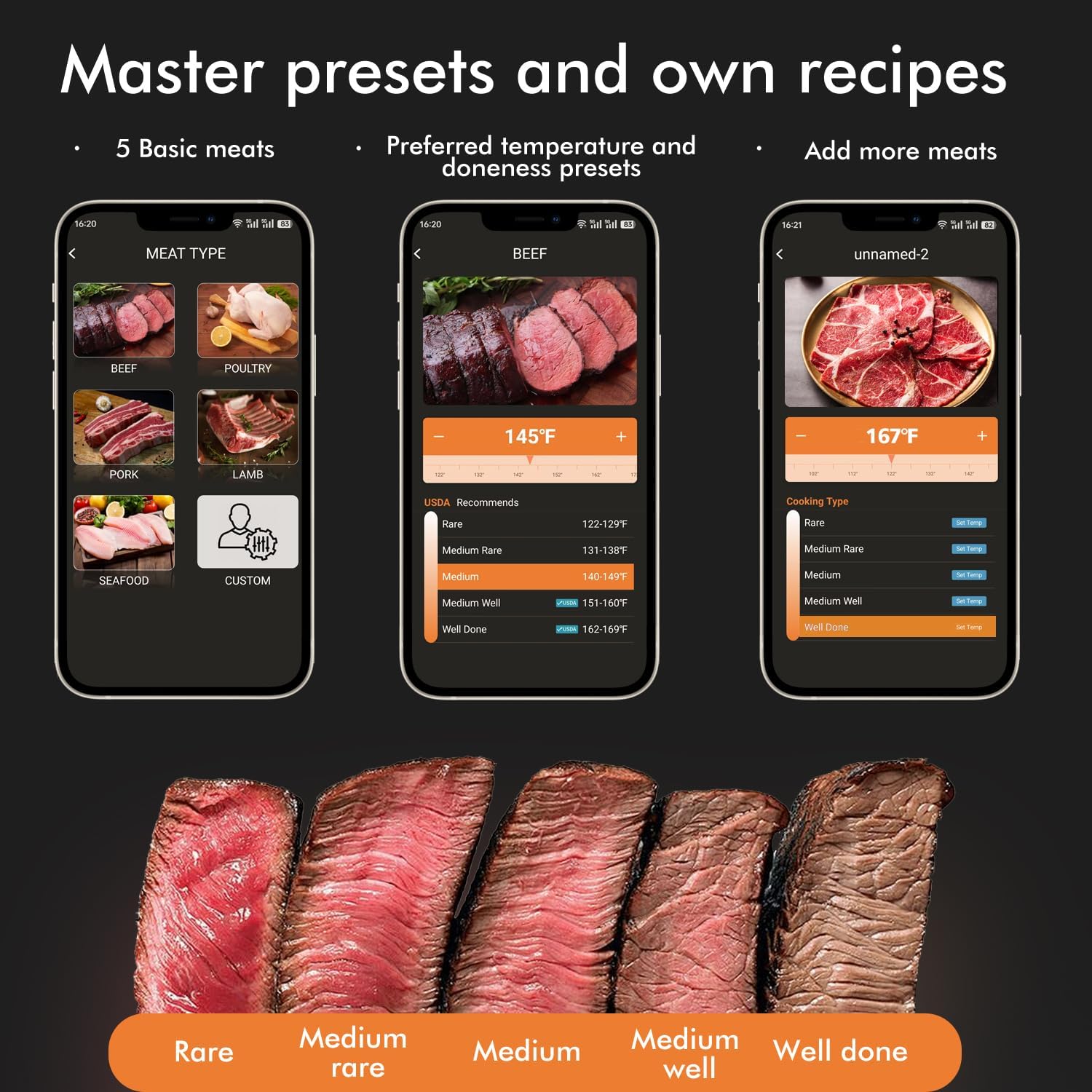
The app's interface for selecting meat type and desired doneness.

Real-time temperature monitoring and trend display on the smartphone app.
Maintenance
Proper care and maintenance will extend the life of your thermometer:
- Charging: The thermometer base is equipped with a 2000mAh rechargeable lithium battery. Charge the probes by placing them in the base and connecting the base to a USB power source. A 6-hour charge provides approximately 300 hours of use.
- Cleaning: The probes are IPX7 waterproof and dishwasher safe. After each use, clean the probes thoroughly to prevent food residue buildup. The base should be wiped clean with a damp cloth. Do not immerse the base in water.
- Storage: Store the probes in their charging base when not in use to keep them charged and protected.

The probes are IPX7 waterproof for easy cleaning.

The charging base for the wireless meat thermometer probes.
Troubleshooting
If you encounter issues with your thermometer, refer to the following common problems and solutions:
- Probe Not Connecting to App:
- Ensure Bluetooth is enabled on your smartphone.
- Make sure the probes are removed from the charging base to activate them.
- Check that the probes and base are within the Bluetooth range (up to 432 feet in open areas, but obstacles like walls can reduce this). Try moving closer to the base.
- Restart the app and try pairing again.
- Inaccurate Temperature Readings:
- Verify that the probe is inserted correctly, past the safety line, into the thickest part of the meat and not touching bone.
- Ensure the probe tip is not exposed to direct flame or heating elements, which can affect accuracy.
- Probe Not Charging:
- Confirm the USB charging cable is securely connected to both the base and a working power source.
- Ensure the probes are correctly seated in their slots in the charging base.
- App Performance Issues (e.g., excessive data usage):
- Ensure your app is updated to the latest version.
- If issues persist, try clearing the app's cache or reinstalling the application.
Video demonstrating the wireless functionality and range of the meat thermometer.

Bluetooth connectivity range and considerations for optimal signal.
Specifications
| Feature | Detail |
|---|---|
| Brand | NIGOGOR |
| Model Name | FM230-N |
| Special Feature | High Accuracy |
| Color | Black |
| Included Components | Thermometer base, 4 probes |
| Outer Material | Plastic |
| Display Type | Digital |
| Connectivity Technology | Bluetooth 5.2 |
| Unit Count | 4.0 Count (probes) |
| Power Source | Battery Powered (2000mAh rechargeable lithium battery) |
| Upper Temperature Rating | 212 Degrees Fahrenheit (internal) / 572 Degrees Fahrenheit (external) |
| Reusability | Reusable |
| Indoor/Outdoor Usage | Outdoor |
| Item Weight | 1.17 pounds |
| Waterproof Rating | IPX7 (probes) |
Warranty and Support
NIGOGOR is committed to providing high-quality products and customer satisfaction. For any questions, concerns, or technical support regarding your Smart Wireless Meat Thermometer, please contact our customer service team. While specific warranty details are not provided in this manual, we strive to address any product-related issues promptly and effectively.
Please refer to the product packaging or the official NIGOGOR website for the most up-to-date warranty information and contact details.