
1. Introduction
The OnRetul V526 OBD2 Scanner Diagnostic Tool is a full-function device designed to assist in diagnosing vehicle issues. It can turn off the engine light and check various aspects of vehicle status, including vehicle information, battery voltage, and on-board monitor data. This tool allows users to read and erase diagnostic trouble codes (DTCs), test the EVAP system, and view freeze frame data. With features like DTC lookup and live data monitoring, it provides comprehensive vehicle diagnostic capabilities for a wide range of vehicles.

Figure 1.1: The V526 OBD2 Scanner displaying its main interface and a summary of its diagnostic functions.
2. Getting Started
2.1 Package Contents
- V526 OBD2 Scanner Diagnostic Tool
- User Manual
2.2 Connecting the Scanner
The V526 scanner is designed for plug-and-play operation. To begin, locate your vehicle's OBD-II port, which is typically found under the dashboard on the driver's side. Once located, firmly plug the scanner's 16-pin heavy-duty lead standard OBDII plug into the vehicle's OBD-II port. The device will power on automatically.

Figure 2.1: The V526 scanner's handheld design and OBDII plug for easy connection.
3. Operating the V526 Scanner
3.1 Navigating the Menu
The V526 features a 2.8-inch high-definition color screen and soft, comfortable silicone buttons for navigation. Use the directional arrow buttons (up, down, left, right) to move through menu options. Press the OK button to confirm a selection and the EXIT button to return to the previous screen.
3.2 Key Functions
- Read DTC: Retrieves Diagnostic Trouble Codes from the vehicle's computer.
- Clear DTC: Erases Diagnostic Trouble Codes and turns off the Check Engine Light.
- Freeze Frame: Displays a snapshot of vehicle operating conditions at the time a fault code was set.
- I/M Readiness: Checks the status of emission-related monitors to determine if the vehicle is ready for an emissions test.
- Vehicle Info: Displays vehicle identification number (VIN), calibration ID (CALID), and calibration verification number (CVN).
- Live Data: Shows real-time data streams from various vehicle sensors and components.
- O2 Sensor Test: Retrieves O2 sensor monitor test results.
- Mode 6: Accesses results for on-board diagnostic monitoring tests of specific components/systems that are not continuously monitored.
- Mode 8 (EVAP System Test): Initiates a test of the evaporative emission control system.
- Battery Voltage: Displays the current battery voltage.

Figure 3.1: Overview of the V526's comprehensive diagnostic functions.
3.3 Real-Time Data Stream Tracking
The V526 can track more than 20 data streams in real-time, such as fuel pressure, oxygen sensors, and coolant temperature. This feature is crucial for accurately locating intermittent faults and avoiding misdiagnosed repairs. The device can display real-time curves for parameters like Engine Coolant Temp, Calculate Load Value, Engine RPM, and Car Speed.

Figure 3.2: Live data stream and real-time curve display on the V526 scanner.
3.4 Understanding Visual Indicators
The V526 features user-friendly visual indicators (Red, Orange, Green) to quickly convey vehicle status:
- Red: Indicates a critical issue that requires immediate action.
- Orange: Suggests an issue that needs your attention soon.
- Green: Signifies that the vehicle is in good condition.
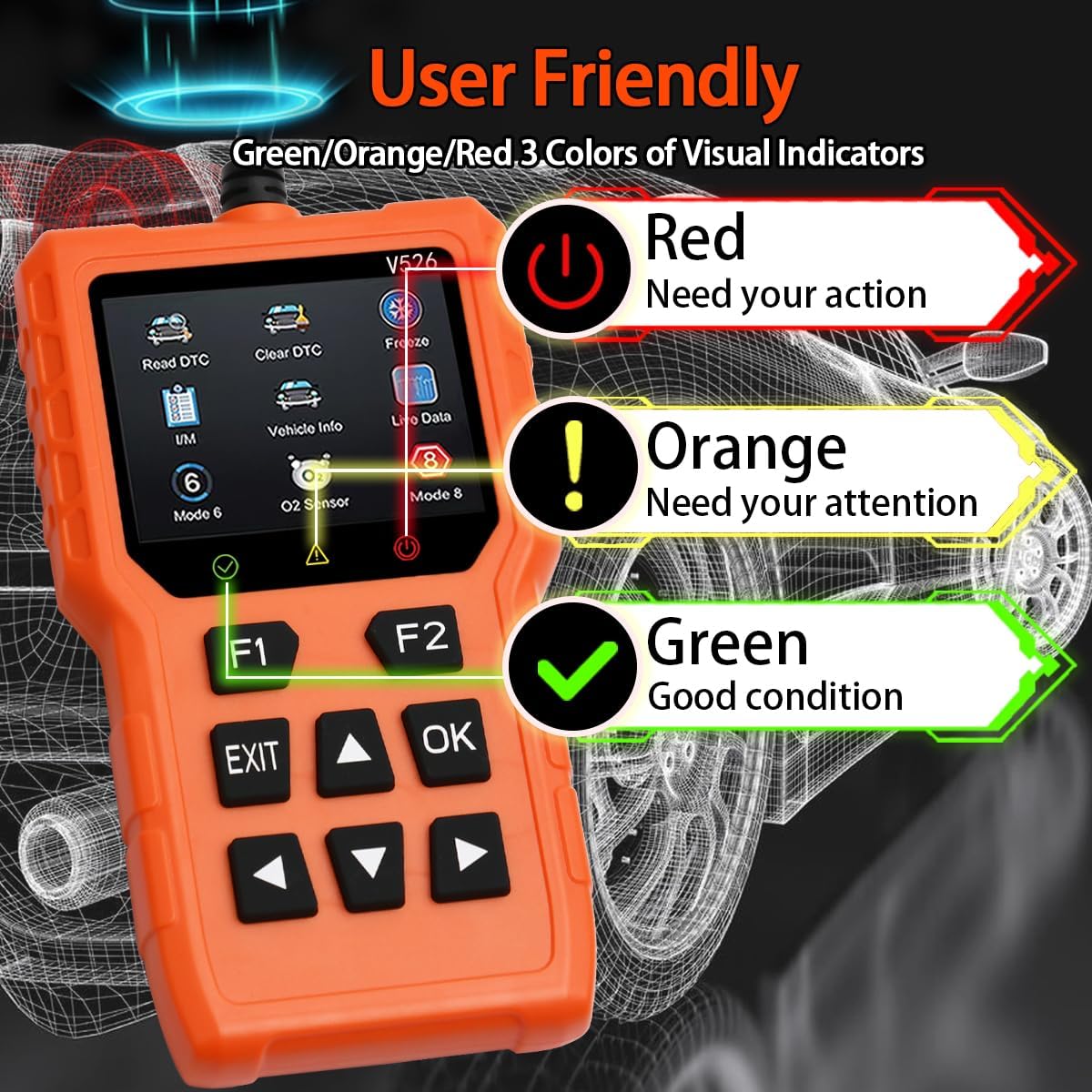
Figure 3.3: Visual indicators on the V526 scanner for quick status assessment.
4. Maintenance
To ensure the longevity and optimal performance of your V526 OBD2 Scanner, follow these simple maintenance guidelines:
- Cleaning: Use a soft, dry cloth to clean the device. Avoid using abrasive cleaners or solvents that could damage the screen or casing.
- Storage: Store the scanner in a cool, dry place away from direct sunlight, extreme temperatures, and excessive moisture.
- Handling: Handle the device with care to prevent drops or impacts that could damage internal components.
- Cable Care: Do not bend or crimp the OBDII cable excessively. Store it neatly to prevent tangles and damage.
5. Troubleshooting and Important Notes
5.1 Compatibility and Limitations
The V526 OBD2 Scanner is compatible with over 98% of sedans, trucks, and SUVs produced by American manufacturers since 1996, Japanese manufacturers since 2002, and European manufacturers since 2008. However, please be aware of the following limitations:
- Does Not Support ABS/SRS/TPMS: This product is designed primarily for engine-related diagnostics and does not support reading or clearing codes for Anti-lock Braking System (ABS), Supplemental Restraint System (SRS), or Tire Pressure Monitoring System (TPMS).
- Diesel Vehicles: For diesel vehicles, ensure that the specific protocols supported by this scanner are compatible with your vehicle. Otherwise, the product may not function correctly.
- Older Vehicles: Some older fuel vehicles from certain years may not fully comply with the OBD2 protocol, which could affect the scanner's functionality.
- Electric Vehicles (EVs): This scanner may have limited functionality or fail to connect with certain electric vehicles, such as Tesla Model S or Nissan Leaf, beyond basic voltage readings.
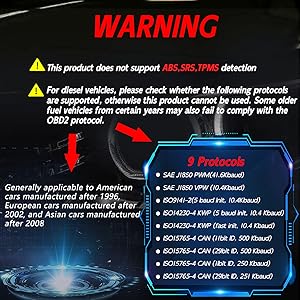
Figure 5.1: Important compatibility and limitation warnings for the V526 scanner.
5.2 Common Issues
- Device Not Powering On: Ensure the OBDII cable is securely connected to the vehicle's OBD-II port. Check the vehicle's battery for sufficient power.
- No Communication with Vehicle: Verify that the vehicle's ignition is in the ON position (engine off or running). Check for blown fuses in the vehicle's OBD-II circuit. Ensure your vehicle is OBD-II compliant.
- Incorrect Readings: Ensure the vehicle's information (VIN, etc.) is correctly recognized by the scanner. If issues persist, try updating the scanner's firmware if an update option becomes available (note: some models may not have an accessible USB port for updates as per user feedback).
6. Product Specifications
| Feature | Specification |
|---|---|
| Brand | OnRetul |
| Model Number | V526 |
| Product Dimensions | 6"L x 1"W x 3"H (approx. 15.50cm L x 7.80cm W x 2.54cm H) |
| Item Weight | 7.4 ounces |
| Display | 2.8-inch Color Screen |
| Automotive Fit Type | Universal Fit |
| Supported Protocols | SAE J1850 PWM (41.6Kbaud), SAE J1850 VPW (10.4Kbaud), ISO9141-2 (5 baud init, 10.4Kbaud), ISO14230-4 KWP (5 baud init, 10.4 Kbaud), ISO14230-4 KWP (fast init, 10.4 Kbaud), ISO15765-4 CAN (11bit ID, 500 Kbaud), ISO15765-4 CAN (29bit ID, 500 Kbaud), ISO15765-4 CAN (11bit ID, 250 Kbaud), ISO15765-4 CAN (29bit ID, 251 Kbaud) |
| Supported Languages | English, Spanish, German, French, Italian, Dutch, Chinese, Russian, Portuguese, Japanese |
| UPC | 768383869040 |

Figure 6.1: Physical dimensions of the V526 OBD2 Scanner.
7. Customer Support
If you encounter any problems during the use of your OnRetul V526 OBD2 Scanner, please do not hesitate to contact our customer support team. We are committed to providing high-quality service and will respond to your inquiries within 24 hours.
For support, please refer to the contact information provided with your product packaging or visit the official OnRetul website.