
Skullcandy S2MTW-T740
Contents
Skullcandy Method 360 ANC Wireless Earbuds User Manual
Model: S2MTW-T740 | Brand: Skullcandy
Keywords: Skullcandy, Method, 360, ANC, Wireless, Earbuds, Sound, Bose, Bluetooth, Headphones, Premium, Noise, Cancelling, 40 Hrs, Battery, Sweat, Water Resistant, Microphone, iPhone, Android, True Black, S2MTW-T740, 810145321935
Introduction
The Skullcandy Method 360 ANC Wireless Earbuds are engineered for incredible audio and nonstop action, offering a perfect fusion of best-in-class sound and fearless design. This manual provides comprehensive instructions for setting up, operating, and maintaining your earbuds to ensure optimal performance and longevity.

Image: The Skullcandy Method 360 ANC Wireless Earbuds in True Black, shown with their unique cylindrical charging case featuring a clip-anywhere design.
What's in the Box
- Method 360 ANC True Wireless Earbuds
- Charging Case Design™
- Ear Gel sizes: S, M, L
- Fit Fin sizes: S, M, L
- User Manual
- Micro USB-C to USB Charging Cable
Setup
Initial Pairing
- Remove both earbuds from the charging case. They will automatically enter pairing mode.
- On your device (smartphone, tablet, etc.), open Bluetooth settings.
- Select "Skullcandy Method 360 ANC" from the list of available devices.
- Once connected, you will hear an audible confirmation.
Skull-iQ App Download
For full customization and access to advanced features, download the Skull-iQ App from your device's app store. The app allows you to adjust EQ settings, reconfigure button functions, and manage ANC/Stay-Aware modes.

Image: A smartphone displaying the Skull-iQ App interface, showing various customization options for the Method 360 ANC earbuds.
Operating Instructions
Touch Controls
The earbuds feature intuitive touch controls. Functions can be customized via the Skull-iQ App.
- Single Press: Play/Pause, Answer/End Call
- Double Press: Next Track, Reject Call
- Triple Press: Previous Track
- 1-Second Hold: Activate Voice Assistant, Toggle ANC/Stay-Aware
Active Noise Cancelling (ANC) & Stay-Aware Mode
Block out distractions with Superior Active Noise Cancelling or activate Stay-Aware mode to hear your surroundings. Toggle between modes using the touch controls or the Skull-iQ App. Intensity levels for Stay-Aware mode can be adjusted in the app.

Image: A visual representation of Active Noise Cancelling, showing sound waves being eliminated around the earbud.
Multipoint Pairing
Connect to two devices simultaneously and seamlessly switch audio playback between them without needing to disconnect and reconnect. Manage multipoint pairing in the Skull-iQ App.
Spotify Tap™
Get straight to your music by assigning Spotify Tap™ to a button function in the Skull-iQ App. A single tap will launch Spotify and start playing music.
Low Latency Audio
Reduce audio delays for gaming or watching videos, ensuring your picture and sound stay in perfect sync. This feature can be enabled in the Skull-iQ App.
Take a Photo
Turn your earbud into a remote trigger for your phone camera. Assign the "Take a Photo" function to a button press in the Skull-iQ App to capture pictures or videos with a simple tap. Ensure your camera app is open before using this feature.
Battery & Charging
The Method 360 ANC earbuds offer up to 40 hours of total battery life with ANC off (11 hours in earbuds, 29 hours in case). With ANC on, you can expect slightly less playback time.

Image: The earbuds and charging case, highlighting the impressive 40-hour battery life.
Rapid Charge
Benefit from Rapid Charge technology: a quick 10-minute charge provides up to 2 hours of playback. Use the included Micro USB-C to USB Charging Cable for optimal charging.
Fit & Comfort
The earbuds are designed for a secure and comfortable fit. They come with multiple sizes of ear gels and fit fins to ensure a perfect seal for optimal sound and stability.

Image: A side profile of an earbud comfortably seated in a person's ear, demonstrating the secure fit.
Customizable Fit
- Ear Gel sizes (S, M, L): Choose the size that provides the best seal for sound isolation and comfort.
- Fit Fin sizes (S, M, L): These fins help secure the earbuds in your ear, especially during active use.
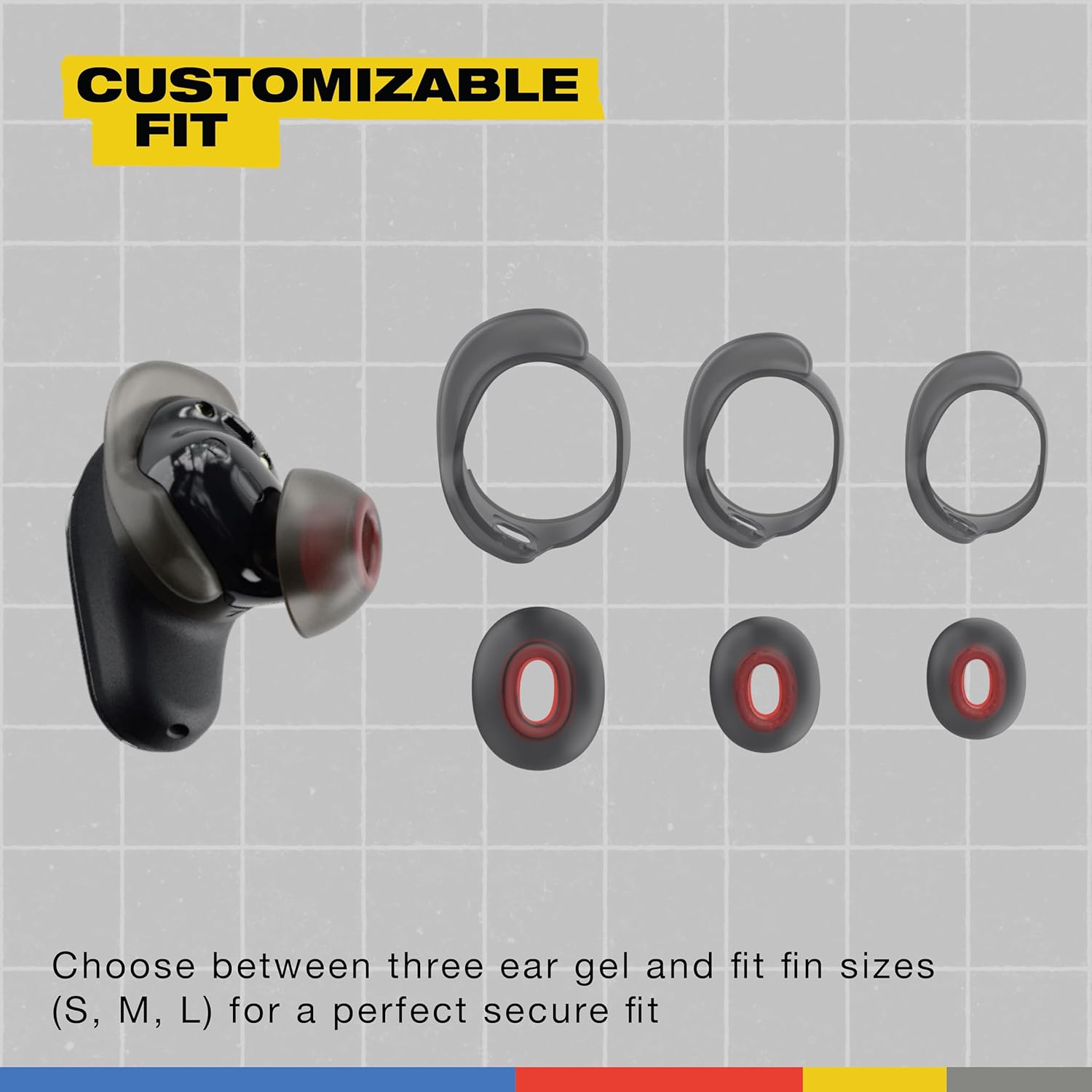
Image: An earbud with an IPX4 rating, indicating its resistance to sweat and water, suitable for workouts and outdoor activities.
Sweat and Water Resistant (IPX4)
With an IPX4 rating, your Method 360 ANC earbuds are resistant to sweat and water splashes, making them ideal for workouts and outdoor adventures.
Sound Quality
Experience high-fidelity audio with Sound by Bose. The earbuds are engineered for incredible sound clarity and depth of range, with optimized ear gels and audio architecture for ideal performance.

Image: An exploded view of the earbud's internal components, highlighting the "Sound by Bose" technology for premium audio.
Customizable EQ
Tailor your audio experience by choosing from 3 preset EQs or creating your own custom equalizer settings within the Skull-iQ App.
Maintenance
Cleaning
Regularly clean your earbuds and charging case with a soft, dry, lint-free cloth. Remove ear gels and clean them separately with mild soap and water if necessary, ensuring they are completely dry before reattaching.
Storage
When not in use, always store the earbuds in their charging case to protect them and ensure they remain charged.
Troubleshooting
| Problem | Solution |
|---|---|
| Earbuds not pairing | Ensure earbuds are charged. Place them back in the case, then remove to re-enter pairing mode. Check your device's Bluetooth settings. |
| No sound or low volume | Check device volume and earbud volume. Ensure earbuds are properly seated in your ears and ear gels provide a good seal. Clean ear gels if necessary. |
| Connectivity issues (dropping out) | Ensure earbuds are within range of your device. Disconnect and reconnect Bluetooth. Update firmware via the Skull-iQ App. |
| ANC not working effectively | Ensure earbuds are properly seated and ear gels provide a tight seal. Check ANC mode settings in the Skull-iQ App. |
Specifications
| Feature | Detail |
|---|---|
| Model Name | Method 360 ANC with Sound by Bose |
| Noise Control | Active Noise Cancellation |
| Connectivity Technology | Wireless (Bluetooth 5.3) |
| Battery Life | Up to 40 Hours (ANC off) |
| Rapid Charge | 10 minutes = 2 hours playtime |
| Water Resistance Level | IPX4 (Sweat and Water Resistant) |
| Control Method | Touch |
| Frequency Response | 20Hz - 20KHz |
| Impedance | 16 Ohm |
| Sensitivity | 97.1 dB |
| Item Weight | 88 Grams (3.1 ounces) |
| Color | True Black |
| Manufacturer | Skullcandy |
| Item model number | S2MTW-T740 |
| UPC | 810145321935 |
Official Product Videos
Meet Method 360 ANC with Sound by Bose
Video: An official Skullcandy video introducing the Method 360 ANC earbuds, highlighting their key features and collaboration with Bose. (Duration: 0:30)
Method 360 ANC True Black with Sound by Bose
Video: A short product showcase of the Method 360 ANC earbuds in True Black, emphasizing the Sound by Bose feature. (Duration: 0:07)
Warranty & Support
The Skullcandy Method 360 ANC Wireless Earbuds come with a 1-Year USA Limited Warranty. For support, please refer to the official Skullcandy website or contact their customer service.
Documents and downloads
Ask a question about this manual
Ask about setup, troubleshooting, compatibility, parts, safety, or missing instructions. Manuals+ will review the question and use this page’s manual context to help answer it.