
Introduction
This manual provides essential information for the safe and efficient use of your LG S40T 2.1 Channel Soundbar with Wireless Subwoofer. This system is designed to enhance your audio experience with 2 channels, a dedicated wireless subwoofer, and advanced features like Dolby & DTS support, AI Sound Pro, and the LG Wow Interface for seamless TV integration. Please read this manual thoroughly before operating the product and retain it for future reference.

The LG S40T Soundbar and its wireless subwoofer integrated into a home entertainment environment.
Safety Information
To reduce the risk of electric shock, fire, or injury, always follow these basic safety precautions:
- Power Source: Connect the product only to an AC power outlet specified in the operating instructions or marked on the product.
- Ventilation: Do not block any ventilation openings. Install in accordance with the manufacturer's instructions.
- Water and Moisture: Do not expose this apparatus to rain or moisture. Do not use this apparatus near water.
- Heat: Do not install near any heat sources such as radiators, heat registers, stoves, or other apparatus (including amplifiers) that produce heat.
- Cleaning: Unplug this apparatus during lightning storms or when unused for long periods of time. Clean only with a dry cloth.
- Servicing: Refer all servicing to qualified service personnel. Servicing is required when the apparatus has been damaged in any way.
Package Contents
Verify that all components are present in the package:
- LG S40T Soundbar Unit
- Wireless Subwoofer
- Remote Control
- Power Cables (for Soundbar and Subwoofer)
- User Manual (this document)
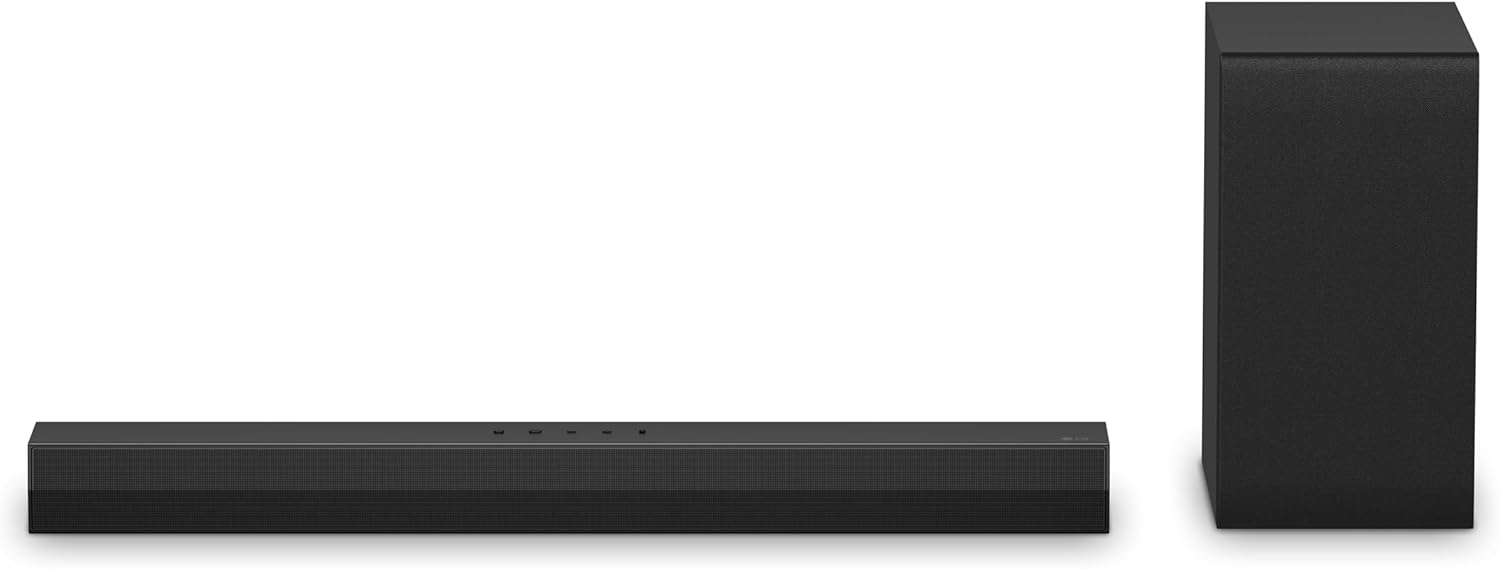
The LG S40T Soundbar and its accompanying wireless subwoofer.
Setup
1. Placement
- Soundbar: Place the soundbar horizontally on a stable surface directly below your TV, centered for optimal sound dispersion. Ensure there are no obstructions in front of the soundbar.
- Wireless Subwoofer: Position the wireless subwoofer on the floor near the soundbar. For best bass performance, experiment with different locations in the room. Avoid placing it directly against a wall or in a corner, which can cause excessive resonance.

Front view of the LG S40T Soundbar.
2. Connections
- Power: Connect the power cables to the soundbar and the wireless subwoofer, then plug them into separate wall outlets.
- Audio Connection (Recommended - HDMI ARC/eARC): Connect an HDMI cable from the HDMI OUT (TV ARC/eARC) port on the soundbar to the HDMI IN (ARC/eARC) port on your TV. This allows for high-quality audio transmission and TV remote control integration.
- Audio Connection (Optical): If your TV does not support HDMI ARC/eARC, connect an optical cable from the OPTICAL IN port on the soundbar to the Optical Digital Audio Out port on your TV.
- Bluetooth: For wireless audio streaming from mobile devices, refer to the 'Operating - Bluetooth Connection' section.
3. Wireless Subwoofer Pairing
The wireless subwoofer should automatically pair with the soundbar when both are powered on. If the subwoofer does not connect:
- Ensure both the soundbar and subwoofer are powered on.
- Locate the PAIRING button on the back of the wireless subwoofer.
- Press and hold the PAIRING button for a few seconds. The LED indicator on the subwoofer will blink.
- Turn off the soundbar, then turn it back on. The subwoofer should now pair, and the LED indicator will turn solid green.
Operating
1. Basic Controls
The soundbar can be controlled using the buttons on the top panel or the included remote control.

Top panel controls of the LG S40T Soundbar.
- Power (⏻): Turns the soundbar on or off.
- Volume (+/-): Adjusts the master volume level.
- Function (F): Selects the input source (HDMI ARC, Optical, Bluetooth).
2. Sound Modes
The LG S40T features AI Sound Pro, which automatically optimizes sound settings based on the content you are watching or listening to. It also supports Dolby & DTS for immersive audio experiences.

AI Sound Pro dynamically adjusts audio for various content, from live sports to music and action scenes.
3. TV Remote Control (LG Wow Interface)
If connected via HDMI ARC/eARC to a compatible LG TV, you can control the soundbar's volume and basic functions directly using your LG TV remote control. This feature, known as the LG Wow Interface, allows for integrated control and access to soundbar settings through your TV's on-screen menu.

Adjusting soundbar settings directly from a compatible LG TV remote via the Wow Interface.
4. Bluetooth Connection
- Press the Function (F) button on the soundbar or remote control until 'BT' (Bluetooth) appears on the display.
- On your mobile device, enable Bluetooth and search for available devices.
- Select 'LG S40T' from the list of devices. Once connected, the soundbar display will show 'PAIRED'.
- Play audio from your device, and it will stream through the soundbar.
5. Mobile Application Control
For advanced settings, including subwoofer volume control and detailed equalizer adjustments, download and install the official LG Sound Bar mobile application from your device's app store. You may need to create an LG account and sign in to access all features.
Maintenance
- Cleaning: Disconnect the power cord before cleaning. Use a soft, dry cloth to wipe the surfaces of the soundbar and subwoofer. Do not use liquid cleaners or abrasive materials.
- Ventilation: Ensure that the ventilation openings are kept clear of dust and debris.
- Storage: If storing the unit for an extended period, unplug it from the power outlet and store it in a cool, dry place.
Troubleshooting
If you encounter issues with your LG S40T Soundbar, refer to the following table for common problems and solutions:
| Problem | Possible Solution |
|---|---|
| No sound from soundbar. |
|
| Wireless subwoofer not producing sound. |
|
| Remote control not working. |
|
| Bluetooth pairing issues. |
|
Specifications
| Feature | Specification |
|---|---|
| Brand | LG |
| Model Name | S40T |
| Number of Audio Channels | 2.1 |
| Connectivity Technology | RCA, Bluetooth, HDMI |
| Connectivity Protocol | Bluetooth, HDMI |
| Audio Output Mode | Stereo |
| Mounting Type | Wall Mount |
| Additional Features | Hi Res Audio, AI Sound Pro, TV Synergy, Wow Interface |
| Control Method | Remote |
| Item Dimensions (D x W x H) | 33"D x 8.6"W x 15.81"H |
| Item Weight | 16.75 Pounds |
| Compatible Devices | Laptop, Smartphone, Tablet, Television |
| Power Source | Corded Electric |
| GTIN / UPC | 703670898129 |
Warranty and Support
This LG S40T Soundbar comes with a 90 days limited warranty. Please retain your proof of purchase for warranty claims.
For technical support, service inquiries, or additional product information, please visit the official LG website or contact LG customer service in your region. You can find contact details and support resources on the LG support portal.