
1. Introduction
This manual provides essential information for the safe and efficient operation, maintenance, and troubleshooting of your Rocket Espresso Giannino Grinder. Please read all instructions carefully before using the appliance and retain this manual for future reference.
The Giannino Grinder is designed to provide a consistent and even grind for optimal coffee extraction, particularly for espresso. It features a robust motor, innovative flat burrs, and a user-friendly touch interface.
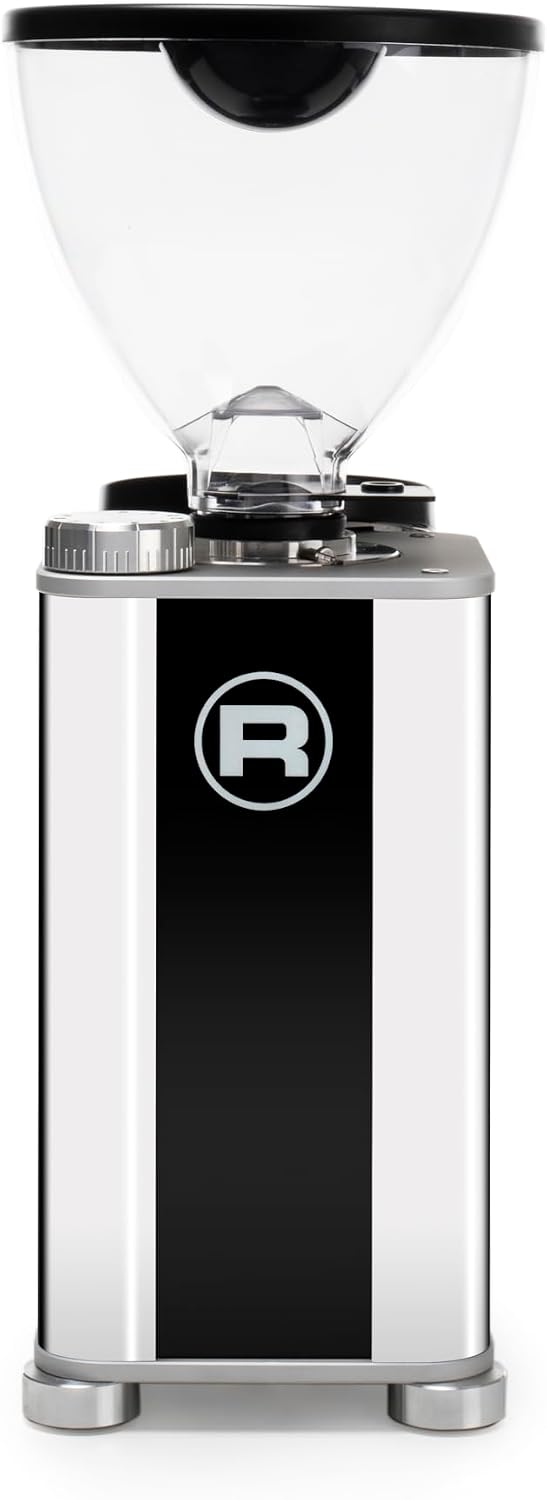
Image 1.1: Front view of the Giannino Grinder, showcasing its sleek design and touch interface.
2. Safety Instructions
- Always ensure the grinder is unplugged before cleaning or performing any maintenance.
- Do not immerse the grinder in water or any other liquid.
- Keep hands and foreign objects away from the grinding burrs and bean hopper during operation.
- This appliance is intended for grinding roasted coffee beans only. Do not use it for other substances.
- Ensure the grinder is placed on a stable, level, and dry surface.
- Do not operate the grinder with a damaged cord or plug. Contact authorized service personnel for repairs.
3. Setup
3.1 Unpacking
Carefully remove all components from the packaging. Check for any signs of damage. Retain packaging for future transport or storage.
3.2 Placement
Place the grinder on a clean, dry, and stable countertop. Ensure adequate ventilation around the unit. Avoid placing it near heat sources or in direct sunlight.

Image 3.1: Side view of the Giannino Grinder, illustrating its compact footprint for placement.
3.3 Initial Cleaning
Before first use, wipe the exterior of the grinder with a damp cloth. Wash the bean hopper and ground coffee container with warm, soapy water, rinse thoroughly, and dry completely.
3.4 Hopper Assembly
Place the clean and dry bean hopper onto the top of the grinder. Ensure it is seated correctly and securely. Fill the hopper with fresh, roasted coffee beans.
4. Operating Instructions
4.1 Power On/Off
Plug the grinder into a suitable electrical outlet. The grinder will enter standby mode. To power on, touch the designated power icon on the touch interface.
4.2 Grind Adjustment
The Giannino Grinder features a stepless grind adjustment mechanism, allowing for precise control over grind size. Rotate the grind adjustment collar located beneath the bean hopper to change the fineness. Rotate clockwise for a finer grind and counter-clockwise for a coarser grind. Start with a medium-fine setting for espresso and adjust as needed based on your espresso machine and coffee beans.

Image 4.1: Top view highlighting the grind adjustment dial for precise control.
4.3 Grinding Process
Place your portafilter into the portafilter holder. The grinder's touch interface allows for programmable dosing. Select your desired dose (single or double shot) by touching the corresponding icon. The grinder will automatically dispense the pre-set amount of ground coffee. For manual grinding, press and hold the manual grind button.

Image 4.2: Side view demonstrating the portafilter holder and coffee dispensing area.
4.4 Capacity
The bean hopper has a capacity of approximately 320 grams of coffee beans.
5. Maintenance
5.1 Regular Cleaning
To maintain optimal performance, regularly clean your grinder. Unplug the unit. Remove the bean hopper and any remaining beans. Use a brush or vacuum cleaner to remove coffee grounds from the grinding chamber and dispensing chute. Wipe the exterior with a soft, damp cloth.
5.2 Burr Care
The Giannino Grinder uses durable 55mm steel flat burrs. Over time, coffee oils can build up on the burrs, affecting grind consistency. Periodically, use specialized grinder cleaning tablets (follow tablet manufacturer's instructions) or carefully remove the burrs (refer to advanced cleaning guides or professional service) for a deeper clean. Always ensure the grinder is unplugged before attempting to access the burrs.
6. Troubleshooting
- Grinder not turning on: Ensure the power cord is securely plugged into a working outlet. Check if the power button on the touch interface has been pressed.
- No coffee grinding: Check if the bean hopper contains coffee beans. Ensure the hopper is correctly seated. The burrs might be clogged; refer to the cleaning section.
- Inconsistent grind: This can be due to old coffee beans, burr wear, or burr clogging. Clean the burrs as described in the maintenance section. Consider replacing burrs if they are worn out (contact support).
- Grinder making unusual noises: Unplug the grinder immediately. Check for foreign objects in the bean hopper or grinding chamber. If the noise persists after checking, contact customer support.
7. Specifications
| Feature | Detail |
|---|---|
| Brand | ROCKET ESPRESSO MILANO |
| Model Name | Giannino |
| Color | Stainless Steel & Black |
| Product Dimensions (D x W x H) | 11.8" x 9.6" x 5.5" |
| Item Weight | 16.5 pounds |
| Material | Stainless Steel |
| Capacity (Bean Hopper) | 320 Grams |
| Burr Type | 55mm Steel Flat Burrs |
| Human Interface Input | Touchscreen |
| Specific Uses For Product | Espresso |
| Included Components | User Manual |
8. Warranty and Support
For warranty information, please refer to the warranty card included with your product or visit the official Rocket Espresso Milano website. For technical support, spare parts, or service inquiries, please contact your authorized Rocket Espresso dealer or customer service.
Contact Information: Please refer to the contact details provided on the Rocket Espresso Milano official website or your purchase documentation.


