
Introduction
The JBL Vibe Beam 2 True Wireless Earbuds deliver a high-quality audio experience with JBL Pure Bass Sound. Designed for versatility, these earbuds feature Active Noise Cancelling (ANC) and Smart Ambient technology, allowing you to control your auditory environment. With four microphones, calls are crisp and clear, even in noisy settings. The earbuds offer up to 40 hours of combined playback time with the charging case and are built to withstand dust and water with an IP54 rating. Customize your listening experience further using the JBL Headphones app.

Image: JBL Vibe Beam 2 True Wireless Earbuds in their blue charging case.
What's in the Box
- 1 x JBL Vibe Beam 2 headphones
- 1 x Type-C USB charging cable
- 1 x 3 sizes of ear tips (Small, Medium, Large)
- 1 x Charging case
- 1 x Warranty / Warning (W / !); 1 x product QSG/ Safety Sheet (S / i)

Image: Included accessories: USB-C charging cable and various ear tip sizes.
Setup
Initial Charge
Before first use, place both earbuds into the charging case and connect the case to a power source using the provided USB-C cable. Ensure the earbuds and case are fully charged for optimal performance. A full charge typically takes approximately 2 hours.
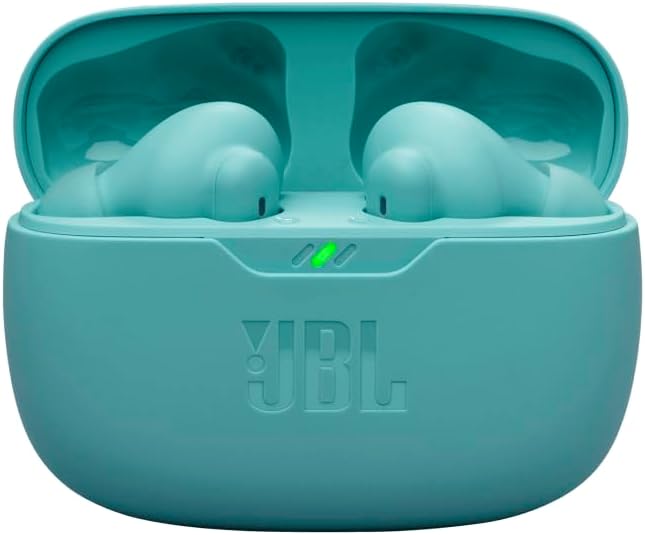
Image: The charging case showing its indicator lights during charging.
Bluetooth Pairing
- Open the charging case. The earbuds will automatically enter pairing mode.
- On your device (smartphone, tablet, computer), go to Bluetooth settings.
- Select "JBL Vibe Beam 2" from the list of available devices.
- Once connected, you will hear an audible confirmation, and the LED indicator on the earbuds will change.
The earbuds support multi-point connection, allowing seamless switching between up to 8 Bluetooth devices.

Image: Blue JBL Vibe Beam 2 earbuds ready for pairing.
Operating Instructions
Power On/Off
- Power On: Open the charging case, and the earbuds will automatically power on and connect to the last paired device.
- Power Off: Place the earbuds back into the charging case and close the lid. They will automatically power off and begin charging.
Touch Controls
The JBL Vibe Beam 2 earbuds feature intuitive touch controls for managing playback, calls, and sound modes. Refer to the JBL Headphones app for detailed customization of touch gestures.
Active Noise Cancelling (ANC) & Smart Ambient
Control how much of your surroundings you hear:
- Active Noise Cancelling (ANC): Reduces external noise for an immersive listening experience.
- Smart Ambient: Allows you to hear your surroundings while still enjoying your audio, useful for staying aware of traffic or engaging in conversations without removing earbuds.
Toggle between these modes using the touch controls or the JBL Headphones app.

Image: User experiencing Active Noise Cancelling or Smart Ambient with JBL Vibe Beam 2 earbuds.
Calls
Each earbud is equipped with two microphones, totaling four microphones, to ensure crisp and clear calls by effectively canceling out ambient noise. Manage calls directly via touch controls.

Image: Close-up of JBL Vibe Beam 2 earbuds, illustrating the 4-microphone system for calls.
JBL Headphones App
Download the JBL Headphones app to unlock full customization options:
- Equalizer (EQ): Select from preset EQs or create your own custom sound profile.
- Voice Prompts: Receive useful information, such as low battery alerts, in multiple languages.
- Relax Mode: Choose from five peaceful sounds to help you unwind.
Charging
The JBL Vibe Beam 2 earbuds provide up to 10 hours of playtime on a single charge, with an additional 30 hours of battery life stored in the charging case (totaling 40 hours with ANC off). For quick power-ups, a 10-minute charge using the USB-C cable provides approximately 3 hours of playback.

Image: Black JBL Vibe Beam 2 earbuds in their charging case, highlighting extended battery life.
Maintenance
Water and Dust Resistance
The earbuds are IP54 rated, making them dust and water resistant. This means they can withstand splashes of water and dust ingress, making them suitable for workouts and outdoor activities. However, they are not designed for submersion in water.
Cleaning and Storage
- Regularly clean the ear tips and charging contacts with a soft, dry cloth to prevent debris buildup.
- Store the earbuds in their charging case when not in use to protect them and ensure they remain charged.
- Avoid exposing the earbuds to extreme temperatures or direct sunlight for prolonged periods.
Troubleshooting
- No Sound/Poor Sound Quality: Ensure earbuds are properly seated in your ears and connected to your device. Check the volume levels on both the earbuds and your device. Try different ear tip sizes for a better seal.
- Pairing Issues: Make sure Bluetooth is enabled on your device and the earbuds are in pairing mode. Forget the device from your Bluetooth list and attempt to re-pair.
- Earbuds Not Charging: Verify that the charging cable is securely connected to both the case and a power source. Clean the charging contacts on both the earbuds and the case.
- App Connectivity: Ensure the JBL Headphones app is up-to-date and your device's Bluetooth is active.
For persistent issues, consult the full product QSG/Safety Sheet included in the box or visit the official JBL support website.
Specifications
| Feature | Detail |
|---|---|
| Model Name | JBL Vibe Beam 2 |
| Connectivity Technology | Wireless (Bluetooth 5.3) |
| Noise Control | Active Noise Cancellation, Smart Ambient |
| Audio Driver Size | 8mm Dynamic Driver |
| Frequency Response | 20 Hz - 20 kHz |
| Sensitivity | 100 dB |
| Battery Life (Earbuds) | Up to 10 hours |
| Total Playback Time (with case) | Up to 40 hours (ANC off) |
| Charging Time | 2 Hours |
| Water Resistance Level | IP54 (Dust and Water Resistant) |
| Microphones | 4 (2 per earbud) |
| Control Method | Touch, App |
Warranty & Support
The JBL Vibe Beam 2 earbuds come with a manufacturer's warranty. Please refer to the Warranty / Warning (W / !) document included in your product packaging for detailed information regarding warranty terms, conditions, and registration procedures.
For additional support, FAQs, and product information, please visit the official JBL website or contact their customer service. Keep your purchase receipt for warranty claims.


