1. Introduction
This manual provides comprehensive instructions for the Sound Oasis® Bluetooth® Sleep Sound Therapy System® Alarm Clock, model BST-150. Please read this manual thoroughly before operating the device to ensure proper use and to maximize its features. This device is designed to assist with sleep, manage tinnitus, and provide a pleasant auditory environment through its built-in sounds and Bluetooth streaming capabilities.
For additional support and information, please visit the official Sound Oasis website or contact customer service.
2. Safety Information
It is important to read and understand all safety warnings and instructions before using this product. Failure to do so may result in injury or damage to the device.
- This product is not a toy. Keep out of reach of children.
- Do not expose ears to loud sounds for extended periods. Prolonged exposure to high volume levels may cause hearing damage.
- Always follow the manufacturer's instructions for safe use and charging.
- Do not use if the device is damaged or broken. Contact customer support for assistance.
- Risk of electric shock if improperly handled. Ensure hands are dry when plugging or unplugging the device.
- Only use with the provided USB-C charging cable and a compatible power adapter.
- Do not use while sleeping if it causes discomfort or affects your ability to hear important sounds such as smoke alarms or emergency alerts.
- Do not disassemble, modify, or attempt to repair the device yourself. This will void the warranty.
- Avoid exposing the device to extreme temperatures, direct sunlight, or high humidity.
3. Package Contents
Verify that all items are present in the package:
- Sound Oasis® Bluetooth® Sleep Sound Therapy System® Alarm Clock (BST-150)
- USB-C Charging Cable
- User Manual
- "Tips for Better Sleep" Booklet
- Pre-installed Micro SD Card with 30 Built-in Sounds

Image: Contents of the Sound Oasis BST-150 package, showing the device, charging cable, user manual, and a booklet titled "Tips for Better Sleep".
4. Product Overview
Familiarize yourself with the components and features of your Sound Oasis BST-150.

Image: An exploded view diagram of the Sound Oasis BST-150, highlighting its internal components and external features such as the rear-facing speaker, subwoofer, Bluetooth module, rechargeable battery, removable sound card slot, headphone jack, and USB-C charging port.
- Front Display: Sleep intelligent orange backlit 12/24 hour alarm clock with 31 brightness settings (including OFF).
- Top Buttons: Controls for power, sound selection, volume, alarm, timer, and light.
- Rear Speaker: High-quality rear-facing speaker with subwoofer for rich, bass-filled sound.
- USB-C Charging Port: For charging the built-in rechargeable battery.
- Micro SD Card Slot: Houses the removable sound card with 30 built-in sounds. Allows for expansion of sound list.
- Headphone Jack: For private listening.
- Bluetooth Technology: Enables streaming of audio from any Bluetooth device.
5. Setup
5.1 Initial Charging
Before first use, it is recommended to fully charge the device.
- Connect the provided USB-C charging cable to the USB-C port on the back of the device.
- Plug the other end of the USB-C cable into a compatible USB power adapter (not included) or a powered USB port.
- The charging indicator light will illuminate. Allow several hours for a full charge. A full charge provides 7-16 hours of playtime.
- The device can be used while plugged in.
5.2 Powering On/Off
- To power on, press and hold the Power button located on the top of the device.
- To power off, press and hold the Power button again.
6. Operating Instructions
6.1 Sound Playback
The BST-150 comes with 30 built-in sounds on a removable Micro SD card.

Image: The Sound Oasis BST-150 with an overlay showing the 30 professional sleep sounds it offers, such as various nature sounds and white noise variations.
- Press the Sound button to cycle through the available sounds.
- Use the Volume + and Volume - buttons to adjust the playback volume.
- To pause or resume playback, press the Play/Pause button.
6.2 Bluetooth Streaming
Stream audio from your smartphone or other Bluetooth-enabled devices.
- Ensure the BST-150 is powered on.
- Press the Bluetooth button on the device. The Bluetooth indicator light will flash, indicating pairing mode.
- On your smartphone or Bluetooth device, go to Bluetooth settings and select "Sound Oasis BST-150" from the list of available devices.
- Once paired, the Bluetooth indicator light will become solid. You can now stream audio to the BST-150.
- Adjust volume using the device's volume buttons or your connected device.

Image: A graphic showing the Sound Oasis BST-150 wirelessly connected to a smartphone via Bluetooth, demonstrating the audio streaming capability.
6.3 Alarm Clock Function
The BST-150 features a 12/24 hour alarm clock with three alarm sounds.
- Press the Alarm button. The hour display will flash.
- Use the Volume + and Volume - buttons to set the hour. Press Alarm again to confirm.
- The minute display will flash. Use Volume + and Volume - to set the minutes. Press Alarm again to confirm.
- The alarm sound selection will flash. Use Volume + and Volume - to choose one of the three alarm sounds. Press Alarm again to confirm and activate the alarm.
- To turn off a sounding alarm, press any button. To disable the alarm completely, press the Alarm button until the alarm icon disappears from the display.
The device supports "auto time set" with your smartphone when connected via Bluetooth.
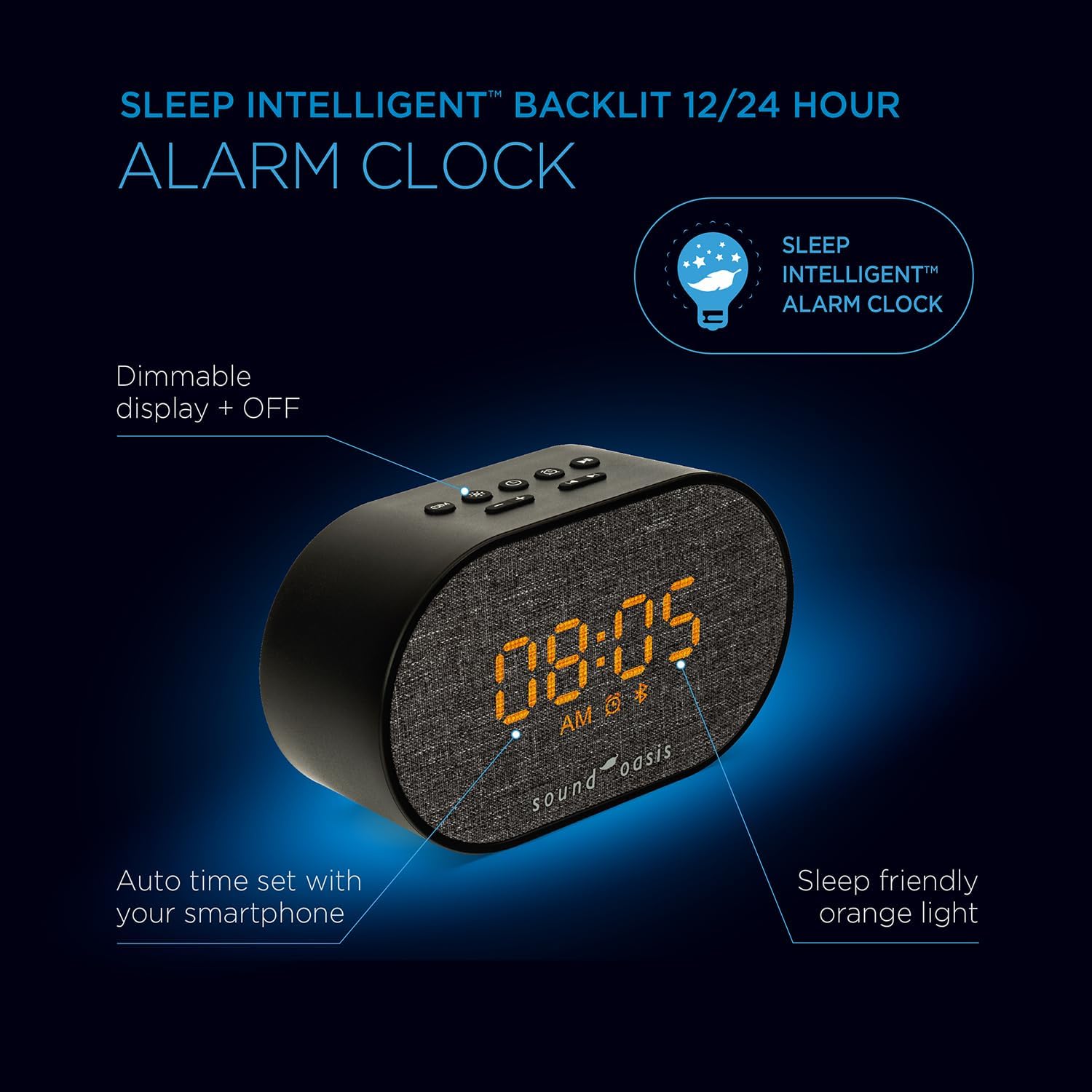
Image: The Sound Oasis BST-150 displaying the time, highlighting its sleep-friendly orange light and the auto time set feature via smartphone.
6.4 Sleep Timer
Set a timer for the sound to gradually fade out and turn off.
- Press the Timer button to cycle through the available sleep timer options: 30 minutes, 60 minutes, or 90 minutes.
- The selected timer duration will appear on the display. The sound will gradually decrease in volume and turn off after the set time.
- To cancel the sleep timer, press the Timer button until no timer duration is displayed.
6.5 Display Brightness
Adjust the brightness of the display to your preference.
- Press the Light button.
- Use the Volume + and Volume - buttons to cycle through the 31 brightness settings, including OFF.
6.6 Headphone Use
For private listening, use the headphone jack.
- Plug your 3.5mm headphones into the headphone jack located on the back of the device.
- The sound will automatically switch from the speaker to the headphones.
- Adjust volume using the device's volume buttons.
7. Maintenance
7.1 Cleaning
- Ensure the device is powered off and unplugged before cleaning.
- Wipe the exterior of the device with a soft, dry, lint-free cloth.
- Do not use abrasive cleaners, waxes, or solvents as they may damage the finish.
- Avoid getting moisture into any openings.
7.2 Storage
- Store the device in a cool, dry place away from direct sunlight and extreme temperatures.
- If storing for an extended period, ensure the battery is partially charged to maintain battery health.
7.3 Removable Sound Card
The BST-150 features an exclusive removable sound card system, allowing you to change or expand your sound list by purchasing additional sound cards from Sound Oasis.
- To remove the sound card, gently push it into the slot until it clicks, then release. The card will spring out slightly, allowing you to pull it out.
- To insert a new sound card, align it correctly with the slot and gently push until it clicks into place.
- Handle the sound card with care to avoid damage.
8. Troubleshooting
| Problem | Possible Cause | Solution |
|---|---|---|
| Device does not power on. | Battery is depleted. | Connect the device to power using the USB-C cable and allow it to charge. |
| No sound from speaker. | Volume is too low or muted. Headphones are plugged in. Sound card is not properly inserted. | Increase the volume. Unplug headphones. Ensure the Micro SD sound card is fully inserted. |
| Cannot pair with Bluetooth device. | Device is not in pairing mode. Bluetooth is off on your device. Device is too far from the BST-150. | Press the Bluetooth button to enter pairing mode. Enable Bluetooth on your smartphone/device. Move your device closer to the BST-150 (within 30ft/10m). |
| Alarm does not sound. | Alarm is not set or activated. Volume is too low. | Verify alarm settings and ensure the alarm icon is displayed. Increase the alarm volume. |
| Display is too dim or off. | Brightness setting is low or off. | Press the Light button and use Volume + to increase brightness. |
9. Specifications
- Model Name: BST-150
- Brand: Sound Oasis
- Color: Black
- Material: Plastic
- Power Source: Battery Powered (Rechargeable) / USB-C
- Battery: 1 AA battery required (included) - Note: Product description states "built-in rechargeable battery" and "USB-C charging cable". The "1 AA batteries required (included)" from specifications seems contradictory or refers to a different internal component. Assuming the rechargeable battery is primary.
- Dimensions: Approximately 5.47" (L) x 1.97" (W) x 3.23" (H) (138.9mm x 50.0mm x 82.1mm)
- Weight: Approximately 9.38 oz (266 g)
- Built-in Sounds: 30
- Bluetooth Range: Up to 30 feet (10 meters)
- Alarm Clock: 12/24 hour, 3 alarm sounds, 31 brightness settings (including OFF)
- Sleep Timer: 30, 60, 90 minutes
- Connectivity: Bluetooth, USB-C, 3.5mm Headphone Jack

Image: A diagram illustrating the physical dimensions of the Sound Oasis BST-150, including its length (138.9mm / 5.47"), width (50.0mm / 1.97"), and height (82.1mm / 3.23").
10. Warranty Information
Sound Oasis products are designed and manufactured to the highest quality standards. For specific warranty details, please refer to the warranty card included with your product or visit the official Sound Oasis website. Typically, Sound Oasis offers a limited warranty covering defects in materials and workmanship under normal use.
Keep your purchase receipt as proof of purchase for warranty claims.
11. Customer Support
If you have any questions, require technical assistance, or need to report an issue with your Sound Oasis BST-150, please contact Sound Oasis customer support.
- Website: Visit the official Sound Oasis website for FAQs, product registration, and support resources.
- Email/Phone: Refer to the contact information provided in your product packaging or on the Sound Oasis website.
For additional insights and strategies for improving sleep and managing tinnitus, refer to the included "Tips for Better Sleep" booklet.
Sound Oasis also offers leading Sound Oasis APPs with no-charge access for BST-150 owners. These apps can provide additional sound options and frequency adjustments.
Image: A collection of Sound Oasis mobile application icons, including apps for Pet Therapy, Sleep Sounds for Babies, Nature Sounds, Tinnitus, and White Noise, indicating available digital resources.


