
Silonn SLIM33B
Silonn Countertop Ice Maker Instruction Manual
Model: SLIM33B | Brand: Silonn
Introduction
Thank you for choosing the Silonn Countertop Ice Maker. This manual provides essential information for the safe and efficient operation of your new appliance. Please read it thoroughly before first use and keep it for future reference.
Key Features
- Innovative Spring-Loaded Ice Basket: Expands to hold up to 2.5 liters (approx. 9 cups) of ice, allowing for continuous ice production.
- Large Capacity Water Tank: Features a 1.8-liter water tank to minimize frequent refills.
- Efficient Ice Production: Produces 9 bullet-shaped ice cubes in approximately 6 minutes, with a daily capacity of up to 26 lbs.
- Two Ice Cube Sizes: Choose between small and large bullet ice for various beverage needs.
- Simple LED Touch Control Panel: Intuitive controls with color indicators for operational status (making ice, ice basket full, low water, self-cleaning).
- Self-Cleaning Function: Ensures easy maintenance and fresh-tasting ice.
- Stylish and Compact Design: Measuring 13.15″W x 8.98″D x 11.14″H, it saves countertop space while adding a modern aesthetic.
What's in the Box
- Silonn Countertop Ice Maker
- Ice Scoop
- Ice Basket
- Instruction Manual
Setup
Unpacking
Carefully remove the ice maker from its packaging. Remove all packing materials, tape, and any protective film. Ensure all accessories (ice basket, ice scoop) are present.
Placement
Place the ice maker on a flat, stable, and level surface away from direct sunlight and heat sources. Ensure adequate ventilation around the unit. Maintain at least 4 inches of clearance from walls or other appliances.
Initial Cleaning
Before first use, clean the interior of the ice maker. Remove the ice basket and wash it with warm water and mild detergent. Wipe the interior with a soft, damp cloth. For a thorough clean, utilize the self-cleaning function as described in the Maintenance section.
Filling the Water Tank
Open the top lid and fill the water tank with clean, potable water up to the "MAX" fill line. Do not overfill. The water tank has a 1.8L capacity.

Image: Filling the water tank of the Silonn ice maker. The internal water reservoir is visible, indicating the fill level.
Operating Instructions
Powering On
Plug the ice maker into a grounded electrical outlet. Press the ON/OFF button on the LED touch control panel to power on the unit. The power indicator light will illuminate.

Image: Close-up of the Silonn ice maker's LED touch control panel, showing buttons for ON/OFF, CLEAN, SMALL, and LARGE ice sizes, along with indicator lights.
Selecting Ice Cube Size
Press the SELECT button to choose between two ice cube sizes: S (Small) or L (Large). The corresponding indicator light will illuminate.

Image: The Silonn ice maker in operation, showing the internal mechanism freezing water into bullet-shaped ice cubes.
Ice Production
The ice maker will begin the ice-making cycle. The "Making Ice" indicator (white light) will be on. Each cycle produces 9 ice cubes in approximately 6 minutes. The unit can produce up to 26 lbs of ice per day.
Ice Basket Management
The innovative spring-loaded ice basket will expand as ice accumulates, maximizing storage capacity up to 2.5 liters. When the ice basket is full, the "Ice Basket Full" indicator (green light) will illuminate, and the unit will pause ice production.

Image: The Silonn ice maker with its unique expandable ice basket, designed to accommodate a larger volume of ice as it's produced.
Use the provided ice scoop to remove ice from the basket. Once ice is removed, the unit will automatically resume ice production if the water level is sufficient.

Image: The Silonn ice maker with the ice basket full of bullet ice, and the included ice scoop ready for use.
Low Water Indicator
If the water level in the tank is too low, the "Low Water" indicator (red light) will illuminate, and the unit will pause. Refill the water tank to the "MAX" line to resume operation.
Official Product Video
Video: Official product video demonstrating the features and operation of the Silonn Countertop Boost Ice Maker SLIM33B-US, including water filling, ice production, and self-cleaning.
Maintenance
Self-Cleaning Function
The Silonn ice maker features a self-cleaning cycle for convenient maintenance. To activate:
- Ensure the water tank is filled with clean water.
- Press and hold the CLEAN button for 3 seconds. The "Self-Cleaning" indicator (blue light) will illuminate.
- The cleaning cycle will run for approximately 15-20 minutes.
- Once the cycle is complete, drain the water from the unit by removing the drain plug located at the bottom.
- Wipe the interior dry with a soft cloth.
It is recommended to perform a self-cleaning cycle at least once a week or as needed, especially if using hard water.
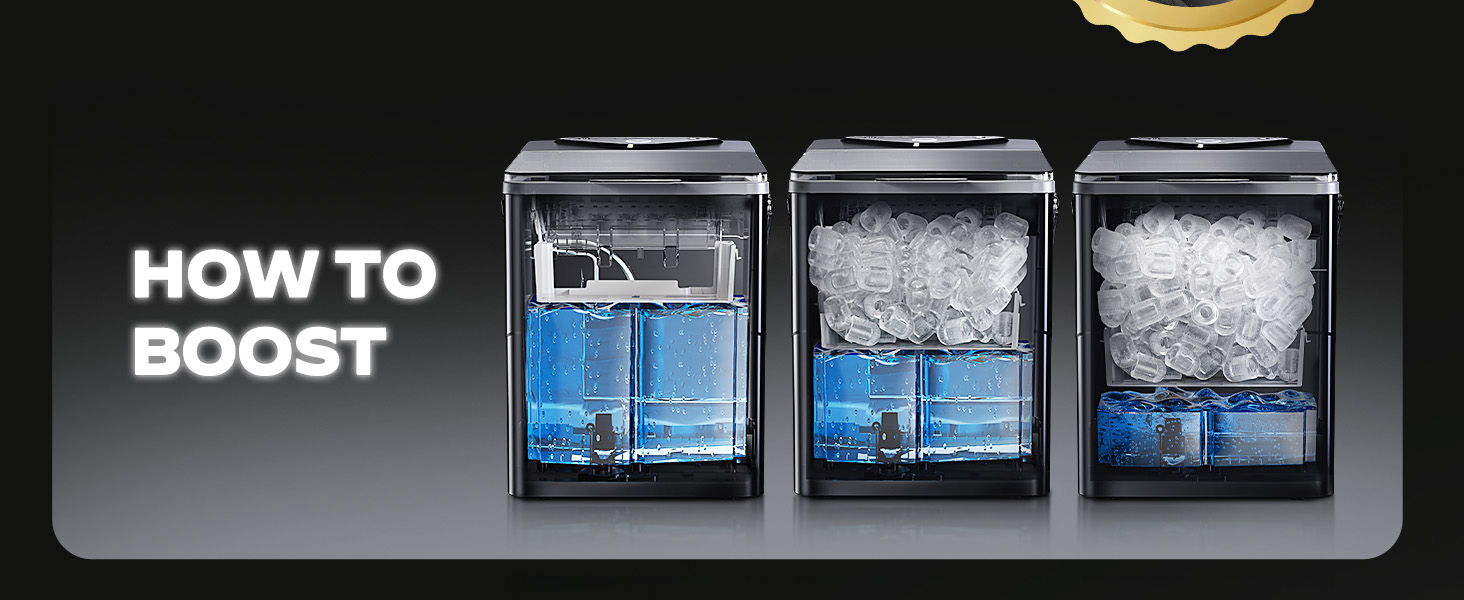
Image: Diagram illustrating the internal water circulation during the self-cleaning cycle of the Silonn ice maker.
Regular Cleaning
Regularly wipe the exterior of the ice maker with a soft, damp cloth. For stubborn stains, use a mild detergent. Do not use abrasive cleaners or solvents.
Storage
If storing the ice maker for an extended period, ensure it is thoroughly cleaned and completely dry. Drain all water from the tank and store the unit in a cool, dry place.
Troubleshooting
Unit Not Turning On
- Ensure the power cord is securely plugged into a grounded outlet.
- Check if the outlet has power.
Ice Not Being Produced
- Check if the water tank is filled to the "MAX" line.
- Ensure the ambient temperature is within the recommended operating range (typically 50°F - 90°F).
- Verify that the ice basket is not full, triggering the "Ice Full" indicator.
Ice Cubes are Small or Mushy
- This can happen during the first few cycles. Allow the unit to run for a few more cycles.
- Ensure the water temperature is cold. Using chilled water can improve ice quality.
- Clean the unit to prevent mineral buildup affecting performance.
Unusual Noise
- Some noise during operation (water pump, ice dropping) is normal.
- Ensure the unit is on a level surface.
- If the noise is excessive or unusual, contact customer support.
Specifications
| Attribute | Detail |
|---|---|
| Model Name | SLIM33B |
| Brand | Silonn |
| Product Dimensions | 13.15″W x 8.98″D x 11.14″H |
| Weight | 16.5 Pounds |
| Water Tank Capacity | 1.8 Liters |
| Ice Basket Capacity | 2.5 Liters |
| Ice Production Rate | 9 cubes in 6 minutes |
| Daily Ice Production | Up to 26 lbs |
| Ice Cube Shapes | Bullet (Small, Large) |
| Control Type | LED Touch Panel |
| Self-Cleaning | Yes |
| Wattage | 192 Watt-hours |
| Country of Origin | China |
Warranty and Support
For warranty information, technical support, or service inquiries, please contact Silonn Customer Service. Refer to the product packaging or the official Silonn website for the most up-to-date contact details.
Related documentsSLIM33B


Ask a question about this manual
Ask about setup, troubleshooting, compatibility, parts, safety, or missing instructions. Manuals+ will review the question and use this page’s manual context to help answer it.