
SinKeu E300
SinKeu Portable Solar Generator E300 User Manual
Model: E300
1. Introduction
Thank you for choosing the SinKeu Portable Solar Generator E300. This comprehensive system includes a 300W portable power station and a foldable 60W solar panel, designed to provide reliable power for various applications, from home use and RV travel to outdoor camping and emergency backup. This manual provides essential information for safe operation, setup, maintenance, and troubleshooting.
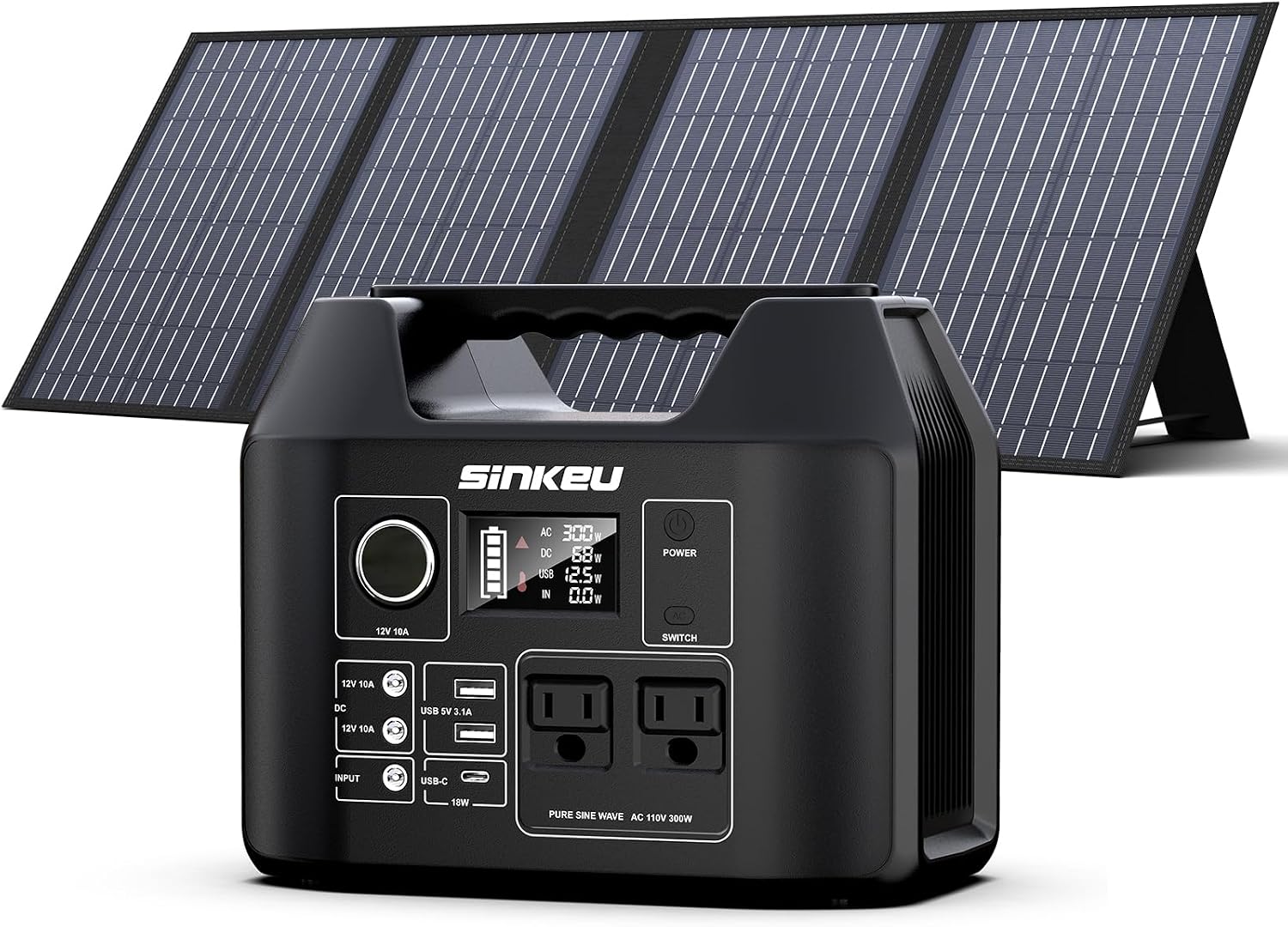
Figure 1: SinKeu Portable Solar Generator E300 and Foldable Solar Panel.
2. Safety Information
Please read all safety warnings and instructions carefully before using this product. Failure to follow these instructions may result in electric shock, fire, or serious injury.
- Do not disassemble, repair, or modify the unit.
- Do not expose the unit to fire or extreme temperatures.
- Keep the unit away from water, moisture, and corrosive substances.
- Ensure proper ventilation during use and charging to prevent overheating.
- Do not insert foreign objects into the ports.
- Keep out of reach of children and pets.
- Use only original or certified charging cables and adapters.
- Dispose of the product according to local regulations.
3. Product Overview
3.1 Portable Power Station E300
The E300 power station features a 256Wh (80000mAh) LiFePO4 battery, providing a stable 300W pure sine wave AC output. It is equipped with multiple output ports to power various devices simultaneously.

Figure 2: Compact and powerful design of the E300 power station, highlighting its LiFePO4 battery technology.
Output Ports:
- 2 x AC Outlets (110V, 300W total)
- 1 x USB-C PD 18W Output
- 2 x USB-A QC2.0 15W Outputs
- 1 x Car Port (12V)
- 2 x DC Outputs (12V)
The advanced Battery Management System (BMS) monitors voltage, current, and temperature, ensuring a long lifespan of over 3500 charge-discharge cycles for the LiFePO4 battery.
3.2 Foldable 60W Solar Panel
The 60W monocrystalline solar panel offers a high conversion efficiency of 22%, capable of generating power even in low light conditions. Its foldable design makes it highly portable for outdoor use.

Figure 3: The 60W foldable solar panel, shown with its included 10-in-1 connect cable and various DC adapters for broad compatibility.
Solar Panel Output Ports:
- 1 x DC Output (12-18V, 3.3A Max)
- 1 x USB-C (5V/3A, 9V/2A, 12V/1.5A)
- 2 x USB QC3.0

Figure 4: Dimensions and weight specifications for the portable and compact 60W solar panel.

Figure 5: The 10-in-1 connect cable with various DC adapters, ensuring compatibility with a wide range of electronic devices.
4. Setup
4.1 Charging the Power Station
Before first use, fully charge the power station. The E300 can be charged via AC wall outlet, car charger, or the included solar panel.
Charging via Solar Panel:
- Unfold the 60W solar panel and place it in direct sunlight.
- Connect the DC output cable of the solar panel to the DC input port of the E300 power station. Use the appropriate DC adapter if necessary.
- The LCD display on the power station will indicate charging status.

Figure 6: The 60W solar panel connected and charging multiple devices, demonstrating its versatility.
Charging via AC Wall Outlet:
- Connect the AC adapter to the input port of the power station and plug it into a standard wall outlet.
Charging via Car Charger:
- Connect the car charger adapter to the input port of the power station and plug it into your vehicle's 12V car outlet.
5. Operating Instructions
5.1 Powering On/Off
- To power on the unit, press and hold the "POWER" button until the LCD screen illuminates.
- To power off, press and hold the "POWER" button again until the LCD screen turns off.
5.2 Using AC Outlets
- Press the "AC" button to activate the AC outlets. The AC indicator on the LCD screen will light up.
- Plug your AC devices (e.g., laptop, small appliances) into the AC outlets. Ensure the total wattage does not exceed 300W.
- Press the "AC" button again to turn off the AC outlets when not in use.
5.3 Using USB and DC Outlets
- The USB-A, USB-C, Car Port, and DC outputs are typically active when the unit is powered on.
- Connect your USB-powered devices (phones, tablets) to the USB-A or USB-C ports.
- Connect 12V DC devices to the DC or Car Port outlets.
5.4 Simultaneous Charging and Discharging
The E300 supports charging and discharging simultaneously. However, it is not recommended for use as an Uninterruptible Power Supply (UPS) for sensitive electronics.

Figure 7: The E300 power station being carried, illustrating its suitability for various outdoor usage scenarios.

Figure 8: Examples of the E300 power station's versatility in different outdoor activities such as fishing, camping, and aerophotography.

Figure 9: The E300 power station and solar panel are ideal companions for diverse outdoor adventures, including hiking and rooftop charging.
6. Maintenance
- Cleaning: Use a soft, dry cloth to clean the surface of the power station and solar panel. Do not use abrasive cleaners or solvents.
- Storage: Store the unit in a cool, dry place, away from direct sunlight and extreme temperatures. For long-term storage, charge the power station to 50-80% every 3-6 months to maintain battery health.
- Battery Care: Avoid fully discharging the battery frequently to prolong its lifespan.
7. Troubleshooting
| Problem | Possible Cause | Solution |
|---|---|---|
| Unit not turning on | Battery is fully discharged; Power button not pressed long enough. | Charge the unit; Press and hold the power button for 3-5 seconds. |
| AC output not working | AC output not activated; Device wattage exceeds 300W; Overload protection. | Press the AC button; Reduce connected load; Disconnect devices and restart unit. |
| Solar panel not charging | Insufficient sunlight; Panel not connected properly; Damaged panel/cable. | Reposition panel in direct sunlight; Check all connections; Inspect for damage. |
| USB/DC outputs not working | Unit not powered on; Device not compatible. | Ensure unit is powered on; Check device compatibility and cable. |
8. Specifications
| Feature | Specification |
|---|---|
| Model | E300 |
| Battery Type | LiFePO4 |
| Capacity | 256Wh / 80000mAh |
| AC Output | 2 x 110V Pure Sine Wave, 300W (Peak 450W) |
| USB-C Output | 1 x PD 18W (5V/3A, 9V/2A, 12V/1.5A) |
| USB-A Output | 2 x QC2.0 15W |
| DC Output | 2 x 12V |
| Car Port Output | 1 x 12V |
| Solar Panel Wattage | 60W Monocrystalline |
| Solar Panel Efficiency | 22% |
| Solar Panel DC Output | 12-18V, 3.3A Max |
| Solar Panel USB-C Output | 5V/3A, 9V/2A, 12V/1.5A |
| Solar Panel USB QC3.0 Output | 2 ports |
| Charging Time (AC) | Approx. 4-5 hours (varies by charger) |
| Operating Temperature | -10°C to 40°C (14°F to 104°F) |
9. Warranty & Support
SinKeu products typically come with a limited warranty. Please refer to the warranty card included with your product or visit the official SinKeu website for detailed warranty terms and conditions.
For technical support, troubleshooting assistance, or warranty claims, please contact SinKeu customer service through the contact information provided on their official website or your purchase platform.
Official Website: Visit the SinKeu Store on Amazon
Ask a question about this manual
Ask about setup, troubleshooting, compatibility, parts, safety, or missing instructions. Manuals+ will review the question and use this page’s manual context to help answer it.