1. Introduction
The AWANFI GL-528 Walkie Talkies are designed to provide reliable and clear two-way communication for various activities, including family camping, cycling, hiking, and general use. Featuring a compact design, long-lasting rechargeable battery, and multiple functions, these radios are easy to use for both adults and children.
Key Features:
- Rechargeable Battery: Upgraded lithium battery provides up to 24 hours of battery life on a single charge with convenient USB charging.
- Easy Operation: Simple Push-to-Talk (PTT) button and intuitive controls.
- VOX (Voice Operated Exchange): Hands-free communication for outdoor exploration.
- Full-Featured Design: Compact, lightweight, with included lanyards and belt clips for portability.
- Built-in LED Flashlight: For use in low-light conditions.
- Back-lit LCD Display: Ensures visibility in various lighting.
- Additional Features: Auto Scan, 10 Call Tone Alerts, SOS Siren, Keypad Lock.
- Wide Application: Ideal for hiking, biking, camping, road trips, cruises, and home use.
2. Package Contents
Please check the box to ensure all items are present:
- 3 x AWANFI GL-528 Walkie Talkies
- 3 x Belt Clips
- 3 x Lanyards
- 1 x 3-in-1 Type-C Cable
- 1 x User Manual
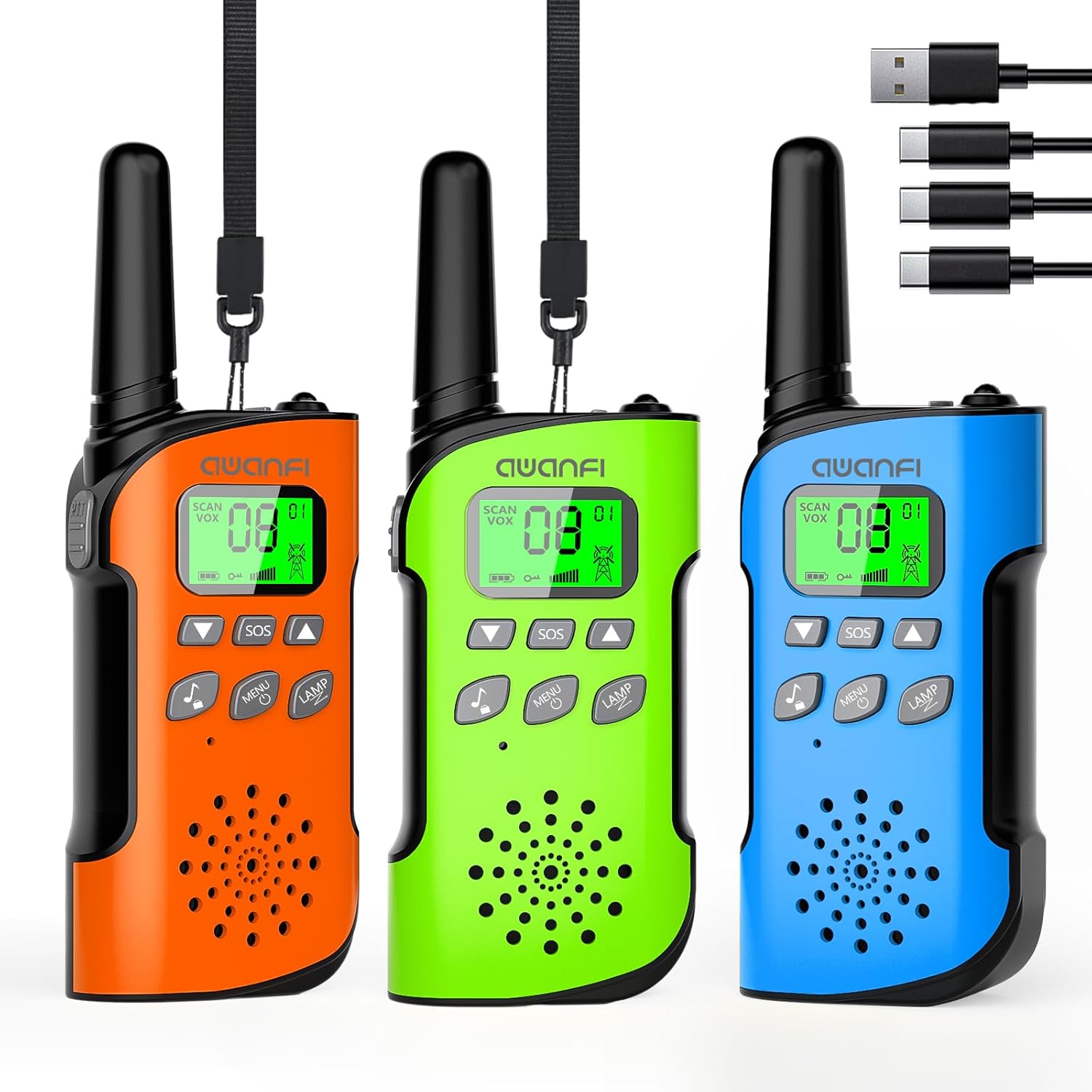
Image: The complete package contents, including three walkie talkies and the charging cable.
3. Product Overview
Key Features at a Glance:

Image: Visual representation of the walkie talkie's main features, including 22 channels, flashlight, 10 call tones, VOX, keypad lock, LCD display, and HD voice.
Parts Identification:
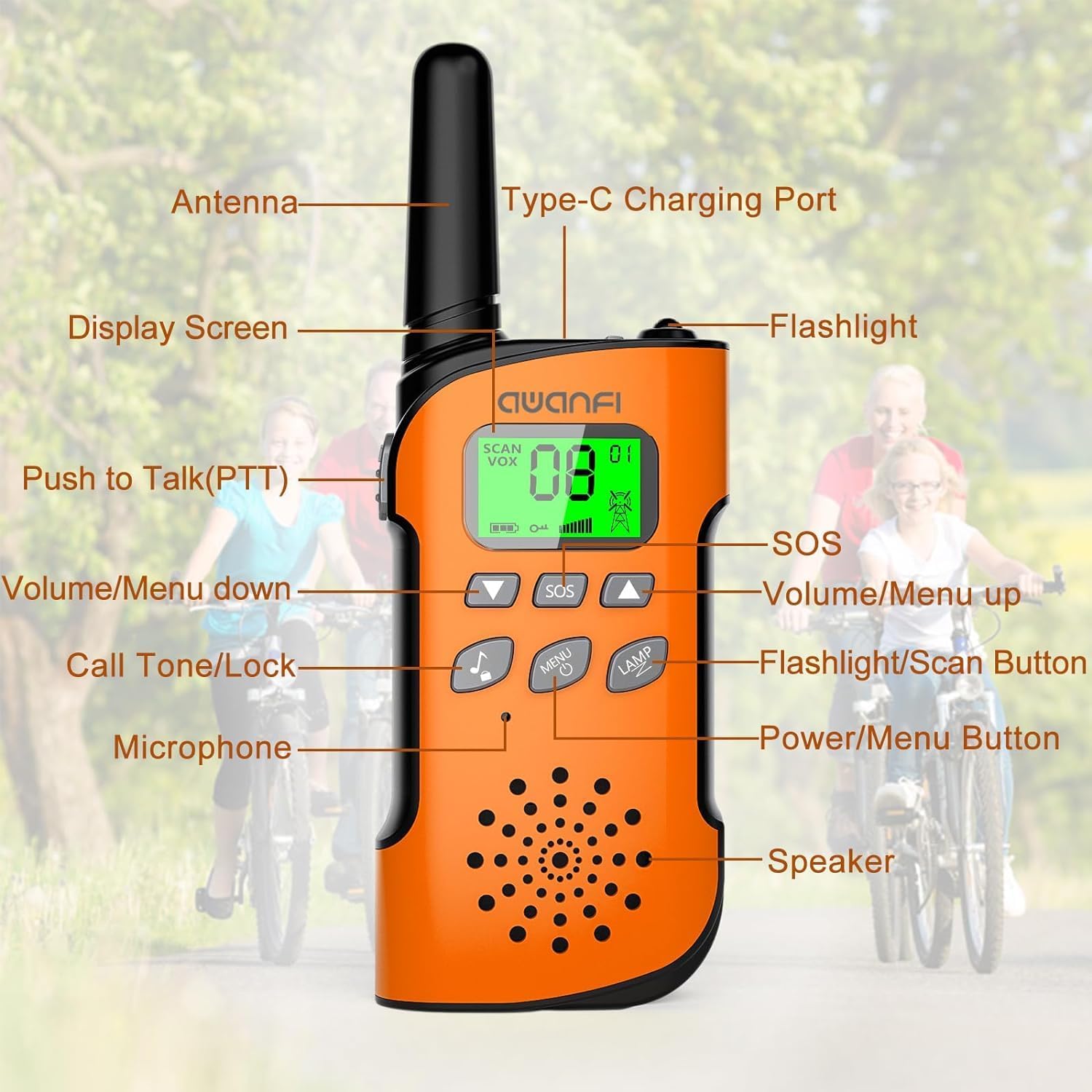
Image: Detailed diagram showing the location and function of each part of the walkie talkie, including buttons, ports, and display.
- Antenna: For transmitting and receiving signals.
- Type-C Charging Port: For recharging the internal battery.
- Display Screen: Shows channel, battery level, and feature indicators.
- Flashlight: Built-in LED light.
- Push to Talk (PTT) Button: Press and hold to transmit your voice.
- SOS Button: Activates an emergency distress signal.
- Volume/Menu Up Button: Adjusts volume up or navigates menu up.
- Volume/Menu Down Button: Adjusts volume down or navigates menu down.
- Call Tone/Lock Button: Sends a call tone or locks/unlocks the keypad.
- Flashlight/Scan Button: Toggles flashlight or initiates channel scan.
- Microphone: For speaking into the radio.
- Power/Menu Button: Turns the radio on/off or enters the menu.
- Speaker: For receiving audio.
4. Getting Started
Charging the Battery:
The AWANFI GL-528 walkie talkies come with a built-in 1000mAh lithium battery, providing up to 48 hours of standby time. Before first use, fully charge the walkie talkies.

Image: Illustration of the walkie talkie's internal 1000mAh battery and its convenient USB-C charging capability.
- Locate the Type-C Charging Port on the side of the walkie talkie.
- Connect the provided 3-in-1 Type-C cable to the charging port.
- Plug the USB end of the cable into any standard USB power source (e.g., car charger, power bank, 5V wall charger).
- The battery indicator on the LCD screen will show charging status. A full charge typically takes a few hours.
- Once fully charged, disconnect the cable.
Attaching Belt Clip and Lanyard:
For easy portability, attach the included belt clip or lanyard.
- Belt Clip: Slide the belt clip into the slot on the back of the walkie talkie until it clicks into place.
- Lanyard: Thread the lanyard through the designated loop at the top of the walkie talkie.
5. Basic Operation
Power On/Off:
- To turn on, press and hold the Power/Menu Button until the LCD screen illuminates.
- To turn off, press and hold the Power/Menu Button until the screen turns off.
Adjusting Volume:
- Press the Volume/Menu Up Button to increase volume.
- Press the Volume/Menu Down Button to decrease volume.
Selecting a Channel:
The walkie talkies have 22 available channels. For communication, all radios must be on the same channel.
- With the radio on, press the Power/Menu Button once to enter channel selection mode. The channel number will flash.
- Use the Volume/Menu Up or Volume/Menu Down Buttons to select your desired channel (1-22).
- Press the Power/Menu Button again to confirm the channel, or wait a few seconds for it to set automatically.
Push-to-Talk (PTT):
This is the primary method for communication.
- To speak, press and hold the PTT Button located on the side of the radio.
- Speak clearly into the microphone, holding the radio approximately 2-3 inches from your mouth.
- Release the PTT Button when you finish speaking to allow others to respond.
6. Advanced Features
VOX (Voice Operated Exchange):
VOX allows for hands-free communication. When activated, the walkie talkie will automatically transmit when it detects your voice.

Image: Demonstrates the convenience of VOX hands-free communication, ideal for activities where holding the radio is inconvenient.
- Press the Power/Menu Button repeatedly until 'VOX' appears on the display.
- Use the Volume/Menu Up or Volume/Menu Down Buttons to select a VOX sensitivity level (1-3, with 3 being most sensitive). 'OF' turns VOX off.
- Press the Power/Menu Button to confirm.
Built-in LED Flashlight:
The integrated flashlight is useful in low-light conditions.

Image: Shows the walkie talkie's flashlight in action during nighttime, emphasizing its utility for safety and visibility.
- Press the Flashlight/Scan Button once to turn the flashlight on.
- Press it again to turn the flashlight off.
SOS Function:
In an emergency, the SOS function sends a distress signal.
- Press and hold the SOS Button to activate the distress alarm. Your companion on the same channel will receive the signal.
- Release the button to stop the alarm.
Keypad Lock:
To prevent accidental button presses, you can lock the keypad.
- Press and hold the Call Tone/Lock Button until a lock icon appears on the display.
- To unlock, press and hold the Call Tone/Lock Button again until the lock icon disappears.
Channel Scan:
The scan feature allows you to quickly find active channels.
- Press and hold the Flashlight/Scan Button to initiate channel scanning. The radio will cycle through channels until it detects activity.
- It will pause on an active channel. To stop scanning, press any button.
Call Tone Alerts:
The radio offers 10 different call tones to alert other users.
- Press the Call Tone/Lock Button once to send a call tone.
- To change the call tone, enter the menu (press Power/Menu Button repeatedly until 'CA' appears), then use Volume/Menu Up/Down Buttons to select a tone (0-9). Press Power/Menu Button to confirm.
7. Communication Range
The effective communication range of your walkie talkies can vary significantly based on terrain, weather conditions, electromagnetic interference, and obstructions.

Image: Visual guide to typical communication ranges under different environmental conditions.
- Mountain to Valley: Up to 5 KM (optimal conditions with clear line of sight).
- Open Fields: Up to 3 KM (minimal obstructions).
- Neighborhood/Urban Areas: Up to 1 KM (buildings and other structures can significantly reduce range).
8. Care and Maintenance
- Cleaning: Wipe the radio with a soft, damp cloth. Do not use harsh chemicals or abrasive cleaners.
- Storage: Store the walkie talkies in a cool, dry place when not in use. Avoid extreme temperatures.
- Battery Care: To prolong battery life, avoid fully discharging the battery frequently. Recharge regularly. If storing for extended periods, charge the battery to about 50% every few months.
- Water Resistance: These walkie talkies are NOT water resistant. Avoid exposure to rain, splashes, or submersion in water.
9. Troubleshooting
- No Power: Ensure the battery is charged. Press and hold the Power/Menu button to turn on.
- Cannot Communicate: Verify that all walkie talkies are on the same channel. Check battery levels. Ensure you are within range.
- Poor Sound Quality/Static: Move to an open area. Check for obstructions. Adjust volume. Ensure antenna is not obstructed.
- Short Range: Obstructions (buildings, dense foliage) significantly reduce range. Move to higher ground or an open area. Low battery can also affect range.
- Keypad Unresponsive: Check if the keypad lock is activated. Press and hold the Call Tone/Lock button to unlock.
10. Technical Specifications
| Feature | Specification |
|---|---|
| Model Number | GL-528 |
| Brand | AWANFI |
| Number of Channels | 22 |
| Battery Type | 1000mAh Li-ion (Nonstandard Battery) |
| Talking Range Maximum | 3 Kilometer (Open Fields) |
| Tuner Technology | UHF |
| Special Features | Call Alert, Integrated Flashlight, Keypad Lock, Lightweight, Long Range |
| Water Resistance Level | Not Water Resistant |
| Manufacturer | Shenzhen Geling Technology Co., Ltd. |
11. Warranty and Support
Warranty Information:
The AWANFI GL-528 Walkie Talkies come with a 1-Year Warranty from the date of purchase. This warranty covers manufacturing defects and malfunctions under normal use. It does not cover damage caused by misuse, accidents, unauthorized modifications, or exposure to water.
Customer Support:
For any questions, technical assistance, or warranty claims, please contact the seller directly. The seller for this product is AWANFI DIRECT. Please refer to your purchase platform for specific contact methods or visit the AWANFI brand store for more information.
AWANFI Store: https://www.amazon.com/stores/AWANFI/page/0FF934D6-3A19-484F-9FEF-233A94114233


