1. Introduction
This manual provides essential instructions for the safe and efficient use of your Lydsto Cordless Handheld Pool Vacuum Host, Model YM-S1-03. Please read this manual thoroughly before operating the device and retain it for future reference.
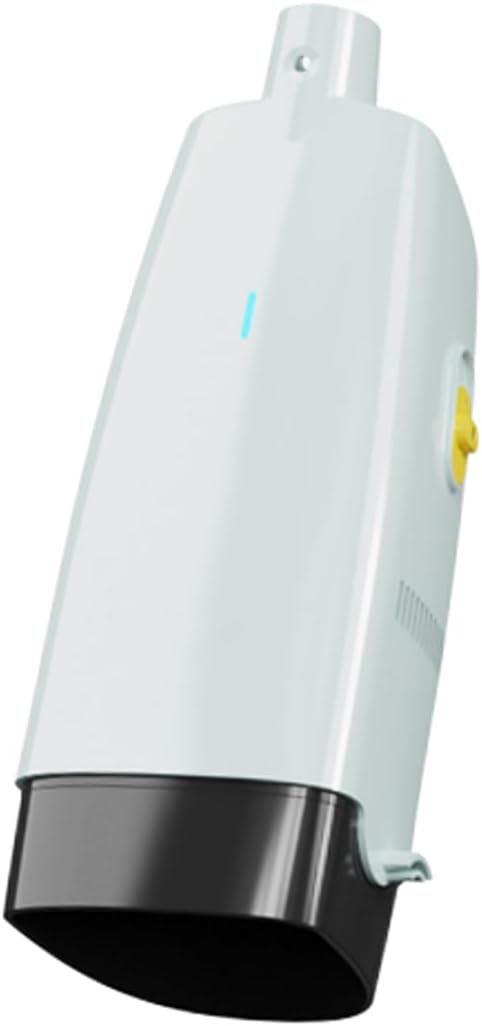
Figure 1: Lydsto Cordless Handheld Pool Vacuum Host. The device is white with a black base, featuring a blue indicator light on the front and a yellow power button on the side. It is designed for easy handling and efficient pool cleaning.
2. Safety Information
- This product is intended for use by adults 18 years and older.
- Always ensure the device is turned off and disconnected from any charging source before performing maintenance or cleaning.
- Do not operate the vacuum if any part is damaged. Contact customer support for assistance.
- Keep the device away from extreme temperatures and direct sunlight when not in use.
- Do not attempt to open or repair the battery pack.
3. Package Contents
Please verify that all components are present in the package:
- Lydsto Cordless Handheld Pool Vacuum Host (Main Unit)
- Lithium-Ion Battery (pre-installed or separate)
- Charging Cable/Adapter
- User Manual
4. Setup and Assembly
Assembly is required and typically takes approximately 3 minutes.
- Charge the Battery: Before first use, fully charge the pool vacuum. Refer to Section 5 for charging instructions.
- Attach to Pole: The vacuum unit is designed to attach to a standard pool pole (not included) or the included pole if applicable. Securely fasten the vacuum host to the pole. Ensure it is firmly attached to prevent detachment during operation.
5. Charging Instructions
The Lydsto Pool Vacuum is powered by a Lithium-Ion battery. A full charge takes approximately 4.5 hours.
- Locate the charging port on the vacuum unit.
- Connect the charging cable to the vacuum and then to a suitable power outlet.
- The indicator light on the unit will show the charging status (refer to the device's specific light indicators for details, usually red for charging, green/blue for full).
- Once fully charged, disconnect the charging cable.
Note: It is recommended to charge the battery every 3 months to maintain optimal battery performance, even when not in regular use.
6. Operation
The vacuum operates via a touch control method.
- Submerge the Unit: Ensure the entire vacuum unit, especially the indicator light, is fully submerged underwater for proper functioning.
- Power On: Locate the power button (often yellow, as seen in Figure 1) and press it to turn the unit on.
- Vacuuming: Guide the vacuum across the pool surfaces, similar to how you would vacuum a floor. Move slowly to allow the vacuum to collect debris effectively.
- Power Off: Once cleaning is complete, press the power button again to turn off the unit.
- Remove from Water: Carefully remove the vacuum from the pool.
7. Maintenance and Care
Regular maintenance ensures the longevity and optimal performance of your pool vacuum.
- Empty Debris Container: After each use, or as needed, empty the debris container. The container has a capacity of 1.3 liters. Rinse it thoroughly with clean water.
- Clean Filter: Inspect and clean the filter regularly to maintain suction power. Follow the manufacturer's instructions for filter removal and cleaning.
- Storage: When not in use, store the pool vacuum in a cool, dry place, away from direct sunlight.
- Battery Care: As mentioned in Section 5, charge the battery every 3 months to ensure its performance.
8. Troubleshooting
If you encounter issues with your Lydsto Pool Vacuum, consider the following common solutions:
- Vacuum not turning on: Ensure the battery is fully charged. Check that the power button is pressed correctly.
- Reduced suction: Empty the debris container and clean the filter. Obstructions in the intake nozzle can also reduce suction.
- Indicator light not working: Ensure the unit is fully submerged if the light is designed to activate underwater. Check battery charge.
For persistent issues, please refer to the warranty and support section.
9. Specifications
| Feature | Detail |
|---|---|
| Model Number | YM-S1-03 |
| Power Source | Battery Powered |
| Battery Type | Lithium-Ion (1 included) |
| Lithium Battery Energy Content | 36 Watt Hours |
| Charging Time | Approximately 4.5 Hours |
| Control Method | Touch |
| Capacity | 1.3 Liters (debris container) |
| Product Dimensions (L x W x H) | 9.45" x 5.83" x 30.59" |
| Item Weight | 9 Pounds |
| Material | Plastic |
| Assembly Required | Yes |
| Assembly Time | 3 Minutes |
| Manufacturer | Lydsto |
10. Warranty and Support
The Lydsto Cordless Handheld Pool Vacuum Host comes with a limited warranty. For detailed information regarding warranty coverage, terms, and conditions, please refer to the warranty card included with your product or visit the official Lydsto website.
For technical support, troubleshooting assistance, or to inquire about replacement parts, please contact Lydsto customer service through their official channels. Ensure you have your product model number (YM-S1-03) and purchase information available when contacting support.


