
1. Introduction
This manual provides comprehensive instructions for the safe installation, operation, and maintenance of your Datewink Moving Head Light ZQ02102. This professional stage lighting unit features 4-in-1 beam wash capabilities with DMX512 and sound-activated control, designed for various event settings including parties, churches, weddings, bars, and KTV rooms. Please read this manual thoroughly before using the product to ensure proper function and longevity.
2. Safety Information
To prevent electric shock, fire, or injury, always observe the following safety precautions:
- Ensure the power supply voltage matches the unit's requirements.
- Always connect the unit to a grounded circuit to avoid electrical hazards.
- Do not open the housing; there are no user-serviceable parts inside. Refer all servicing to qualified personnel.
- Avoid direct eye exposure to the light source.
- Install the unit in a well-ventilated area, away from heat sources and flammable materials.
- Securely mount the fixture using appropriate clamps and safety cables.
- Disconnect power before cleaning or performing any maintenance.
- Keep the unit away from water or high humidity environments.
3. Package Contents
Verify that all items are present and in good condition upon unpacking:
- 6 x Datewink Moving Head Light Units
- 6 x Power Cords
- 6 x Mounting Brackets (Hook Accessories)
- 1 x Instruction Manual
Note: DMX cables are typically sold separately unless specified.
4. Product Overview
The Datewink Moving Head Light ZQ02102 is equipped with advanced features for dynamic lighting effects.
4.1 Key Features
- Light Source: 19x10W 4-in-1 RGBW LEDs and 60x0.8W RGB pixel beads for 16 million vibrant colors.
- Movement: Precise 540° Pan (X-axis) and 220° Tilt (Y-axis) rotation.
- Beam & Wash: Features electronic zoom with a beam angle range of 10° to 60°.
- Control Modes: DMX512, Sound Activated, and Standalone/Auto-run.
- Strobe & Dimming: 1-100Hz strobe rate and smooth dimming capabilities.
- Cooling: Integrated cooling fan for stable operation.
4.2 Components and Control Panel

Figure 1: Front view of the Moving Head Light, showing the main LED array and side light strip.
Figure 1 illustrates the main light source, consisting of 19 RGBW 4-in-1 LEDs for powerful beam and wash effects, complemented by a 5050 RGB 60pcs Phantom Side Light Strip for additional ambient lighting.
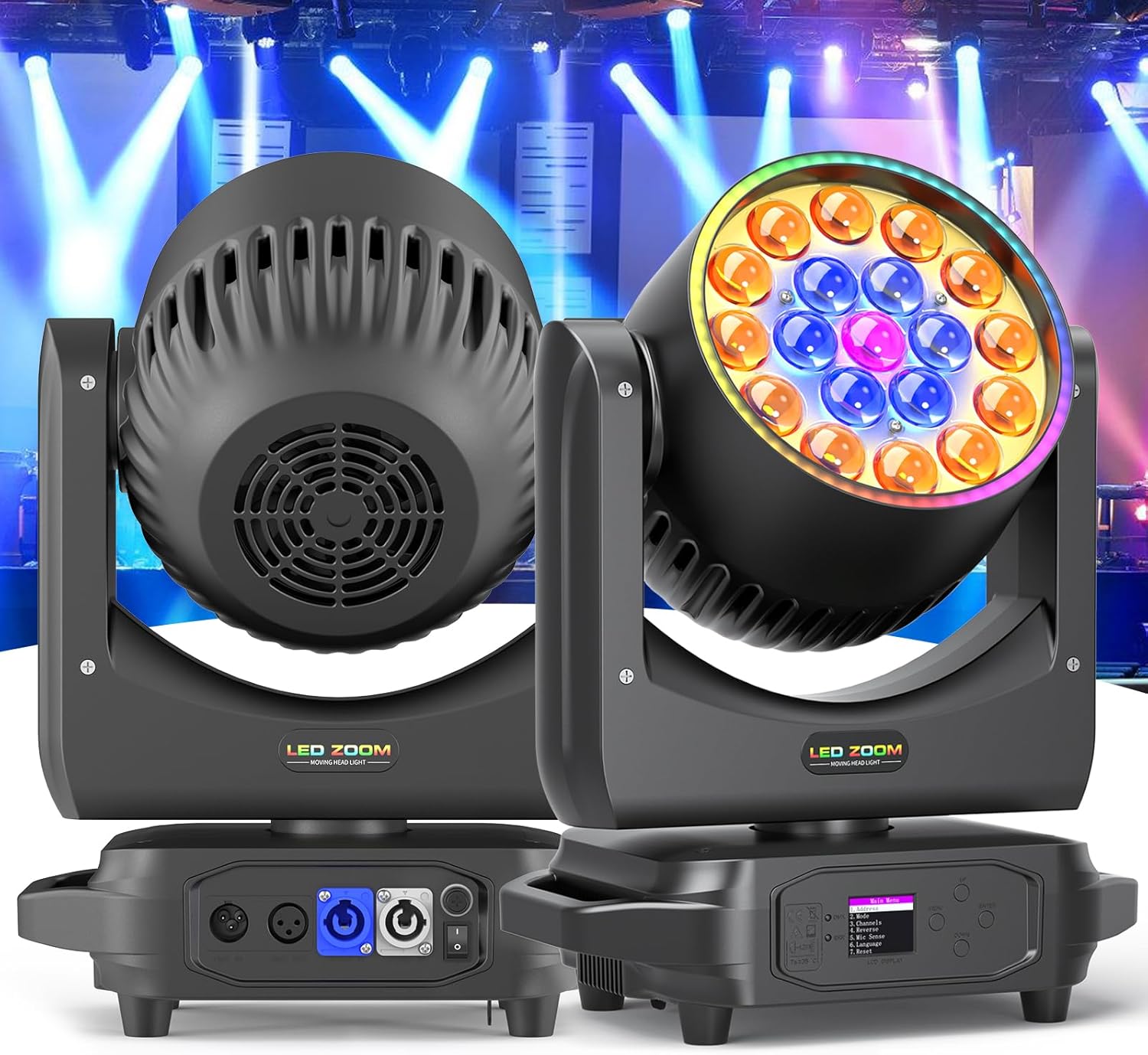
Figure 2: Control panel and connection ports.
Figure 2 details the control interface and connectivity options. The base of the unit features an LCD display and navigation buttons (MENU, UP, DOWN, ENTER) for mode selection and parameter adjustment. On the rear, you will find DMX IN/OUT ports for signal connection, POWER IN/OUT for daisy-chaining power, and the main ON/OFF switch.
5. Setup and Installation
Proper installation is crucial for safety and optimal performance.
5.1 Mounting
The moving head light can be mounted on ceilings, walls, or placed on floors. Always ensure the mounting surface or truss system can support the weight of the fixture(s) and any additional equipment. Use the provided mounting brackets and safety cables.

Figure 3: Mounting and movement axes.
Figure 3 illustrates the unit's pan (X-axis) and tilt (Y-axis) movement capabilities and typical overhead mounting configurations. Always secure the fixture with a safety cable attached to a separate support point.
5.2 Electrical Connection
- Connect the provided power cord to the POWER IN port on the unit and then to a suitable grounded power outlet.
- For multiple units, you can daisy-chain power using the POWER OUT port to the POWER IN of the next unit, ensuring not to exceed the maximum power load of the circuit.
5.3 DMX Connection (Optional)
- Connect a DMX cable from your DMX controller's OUT port to the DMX IN port of the first moving head light.
- Connect the DMX OUT port of the first unit to the DMX IN port of the next unit in the chain. Continue this for all units.
- For optimal signal integrity, terminate the last unit in the DMX chain with a DMX terminator (not included).
6. Operating Modes
The Datewink Moving Head Light offers several operational modes to suit various applications.
6.1 DMX512 Control Mode
This mode allows precise control over all functions using a DMX controller. The unit supports 17 or 25 DMX channels. Refer to the DMX channel chart (usually found in a separate DMX manual or appendix) for specific channel assignments and values.
- Use the LCD display and buttons to set the DMX address for each unit. Ensure each unit has a unique address.
- Select the desired DMX channel mode (e.g., 17CH or 25CH) via the menu.
- Control pan, tilt, color, gobos, strobe, dimming, and zoom functions from your DMX controller.

Figure 4: Examples of RGBW 4-in-1 light effects.
Figure 4 showcases the variety of RGBW 4-in-1 light effects achievable, which can be precisely controlled in DMX mode.
6.2 Sound Activated Mode
In this mode, the light reacts to ambient sound, creating dynamic effects synchronized with music beats. The unit features 16 built-in sound-activated programs.
- Access the menu on the LCD display and select "Sound Mode" or "Music Mode".
- Adjust the sound sensitivity if available, to fine-tune its response to music.
6.3 Standalone / Auto-Run Mode
The unit can operate independently, running through pre-programmed sequences without external control.
- Navigate the menu to select "Auto Mode" or "Program Mode".
- You may be able to select specific built-in programs or adjust their speed.
6.4 Zoom Function
The electronic zoom allows adjustment of the beam angle from a narrow 10° spot to a wide 60° wash.

Figure 5: Zoom function demonstrating 10° (Zoom Out) and 60° (Zoom In) beam angles.
Figure 5 illustrates the effect of the zoom function, allowing you to change the beam spread from a concentrated spot to a broad wash.
7. Maintenance
Regular maintenance ensures the longevity and optimal performance of your moving head light.
- Cleaning: Periodically clean the lenses and exterior housing with a soft, lint-free cloth. Do not use abrasive cleaners or solvents.
- Fan & Vents: Ensure cooling fan and ventilation openings are free from dust and debris to prevent overheating.
- Inspection: Regularly check power and DMX cables for damage. Inspect mounting hardware for security.
- Storage: When not in use, store the unit in a dry, dust-free environment.
8. Troubleshooting
If you encounter issues, refer to the following common problems and solutions:
| Problem | Possible Cause | Solution |
|---|---|---|
| No power | Power cord disconnected, faulty outlet, unit switch off. | Check power connections, try a different outlet, ensure ON/OFF switch is engaged. |
| No DMX control | Incorrect DMX address, faulty DMX cable, no DMX signal, incorrect DMX mode. | Verify DMX address, check DMX cable integrity, ensure DMX controller is sending signal, set unit to DMX mode. |
| Light not moving | Movement locked, DMX issue, motor fault. | Check DMX settings for pan/tilt channels, ensure no physical obstruction, power cycle the unit. |
| No light output | Dimmer channel at 0, LED fault, power issue. | Increase dimmer value via DMX or menu, check power, contact support if LEDs are unresponsive. |
If the problem persists after attempting these solutions, please contact customer support.
9. Specifications
Detailed technical specifications for the Datewink Moving Head Light ZQ02102:
| Model Number | ZQ02102 |
| Brand | Datewink |
| Light Source Type | LED (19x10W RGBW 4-in-1, 60x0.8W RGB) |
| Power Source | Corded Electric |
| Material | Acrylonitrile Butadiene Styrene (ABS) |
| Product Dimensions (L x W x H) | 12.59" x 8.81" x 15.74" (32.35cm x 22.5cm x 40cm) |
| Item Weight | 13 lbs (5.9 kg) |
| DMX Channels | 17 / 25 Channels |
| Pan/Tilt Rotation | 540° (Pan) / 220° (Tilt) |
| Beam Angle | 10° - 60° (Electronic Zoom) |
| LED Lifespan | 50,000 hours |

Figure 6: Product dimensions and weight.
Figure 6 provides a visual representation of the unit's physical dimensions and weight for installation planning.
10. Warranty and Support
Your Datewink Moving Head Light ZQ02102 comes with a 90-day warranty from the date of purchase, covering manufacturing defects. The LED light source has an estimated lifespan of 50,000 hours under normal operating conditions.
For technical assistance, warranty claims, or any questions regarding your product, please contact Datewink customer support through your retailer or the official Datewink website. Please have your model number (ZQ02102) and purchase information ready when contacting support.


