
Ruitoo M5 Pro
Ruitoo Electric Scooter M5 Pro User Manual
Model: M5 Pro
Introduction
This user manual provides essential information for the safe operation, maintenance, and troubleshooting of your Ruitoo Electric Scooter M5 Pro. Please read this manual thoroughly before your first ride to ensure proper usage and to maximize the lifespan of your scooter.

Figure 1: Ruitoo Electric Scooter M5 Pro - Upright and Folded
This image displays the Ruitoo Electric Scooter M5 Pro in its full upright position, equipped with a seat and a rear storage box. A smaller inset image shows the scooter in its compact, folded configuration, highlighting its portability.
Safety Information
Your safety is paramount. Always adhere to the following guidelines:
- Always wear a helmet and appropriate safety gear (knee pads, elbow pads) when riding.
- Do not ride under the influence of alcohol or drugs.
- Observe all local traffic laws and regulations.
- Avoid riding in heavy rain, snow, or icy conditions.
- Maintain a safe distance from other vehicles and pedestrians.
- Regularly check tire pressure, brakes, and all fasteners before each ride.
- Do not exceed the maximum load capacity of 264 lbs (120 kg).
- This scooter is designed for adults and teens. Children should not operate this device.
Components Overview
Familiarize yourself with the main components of your Ruitoo Electric Scooter M5 Pro:
- Handlebars: Control steering and house the display, throttle, brakes, and controls.
- Smart LED Display: Shows battery level, speed, gear position, and headlight symbols.
- Throttle: Controls acceleration.
- Brake Levers: Activates the front and rear disc brakes.
- Headlights & Auxiliary Lights: Front illumination for visibility.
- Rear Brake Light & Turn Signals: Rear illumination and signaling.
- Deck: Foot platform.
- Motor: 1600W powerful motor located in the rear wheel.
- Battery: 52V/20.8AH battery housed within the deck.
- Suspension System: Dual suspension (front hydraulic, rear spring) for a smooth ride.
- Wheels: Durable tires suitable for various terrains.
- Folding Mechanism: Allows for compact storage and transport.
- Seat & Storage Box: Removable seat for comfortable riding and a rear storage compartment.

Figure 2: Smart LED Display and Handlebar Controls
This image details the smart LED display and the various controls located on the handlebars, including the lighting control, disc brake lever, speed control, scooter horn button, and turn ON/OFF switch.
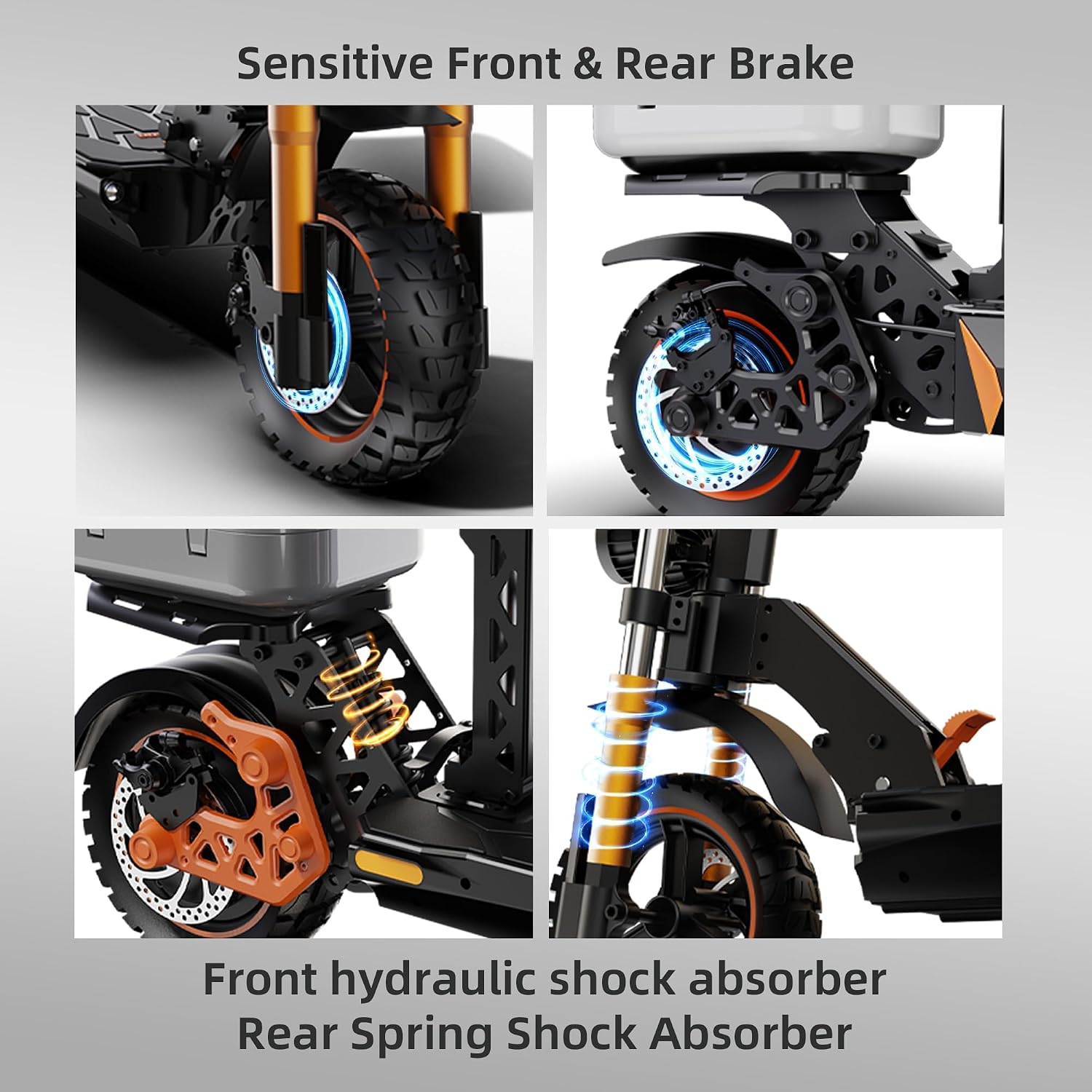
Figure 3: Sensitive Front & Rear Brake and Suspension System
This composite image showcases the sensitive front and rear disc brakes, along with the front hydraulic shock absorber and rear spring shock absorber, emphasizing the scooter's robust braking and suspension capabilities.
Setup
- Unboxing: Carefully remove all components from the packaging. Retain packaging for future transport or storage.
- Handlebar Assembly: Unfold the handlebar stem and secure it in the upright position according to the locking mechanism. Ensure it clicks into place. Attach the handlebars if they are separate, ensuring all cables are clear.
- Seat and Storage Box Installation: If not pre-installed, attach the seat post to the designated slot on the deck and secure the storage box to the rear rack.
- Initial Charge: Fully charge the scooter's battery before its first use. Connect the charger to the charging port and a power outlet. The indicator light on the charger will change when fully charged.
- Tire Pressure Check: Verify that the tires are inflated to the recommended pressure. Refer to the tire sidewall for specifications.
Operating Instructions
Starting the Scooter
- Press and hold the power button on the display to turn on the scooter.
- Check the battery level on the LED display.
- Select your desired speed mode (gear position) using the mode button.
Riding the Scooter
- Place one foot firmly on the deck and push off with the other foot to gain initial momentum.
- Gently press the throttle to accelerate. Increase pressure for more speed.
- To brake, release the throttle and gently squeeze the brake levers. Apply both front and rear brakes for optimal stopping power.
- Use the turn signals to indicate your direction changes.
- Activate headlights and auxiliary lights for night riding or low-light conditions.

Figure 4: Key Performance Features in Use
This image shows a rider on the Ruitoo Electric Scooter M5 Pro, with overlaid graphics indicating its key performance features: 44 Miles Max Range, 32 MPH Top Speed, Up to 30° Slope capability, and 264 Lb Max Load capacity.
Folding the Scooter
- Ensure the scooter is powered off.
- Locate the folding mechanism release lever, typically near the base of the handlebar stem.
- Engage the release and carefully fold the handlebar stem down towards the deck until it locks into place.
- The scooter is now in its compact, portable state for easy transport or storage in a trunk, on public transport, or in small spaces.
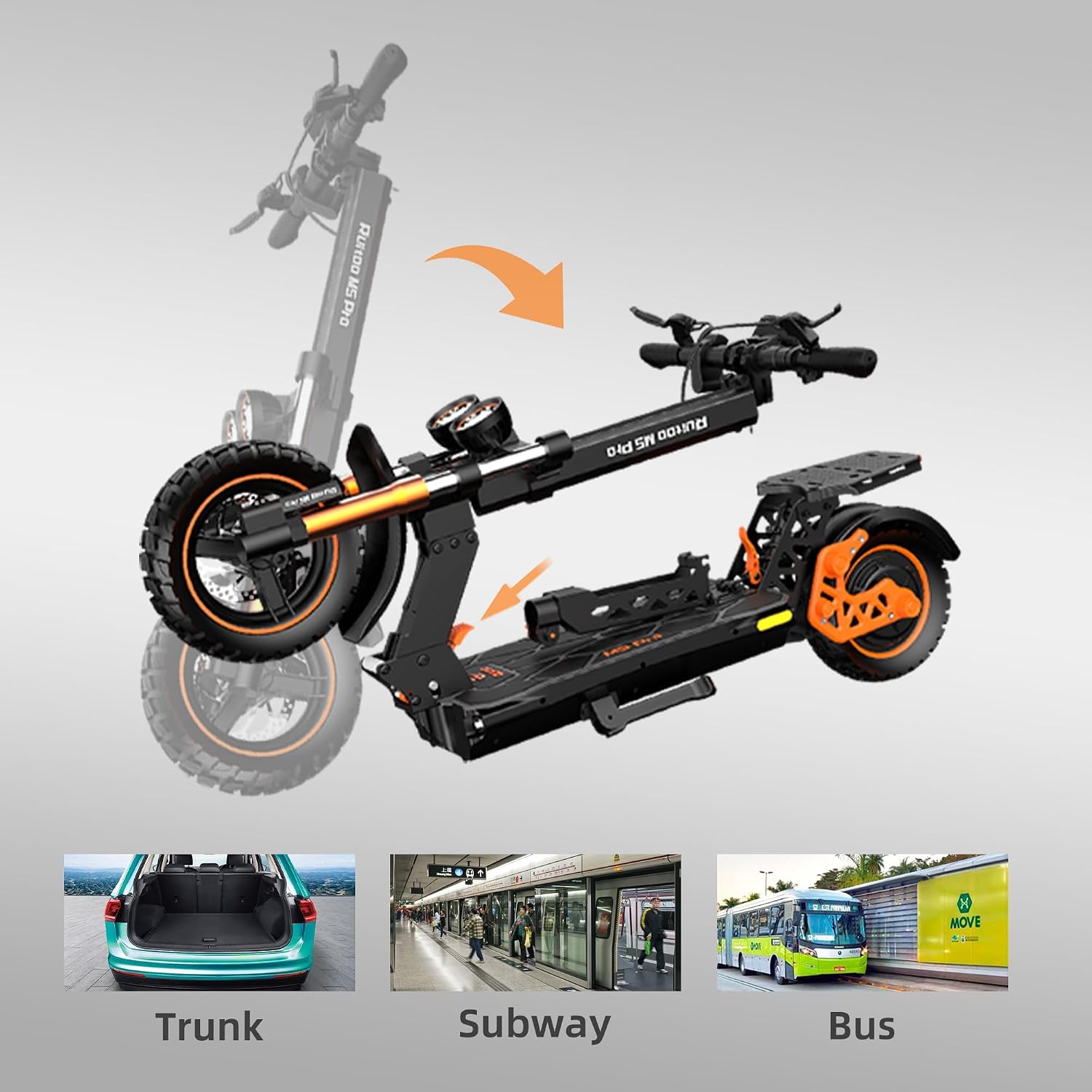
Figure 5: Folding and Portability
This image illustrates the folding process of the Ruitoo Electric Scooter M5 Pro and demonstrates its portability by showing it fitting into a car trunk, being carried onto a subway, and stored on a bus.
Maintenance
Regular maintenance ensures optimal performance and longevity of your scooter:
- Cleaning: Wipe down the scooter with a damp cloth after each ride. Avoid using high-pressure water or harsh chemicals.
- Battery Care:
- Charge the battery fully after each use, even if only partially discharged.
- Do not overcharge or completely drain the battery.
- Store the scooter in a cool, dry place when not in use, and charge it periodically if stored for extended periods.
- Tires: Check tire pressure weekly and inflate as needed. Inspect tires for wear and tear.
- Brakes: Test brakes regularly for responsiveness. Adjust or replace brake pads if necessary.
- Fasteners: Periodically check all screws and bolts to ensure they are tight.
- Lubrication: Apply appropriate lubricant to moving parts as recommended by the manufacturer.
Troubleshooting
| Problem | Possible Cause | Solution |
|---|---|---|
| Scooter does not turn on. | Low battery; loose connections; power button malfunction. | Charge battery; check all cable connections; contact support if issue persists. |
| Reduced range or speed. | Under-inflated tires; low battery charge; heavy load; riding uphill. | Inflate tires to correct pressure; fully charge battery; reduce load; ride on flatter terrain. |
| Brakes feel weak. | Worn brake pads; loose brake cable; air in hydraulic system. | Inspect and replace brake pads; adjust brake cable tension; seek professional service for hydraulic issues. |
| Unusual noises during operation. | Loose components; debris in wheels; motor issue. | Check all fasteners; inspect wheels for obstructions; contact support for motor concerns. |
Specifications
| Feature | Specification |
|---|---|
| Brand | Ruitoo |
| Model | M5 Pro |
| Motor Power | 1600W |
| Top Speed | Up to 38 Mph (61 km/h) |
| Max Range | Up to 42 Miles (67 km) |
| Battery | 52V/20.8AH |
| Max Load Capacity | 264 lbs (120 kg) |
| Frame Material | Aluminum/Aluminum Alloy |
| Suspension Type | Dual Suspension (Front Hydraulic, Rear Spring) |
| Brake Style | Handbrake (Disc Brakes) |
| Handlebar Type | Fixed (Adjustable Height) |
| Lighting System | Front Headlights, Front Auxiliary Lights, Rear Brake Light, Turn Signal Lights |

Figure 6: Motor and Slope Capability
This image highlights the powerful 1600W motor of the Ruitoo Electric Scooter M5 Pro and its ability to climb slopes up to 30 degrees, demonstrating its robust performance.

Figure 7: Comprehensive Lighting System
This image illustrates the scooter's six-light system, which includes front headlights, two front auxiliary lights, a rear brake light, and two turn signal lights, ensuring visibility and safety.
Warranty and Support
The Ruitoo Electric Scooter M5 Pro comes with a limited warranty. Please refer to the warranty card included with your purchase for specific terms and conditions. For technical support, parts, or warranty claims, please contact Ruitoo customer service through the following channels:
- Email: Refer to your purchase documentation or the official Ruitoo website.
- Website: Visit the official Ruitoo website for FAQs and support resources.
- Amazon Store: You can also visit the Ruitoo Amazon Store for product information and contact options.
Please have your purchase receipt and scooter model number (M5 Pro) ready when contacting support.
Related documentsM5 Pro

Ask a question about this manual
Ask about setup, troubleshooting, compatibility, parts, safety, or missing instructions. Manuals+ will review the question and use this page’s manual context to help answer it.