RCA RPJ181-BLACK 720P Home Theater Projector User Manual
Model: RPJ181-BLACK | Brand: RCA
Introduction
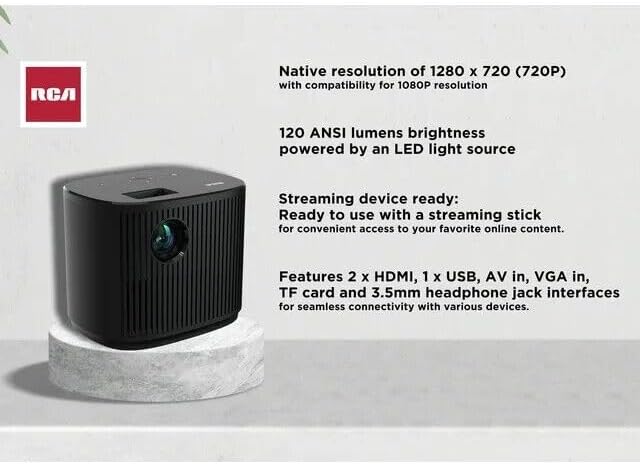
Welcome to the user manual for your RCA RPJ181-BLACK 720P Home Theater Projector. This guide provides comprehensive instructions for setting up, operating, and maintaining your projector to ensure an optimal home theater experience. The RPJ181-BLACK delivers crisp, clear visuals with its native 1280 x 720 (720P) resolution and 120 ANSI lumens brightness, making it ideal for movies, gaming, and presentations.
Please read this manual thoroughly before using the product to ensure safe and correct operation.
What's in the Box
Upon opening your RCA RPJ181-BLACK projector package, please verify that all the following items are included:
- RCA 720P Home Theater Projector (RPJ181-BLACK)
- Remote Control
- AC Power Adapter
- User Manual
Product Overview
The RCA RPJ181-BLACK projector is designed for versatility and ease of use, featuring a compact design and multiple connectivity options. Below are key components and features:

Front angled view of the RCA RPJ181-BLACK projector, showcasing its sleek black design and front lens.

Direct front view of the projector, highlighting the central projection lens and vertical grille design.
Key Features:
- High Definition Display: Native resolution of 1280 x 720 (720P) with compatibility for 1080P resolution for crisp visuals.
- Advanced Display Technology: Utilizes 4" LCD technology for exceptional image quality and clarity.
- Bright and Vibrant: Features 120 ANSI lumens brightness powered by an energy-efficient LED light source.
- Versatile Projection: Supports projection sizes ranging from 30 to 140 inches with a flexible projection distance of 0.8 to 3.8 meters.
- Precision Lens System: Equipped with 3 pieces of glass lenses and manual focus adjustment.
- Enhanced Audio Output: Integrated 5W speaker with 10% THD for an immersive sound experience.
- Multiple Aspect Ratios: Supports both 16:9 and 4:3 aspect ratios.
Setup
Follow these steps to set up your RCA RPJ181-BLACK projector for the first time:
- Placement: Position the projector on a stable, flat surface. Ensure there is adequate ventilation around the unit. For optimal viewing, place the projector at a distance that achieves your desired screen size (30 to 140 inches diagonal).
- Power Connection: Connect the AC Power Adapter to the projector's power input port and then plug the adapter into a standard electrical outlet.
- Initial Power On: Press the power button on the projector or the remote control to turn on the device.
- Focus Adjustment: Once powered on, adjust the manual focus ring located near the lens until the projected image is clear and sharp.
- Keystone Correction: If the image appears trapezoidal, use the keystone correction feature (if available, typically a ring or digital setting) to square the image.

The RCA RPJ181-BLACK projector positioned on a coffee table in a living room, demonstrating a typical setup for home use.
Operating Instructions
Your RCA RPJ181-BLACK projector offers various ways to connect and enjoy your content.
Connectivity:
The projector features a wide range of input ports for connecting different devices:
- 2 x HDMI: For connecting Blu-ray players, gaming consoles, laptops, and streaming devices.
- 1 x USB: For playing media directly from USB drives.
- AV In: For connecting older devices with composite video and stereo audio outputs.
- VGA In: For connecting computers and laptops.
- TF Card Slot: For playing media directly from TF (MicroSD) cards.
- 3.5mm Headphone Jack: For connecting external speakers or headphones.
Detailed view of the projector's rear panel showing the various input and output ports for connectivity.
Using the Control Panel / Remote:
The projector can be operated using the buttons on the top panel or the included remote control.

Top-down view of the projector's control panel, featuring power, menu, navigation, and source selection buttons.
- Power Button: Turns the projector on/off.
- Source Button: Selects the input source (HDMI1, HDMI2, USB, AV, VGA, TF Card).
- Menu Button: Accesses the on-screen display (OSD) menu for settings adjustments.
- Navigation Buttons (Arrows/OK): Navigates through menus and confirms selections.
- Volume Buttons: Adjusts the audio volume.
For detailed menu navigation and settings, refer to the on-screen display (OSD) menu accessible via the Menu button.
Maintenance
Proper maintenance ensures the longevity and optimal performance of your projector.
- Cleaning the Lens: Use a soft, lint-free cloth specifically designed for optical lenses. Do not use abrasive cleaners or solvents.
- Cleaning the Projector Body: Wipe the exterior with a soft, dry cloth. For stubborn marks, a slightly damp cloth can be used, followed by a dry cloth.
- Ventilation: Ensure the projector's ventilation openings are not blocked. Overheating can damage the unit.
- Storage: When not in use for extended periods, store the projector in a cool, dry place, ideally in its original packaging or a protective case.
- Lamp Life: The LED lamp is designed for long-lasting illumination. Avoid frequent on/off cycles to maximize lamp life.
Troubleshooting
If you encounter issues with your projector, refer to the following common problems and solutions:
| Problem | Possible Cause | Solution |
|---|---|---|
| No image projected | Power cable disconnected; Incorrect input source; Lens cap on. | Check power connection; Select correct input source; Remove lens cap. |
| Image is blurry | Focus not adjusted; Projector too close/far from screen. | Adjust the manual focus ring; Adjust projection distance. |
| No sound | Volume too low/muted; Incorrect audio output selected; Source device audio issue. | Increase volume/unmute; Check projector's audio settings; Verify audio output on source device. |
| Remote control not working | Batteries dead/incorrectly inserted; Obstruction between remote and projector. | Replace batteries; Ensure clear line of sight to IR receiver. |
If the problem persists after trying these solutions, please contact RCA customer support.
Specifications
| Feature | Detail |
|---|---|
| Model | RPJ181-BLACK |
| Display Technology | 4" LCD |
| Native Resolution | 1280 x 720 (720P) |
| Compatible Resolution | Up to 1080P |
| Brightness | 120 ANSI Lumens |
| Light Source | LED Lamp |
| Projection Size | 30 to 140 inches (diagonal) |
| Projection Distance | 0.8 to 3.8 meters |
| Aspect Ratios | 16:9, 4:3 |
| Audio Output | Integrated 5W Speaker with 10% THD |
| Connectivity | 2 x HDMI, 1 x USB, AV In, VGA In, TF Card, 3.5mm Headphone Jack |
| Product Dimensions | 8.5 x 6.5 x 3.1 inches |
| Item Weight | 6 pounds |
| Recommended Uses | Education, Home Cinema, Gaming, Business |
Warranty and Support
RCA products are manufactured to the highest quality standards. For information regarding warranty coverage, technical support, or service inquiries, please refer to the warranty card included with your product or visit the official RCA support website.
Please retain your proof of purchase for any warranty claims.