
1. Introduction
Thank you for choosing the OttLite Twist LED Desk Lamp with Wireless Charging Pad. This manual provides essential information for the safe and efficient operation of your new lamp. Please read these instructions thoroughly before use and retain them for future reference.
The OttLite Twist LED Desk Lamp is designed to optimize your workspace with its flexible neck, adjustable height, and OttLite's exclusive ClearSun LED technology. It features three color temperature settings and a convenient wireless charging pad for compatible devices.

Figure 1: OttLite Twist LED Desk Lamp with a smartphone wirelessly charging on its base.
2. Important Safety Instructions
To reduce the risk of fire, electric shock, or injury to persons, please observe the following safety precautions:
- Do not use with an extension cord unless the plug can be fully inserted.
- Do not alter the plug.
- Do not operate the lamp with a damaged cord or plug.
- Unplug the lamp from the electrical outlet before cleaning.
- Do not use the lamp near water.
- This lamp is for indoor use only.
- Do not attempt to disassemble the lamp. There are no user-serviceable parts inside.
- Keep the wireless charging pad clear of metal objects, credit cards, or other items that could interfere with charging or cause overheating.
3. Package Contents
Verify that all items are present in the package:
- OttLite Twist LED Desk Lamp (Model CSNWC51W)
- Power Cable
4. Setup Instructions
- Unpack the Lamp: Carefully remove the lamp and all components from the packaging.
- Position the Lamp: Place the lamp on a stable, flat surface such as a desk, table, or nightstand.
- Connect Power: Insert the power cable into the power port located on the back of the lamp base. Plug the other end of the power cable into a standard electrical outlet.
- Adjust the Neck: Gently adjust the flexible neck to position the light as desired. The height can be adjusted from approximately 8.375 inches to 16.875 inches.

Figure 2: Lamp dimensions and adjustable height range.
5. Operating Instructions
5.1. Light Functions
The lamp features touch-sensitive controls for power, brightness, and color temperature adjustments.
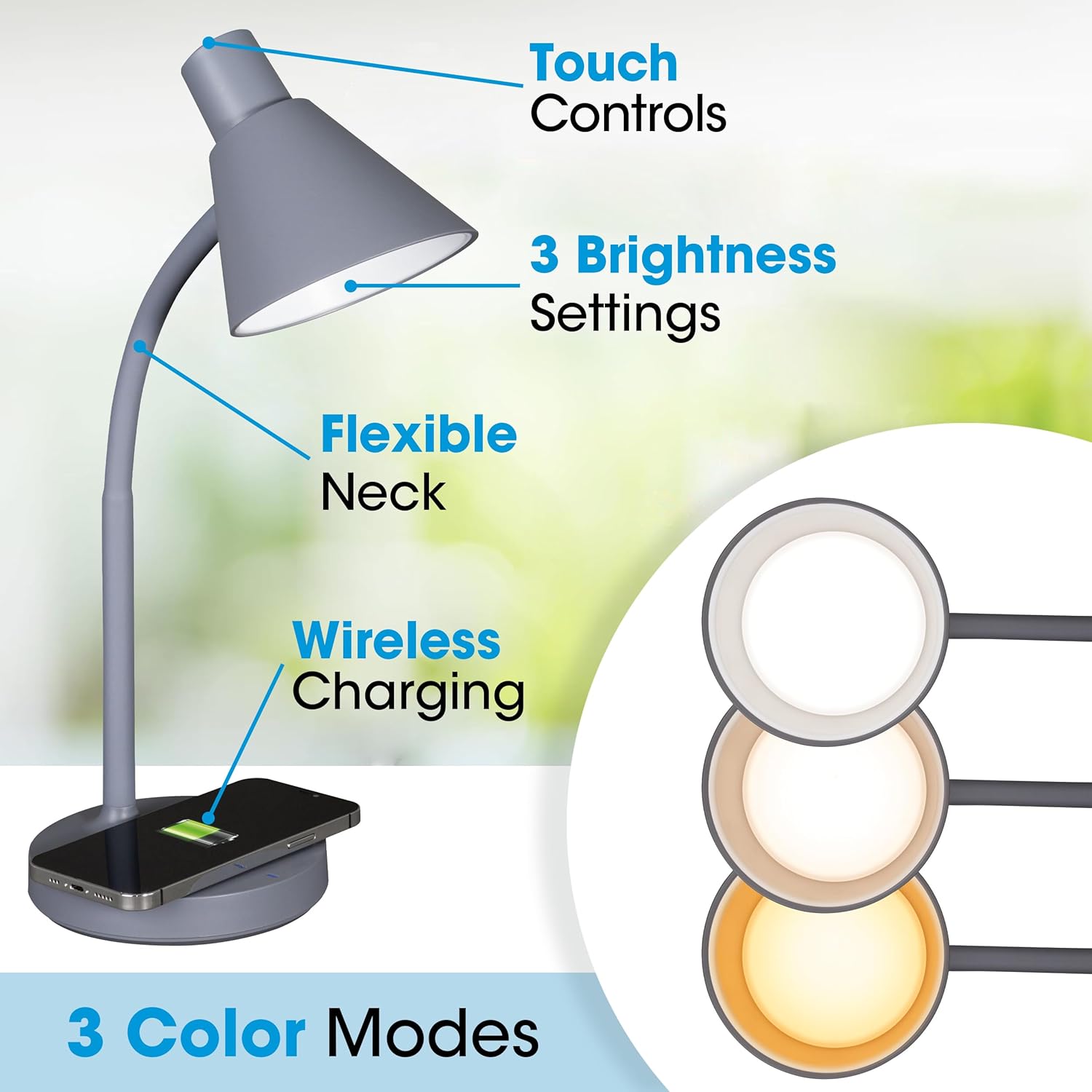
Figure 3: Key features and controls of the lamp.
- Power On/Off: Tap the touch-sensitive power button located on the lamp head to turn the light on or off.
- Adjust Brightness: Once the lamp is on, press and hold the power button to cycle through three brightness levels (low, medium, high). Release the button at your desired brightness.
- Change Color Temperature: Tap the color temperature button (often indicated by a sun or color icon, or integrated with the power button for cycling) to switch between the three available color modes:
- Warm White: Provides a cozy, relaxing light.
- Bright White: A neutral, balanced light suitable for general tasks.
- OttLite ClearSun Natural Daylight: Mimics natural daylight, designed to reduce eyestrain and improve clarity.

Figure 4: ClearSun LED Technology in use, reducing eyestrain.
5.2. Wireless Charging Pad
The lamp base includes a wireless charging pad compatible with Qi-enabled devices, such as iPhone 8 and newer models.
- Place Device: Center your Qi-enabled smartphone or device on the wireless charging pad located on the lamp base.
- Verify Charging: The device should indicate that it is charging. If not, slightly adjust the position of your device on the pad.
- Important: Remove any metal objects, thick cases, or credit cards from your device before placing it on the charging pad to ensure proper function and prevent overheating.
6. Maintenance
- Cleaning: Ensure the lamp is unplugged before cleaning. Use a soft, dry cloth to wipe down the lamp. Do not use abrasive cleaners, waxes, or solvents.
- LEDs: The LEDs in this lamp are designed to last for the lifetime of the product and are not replaceable.
- Storage: If storing the lamp, ensure it is unplugged and placed in a dry, safe location.
7. Troubleshooting
| Problem | Possible Cause | Solution |
|---|---|---|
| Lamp does not turn on. | Power cable not properly connected or no power from outlet. | Ensure the power cable is securely plugged into the lamp and the electrical outlet. Test the outlet with another device. |
| Wireless charging not working. | Device not Qi-enabled, not properly aligned, or obstructed by foreign objects. | Verify your device supports Qi wireless charging. Re-position the device on the charging pad. Remove any metal objects, thick cases, or credit cards. |
| Light flickers or is dim. | Unstable power supply or internal issue. | Try plugging the lamp into a different outlet. If the problem persists, contact customer support. |
8. Specifications
| Feature | Detail |
|---|---|
| Model Number | CSNWC51W |
| Brand | OttLite |
| Light Source Type | LED (ClearSun Technology) |
| Color Temperatures | 3 (Warm White, Bright White, ClearSun Natural Daylight) |
| Brightness Levels | 3 |
| Special Feature | Wireless Charging Pad |
| Flexible Neck | Yes |
| Adjustable Height | 8.375" to 16.875" |
| Base Diameter | 5.125" |
| Product Dimensions | 5.12"D x 5.12"W x 16.87"H |
| Item Weight | 1.75 pounds |
| Material | Plastic |
| Finish Type | Matte |
| Power Source | Dual-powered (AC adapter) |
| UPC | 761712024882 |
9. Warranty and Support
For warranty information or technical support, please contact OttLite customer service. Refer to the OttLite official website for the most current contact details and warranty policies.
Website: www.ottlite.com


