
1. Introduction
This manual provides comprehensive instructions for the setup, operation, and maintenance of your LOCOSYS LC23030-V2 High Performance GNSS Receiver. This device is designed to provide highly accurate positioning data by simultaneously supporting multiple Global Navigation Satellite Systems (GNSS), including GPS, GLONASS, BeiDou, Galileo, and QZSS. Please read this manual thoroughly before using the device to ensure optimal performance and longevity.
2. Product Overview
The LC23030-V2 is a compact and robust GNSS receiver, often referred to as a 'GNSS mouse', due to its small form factor. It features a magnetic holder for easy mounting and connects via a USB-A cable. The device is designed for various applications requiring precise location data, such as automotive navigation, marine navigation, and high-quality NTP time servers.

Figure 2.1: The LOCOSYS LC23030-V2 GNSS Receiver, showing its compact design, integrated USB cable, and magnetic holder for versatile mounting options. The device features indicator lights for operational status.
3. Key Features
- Simultaneous GNSS Support: Compatible with GPS, GLONASS, BeiDou, Galileo, and QZSS dual-band L1 and L5 frequencies.
- High Accuracy: Achieves 1.5m CEP (Circular Error Probable) for precise positioning.
- Adjustable Update Rate: Configurable from 1Hz to 10Hz via software, suitable for dynamic applications.
- SBAS Support: Includes support for SBAS Ranging, WAAS, EGNOS, MSAS, and GAGAN for enhanced accuracy.
- Fast Acquisition: Features free hybrid ephemeride prediction for faster cold starts and quick time-to-first fix even in weak signal conditions.
- Built-in Super Capacitor: Retains system data for rapid satellite re-acquisition.
- Wide Compatibility: Works with most navigation software, including open-source options like OpenCPN.
- Multi-Platform Drivers: Drivers available for Windows, Mac, Linux, and an application for Android devices.
- Durable Design: Waterproof construction for reliable outdoor use.
- Convenient Mounting: Equipped with a magnetic holder for easy installation.
4. Setup Guide
4.1. Hardware Connection
- Unpack the Device: Carefully remove the LC23030-V2 GNSS receiver from its packaging.
- Connect to USB Port: Plug the USB-A connector of the receiver into an available USB port on your computer or compatible Android device.
- Mounting: Utilize the integrated magnetic holder to securely attach the receiver to a metallic surface with a clear view of the sky for optimal signal reception. The 2-meter cable provides flexibility in placement.
4.2. Driver Installation
For Windows, Mac, and Linux operating systems, drivers are required for the device to be recognized. Please visit the official LOCOSYS website or refer to the included software CD (if applicable) to download and install the latest drivers for your specific operating system. For Android devices, a dedicated application is available.
5. Operating Instructions
5.1. GNSS Receiver Software Interface (Windows/Linux)
Upon successful driver installation and connection, you can use compatible GNSS software (e.g., LOCOSYS GNSS Freeware, OpenCPN) to visualize and utilize the data from your receiver. The software typically displays satellite signal strength, GNSS data (latitude, longitude, altitude, fix mode), NMEA sentences, and a skyplot of visible satellites.
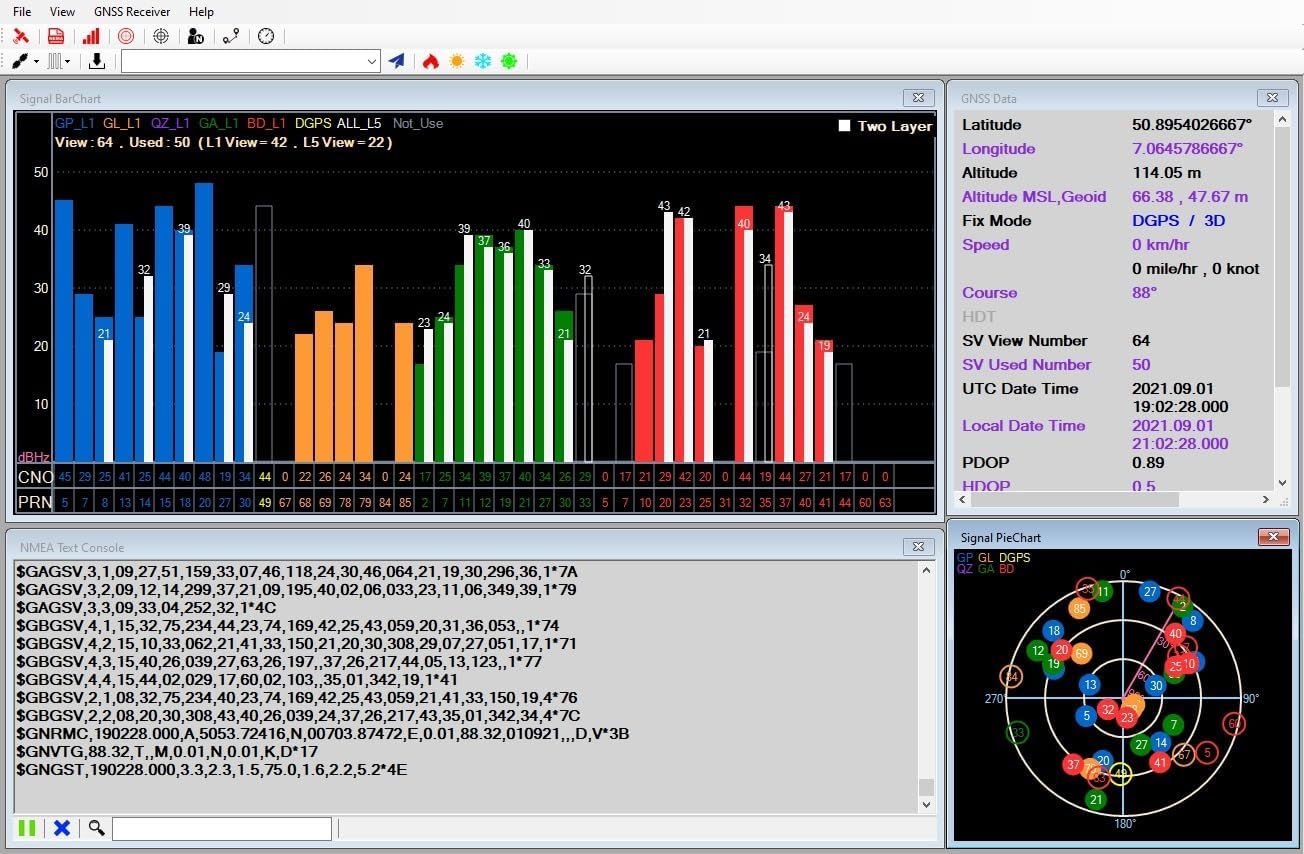
Figure 5.1: Example of the GNSS Receiver software interface, displaying real-time satellite signal strength, detailed positional data, raw NMEA output, and a graphical representation of satellite positions in the sky.
5.2. Map View Functionality
Many GNSS software applications integrate map views, allowing you to see your current position overlaid on a map. This feature is particularly useful for navigation and tracking. You can often adjust the map scale and view coordinates directly on the map.

Figure 5.2: The map view within the GNSS software, illustrating how the receiver's position is displayed on a street map. Controls for zooming and showing coordinates are highlighted.
5.3. Adjusting Refresh Rate
The LC23030-V2 supports an adjustable update rate from 1Hz (default) up to 10Hz. This setting can be changed via the software's command table or configuration menu. A higher refresh rate provides more frequent position updates, which is beneficial for fast-moving applications.

Figure 5.3: Software interface demonstrating how to access the command table to modify the position fix interval (refresh rate). Users can select from various update rates, such as 1000ms (1Hz) to 100ms (10Hz).
5.4. Android Application Usage
For Android devices, the LOCOSYS GPS Mouse application allows you to connect to the receiver and view real-time GNSS data. The app typically displays UTC time, speed, course, latitude, longitude, altitude, fix mode, and raw NMEA sentences. It may also include options for logging data or integrating with Google Maps.

Figure 5.4: The LOCOSYS GPS Mouse Android application interface, displaying current GNSS parameters such as time, coordinates, and fix mode, along with NMEA data streams. Buttons for controlling the connection and logging are visible.
6. Specifications
The following table outlines the technical specifications of the LOCOSYS LC23030-V2 GNSS Receiver:

Figure 6.1: Detailed technical specifications for the LC23030-V2 GNSS receiver, covering supported frequencies, channel count, update rates, acquisition times, and accuracy metrics.
| Feature | Description |
|---|---|
| Product Dimensions | 7.5 x 1.5 x 7.5 cm |
| Item Weight | 80 Grams |
| Model Number | LC23030-V2 mit Magnethalterung |
| Connectivity Technology | USB |
| Connector Type | USB A |
| Special Feature | Water-repellent |
| Color | Black |
| Manufacturer | LOCOSYS TECHNOLOGY INC. |
| Country of Origin | Taiwan |
| Supported GNSS | GPS, GLONASS, BeiDou, Galileo, QZSS (L1 & L5) |
| Channels | Support 135 channels |
| Update Rate | 1Hz (default), up to 10Hz |
| Hot Start (Open Sky) | 2s (typical) |
| Cold Start (Open Sky) | 28s (typical) without AGPS |
| Position Accuracy | Autonomous: 1.5m CEP |
| Datum | WGS-84 (default) |
| Max. Altitude | < 18,000 m |
| Max. Velocity | < 500 m/s |
| Protocol Support | NMEA 0183 ver. 4.1 (115200 bps, 8 data bits, no parity, 1 stop bits) |
7. Maintenance
To ensure the longevity and optimal performance of your GNSS receiver, follow these maintenance guidelines:
- Cleaning: Wipe the device with a soft, dry cloth. Avoid using harsh chemicals or abrasive cleaners.
- Storage: Store the receiver in a cool, dry place when not in use, away from direct sunlight and extreme temperatures.
- Cable Care: Avoid bending or kinking the USB cable excessively to prevent internal damage.
- Firmware Updates: Periodically check the LOCOSYS website for any available firmware updates to ensure your device has the latest features and performance improvements.
8. Troubleshooting
If you encounter issues with your LC23030-V2 receiver, refer to the following common troubleshooting steps:
- No Satellite Fix:
- Ensure the receiver has a clear, unobstructed view of the sky.
- Verify that the device is properly connected to the USB port.
- Check if the necessary drivers are correctly installed for your operating system.
- Software Not Detecting Device:
- Confirm driver installation. Try reinstalling drivers if necessary.
- Check the device manager (Windows) or equivalent for proper recognition.
- Ensure the correct COM port is selected in your GNSS software.
- Inaccurate Positioning:
- Relocate the receiver to an area with better sky visibility, away from tall buildings or dense foliage.
- Ensure the device is stationary if a static fix is desired.
- Verify that SBAS (WAAS/EGNOS) is enabled in your software if available in your region.
- Intermittent Connection:
- Try a different USB port on your computer.
- Ensure the USB cable is not damaged.
- Avoid electromagnetic interference from other electronic devices.
9. Warranty and Support
The LOCOSYS LC23030-V2 GNSS Receiver comes with a 2-year warranty from the date of purchase, covering manufacturing defects. Please retain your proof of purchase for warranty claims.
For technical support, driver downloads, or further assistance, please visit the official LOCOSYS website or contact their customer service department. Contact information can typically be found on the manufacturer's website or product packaging.


