1. Introduction and Overview
The KRYKARD Clamp Meter F407 is a versatile instrument designed for precise electrical measurements. It accurately measures high AC/DC current and voltage, along with various power values including Watts (W), Volt-Amperes (VA), Volt-Ampere Reactive (var), Power Factor (PF), and Displacement Power Factor (DPF). The F407 also provides harmonic analysis up to the 25th order and includes resistance testing with audible continuity. Key features such as TrueInrush current measurement, Min/Max/Peak± analysis, and data recording ensure comprehensive performance. Enhanced data management and remote monitoring capabilities are provided through Bluetooth connectivity and PC software.
2. Safety Information
Always adhere to the following safety precautions to prevent personal injury and damage to the meter or equipment under test.
- This meter is rated for 1000V CAT IV. Do not exceed the maximum input limits for any function.
- Do not use the meter if it appears damaged or if the test leads are damaged.
- Ensure the rotary switch is in the correct position for the desired measurement before connecting to the circuit.
- When measuring current with the clamp, ensure the jaws are fully closed around a single conductor.
- Always disconnect the test leads from the circuit before changing functions or ranges.
- Exercise extreme caution when working with live electrical circuits. Use appropriate personal protective equipment (PPE).
- Do not operate the meter in explosive gas, vapor, or dusty environments.
- Refer to local and national safety codes for safe electrical work practices.
3. Product Features
- High AC/DC current and voltage measurement capabilities.
- Measurement of power values: W, VA, var, PF, and DPF.
- Harmonic analysis up to the 25th order.
- Resistance testing with an audible continuity function.
- Min, Max, and Peak± analysis for all measurement functions.
- TrueInrush current measurement for accurate startup current readings.
- Data recording for comprehensive tracking and analysis.
- Bluetooth interface for wireless connectivity.
- PC software for remote monitoring and advanced data management.
4. Components and Controls
Familiarize yourself with the main components and controls of the KRYKARD Clamp Meter F407 as shown in the image below.
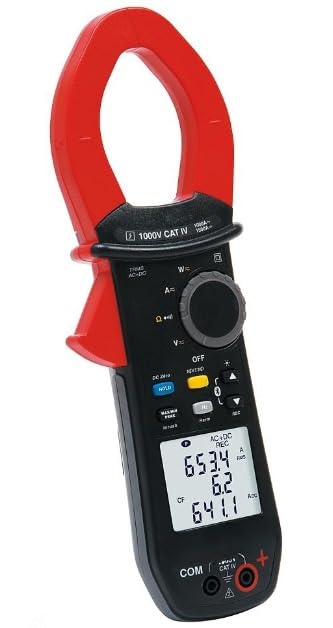
Figure 1: KRYKARD Clamp Meter F407. The image displays the meter's red clamp jaws at the top, a rotary selector switch for various functions (AC/DC current, voltage, resistance, power) in the middle, and a blue backlit LCD screen showing measurement values (e.g., 962.1, 1.68, 31.08). Below the screen are function buttons like HOLD, MIN/MAX/PEAK, and Inrush. At the bottom, there are input terminals for test leads, labeled COM and a positive terminal, with a 1000V CAT IV safety rating indicated.
- Clamp Jaws: Used for non-contact AC/DC current measurement.
- Rotary Switch: Selects the desired measurement function (e.g., A~, A=, V~, V=, W, Ω).
- Function Buttons: Include HOLD, MIN/MAX/PEAK, Inrush, HZ, Bluetooth, and backlight controls.
- LCD Display: Shows measurement readings, units, and active functions.
- Input Terminals: For connecting test leads for voltage, resistance, and continuity measurements (COM and positive terminal).
5. Setup
5.1. Battery Installation
The KRYKARD F407 typically uses standard batteries (e.g., AAA or AA, refer to the battery compartment for specifics).
- Ensure the meter is powered off.
- Locate the battery compartment cover on the rear of the meter.
- Unscrew the retaining screw(s) and remove the cover.
- Insert new batteries, observing the correct polarity (+/-) as indicated inside the compartment.
- Replace the battery compartment cover and secure it with the screw(s).
5.2. Connecting Test Leads
For voltage, resistance, and continuity measurements, connect the supplied test leads.
- Insert the black test lead into the "COM" input terminal.
- Insert the red test lead into the positive input terminal (usually marked with a red circle or "+").
6. Operating Instructions
6.1. Powering On/Off
Turn the rotary switch from the "OFF" position to any desired measurement function to power on the meter. To power off, turn the rotary switch back to "OFF".
6.2. AC/DC Current Measurement (Clamp)
- Set the rotary switch to the A~ (AC Current) or A= (DC Current) position.
- Press the jaw release trigger to open the clamp jaws.
- Enclose a single conductor with the clamp jaws. Ensure the jaws are fully closed.
- Read the current value on the LCD display.
6.3. AC/DC Voltage Measurement
- Connect the test leads as described in Section 5.2.
- Set the rotary switch to the V~ (AC Voltage) or V= (DC Voltage) position.
- Connect the test probes in parallel to the circuit or component to be measured.
- Read the voltage value on the LCD display.
6.4. Resistance and Continuity Measurement
- Connect the test leads as described in Section 5.2.
- Set the rotary switch to the Ω (Resistance) position.
- Ensure the circuit or component under test is de-energized.
- Connect the test probes across the component.
- Read the resistance value. For continuity, the meter will emit an audible tone if resistance is below a certain threshold.
6.5. Power Measurement (W, VA, var, PF, DPF)
- Connect the test leads for voltage measurement and clamp the jaws around the current-carrying conductor.
- Set the rotary switch to the W (Power) position.
- The display will show the active power (W). Use the function buttons (if available) to cycle through VA, var, PF, and DPF readings.
6.6. Harmonic Analysis
The F407 can perform harmonic analysis up to the 25th order. Refer to the detailed operating manual or PC software instructions for specific steps on activating and interpreting harmonic measurements.
6.7. TrueInrush Measurement
The TrueInrush function captures the peak startup current of motors and other inductive loads.
- Set the rotary switch to an AC current function.
- Press the "Inrush" button (if available, or follow on-screen prompts).
- Initiate the motor or load startup. The meter will capture and display the inrush current.
6.8. Min/Max/Peak± Analysis
This function allows you to record the minimum, maximum, and peak positive/negative values over a measurement period.
- Select the desired measurement function.
- Press the "MIN/MAX/PEAK" button to activate the recording mode.
- Press the button repeatedly to cycle through Min, Max, Peak+, and Peak- values.
- Hold the button to exit the recording mode.
6.9. Data Recording and Bluetooth Connectivity
The F407 supports data recording and Bluetooth connectivity for remote monitoring and data transfer to a PC.
- Data Recording: Activate the data recording function via the dedicated button or menu option. The meter will store measurements at set intervals.
- Bluetooth Pairing: Ensure Bluetooth is enabled on your PC or mobile device. Press the Bluetooth button on the meter to activate pairing mode. Follow the instructions in the PC software to connect and transfer data.
- PC Software: Install the KRYKARD PC software to manage recorded data, perform real-time monitoring, and configure meter settings.
7. Maintenance
7.1. Cleaning
Wipe the meter's casing with a damp cloth and mild detergent. Do not use abrasives or solvents. Ensure the meter is completely dry before use.
7.2. Battery Replacement
Replace batteries when the low battery indicator appears on the display. Refer to Section 5.1 for detailed instructions. Dispose of old batteries responsibly.
7.3. Storage
When not in use for extended periods, remove the batteries to prevent leakage. Store the meter in a cool, dry place, away from direct sunlight and extreme temperatures.
8. Troubleshooting
- No Display: Check battery installation and charge. Ensure the rotary switch is not in the "OFF" position.
- Incorrect Readings: Verify the correct function is selected. Ensure test leads are properly connected and not damaged. For current, ensure only one conductor is clamped.
- No Continuity Tone: Check if the circuit is de-energized. Ensure test leads are making good contact.
- Bluetooth Connection Issues: Ensure Bluetooth is enabled on both devices. Restart the meter and the PC software. Check for driver updates for the Bluetooth module.
If issues persist, contact KRYKARD customer support.
9. Specifications
| Specification | Value |
|---|---|
| Brand | KRYKARD |
| Model Number | F407 |
| Generic Name | Clamp Meter |
| AC Current Measurement | Up to 1,000 AAC |
| DC Current Measurement | Up to 1,500 ADC |
| Voltage Measurement | High AC/DC Voltage |
| Power Values | W, VA, var, PF, DPF |
| Harmonic Analysis | Up to 25th order |
| Resistance Testing | Yes, with audible continuity |
| TrueInrush | Yes |
| Data Recording | Yes |
| Connectivity | Bluetooth, PC Software |
| Safety Rating | 1000V CAT IV |
| Item Weight | 600 g |
| Product Dimensions (LxWxH) | 9.2 x 27.2 x 4.1 cm |
| Country of Origin | India |
10. Warranty and Support
The KRYKARD Clamp Meter F407 is manufactured by KRYKARD. For specific warranty terms and conditions, please refer to the warranty card included with your product or visit the official KRYKARD website.
For technical support, service, or inquiries, please contact KRYKARD customer service. Contact details can typically be found on the manufacturer's website or in the product packaging.


