Introduction
The Enbrighten Vibe Eternity Landscape Lights (Model 83789) are a 33-foot lighting system featuring 8 RGBWIC LED pucks designed for outdoor use. This system offers smart control via the Enbrighten app, compatibility with Alexa and Google Home, and is built to withstand various weather conditions. This manual provides instructions for proper installation, operation, maintenance, and troubleshooting to ensure optimal performance and longevity of your landscape lighting.
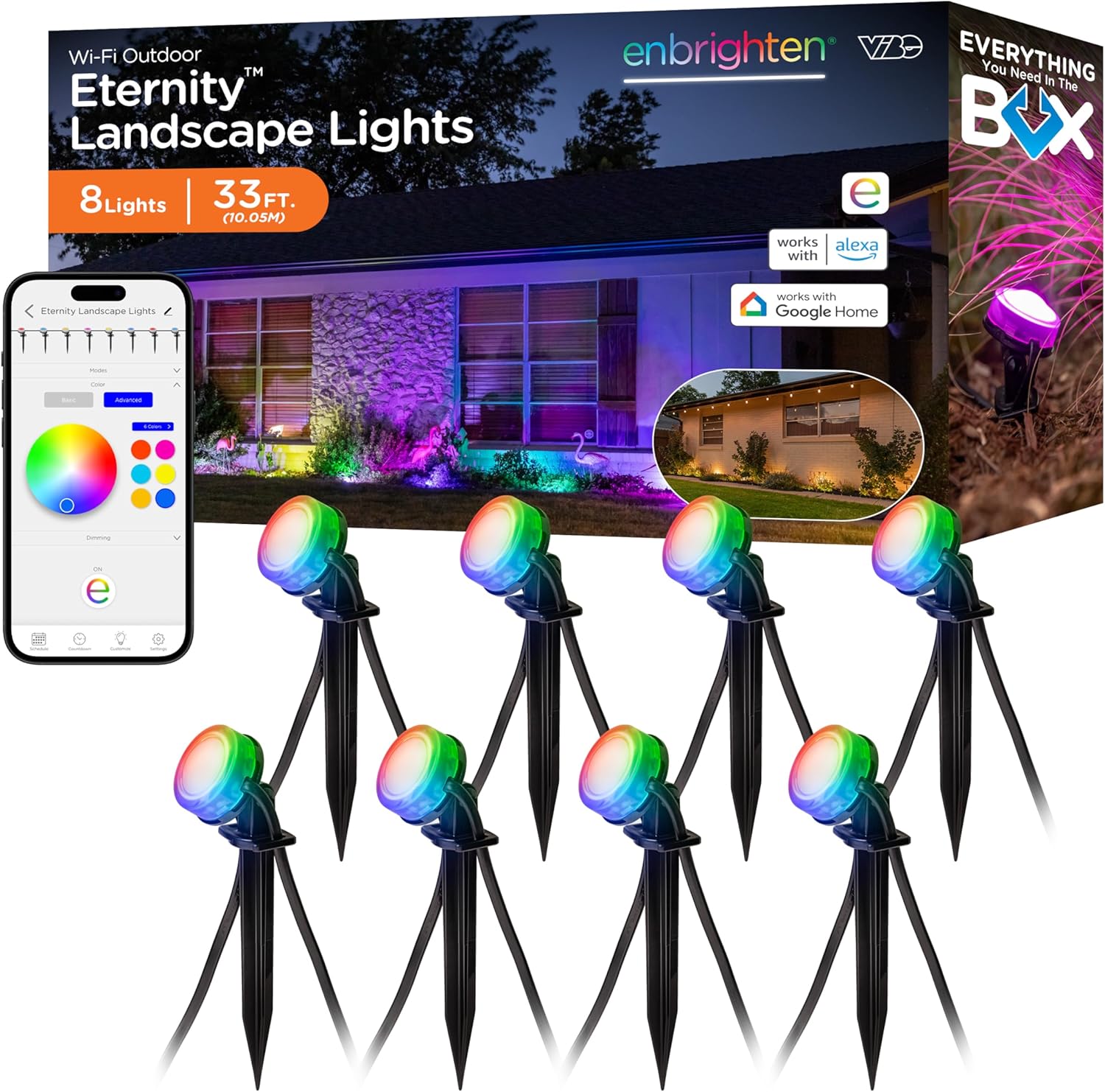
Figure 1: Overview of the Enbrighten Vibe Eternity Landscape Lights system, including the packaging, lights, and app interface.
Package Contents
Verify that all components are present in the package before beginning installation.
- Two (2) 16.5ft. light strands (each with 4 LED pucks)
- Eight (8) stakes with mounting brackets
- One (1) power supply
- Two (2) power supply screws and anchors
- One (1) 10ft. extension cable

Figure 2: All components included in the Enbrighten Vibe Eternity Landscape Lights package.
Setup and Installation
1. Assembling the Lights
- Attach to Mounting Bracket: Press the light puck firmly onto the stake's mounting bracket until it clicks into place.
- Secure Your Cable: Slide the light cable into the cord-management hooks on the stake to keep it tidy.
- Organize Loose Cable: Gently pull to remove any slack in the cord between pucks.
- Firmly Plant into Soil: Insert the stake into the desired location in soil or garden bedding. Adjust the head of the light to aim it as needed.

Figure 3: Visual guide for the four-step installation process of the landscape lights.
2. Connecting Multiple Strands
The system includes two 16.5ft light strands. You can connect multiple strands or extensions to achieve a maximum length of 150ft or 36 LED pucks. Ensure all connections are secure and weatherproof.
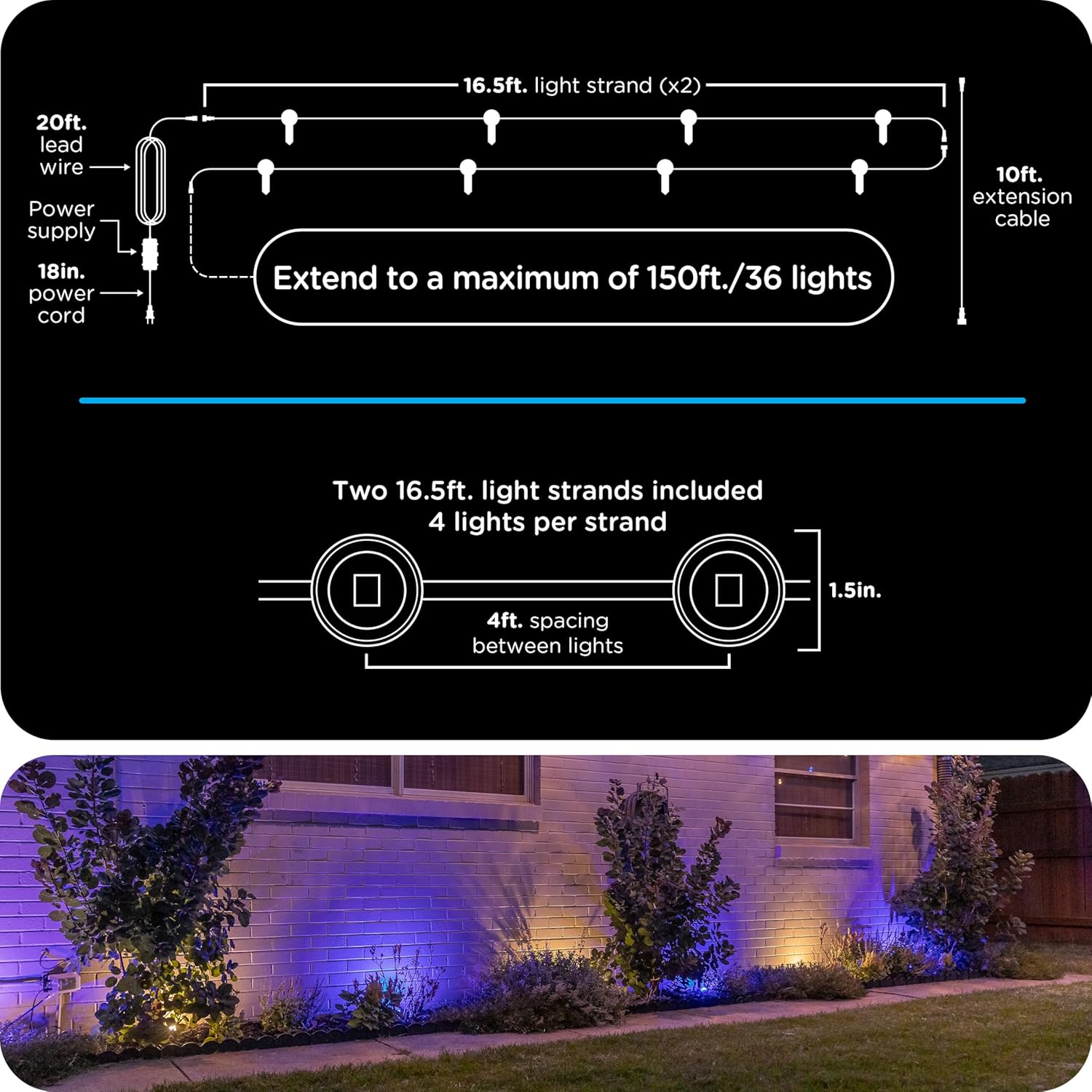
Figure 4: Illustration of connecting multiple light strands and the maximum extension capabilities.

Figure 5: Example of installed landscape lights illuminating a home exterior.
Operation
1. Smart App Control
The Enbrighten Vibe Eternity Landscape Lights are controlled via the free Enbrighten app.
- Download the App: Search for "Enbrighten" in the Apple App Store or Google Play Store.
- Pairing: Connect the lights to your 2.4GHz Wi-Fi network through the app.
- Customization: Access millions of color combinations, dynamic modes, and customizable effects.
- Scheduling: Set schedules and automations for your lighting.
- Individual LED Control: Control individual LED pucks for unique lighting designs.

Figure 6: The Enbrighten app interface on a smartphone, showing color selection and various lighting options.

Figure 7: Visual representation of year-round white, solid color, custom combos, and preset effects achievable with the lights.
2. Voice Control
The lights are compatible with Amazon Alexa and Google Home for convenient voice control.
- Connect to Voice Assistant: Follow the instructions in the Enbrighten app to link your lights with Alexa or Google Home.
- Voice Commands: Use commands such as "Alexa, turn on landscape lights" or "Hey Google, set landscape lights to blue."

Figure 8: Demonstrates smart control options, including app and voice commands with Alexa and Google Home.
3. Manual Control
The lights can also be controlled manually using the button on the power supply. This provides basic on/off functionality.

Figure 9: Overview of control methods, including the Enbrighten app and the power supply button.
4. Adjusting Light Aim
Each light puck features a mounting bracket that allows it to tilt 180 degrees. This enables precise aiming of the light to highlight specific features in your landscape.

Figure 10: Demonstrates the 180-degree tilt capability of the light puck for precise aiming.
Maintenance
- Cleaning: Periodically wipe the light pucks and cables with a soft, damp cloth to remove dirt and debris. Do not use harsh chemicals or abrasive cleaners.
- Cable Inspection: Regularly inspect the cables for any signs of damage, fraying, or wear. Replace any damaged components immediately.
- Connection Check: Ensure all connections between strands and to the power supply remain secure and watertight.
- Stake Stability: Verify that the stakes are firmly planted in the ground to prevent lights from shifting or falling.
- Software Updates: Keep the Enbrighten app updated to the latest version to ensure optimal performance and access to new features.
Troubleshooting
- Lights Not Turning On:
- Ensure the power supply is securely plugged into a working outlet.
- Check all cable connections for tightness.
- Verify that the lights are not set to an "off" schedule in the app.
- App Connectivity Issues:
- Confirm your Wi-Fi network is 2.4GHz.
- Restart your Wi-Fi router and the Enbrighten app.
- Ensure your mobile device is within range of your Wi-Fi network.
- Try re-pairing the device through the Enbrighten app.
- Inconsistent Light Performance:
- Check for any physical obstructions blocking the light pucks.
- Ensure all light pucks are securely attached to their stakes and connections are firm.
- Update the Enbrighten app to the latest version.
- Weather Resistance:
- While IP67 rated, ensure the power supply (IP65) is protected from direct heavy rain or standing water.
- Avoid submerging any components.
For further assistance, refer to the Enbrighten app's help section or contact customer support.
Specifications
| Brand | Enbrighten |
| Model Number | 83789 |
| Light Type | RGBWIC LED Landscape Lights |
| Total Length | 33 ft. (10.05m) |
| Number of Pucks | 8 |
| Puck Spacing | 4 ft. (1.2m) |
| Power Source | Corded Electric |
| Voltage | 120 Volts (AC) |
| Wattage | 20.4 Watts |
| Connectivity | Wi-Fi (2.4GHz) |
| Control Method | App, Voice (Alexa, Google Home), Manual |
| Weather Resistance | Light strands: IP67, Power supply: IP65 |
| Operating Temperature | -4°F to 131°F (-20°C to 55°C) |
| Max Extension | Up to 150 ft. / 36 LED pucks |
| Certifications | ETL, NEC Outdoor-Lighting Requirements |

Figure 11: Details on the weatherproof rating (IP67 for strands, IP65 for power supply) and electrical specifications.
Warranty and Support
Warranty Information
This Enbrighten product is covered by a 5-year limited warranty. This warranty covers defects in materials and workmanship under normal use. Please retain your proof of purchase for warranty claims.
Customer Support
For technical support, troubleshooting assistance, or warranty inquiries, please contact Enbrighten customer service. Contact information can typically be found on the product packaging or the official Enbrighten website.


