Introduction
This manual provides comprehensive instructions for the use and maintenance of your CG Mobile Guess Bluetooth Headphones TWS + Docking Station. Please read this manual carefully before using the product to ensure proper operation and to extend its lifespan.
The Guess 4G printed logo wireless headphones offer excellent sound quality, an elegant design, and functionality tailored to your needs. Crafted from polycarbonate with a sleek, minimalist look, they feature a luxurious golden Guess logo. Enjoy up to 5 hours of continuous music playback on a single charge, with the charging case providing an additional 24 hours of total music enjoyment. Equipped with Bluetooth 5.3 for stable connection and fast pairing, these headphones are also IPX5 water-resistant, making them suitable for outdoor activities. The intuitive touch panel allows for easy control.
Package Contents
Please verify that all items are present in the package:
- CG Mobile Guess Bluetooth Headphones (Left and Right)
- Charging Case
- USB-C/USB-A Charging Cable
- Silicone Ear Studs (S/M sizes)
- Instruction Manual

Image: The product packaging, displaying the wireless earbuds, their charging case, and included accessories. The box highlights key features such as wireless connectivity and extended playback time.
Product Overview
Familiarize yourself with the components of your new headphones and charging case.
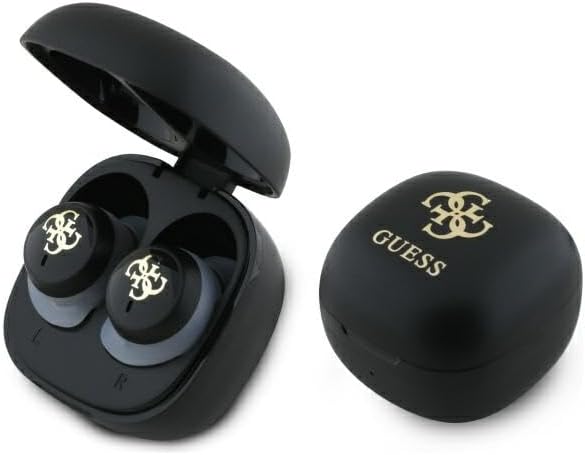
Image: The Guess Bluetooth Headphones, with one earbud pair inside the open charging case and the closed charging case next to it. Both items feature the Guess logo.

Image: A top-down view of the closed Guess charging case, prominently displaying the golden 4G Guess logo on its black surface.

Image: A front view of the Guess charging case, showing its sleek black design and the subtle indicator light below the lid.

Image: A bottom view of the Guess charging case, highlighting the USB-C charging port for convenient power input.

Image: A pair of Guess wireless earbuds, showcasing their black body, golden Guess logo, and translucent silicone ear tips.
Setup
Charging the Headphones and Case
Before first use, fully charge both the headphones and the charging case.
- Place the earbuds into the charging case. Ensure they are correctly seated.
- Connect the USB-C end of the charging cable to the charging port on the case (refer to Product Overview for port location).
- Connect the USB-A end of the charging cable to a compatible USB power adapter (not included) or a computer USB port.
- The indicator light on the case will show charging status. A full charge for the headphones takes approximately 1.5 hours. The case itself will take longer to fully charge.
Note: The charging case acts as a power bank for the earbuds, providing up to 24 hours of total playback time.
Pairing with a Bluetooth Device
The headphones use Bluetooth 5.3 for stable and fast connections.
- Ensure the headphones are charged and inside the charging case.
- Open the lid of the charging case. The headphones will automatically enter pairing mode.
- On your Bluetooth device (smartphone, tablet, computer), go to the Bluetooth settings.
- Search for available devices. You should see "Guess Headphones" or a similar name appear in the list.
- Select the headphones to connect. Once connected, a voice prompt or indicator light will confirm successful pairing.
- If pairing fails, close the case, wait a few seconds, and repeat the steps.
Tip: The headphones will automatically reconnect to the last paired device when taken out of the case, if Bluetooth is enabled on the device.
Operating Instructions
Wearing the Headphones
Choose the correct size of silicone ear tips for a comfortable and secure fit. Insert the earbuds into your ears and gently twist them until they feel snug.
Touch Controls
The headphones feature intuitive touch controls on each earbud.
| Action | Control |
|---|---|
| Play/Pause Music | Single tap on either earbud |
| Next Track | Double tap on the right earbud |
| Previous Track | Double tap on the left earbud |
| Answer/End Call | Single tap on either earbud |
| Reject Call | Press and hold either earbud for 2 seconds |
| Activate Voice Assistant | Triple tap on either earbud |
| Volume Up | Press and hold right earbud |
| Volume Down | Press and hold left earbud |
Power On/Off
- Power On: Open the charging case lid, or take the earbuds out of the case. They will power on automatically.
- Power Off: Place the earbuds back into the charging case and close the lid. They will power off automatically and begin charging.
Maintenance and Care
Proper care will ensure the longevity and optimal performance of your headphones.
- Cleaning: Use a soft, dry, lint-free cloth to clean the earbuds and charging case. Do not use harsh chemicals, cleaning solvents, or strong detergents.
- Water Resistance: The headphones are IPX5 water-resistant, meaning they are protected against sweat and splashes. Do not submerge them in water or expose them to heavy rain. Dry them thoroughly if they get wet.
- Storage: When not in use, store the headphones in their charging case to protect them and keep them charged. Store in a cool, dry place away from direct sunlight and extreme temperatures.
- Battery Care: To preserve battery life, avoid fully discharging the headphones and case frequently. Charge them regularly, even if not used for extended periods.
Troubleshooting
If you encounter issues with your headphones, refer to the following common solutions:
| Problem | Possible Solution |
|---|---|
| Headphones not pairing |
|
| Only one earbud working |
|
| No sound or low volume |
|
| Charging case not charging |
|
Specifications
| Feature | Detail |
|---|---|
| Headphone Type | In-ear |
| Bluetooth Version | 5.3 |
| Headphone Battery | 2 x 30 mAh |
| Charging Case Capacity | 250 mAh |
| Headphone Charging Time | 1.5 hours |
| Working Time (Music Playback) | Up to 6 hours (headphones only) |
| Total Playback Time (with case) | Up to 24 hours |
| Charging Port | USB-C |
| Water Resistance | IPX5 (sweat and splash proof) |
| Impedance | 32 ohms ± 15% |
| Built-in Microphone | Yes |
| Frequency Range | 2.402GHz-2.480GHz |
| Bluetooth Range | 10m |
| Model Number | GUTWSJ144ESK |
| Item Weight | 0.78 Grams |
| Colour | Black |
Warranty Information
This product is manufactured under license from the Guess brand. For specific warranty terms and conditions, please refer to the documentation included with your purchase or contact CG Mobile customer support. Typically, electronic products come with a limited manufacturer's warranty covering defects in materials and workmanship for a specified period from the date of purchase.
Please retain your proof of purchase for any warranty claims.
Support and Contact
If you require further assistance or have questions not covered in this manual, please contact CG Mobile customer support.
- Online Support: Visit the official CG Mobile website for FAQs, support articles, and contact forms.
- Brand Store: You can also visit the CG Mobile Store on Amazon for more product information and support options.


