
ist computers ThinkPad T16
Lenovo ThinkPad T16 Gen 3 Business Laptop User Manual
Model: ThinkPad T16
1. Product Overview
The Lenovo ThinkPad T16 Gen 3 is a robust and powerful 16-inch business laptop designed for high productivity and portability. It features an Intel Core Ultra 7 155U processor, 32GB DDR5 RAM, and a 1TB PCIe M.2 SSD, making it suitable for demanding business applications and AI-assisted tasks. This manual provides essential information for setting up, operating, maintaining, and troubleshooting your device.

Figure 1.1: Front view of the Lenovo ThinkPad T16 Gen 3 laptop, highlighting its AI PC capabilities and key specifications on the screen.

Figure 1.2: The Lenovo ThinkPad T16 Gen 3 laptop showcasing its sleek design and vibrant display.
2. Setup Guide
2.1 Unboxing and Initial Inspection
Carefully remove all components from the packaging. Verify that all items listed in the 'What's in the Box' section are present and undamaged.
- ThinkPad T16 Gen 3 Laptop
- AC Adapter with Power Cord
- User Manual (this document)
2.2 Powering On Your Laptop
- Connect the AC adapter to the laptop's power port and then to a power outlet.
- Open the laptop lid.
- Press the power button, typically located on the top right of the keyboard or side of the chassis.
- Follow the on-screen instructions to complete the initial Windows 11 Pro setup.
2.3 Connecting Peripherals
The ThinkPad T16 Gen 3 offers a variety of ports for connecting external devices:
- USB-A 3.2 Gen 1: For standard USB devices like mice, keyboards, and external drives.
- Thunderbolt 4: High-speed ports for data transfer, video output, and power delivery.
- HDMI 2.1: For connecting to external displays or projectors.
- Ethernet (RJ-45): For wired network connections.
- Headphone / microphone combo jack: For audio input and output.

Figure 2.1: Detailed view of the I/O ports on the Lenovo ThinkPad T16 Gen 3, including USB-A, Thunderbolt 4, HDMI, Ethernet, and the headphone/microphone combo jack.
3. Operating Your Laptop
3.1 Display Features
The laptop features a 16-inch WUXGA (1920 x 1200) IPS Anti-Glare display with 300 nits brightness and a 16:10 aspect ratio, providing a clear and comfortable viewing experience. It supports expansion to up to 3 external monitors via HDMI and Thunderbolt 4 ports, with a maximum supported resolution of 4K (3840x2160) @60Hz.

Figure 3.1: The 16-inch WUXGA display of the ThinkPad T16 Gen 3, highlighting its 16:10 aspect ratio, 85% screen-to-body ratio, 300 nits brightness, and IPS anti-glare features.
3.2 Wireless Connectivity
Stay connected with integrated Intel Wi-Fi 6E for fast and reliable wireless internet access and Bluetooth 5.3 for connecting wireless peripherals.

Figure 3.2: The ThinkPad T16 Gen 3's advanced wireless capabilities, including Wi-Fi 6E and Bluetooth 5.3, ensuring seamless connectivity.
3.3 Security Features
The laptop includes a Fingerprint Reader for secure login and a 5MP Webcam with a Privacy Shutter for enhanced privacy during video calls.

Figure 3.3: The ThinkPad T16 Gen 3 in use during a video conference, demonstrating its webcam and audio capabilities for remote collaboration.
3.4 Operating System
The laptop comes pre-installed with Windows 11 Pro 64-bit, featuring AI-powered Copilot for intelligent assistance across various tasks.
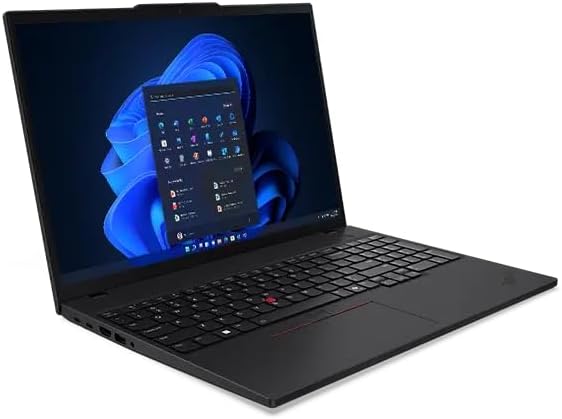
Figure 3.4: The ThinkPad T16 Gen 3 running Windows 11 Pro, showcasing the modern user interface.
4. Maintenance and Care
4.1 Cleaning Your Laptop
- Use a soft, lint-free cloth slightly dampened with water or a screen cleaner to clean the display.
- For the keyboard and chassis, use a soft cloth. Avoid harsh chemicals or abrasive materials.
- Ensure the laptop is powered off and unplugged before cleaning.
4.2 Software Updates
Regularly update your Windows operating system and drivers to ensure optimal performance and security. You can check for updates through Windows Update settings.
4.3 Battery Care
- Avoid fully discharging the battery frequently.
- Store the laptop in a cool, dry place when not in use for extended periods.
- If storing for a long time, ensure the battery is charged to about 50%.
5. Troubleshooting
This section addresses common issues you might encounter with your ThinkPad T16 Gen 3 laptop.
| Problem | Possible Cause | Solution |
|---|---|---|
| Laptop does not power on | No power, discharged battery, hardware issue | Ensure AC adapter is properly connected and power outlet is working. Charge battery for at least 30 minutes. If issue persists, contact support. |
| No display on screen | Screen brightness too low, external monitor connected, display driver issue | Increase brightness using keyboard shortcuts. Disconnect external monitors. Restart laptop. Update display drivers. |
| Wi-Fi connection issues | Wi-Fi disabled, driver issue, router problem | Ensure Wi-Fi is enabled in Windows settings. Restart router. Update Wi-Fi drivers. |
| Slow performance | Too many applications open, low disk space, malware | Close unnecessary applications. Free up disk space. Run a malware scan. Check for Windows updates. |

Figure 5.1: The ThinkPad T16 Gen 3 has passed 12 rigorous tests, ensuring its durability and reliability under various conditions.
6. Specifications
Detailed technical specifications for the Lenovo ThinkPad T16 Gen 3 Business Laptop:
| Feature | Specification |
|---|---|
| Standing Screen Display Size | 16 Inches |
| Screen Resolution | 1920 x 1200 pixels (WUXGA) |
| Max Screen Resolution | 1920x1200 Pixels |
| Processor | Intel Core Ultra 7 155U (12 Cores, 14 Threads, 12 MB Cache, Max Turbo up to 4.8GHz) |
| RAM | 32 GB DDR5-4800MHz |
| Hard Drive | 1 TB PCIe M.2 SSD |
| Graphics Coprocessor | Integrated Intel Graphics |
| Wireless Type | 802.11ax (Wi-Fi 6E), Bluetooth 5.3 |
| Operating System | Windows 11 Pro |
| Item Weight | 3.9 pounds |
| Product Dimensions | 14.15 x 9.85 x 0.77 inches |
| Color | Black |
| Special Features | Anti Glare Coating, Backlit Keyboard, Fingerprint Reader, Numeric Keypad, Spill Resistant |
7. Warranty and Support
Your Lenovo ThinkPad T16 Gen 3 laptop comes with comprehensive warranty coverage:
- Upgraded Memory/SSD Warranty: Three-year warranty from Issaquah Highlands Tech.
- Remaining Components Warranty: Three-year warranty from Lenovo.
For technical assistance or warranty claims, please refer to the contact information provided by Issaquah Highlands Tech or Lenovo's official support channels.
Related documentsThinkPad T16


Ask a question about this manual
Ask about setup, troubleshooting, compatibility, parts, safety, or missing instructions. Manuals+ will review the question and use this page’s manual context to help answer it.