
bella PRO 90222
bella-PRO 4-qt. TriZone Touchscreen Air Fryer
User Manual
This manual provides essential information for the safe and efficient operation, maintenance, and troubleshooting of your bella-PRO TriZone Touchscreen Air Fryer.
Product Overview
The bella-PRO 4-qt. TriZone Touchscreen Air Fryer with Dual Flex Basket is designed for versatile cooking, allowing you to prepare single large meals or two different dishes simultaneously. Its advanced features ensure efficient and convenient meal preparation.

Image: The bella-PRO TriZone Touchscreen Air Fryer, showcasing its sleek design and the dual flex basket filled with cooked green beans and potato wedges, demonstrating its ability to cook two different items simultaneously.
Key Features:
- 4-quart capacity with removable divider: Accommodates meals for up to 4 people, with the flexibility to cook two separate dishes or one large item.
- Dual cooking zones: Features two independent cavities, each with its own cooking basket, cyclonic fan, and rapid heater for precise control.
- Fast heat up, even cooking: Equipped with 1800 watts of power for quick preheating and an adjustable temperature range of 90-450°F.
- 6 built-in cooking programs: Includes Air Fry, Broil, Roast, Bake, Reheat, and Dehydrate functions for diverse culinary needs.
- Smart Sync function: Automatically synchronizes cooking times for different foods, ensuring both dishes finish simultaneously.
- User-friendly digital touchscreen: Provides an intuitive interface for easy operation and program selection.
- EverGood Ceramic Nonstick Coating: Baskets and trays feature a nonstick coating made without PFAS, PFOA, PTFE, Lead, and Cadmium for healthier cooking.
- Easy to clean: Removable ceramic nonstick basket, divider, and crisping trays are dishwasher-safe for convenient cleanup.
Setup and First Use
- Unpacking: Carefully remove the air fryer and all accessories from the packaging. Retain packaging for future storage or transport.
- Initial Cleaning: Before first use, wash the removable basket, divider, and crisping trays with warm, soapy water. Rinse thoroughly and dry completely. Wipe the exterior of the main unit with a damp cloth. Do not immerse the main unit in water.
- Placement: Place the air fryer on a stable, heat-resistant surface, ensuring adequate air circulation around the unit. Keep it at least 6 inches away from walls or other appliances.
- Power Connection: Ensure the voltage of your power outlet matches the air fryer's requirements (120V). Plug the power cord into a grounded electrical outlet.
- Preheating (Optional): For the first use, it is recommended to run the air fryer empty for about 10-15 minutes at 350°F (175°C) to eliminate any manufacturing odors. Ensure the area is well-ventilated during this process.
Operating Instructions
Control Panel Overview:
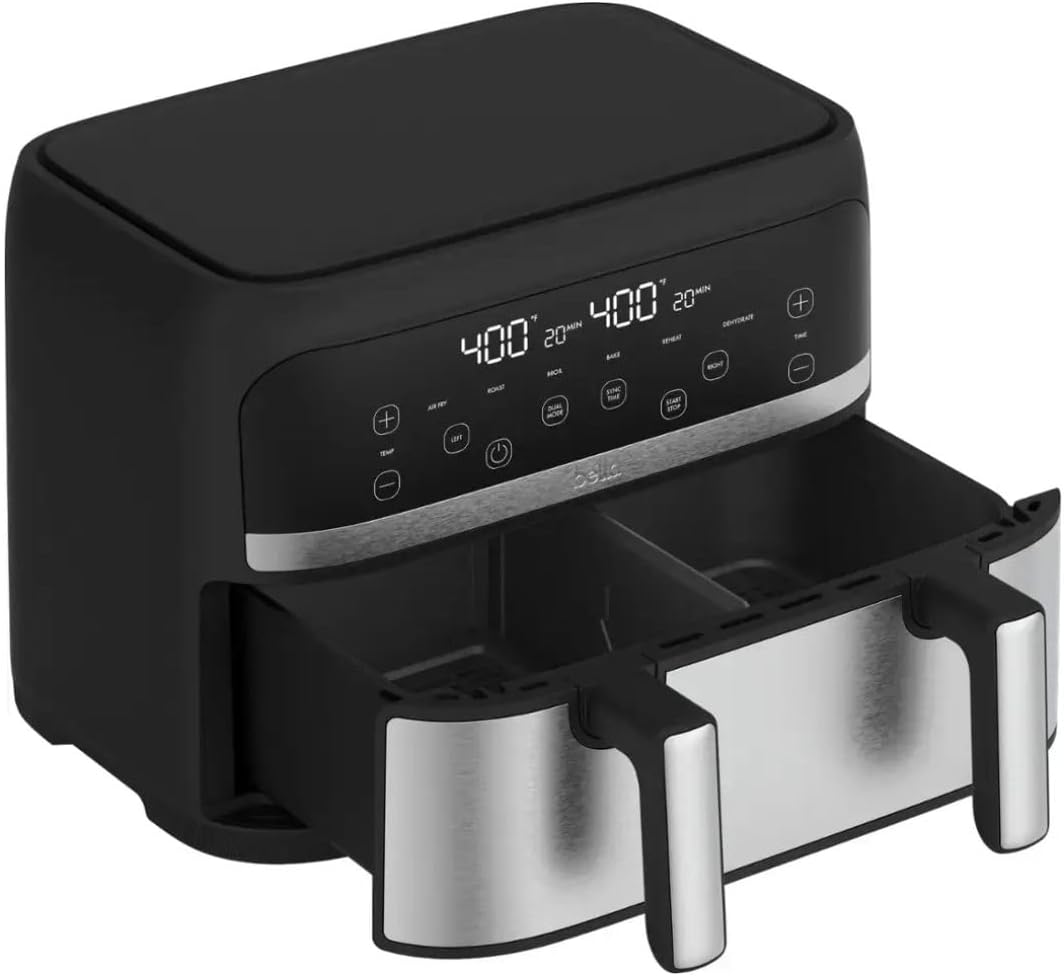
Image: Close-up view of the bella-PRO TriZone Air Fryer's digital touchscreen control panel, showing temperature and time displays for both left and right zones, along with function buttons.
The digital touchscreen allows for easy selection of cooking functions, temperature, and time. The display shows settings for both the Left and Right cooking zones.
Basic Operation:
- Prepare Food: Place your food into the air fryer basket(s). If cooking two different items, use the removable divider to separate the basket into two compartments.
- Insert Basket: Slide the basket(s) firmly into the main unit until they click into place.
- Power On: Press the Power button (⏻) to turn on the unit.
- Select Cooking Function: Choose from the 6 built-in programs: Air Fry, Roast, Broil, Bake, Reheat, or Dehydrate. You can select different functions for the Left and Right zones using the respective zone buttons.
- Adjust Temperature and Time: Use the + and - buttons to set the desired temperature (90-450°F) and cooking time for each zone.
- Dual Mode (for identical settings): If cooking two identical items with the same settings, press the "DUAL MODE" button to mirror the settings from one zone to the other.
- Smart Sync (for different finish times): If cooking two different items that need to finish at the same time, use the "SYNC TIME" function. Set the desired cooking time and temperature for each zone, and the air fryer will automatically adjust the start times so both finish together.
- Start Cooking: Press the "START/STOP" button to begin the cooking process.
- Monitoring: You can pull out the basket(s) at any time to check or shake food. The air fryer will pause and resume cooking once the basket is reinserted.
- End of Cooking: The air fryer will beep when cooking is complete. Carefully remove the basket(s) using the handles.

Image: A hand demonstrating the placement of the removable divider into the air fryer basket, illustrating how to create two separate cooking zones.

Image: A finger interacting with the digital touchscreen of the air fryer, highlighting the ease of selecting cooking functions and adjusting settings.

Image: The air fryer with its dual baskets pulled out, showcasing green beans with bacon in one compartment and seasoned potato wedges in the other, illustrating the dual cooking capability.

Image: The air fryer with its single large basket pulled out, containing a perfectly roasted whole chicken surrounded by vegetables, demonstrating its capacity for larger meals when the divider is removed.
Care and Maintenance
Proper cleaning and maintenance will extend the life of your bella-PRO Air Fryer and ensure optimal performance.
- Unplug Before Cleaning: Always unplug the air fryer from the power outlet and allow it to cool completely before cleaning.
- Basket and Trays: The removable ceramic nonstick basket, divider, and crisping trays are dishwasher-safe. For manual cleaning, wash with warm, soapy water using a non-abrasive sponge. Avoid metal utensils or harsh abrasive cleaners that can damage the nonstick coating.
- Exterior: Wipe the exterior of the air fryer with a damp cloth. Do not use abrasive cleaners or scourers.
- Interior: If the interior of the main unit needs cleaning, wipe it with a damp cloth. For stubborn residue, use a mild detergent on the cloth. Ensure the interior is completely dry before next use.
- Storage: Store the air fryer in a cool, dry place when not in use. Ensure all parts are clean and dry before storing.
Troubleshooting
If you encounter any issues with your air fryer, please refer to the following common problems and solutions:
| Problem | Possible Cause | Solution |
|---|---|---|
| Air fryer does not turn on. | Not plugged in; power outlet issue; unit not properly assembled. | Ensure the power cord is securely plugged into a working outlet. Check if the basket(s) are fully inserted. |
| Food is not cooked evenly. | Overcrowding the basket; insufficient shaking/flipping. | Do not overcrowd the basket; cook in smaller batches if necessary. Shake or flip food halfway through cooking for even results. |
| White smoke coming from the unit. | Grease residue from previous use; high-fat food cooking. | Clean the basket and crisping tray thoroughly after each use. For high-fat foods, drain excess fat during cooking. |
| Air fryer smells like plastic on first use. | New unit burning off manufacturing residue. | This is normal for first use. Run the air fryer empty for 10-15 minutes in a well-ventilated area. The smell should dissipate. |
Technical Specifications
| Feature | Specification |
|---|---|
| Model Name | TriZone Touchscreen Air Fryer |
| Model Number | 90222 |
| Capacity | 4 Quarts |
| Output Wattage | 1800 Watts |
| Voltage | 120 Volts |
| Temperature Range | 90-450°F |
| Control Method | Touchscreen |
| Material | Stainless Steel (exterior), Ceramic (inner coating) |
| Product Dimensions (DxWxH) | 10.94"D x 13.3"W x 9.96"H |
| Item Weight | 11.02 Pounds |
| Dishwasher Safe Parts | Removable basket, divider, crisping trays |
Warranty Information
For specific warranty details, including coverage period and terms, please refer to the warranty card included with your product or visit the official bella PRO website. Keep your purchase receipt as proof of purchase for any warranty claims.
Customer Support
If you have any questions, require assistance, or need to report an issue with your bella-PRO TriZone Touchscreen Air Fryer, please contact customer support through the manufacturer's official channels. Contact information can typically be found on the product packaging or the official bella PRO website.
For online resources and FAQs, please visit the manufacturer's support page.
Related documents90222

Ask a question about this manual
Ask about setup, troubleshooting, compatibility, parts, safety, or missing instructions. Manuals+ will review the question and use this page’s manual context to help answer it.