
1. Introduction
This manual provides detailed instructions for the installation, operation, and maintenance of your DOITOOL Ultrasonic Water Level Sensor Tank Gauge Liquid Level Meter. This device is designed to monitor water levels and temperatures in outdoor tanks from the comfort of your indoor living space, offering a transmission range of up to 100 meters in open fields.
2. Product Features
- Indoor temperature display (°C/°F)
- Tank temperature display (°C/°F)
- Water level displayed on a 10-bar graph
- Records minimum and maximum indoor and tank temperatures
- Adjustable tank level alarm modes (high/low)
- Tank empty alert function
- Time display (12/24hr format)
- Time alarm mode
- Tank level updated every 30 seconds or 3 minutes
- Transmission range: 100m (open field)
- Tank level/depth measurement range: 0.5m to 15m
- Minimum air gap requirement: 0.5m
- Receiver unit can be wall-mounted or placed on a surface using its stand
3. Package Contents
- 1 x Liquid Level Meter Receiver Unit
- 1 x Ultrasonic Transmitter Unit
- User Manual (this document)
Note: Batteries are not included. The receiver unit typically requires 2x AA batteries, and the transmitter unit requires 6x AAA batteries.
4. Specifications
| Specification | Value |
|---|---|
| Receiver Unit Dimensions | 4.13"L x 3.66"W x 0.98"H (10.5 x 9.3 x 2.5 cm) |
| Receiver Unit Weight | 8 ounces |
| Material | Plastic |
| Tank Level/Depth Range | 0.5m to 15m |
| Minimum Air Gap | 0.5m |
| Transmission Range | 100m (open field) |
| Power (Receiver) | Batteries (Not Included) |
| Power (Transmitter) | Batteries (Not Included) |
5. Setup and Installation
5.1 Battery Installation
Before installation, insert the required batteries into both the receiver and transmitter units. Ensure correct polarity.

Image: Rear view of the receiver unit, showing the battery compartment with the cover removed. This is where the receiver unit's batteries are inserted.
5.2 Transmitter Unit Installation
The transmitter unit is installed at the top of your water tank. Follow these guidelines for optimal performance:
- Antenna: Ensure the antenna is positioned for clear signal transmission.
- Balance Bubble: Use the integrated balance bubble to ensure the transmitter is level for accurate readings.
- Mounting: Secure the transmitter using screws through the designated bracket.
- Sensor Placement: The ultrasonic sensor should have a clear path to the water surface. Ensure there is a minimum air gap of 0.5 meters (H1 height) between the sensor and the maximum water level.
- Tank Opening: The tank opening for the sensor should be at least 20cm in diameter (Ø > 20CM) to prevent interference from tank walls.
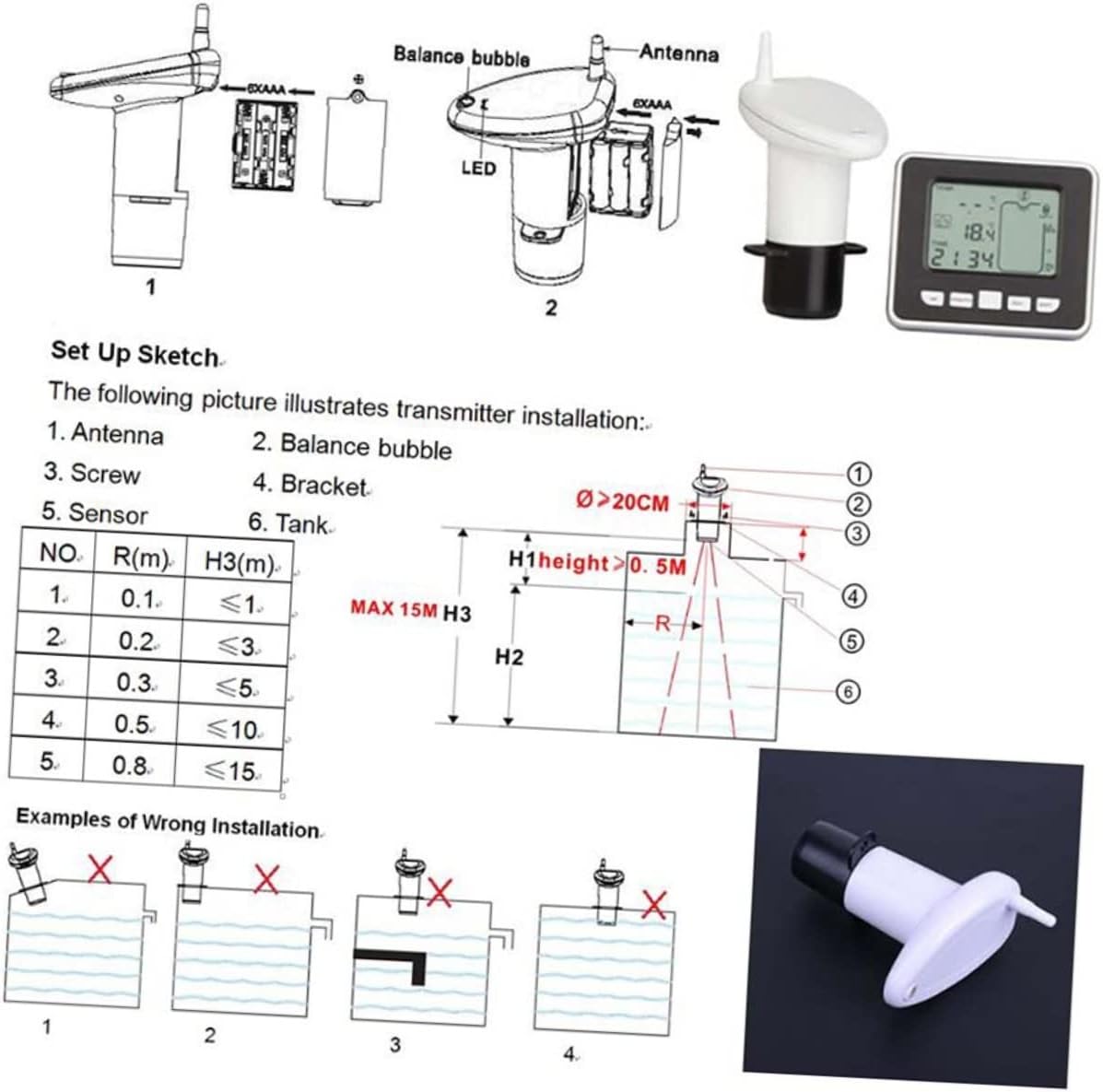
Image: A detailed diagram illustrating the components of the transmitter unit (antenna, balance bubble, sensor), a setup sketch for proper installation on a tank, and visual examples of incorrect installation methods to avoid.
5.3 Receiver Unit Placement
The receiver unit can be placed indoors. It features a stand for desktop use or can be mounted on a wall using the integrated hooks. Position it in a location where the signal from the transmitter is strong and clear.
6. Operating Instructions
The receiver unit displays various information on its screen, including indoor temperature, tank temperature, water level, and time. It features several buttons for configuration and viewing data.

Image: The front of the receiver unit, showing the digital display and control buttons: 'set', '+/max/min', '-/tank', and 'alarm'.
6.1 Display Overview
- T.ANK: Displays the water level in the tank, often represented by a 10-bar graph and a percentage.
- °C/°F: Indicates temperature units.
- Indoor Temperature: Shows the ambient temperature where the receiver is located.
- Tank Temperature: Shows the temperature of the water in the tank.
- TIME: Displays the current time.
6.2 Button Functions
- SET: Used to enter settings mode for time, alarms, and units. Press to cycle through settings.
- +/MAX/MIN: In normal mode, press to view maximum and minimum recorded temperatures. In settings mode, use to increase values.
- -/TANK: In normal mode, press to switch between tank level display units (meters/feet). In settings mode, use to decrease values.
- ALARM: Used to set or activate/deactivate various alarms (e.g., high/low water level, empty tank).
6.3 Setting Time and Alarms
- Press the SET button to enter time setting mode. Use + or - to adjust hours and minutes. Press SET again to confirm.
- To set water level alarms, press the ALARM button. Use + or - to adjust the high or low water level thresholds. Press ALARM again to confirm and activate.
- An audible alarm will sound when a set condition (e.g., tank empty, high/low level) is met.
7. Maintenance
- Cleaning: Wipe both units with a soft, dry cloth. Do not use abrasive cleaners or immerse units in water.
- Battery Replacement: Replace batteries in both units when the low battery indicator appears on the receiver display. Ensure to use fresh batteries of the correct type and size.
- Transmitter Check: Periodically check the transmitter unit for any obstructions or debris that might interfere with the ultrasonic sensor's operation. Ensure it remains level.
8. Troubleshooting
- No Reading on Receiver:
- Check batteries in both units and replace if necessary.
- Ensure both units are within the 100m transmission range and there are no significant obstructions.
- Verify the transmitter is correctly installed and level.
- Inaccurate Water Level:
- Confirm the transmitter is level and the sensor has a clear path to the water.
- Ensure the minimum air gap of 0.5m is maintained.
- Check for debris or buildup on the sensor.
- Temperature Readings Incorrect:
- Ensure the units are not exposed to direct sunlight or extreme heat sources that could affect readings.
9. Safety Information
- Do not attempt to disassemble or repair the device yourself. Refer to qualified personnel for service.
- Keep the device away from extreme temperatures, direct sunlight, and moisture.
- Dispose of batteries according to local regulations. Do not mix old and new batteries or different types of batteries.
- This device is not a toy. Keep out of reach of children.
10. Warranty and Support
For warranty information and technical support, please refer to the retailer where you purchased the product or visit the official DOITOOL brand website. Keep your proof of purchase for warranty claims.
You can find more information about DOITOOL products at the DOITOOL Store.