
Introduction
Thank you for choosing the T'nB Bounce Max Wireless Headphones. These over-ear headphones are designed to provide an immersive audio experience with superior comfort and convenience. Featuring Bluetooth connectivity, integrated microphone, and long-lasting battery life, the Bounce Max is perfect for enjoying your music and managing calls on the go.
This manual provides detailed instructions on how to set up, operate, and maintain your headphones to ensure optimal performance and longevity.

Image: T'nB Bounce Max Wireless Headphones in silver. These over-ear headphones feature a sleek metallic silver finish on the earcups and a light grey headband and ear cushions, designed for comfort and style.
Safety Information
Please read all safety warnings and instructions carefully before using this product to prevent injury or damage.
- Hearing Protection: Avoid listening at high volume levels for extended periods to prevent hearing damage.
- Driving Safety: Do not use headphones while driving or cycling, or in any situation where your inability to hear ambient sounds could pose a danger to yourself or others.
- Water and Moisture: Keep the headphones away from water and excessive moisture. Do not immerse them in liquid.
- Cleaning: Use a soft, dry cloth for cleaning. Do not use harsh chemicals or abrasive materials.
- Temperature: Do not expose the headphones to extreme temperatures (hot or cold).
- Disassembly: Do not attempt to disassemble, repair, or modify the headphones. This will void the warranty.
- Battery: The headphones contain a rechargeable battery. Do not expose the battery to excessive heat or dispose of it in fire. Recycle responsibly.
Package Contents
Please check the package contents upon opening to ensure all items are present:
- T'nB Bounce Max Wireless Headphones
- USB-C Charging Cable
- 3.5mm Audio Cable (Jack Cable)
- User Manual (this document)

Image: Front of the T'nB Bounce Max headphone packaging. The box prominently displays the headphones, brand logo, and "BOUNCE MAX" text, indicating key features like Bluetooth and 50H max playing time.
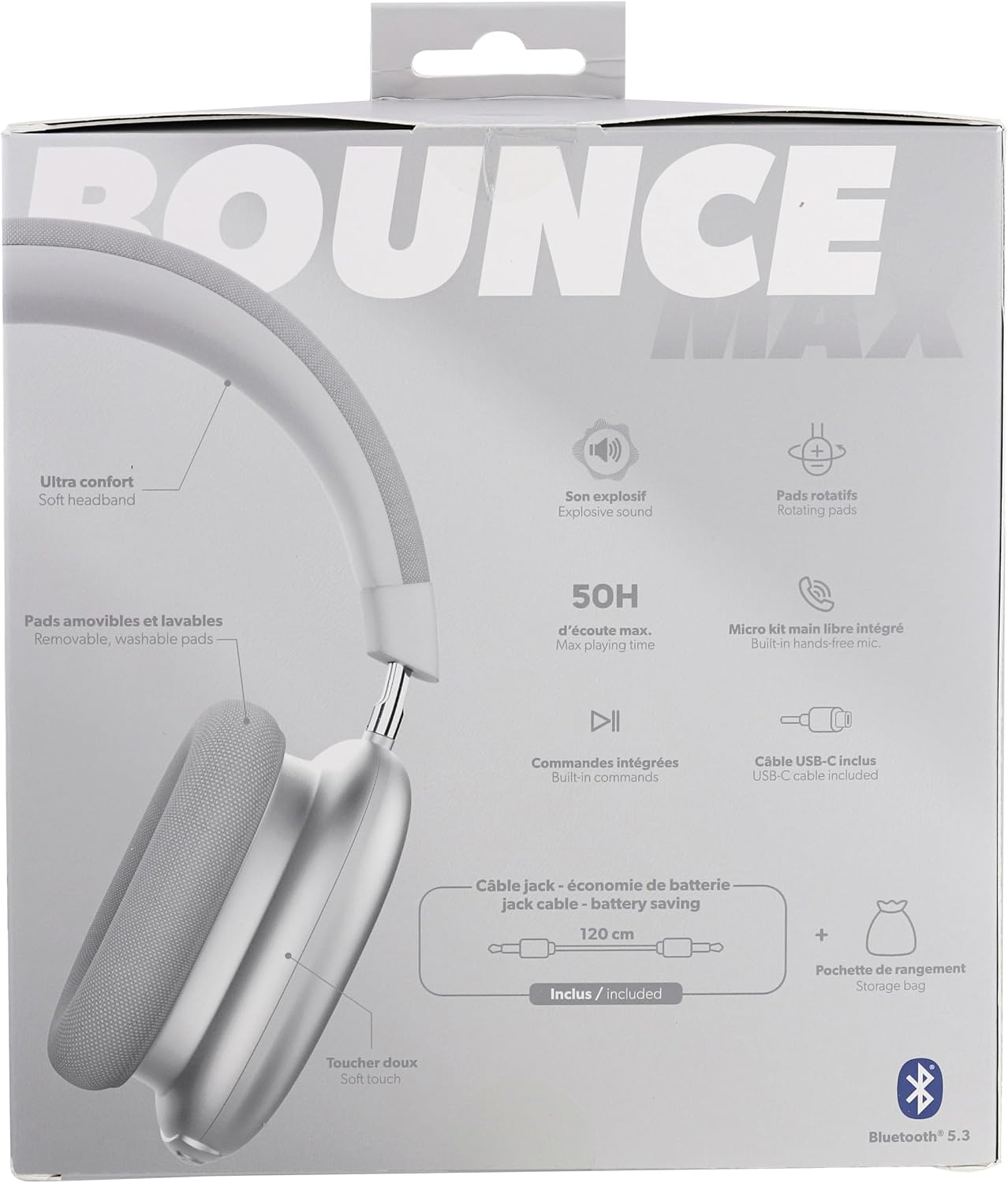
Image: Back of the T'nB Bounce Max headphone packaging. This view highlights features such as ultra comfort, removable and washable pads, explosive sound, rotating pads, 50H max playing time, built-in hands-free mic, built-in commands, USB-C cable included, and a 3.5mm jack cable for battery saving.
Product Overview
Familiarize yourself with the different parts of your T'nB Bounce Max headphones:
- Earcups: Over-ear design for passive noise reduction and comfort.
- Ear Pads: Removable and washable fabric ear pads.
- Headband: Adjustable and soft headband for ultra comfort.
- Control Buttons: Located on the earcup for managing music and calls. (Specific button functions detailed in Operating Instructions)
- Microphone: Integrated for hands-free calls.
- USB-C Port: For charging the headphones.
- 3.5mm Audio Jack: For wired connection.

Image: Front view of the T'nB Bounce Max headphones. This image clearly shows the large, comfortable earcups and the padded headband, emphasizing the over-ear design.

Image: Top view of the T'nB Bounce Max headphones. This perspective highlights the design of the headband and how the earcups are attached, providing a sense of their overall structure.
Setup
1. Charging the Headphones
Before first use, fully charge your headphones. A full charge provides up to 50 hours of playback time.
- Connect the small end of the USB-C charging cable to the USB-C port on the headphone earcup.
- Connect the large end of the USB-C cable to a USB power adapter (not included) or a computer's USB port.
- The LED indicator on the headphones will show charging status (e.g., red for charging, blue for fully charged).
2. Powering On/Off
- To Power On: Press and hold the Power button (usually the multi-function button) for approximately 3 seconds until the LED indicator lights up and you hear an audible prompt.
- To Power Off: Press and hold the Power button for approximately 5 seconds until the LED indicator turns off and you hear an audible prompt.
3. Bluetooth Pairing
Pair your headphones with your Bluetooth-enabled device (smartphone, tablet, computer).
- Ensure the headphones are powered off.
- Press and hold the Power button for about 5-7 seconds until the LED indicator flashes red and blue alternately, indicating pairing mode.
- On your device, go to Bluetooth settings and enable Bluetooth.
- Search for available devices. Select "T'nB Bounce Max" from the list.
- Once paired, the LED indicator will turn solid blue, and you will hear a confirmation sound.
- If prompted for a password, enter "0000".
Note: The headphones will automatically attempt to reconnect to the last paired device when powered on.
4. Wired Connection (3.5mm Audio Cable)
You can use the headphones in wired mode, which conserves battery life or allows use when the battery is depleted.
- Connect one end of the included 3.5mm audio cable to the 3.5mm audio jack on the headphone earcup.
- Connect the other end of the cable to the audio output jack of your device (e.g., smartphone, MP3 player, computer).
- In wired mode, the headphone's battery is not used, and some control functions on the headphones may be disabled (e.g., volume control, track skipping via headphone buttons).
Operating Instructions
The T'nB Bounce Max headphones feature intuitive controls for managing your audio and calls.
Music Playback Controls
| Function | Action |
|---|---|
| Play/Pause | Press the Multi-function button once. |
| Next Track | Long press the "+" button. |
| Previous Track | Long press the "-" button. |
| Volume Up | Short press the "+" button. |
| Volume Down | Short press the "-" button. |
Call Management
| Function | Action |
|---|---|
| Answer/End Call | Press the Multi-function button once. |
| Reject Call | Press and hold the Multi-function button for 2 seconds. |
| Redial Last Number | Double-press the Multi-function button. |
Maintenance
Proper maintenance will extend the life of your T'nB Bounce Max headphones.
- Cleaning Ear Pads: The fabric ear pads are removable and washable. Gently detach them from the earcups. Hand wash with mild soap and water, then air dry completely before reattaching.
- Cleaning Headphones Body: Wipe the headphones with a soft, dry, lint-free cloth. Do not use abrasive cleaners, solvents, or spray directly onto the headphones.
- Storage: When not in use, store the headphones in a cool, dry place, away from direct sunlight and extreme temperatures.
- Battery Care: To preserve battery life, charge the headphones at least once every three months if not used regularly.
Troubleshooting
If you encounter issues with your headphones, refer to the following common problems and solutions:
| Problem | Solution |
|---|---|
| Headphones do not power on. | Ensure the headphones are charged. Connect them to a power source using the USB-C cable. |
| Cannot pair with Bluetooth device. |
|
| No sound or low volume. |
|
| Sound is distorted or cuts out. |
|
| Microphone not working. |
|
Specifications
| Feature | Detail |
|---|---|
| Model Name | CBBOUNCE2SL |
| Connectivity Technology | Wireless (Bluetooth) / Wired (3.5mm Jack) |
| Form Factor | Over-Ear (Circum-aural) |
| Color | Silver |
| Frequency Response | 20 - 20000 Hz |
| Sensitivity | 102 dB |
| Battery Life | Up to 50 hours (Wireless) |
| Microphone | Integrated |
| Ear Pads | Removable and Washable Fabric |
| Included Components | Headphones, USB-C Charging Cable, 3.5mm Audio Cable |
Warranty and Support
T'nB products are designed and manufactured to the highest quality standards. For information regarding warranty coverage, technical support, or service, please refer to the warranty card included in your product packaging or visit the official T'nB website.
Official T'nB Website: www.tnb.com
Please have your model number (CBBOUNCE2SL) and proof of purchase ready when contacting support.