
1. Important Safety Information
Please read and understand all safety instructions before operating the Tornado Marathon 1200 carpet extractor. Failure to follow these instructions may result in electric shock, fire, or serious injury.
- Electrical Safety: Always connect the machine to a properly grounded outlet. Do not use with damaged cords or plugs. Keep the power cord away from heated surfaces and sharp edges. Disconnect power before performing any maintenance or cleaning.
- Chemical Handling: Use only recommended cleaning solutions. Wear appropriate personal protective equipment (PPE) such as gloves and eye protection when handling chemicals. Refer to the Safety Data Sheet (SDS) for all cleaning agents used.
- Operation: Do not operate the machine in areas with flammable liquids or gases. Keep hands, feet, and loose clothing away from moving parts. Ensure all covers and guards are in place before operation.
- Storage: Store the machine in a dry, indoor area. Do not expose to freezing temperatures.
2. Product Overview and Components
The Tornado Marathon 1200 is a self-contained carpet extractor designed for efficient cleaning of carpeted surfaces. It features separate tanks for clean solution and dirty recovery, a powerful vacuum motor, and a brush system for deep cleaning.

Figure 2.1: General view of the Tornado Marathon 1200 carpet extractor.
Key Components:
- Solution Tank: Holds clean water and cleaning solution.
- Recovery Tank: Collects dirty water extracted from the carpet.
- Vacuum Motor: Provides suction for water extraction.
- Brush Assembly: Agitates carpet fibers for effective cleaning.
- Spray Nozzle: Applies cleaning solution to the carpet.
- Control Panel: Contains power switches and operational controls.
- Power Cord: 50-foot cord for extended reach.
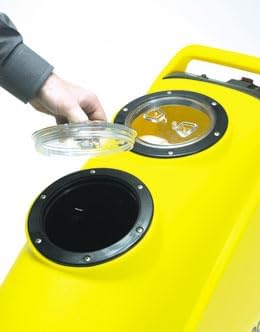
Figure 2.2: Accessing the solution or recovery tank via the top opening.
3. Setup Instructions
- Unpacking: Carefully remove the extractor from its packaging. Inspect for any shipping damage. Report any damage to your supplier immediately.
- Positioning: Place the machine on a flat, stable surface.
- Fill Solution Tank: Open the solution tank cap (refer to Figure 2.2). Fill the tank with clean water and the recommended carpet cleaning solution according to the manufacturer's instructions. Do not overfill. Securely close the cap.
- Connect Power: Plug the 50-foot power cord into a grounded electrical outlet. Ensure the outlet matches the voltage requirements of the machine.
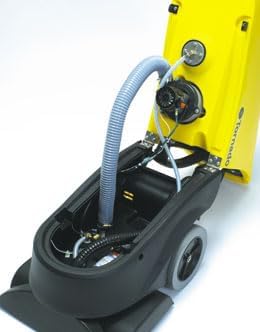
Figure 3.1: Internal components of the extractor (for reference, not user-serviceable).
4. Operating Instructions
4.1 Pre-Operation Checklist
- Ensure solution tank is filled.
- Check recovery tank is empty.
- Verify power cord is securely plugged in.
- Pre-vacuum the area to remove loose dirt and debris.
4.2 Cleaning Procedure
- Turn on the vacuum motor switch.
- Turn on the pump/spray switch.
- Push the machine forward slowly, allowing the spray nozzle to apply solution and the brush to agitate the carpet.
- Pull the machine backward over the same path, allowing the vacuum to extract the dirty solution. Overlap passes slightly to ensure complete coverage.
- For heavily soiled areas, repeat the process or allow the solution to dwell for a few minutes before extraction.
- Monitor the recovery tank. When it is full, the vacuum suction will decrease. Turn off the machine and empty the recovery tank.
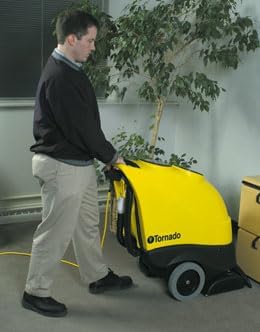
Figure 4.1: Operator using the Tornado Marathon 1200 carpet extractor.
5. Maintenance
Regular maintenance ensures optimal performance and extends the life of your carpet extractor.
5.1 After Each Use
- Empty and Rinse Tanks: Empty both the solution and recovery tanks. Rinse them thoroughly with clean water to prevent residue buildup and odors.
- Clean Filters: Check and clean any filters (e.g., vacuum motor filter, solution line filter) as per the machine's specific design.
- Wipe Down Machine: Wipe the exterior of the machine with a damp cloth to remove any dirt or chemical residue.
- Check Brush: Inspect the brush for tangled hair or debris. Remove any obstructions.
5.2 Periodic Maintenance
- Inspect Hoses and Cords: Regularly check all hoses for cracks or leaks and the power cord for damage. Replace if necessary.
- Nozzle Cleaning: If spray becomes uneven, clean the spray nozzle to remove any blockages.
- Professional Servicing: For internal components or complex issues, consult a qualified service technician.
6. Troubleshooting
Refer to the table below for common issues and their solutions.
| Problem | Possible Cause | Solution |
|---|---|---|
| Machine does not turn on | No power to outlet; Power cord damaged; Switch off | Check outlet and circuit breaker; Inspect power cord; Ensure all switches are in the 'ON' position |
| No spray from nozzle | Solution tank empty; Pump switch off; Nozzle clogged; Solution line blocked | Fill solution tank; Turn on pump switch; Clean nozzle; Check solution line for kinks or blockages |
| Poor vacuum suction | Recovery tank full; Recovery tank lid not sealed; Vacuum hose clogged; Vacuum motor filter dirty | Empty recovery tank; Ensure lid is properly sealed; Clear vacuum hose; Clean vacuum motor filter |
| Brush not rotating | Brush motor switch off; Debris tangled in brush; Drive belt broken | Turn on brush motor switch; Remove debris; Contact service for belt replacement |
7. Specifications
- Model: Tornado Marathon 1200
- Model Number: 98168
- Brand: Tornado
- Solution Tank Capacity: 12 Gallons
- Recovery Tank Capacity: 12 Gallons
- Vacuum Motor: 2 HP
- Brush Width: 17 inches
- Power Cord Length: 50 feet
- UPC: 098612583509
- ASIN: B0DVJ7CSMB
8. Warranty and Support
For warranty information, technical support, or to order replacement parts, please contact Tornado customer service. Keep your purchase receipt and model number (98168) available when contacting support.
Contact details can typically be found on the manufacturer's official website or on the product packaging.


