
Mova Mova 600 Kit
Mova 600 Robotic Lawnmower User Manual
Model: Mova 600 Kit
1. Introduction
The Mova 600 Robotic Lawnmower is designed to provide efficient and autonomous lawn care for areas up to 600 m². Featuring advanced UltraView™ environmental detection technology and wireless installation, it simplifies the process of maintaining a pristine lawn. This manual provides essential information for the safe and effective use of your Mova 600.
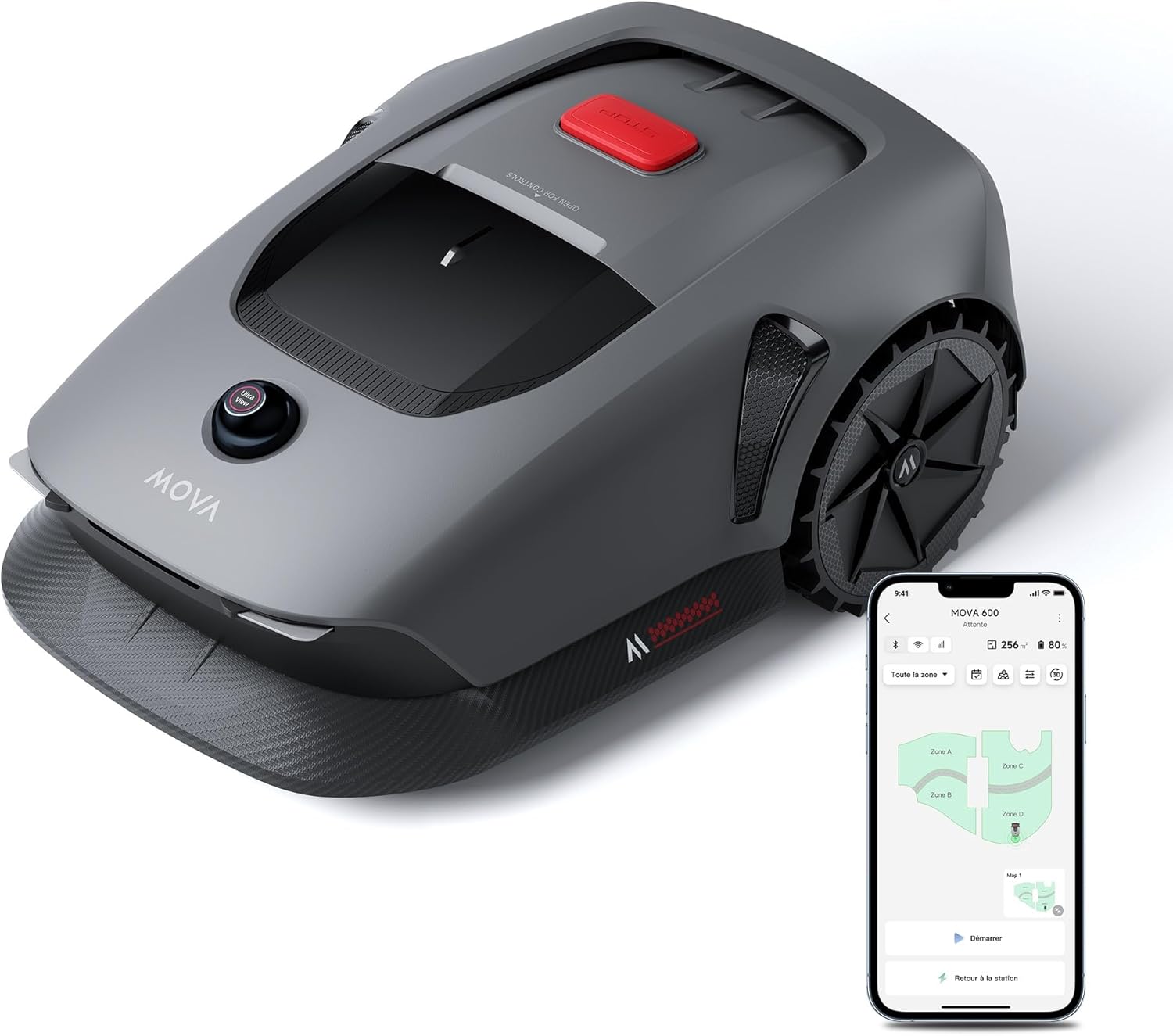
Figure 1.1: Mova 600 Robotic Lawnmower and companion app.
2. Safety Information
Always prioritize safety when operating the Mova 600. Read and understand all instructions before use. Failure to follow these instructions may result in injury or damage.
General Safety Guidelines:
- Keep hands and feet away from the cutting blades.
- Do not operate the lawnmower when people, especially children, or pets are in the vicinity.
- Ensure the lawnmower is turned off and disconnected from power before performing any maintenance or cleaning.
- Do not tamper with safety features.
- Only use original Mova replacement parts and accessories.
- The Mova 600 features intelligent obstacle avoidance. However, always clear the mowing area of large objects, toys, and debris before operation.
- The device is equipped with security alerts. If the lawnmower is lifted during operation, an alarm will sound, and the app will send notifications to prevent theft.

Figure 2.1: Intelligent obstacle avoidance in action.
3. Package Contents
Verify that all items listed below are included in your Mova 600 Kit package:
- 1 x Mova 600 Robotic Lawnmower
- 1 x Charging Station
- 1 x Cleaning Brush
- 8 x Screws
- 1 x Hex Key
- 1 x Power Adapter
- 1 x Non-lint Cloth
- 1 x User Manual
- 1 x Quick Start Guide
- 1 x Replacement Blade Kit (81 blades and bolts)

Figure 3.1: Contents of the Mova 600 Kit.
4. Setup
The Mova 600 features wireless installation, eliminating the need for perimeter wires or RTK base stations. Follow these steps to set up your robotic lawnmower:
- Charging Station Placement: Select a suitable location for the charging station on a flat, level surface. Ensure it has access to a power outlet and is within Wi-Fi range.
- Initial Charge: Place the Mova 600 on the charging station and allow it to fully charge.
- App Installation: Download the MOVAhome application from your smartphone's app store.
- Device Pairing: Open the app and follow the on-screen instructions to pair your Mova 600 with your smartphone via Wi-Fi and Bluetooth.
- Mapping Your Lawn: Use the MOVAhome app to remotely guide the Mova 600 around the perimeter of your lawn. The robot will perceive its 3D environment and create a precise real-time map. You can define virtual boundaries, no-go zones, and pathways between different sections.

Figure 4.1: Fast and precise lawn mapping via the MOVAhome app.
5. Operation
The Mova 600 offers comprehensive control and customization through the MOVAhome app, ensuring your lawn is maintained exactly as you desire.
App Control and Features:
- Mowing Modes: Choose from various mowing modes including full coverage, zone-specific mowing, edge cutting, spot mowing, and manual control.
- Mowing Programs: Create and customize seasonal mowing schedules to adapt to different grass growth rates.
- Mowing Efficiency: Adjust the mowing efficiency to suit your needs, with standard and efficient modes available.
- Custom Mowing Patterns: Personalize mowing patterns (e.g., checkerboard, cross-cut) for aesthetic results.
- Dual Map Management: Manage multiple maps for different properties or disconnected lawn areas (requires additional charging station).
- Adjustable Cutting Height: Easily adjust the cutting height from 2 cm to 6 cm using the button on the control panel.
- Intelligent Rain Detection: The Mova 600 automatically returns to its charging station when rain is detected and resumes mowing when the rain stops.

Figure 5.1: MOVAhome app functionalities for lawn maintenance.
Cutting Performance:
The Mova 600 utilizes a systematic U-shaped cutting pattern for efficient and aesthetically pleasing results. Its UltraView™ technology ensures precise positioning and navigation even in complex outdoor environments, including slopes up to 45% (24°).

Figure 5.2: Systematic and efficient U-shaped cutting.

Figure 5.3: Personalized cutting height adjustment.
Official Product Video:
Watch the official product video for a visual guide on the Mova 600's features and operation.
Video 5.1: Mova 1000 & 600 Pro Robotic Lawnmower Overview. This video demonstrates the key features, setup, and operational capabilities of the Mova robotic lawnmowers, including the Mova 600.
6. Maintenance
Regular maintenance ensures the longevity and optimal performance of your Mova 600.
Cleaning:
The Mova 600 has an IPX6 waterproof design, allowing for easy cleaning with water. Ensure the device is powered off and disconnected from the charging station before cleaning.

Figure 6.1: Mova 600's IPX6 waterproofing for easy cleaning.
Blade Replacement:
The Mova 600 Kit includes 81 replacement blades and bolts. Regularly inspect the blades for wear or damage and replace them as needed to maintain cutting performance. Refer to the Quick Start Guide for detailed blade replacement instructions.
7. Troubleshooting
If you encounter issues with your Mova 600, refer to the following common troubleshooting tips. For more detailed diagnostics and solutions, consult the MOVAhome app or the full user manual.
- Robot not charging: Ensure the charging station is powered on and the robot is correctly docked. Check for debris obstructing the charging contacts.
- Robot not mowing: Verify that a mowing schedule is set in the app and that the robot is within its defined mowing area. Check for any error messages in the app.
- Poor cutting performance: Inspect the blades for wear or damage and replace them if necessary. Ensure the cutting height is set appropriately for your grass type.
- Obstacle detection issues: Clean the LiDAR sensor on top of the robot. Ensure the mowing area is clear of small, easily moved objects.
- Connectivity problems: Check your Wi-Fi signal strength at the charging station and robot's operating area. Restart your router and the robot.
8. Specifications
Key technical specifications for the Mova 600 Robotic Lawnmower:
| Feature | Detail |
|---|---|
| Product Dimensions (L x W x H) | 77 x 30.9 x 48.1 cm |
| Item Weight | 10 Kilograms |
| Model Number | MLLM1110KIT |
| Brand | Mova |
| Power Source | Battery Powered |
| Color | Grigio (Grey) |
| Cutting Width | 20 Centimeters |
| Adjustable Max Cutting Height | 6 Centimeters |
| Operation Mode | Automatic |
| Mapping & Navigation | UltraView™ Environmental Detection Technology (3D LiDAR) |
| Obstacle Avoidance | Intelligent (LiDAR 3D) |
| Mowing Capacity | Up to 600 m² |
| Max Slope Performance | 45% (24°) |
| Waterproof Rating | IPX6 |

Figure 8.1: Technical specifications comparison (Mova 600 Kit column is relevant).
9. Warranty and Support
For warranty information, technical support, or service inquiries, please refer to the contact details provided in the full user manual or visit the official Mova website. Keep your proof of purchase for warranty claims.