
Introduction
This manual provides instructions for the assembly, operation, maintenance, and troubleshooting of the Sysracks 15U Server Rack Cabinet Enclosure. This cabinet is designed to provide a secure and organized solution for 19-inch server and network equipment in professional and home environments.
The Sysracks 15U cabinet features a 24-inch depth, accommodating various IT gear. It is constructed from cold-rolled steel with an anti-corrosive finish, supporting up to 140 pounds. Key features include lockable front and side panels, dust-tight cable entries, a powerful cooling fan, ventilated doors, an 8-outlet power strip, and one vented shelf.
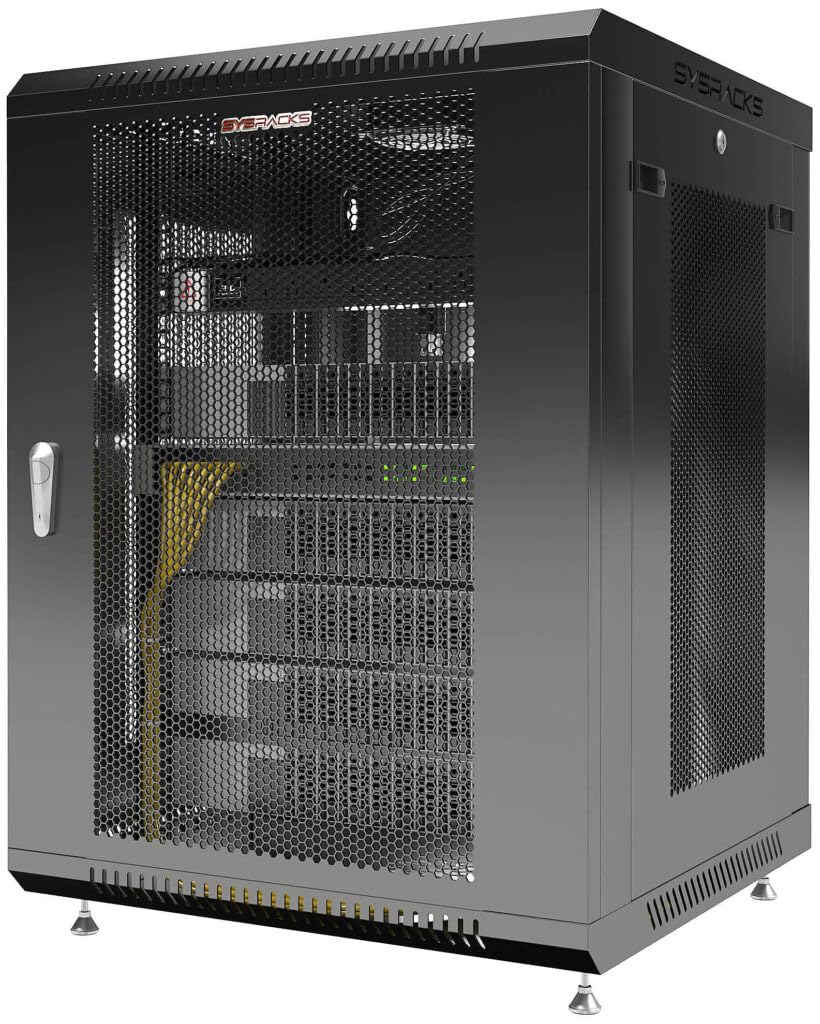
Figure 1: Front view of the Sysracks 15U Server Rack Cabinet.
Setup and Assembly
The Sysracks 15U cabinet is shipped in a flat-pack design for easier transport and assembly. Follow these steps for proper setup:
- Unpacking: Carefully unpack all components from the packaging. Verify that all parts listed in the packing list are present. Keep packaging materials until assembly is complete.
- Frame Assembly: Assemble the main frame of the cabinet according to the included diagram. Ensure all screws and fasteners are securely tightened.
- Door Installation: Attach the front and side mesh doors. Ensure the locking mechanisms operate smoothly. The cabinet includes 4 keys for the locks.
- Shelf Installation: Install the heavy-duty vented shelf at the desired height within the cabinet using the provided mounting cage bolt/nut hardware.
- Power Strip Installation: Mount the 8-outlet power strip inside the cabinet. Connect it to a suitable power source once equipment is installed.
- Cooling Fan Installation: The cooling fan is typically pre-installed or requires simple attachment to the top panel. Ensure it is securely fastened and its power cable is routed correctly.
- Cable Entry Management: Utilize the dust-tight cable entries for routing network and power cables into and out of the cabinet. This helps maintain a clean and organized setup.
- Equipment Mounting: Install your 19-inch server, network, or AV equipment using appropriate rack-mount hardware (not included unless specified). Ensure equipment is evenly distributed to maintain stability.

Figure 2: Interior view of the Sysracks 15U Server Rack Cabinet with doors open, showing the installed shelf and power strip.

Figure 3: Close-up view of the vented shelf included with the Sysracks 15U Server Rack Cabinet.
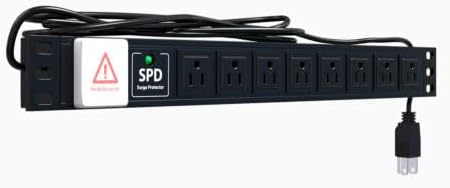
Figure 4: The 8-outlet power strip provided with the Sysracks 15U Server Rack Cabinet.
Operating Instructions
Once assembled and populated with equipment, the Sysracks 15U cabinet is ready for operation.
- Powering Equipment: Connect your equipment to the internal 8-outlet power strip. Ensure the power strip is connected to a reliable external power source.
- Cooling System: The integrated cooling fan provides active ventilation. Ensure the fan is powered on and operating correctly to maintain optimal temperatures within the cabinet. The perforated mesh doors also contribute to passive ventilation.
- Security: Utilize the lockable front and side panels to secure your valuable equipment. Always keep the keys in a safe and accessible location.
- Cable Management: Regularly check and organize cables using the dust-tight cable entries to prevent obstruction of airflow and maintain a tidy setup.
Maintenance
Regular maintenance ensures the longevity and optimal performance of your Sysracks 15U Server Rack Cabinet.
- Cleaning: Periodically clean the exterior and interior surfaces of the cabinet with a soft, damp cloth. Avoid abrasive cleaners. Ensure the mesh doors are free from dust buildup to maintain airflow.
- Fan Inspection: Check the cooling fan periodically for dust accumulation. Clean the fan blades gently if necessary to ensure efficient operation.
- Lock Mechanisms: Lubricate the door lock mechanisms annually with a small amount of graphite or silicone spray to ensure smooth operation.
- Fastener Check: Annually inspect all screws and fasteners for tightness. Re-tighten any loose connections to maintain structural integrity.
- Cable Integrity: Inspect all power and network cables for signs of wear or damage. Replace any compromised cables immediately.
Troubleshooting
This section addresses common issues you might encounter with your Sysracks 15U Server Rack Cabinet.
| Problem | Possible Cause | Solution |
|---|---|---|
| Equipment Overheating |
|
|
| Doors or Panels Not Locking |
|
|
| Power Strip Not Functioning |
|
|
Technical Specifications
| Feature | Detail |
|---|---|
| Model | 15U Server Rack Cabinet |
| Dimensions (External) | 24"D x 24"W x 31"H |
| Internal Usable Depth | 20 inches |
| Material | Cold-rolled steel with anti-corrosive powder paint coating |
| Color | Black RAL 9005 |
| Load Capacity | Up to 140 pounds |
| Cooling Fan | High Performance (Airflow: 110 m³, ~40dB) |
| Ventilation | Active (Cooling Fan), Passive (Perforated Doors) |
| Cable Entries | 2 x Dust-Tight |
| Included Accessories | 8-outlet Powerbar, 1 Heavy Duty Vented Shelf, Mounting Cage Bolt/Nut Hardware, 4 Keys |
| Item Weight | 60 pounds |
| UPC | 764333745488 |
| ASIN | B0DVDD8DCJ |
Warranty Information
The Sysracks 15U Server Rack Cabinet comes with an original manufacturer warranty of 1 Year. Please retain your proof of purchase for warranty claims. For detailed warranty terms and conditions, refer to the documentation provided with your purchase or contact Sysracks customer support.
Customer Support
For technical assistance, troubleshooting, or warranty inquiries regarding your Sysracks 15U Server Rack Cabinet, please contact Sysracks Inc. customer support.
- Seller: Sysracks Inc
- Amazon Seller ID: A10P8OVK125R6G
- Amazon Store: Visit the Sysracks Store on Amazon
When contacting support, please have your product model (15U) and ASIN (B0DVDD8DCJ) available for faster service.