Introduction
The Kalorik MAXX 26 Quart Flex Sync Air Fryer Oven is a versatile kitchen appliance designed for efficient and flexible cooking. This manual provides essential information for safe operation, setup, maintenance, and troubleshooting to ensure optimal performance and longevity of your appliance.
Important Safety Instructions
When using electrical appliances, basic safety precautions should always be followed, including the following:
- Read all instructions before operating the appliance.
- Do not touch hot surfaces. Use handles or knobs.
- To protect against electric shock, do not immerse cord, plugs, or the appliance in water or other liquid.
- Close supervision is necessary when any appliance is used by or near children.
- Unplug from outlet when not in use and before cleaning. Allow to cool before putting on or taking off parts.
- Do not operate any appliance with a damaged cord or plug or after the appliance malfunctions or has been damaged in any manner.
- The use of accessory attachments not recommended by the appliance manufacturer may cause injuries.
- Do not use outdoors.
- Do not let cord hang over edge of table or counter or touch hot surfaces.
- Do not place on or near a hot gas or electric burner, or in a heated oven.
- Extreme caution must be used when moving an appliance containing hot oil or other hot liquids.
- To disconnect, turn any control to "off", then remove plug from wall outlet.
- Do not use appliance for other than intended use.
Product Overview
The Kalorik MAXX Flex Sync Air Fryer Oven is designed for maximum flexibility and efficiency in your kitchen. It features a unique design that allows it to convert between two independent 13-quart air fryer ovens or one spacious 26-quart oven.
Key Features:
- Flex Sync Technology: Convert between dual 13-quart zones or a single 26-quart cooking space.
- Independent Controls: Prepare two separate dishes with customized times, temperatures, and methods.
- Turbo MAXX Airflow System: Dual independent turbo fans ensure fast and even cooking results.
- High Temperature: Reaches temperatures up to 500°F for perfect browning and searing.
- Digital Controls & Presets: User-friendly digital controls with 10 presets for various cooking functions.
- French Doors: Convenient glass French doors with cool-touch handles for easy access and monitoring.
- Interior Light: Monitor your dishes as they cook with the convenient interior light.
Included Accessories:
The oven comes with 14 accessories to accommodate big batches and large food items, including two sets of custom-sized accessories to fit each 13-quart cabinet.
- Air Fryer Basket
- Baking Tray
- Air Rack
- Crumb Tray
- Rotisserie accessories
- Additional custom-sized accessories for dual-zone cooking
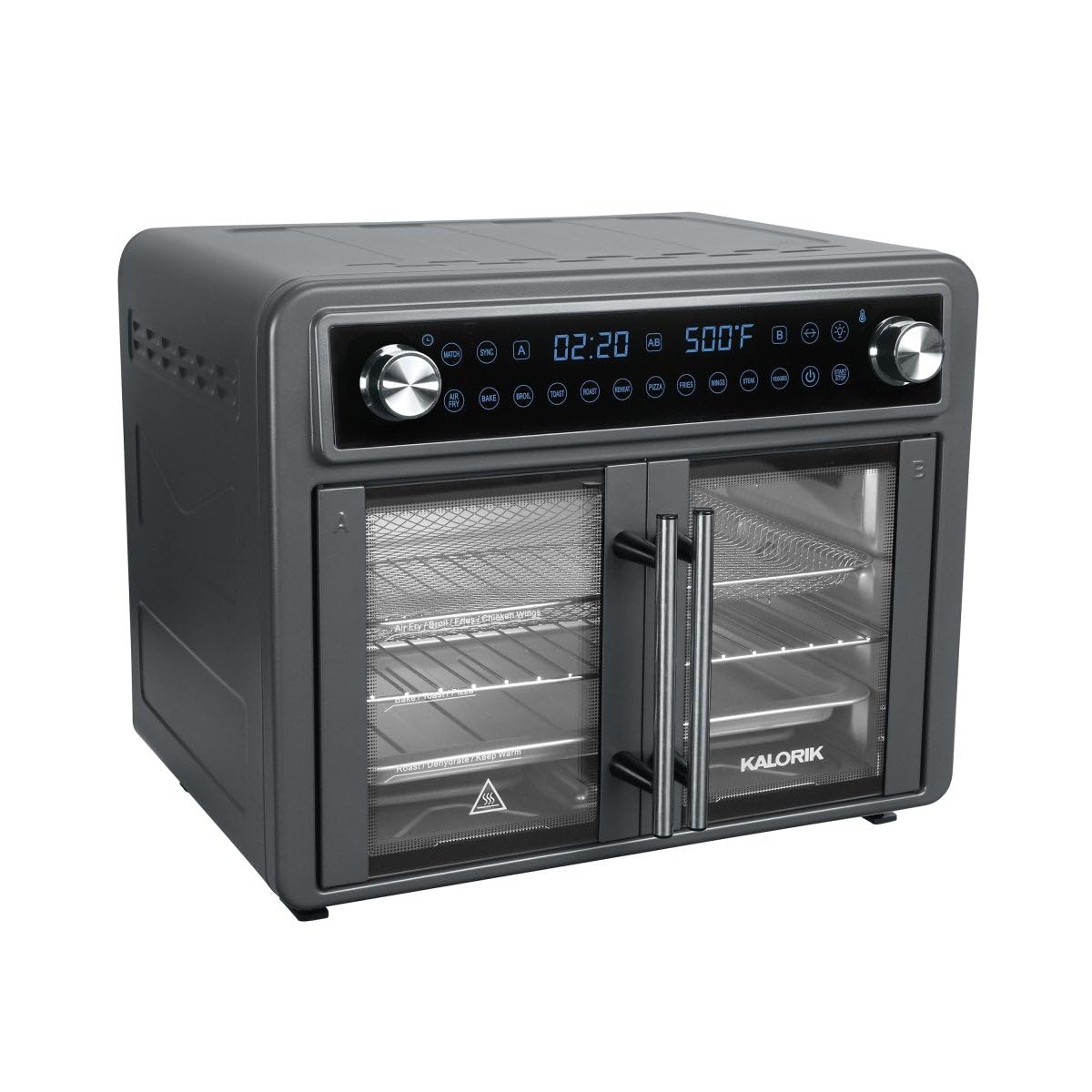
Image: Kalorik MAXX 26 Quart Flex Sync Air Fryer Oven with French doors closed.

Image: The oven interior configured for dual cooking, with different foods in each compartment.
Setup
- Unpacking: Carefully remove all packaging materials, including any protective films or stickers from the appliance and accessories.
- Initial Cleaning: Wipe down the interior and exterior of the oven with a damp cloth. Wash all accessories (air fryer basket, baking tray, air rack, crumb tray, rotisserie accessories) with warm, soapy water. Rinse thoroughly and dry.
- Placement: Place the oven on a stable, level, heat-resistant surface. Ensure there is adequate clearance (at least 4 inches) on all sides and above the oven for proper ventilation. Do not place it directly against a wall or under cabinets.
- Power Connection: Plug the power cord into a grounded electrical outlet.
- First Use (Burn-Off): Before cooking food, operate the oven empty for approximately 15 minutes at 400°F (200°C) to burn off any manufacturing residues. A slight odor or smoke may be present during this process; this is normal. Ensure the area is well-ventilated.
Operating Instructions
The Kalorik MAXX Flex Sync Air Fryer Oven features intuitive digital controls and versatile cooking modes.
Basic Operation:
- Power On: Press the Power button to turn on the oven. The display will illuminate.
- Select Cooking Mode: Use the dedicated buttons for Air Fry or Oven functions.
- Choose a Preset: The oven offers 10 presets: Air Fry, Bake, Broil, Toast, Roast, Reheat, Pizza, Fries, Chicken Wings, Steak, and Veggies. Select the desired preset.
- Adjust Time/Temperature: Use the control knob to adjust the cooking time and temperature as needed. Press the knob to toggle between time and temperature settings.
- Start Cooking: Press the Start/Stop button to begin the cooking cycle.
- Pause/Stop: Press the Start/Stop button during cooking to pause. Press and hold to stop the cycle.
Flex Sync Technology:
The unique Flex Sync feature allows you to adapt the oven to your cooking needs:
- Dual 13-Quart Zones: Insert the divider wall to create two independent cooking compartments. Each zone can be set with different times and temperatures, allowing you to cook two different meals simultaneously.
- Single 26-Quart Oven: Remove the divider wall to utilize the full 26-quart capacity for larger items like a whole chicken or roast.
- Sync Function: Use the Sync function to ensure that two different dishes, set with varying cooking times, finish cooking simultaneously.
Rack Positions:
The oven provides clear indications on the French doors for optimal rack positions based on the cooking function:
- Dehydrate: Top rack position.
- Broil / Fast Air Fry / Grill / Steak: Upper-middle rack position.
- Air Fry: Middle rack position.
- Rotisserie: Specific rotisserie hooks are available for this function.
- Bake / Defrost / Pizza / Roast / Toast / Warm / Proof: Lower rack positions (Bake 2 / Defrost / Pizza / Roast / Toast / Warm, and Bake 1 / Proof).
Cleaning and Maintenance
Regular cleaning and maintenance will extend the life of your Kalorik MAXX Air Fryer Oven.
- Always unplug the appliance and allow it to cool completely before cleaning.
- Exterior: Wipe the exterior with a soft, damp cloth. Do not use abrasive cleaners or scouring pads.
- Interior: Clean the interior with a damp cloth and mild detergent. For stubborn stains, a non-abrasive sponge can be used.
- Crumb Tray: The removable crumb tray should be emptied and cleaned after each use to prevent grease buildup and smoking. It can be washed with warm, soapy water.
- Accessories: All removable accessories (air fryer basket, baking tray, air rack, rotisserie accessories) are dishwasher safe or can be hand-washed with warm, soapy water.
- Storage: Ensure the oven is clean and dry before storing. Store it in a cool, dry place.
Troubleshooting
If you encounter any issues with your oven, refer to the following common troubleshooting tips:
- Appliance does not turn on: Ensure the power cord is securely plugged into a working electrical outlet. Check your circuit breaker.
- Food is not cooking evenly: Ensure food is arranged in a single layer and not overcrowded. Use the recommended rack position for the selected function. Flip or rotate food halfway through cooking if necessary.
- Smoke coming from the oven: This may be due to grease buildup. Clean the crumb tray and interior thoroughly. Ensure fatty foods are placed on the baking tray to catch drips.
- Oven beeps and stops: The French doors may not be fully closed. Ensure both doors are securely latched.
- Digital display not working: Unplug the oven, wait a few minutes, then plug it back in to reset the system.
For further assistance, please contact customer support.
Specifications
| ASIN | B0DVBXCHP3 |
| Brand | Kalorik |
| Model | MAXX 26 Quart Flex Sync Air Fryer Oven |
| Color | Blue |
| Capacity | 26 Quarts (convertible to dual 13-Quart) |
| Max Temperature | 500°F |
| UPC | 848052007512 |
| Date First Available | January 28, 2025 |
Warranty and Support
The Kalorik MAXX 26 Quart Flex Sync Air Fryer Oven comes with a standard manufacturer's warranty. Please refer to the warranty card included in your product packaging for specific terms and conditions.
For technical support, troubleshooting, or warranty claims, please contact Kalorik Customer Service:
- Website: Visit the official Kalorik website for FAQs and support resources.
- Phone: Refer to your warranty card for the customer service phone number.
- Email: Refer to your warranty card for customer service email contact.
Please have your model number and purchase date available when contacting support.


