
Introduction
This manual provides detailed instructions for the installation, operation, and maintenance of your General Pump 100651 DuraView Inlet Filter. Designed for general purpose pressure wash use, this filter integrates a garden hose nut and features a clear plastic cover for easy inspection. Please read this manual thoroughly before using the product to ensure proper function and longevity.
Safety Information
Always observe the following safety precautions to prevent injury or damage to the product:
- Ensure all connections are secure and leak-free before operating any equipment connected to the filter.
- Do not exceed the maximum operating pressure of 150 PSI or flow rate of 8.0 GPM.
- Wear appropriate personal protective equipment (PPE) when handling pressure washing equipment.
- Regularly inspect the filter for any signs of wear, damage, or blockages.
- Disconnect the water supply and relieve pressure before performing any maintenance or cleaning.
Product Overview
The General Pump 100651 DuraView Inlet Filter is engineered for durability and ease of use. It features a load-bearing brass spine, an integrated garden hose connector, and a flow-through design with a clear plastic cover, allowing visual inspection of the filter screen.
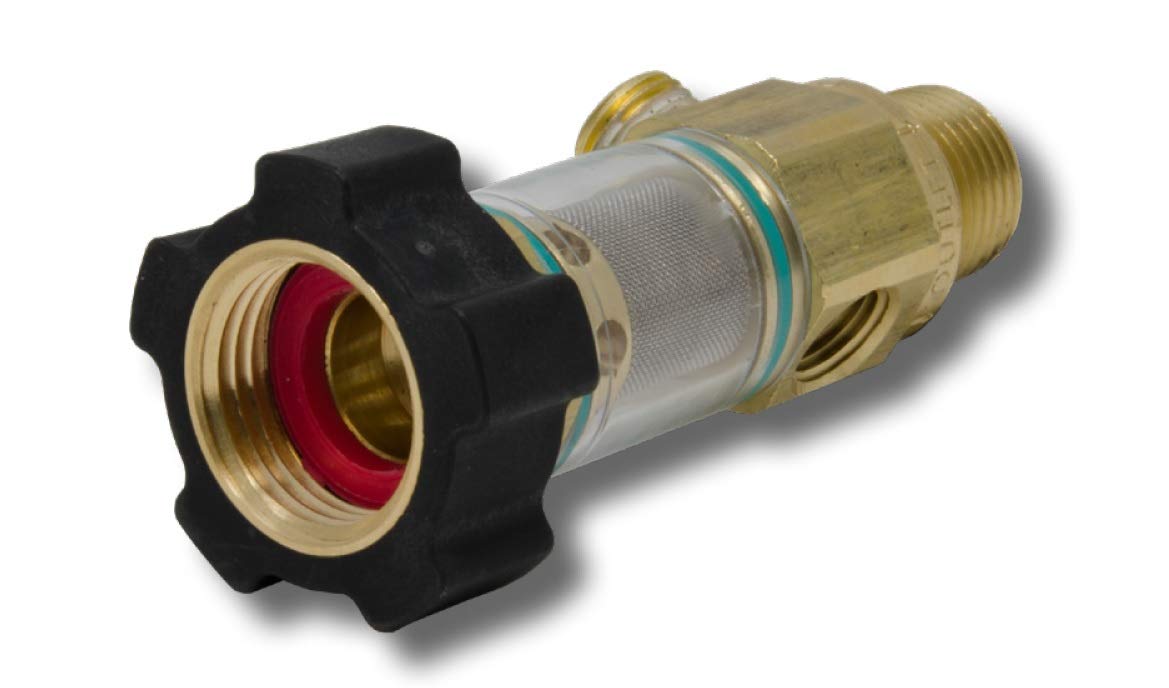
This image displays the General Pump 100651 DuraView Inlet Filter. It features a black integrated garden hose nut on the left, connected to a clear plastic housing that reveals a mesh filter screen inside. The right side shows brass fittings, including a threaded outlet and a bypass port. The overall construction highlights the durable brass spine and transparent filter housing.
Key Features:
- Integrated Garden Hose (GH) connector for easy attachment.
- Clear plastic cover for visual inspection of the filter screen.
- Durable brass spine construction.
- Available with or without bypass ports (this model includes a bypass port).
- Designed for general purpose pressure washing applications.
Setup and Installation
Follow these steps for proper installation of your DuraView Inlet Filter:
- Inspect Components: Unpack the filter and ensure all components are present and undamaged. The package should contain one Brass Inline Water Filter.
- Prepare Connections: Ensure the water source (garden hose) and the inlet of your pressure washer or equipment are clean and free of debris.
- Connect to Water Source: Thread the integrated garden hose nut (3/4" GH inlet) of the DuraView filter onto your standard garden hose. Hand-tighten first, then use a wrench if necessary to ensure a snug, leak-free connection. Do not overtighten.
- Connect to Equipment: Attach the 1/2" NPT-M outlet of the filter to the water inlet of your pressure washer or other equipment. Use appropriate thread sealant (e.g., PTFE tape) on the NPT threads to prevent leaks. Tighten securely.
- Check Bypass Port (if applicable): If your model includes a bypass port, ensure it is either properly plugged or connected as required by your system.
- Test for Leaks: Slowly turn on the water supply and check all connections for leaks. Tighten any leaking connections as needed.
Operating Instructions
Once installed, the DuraView Inlet Filter operates automatically to filter incoming water. No special operational steps are required beyond ensuring proper installation and regular maintenance.
- The clear plastic cover allows for visual inspection of the filter screen. Monitor this regularly to determine when cleaning is necessary.
- Maintain water flow within the specified 8.0 GPM and pressure within 150 PSI to ensure optimal performance and prevent damage.
Maintenance
Regular cleaning of the filter screen is crucial for maintaining optimal performance and preventing damage to your equipment.
- Disconnect Water Supply: Turn off the water supply to the filter and relieve any system pressure.
- Remove Filter Housing: Carefully unscrew the clear plastic housing from the brass body.
- Remove Filter Screen: Extract the mesh filter screen from the housing.
- Clean Screen: Rinse the filter screen thoroughly under running water to remove any trapped debris. A soft brush can be used for stubborn particles.
- Inspect O-ring: Check the O-ring for any signs of wear, cracks, or damage. Replace if necessary to ensure a watertight seal.
- Reassemble: Place the clean filter screen back into the housing, ensuring it is seated correctly. Reattach the housing to the brass body, hand-tightening until snug. Do not overtighten.
- Test: Slowly turn on the water supply and check for leaks.
Perform this maintenance whenever you observe a reduction in water flow or visible debris accumulation in the clear housing.
Troubleshooting
| Problem | Possible Cause | Solution |
|---|---|---|
| Water Leakage | Loose connections, damaged O-ring, incorrect thread sealant. | Tighten connections, replace O-ring, reapply thread sealant. |
| Reduced Water Flow | Clogged filter screen. | Clean the filter screen as per maintenance instructions. |
| Filter Housing Appears Damaged | Physical impact, overtightening. | Discontinue use and replace the filter. |
Specifications
| Attribute | Detail |
|---|---|
| Model Number | 100651 |
| Brand | General Pump |
| Maximum Flow Rate | 8.0 GPM |
| Maximum Pressure | 150 PSI |
| Inlet Connection | 3/4" GH (Garden Hose) |
| Outlet Connection | 1/2" NPT-M (National Pipe Taper - Male) |
| Material | Brass (spine), Plastic (housing) |
| Product Dimensions | 4.5 x 2 x 0.2 inches |
| Item Weight | 0.18 Kilograms (6.35 ounces) |
| Color | Black (nut) |
Warranty and Support
For warranty information or technical support, please refer to the official General Pump website or contact their customer service department. Keep your purchase receipt as proof of purchase.

