
Carson Virus V21
Carson 500204036 1:8 Virus V21 2.4G RTR Nitro RC Buggy Instruction Manual
Model: Virus V21
Brand: Carson
Introduction
This manual provides essential information for the safe and effective operation, maintenance, and setup of your Carson 500204036 1:8 Virus V21 2.4G RTR Nitro RC Buggy. Please read this manual thoroughly before using the product to ensure proper handling and to maximize your enjoyment.
The Virus V21 is a high-performance 1:8 scale RC buggy designed for ambitious RC enthusiasts. With its 3.5 ccm Force nitro engine and numerous configuration options, it provides impressive driving fun both off-road and on asphalt. It features a 2.4 GHz interference-free remote control system, a robust competition aluminum chassis, and high-quality components like three steel differentials and powerful 9kg servos.
Safety Warnings
WARNING!
- Not recommended for children under 14 years of age.
- Please keep these indications for any query.
- Images may differ from the product found in the packaging.
- TAMIYA-CARSON reserves the right to make improvements and modifications.
- Always operate the RC buggy in a safe and open area, away from people, pets, and obstacles.
- Never operate the RC buggy near public roads or in areas where it could cause a disturbance.
- Ensure proper ventilation when operating the nitro engine.
- Handle fuel with care and store it in a safe, well-ventilated area away from ignition sources.
Setup
1. Unpacking and Component Identification
Carefully remove all components from the packaging. Verify that all parts are present according to the packing list. The package includes the fully assembled RC buggy with a combustion engine and a 2.4 GHz remote control system.
- Carson 1:8 Virus V21 RC Buggy
- 2.4 GHz Reflex Wheel Remote Control
- Nitro Combustion Engine (3.5 ccm Force engine)
- Instruction Manual
- Additional accessories (check packaging for full list)
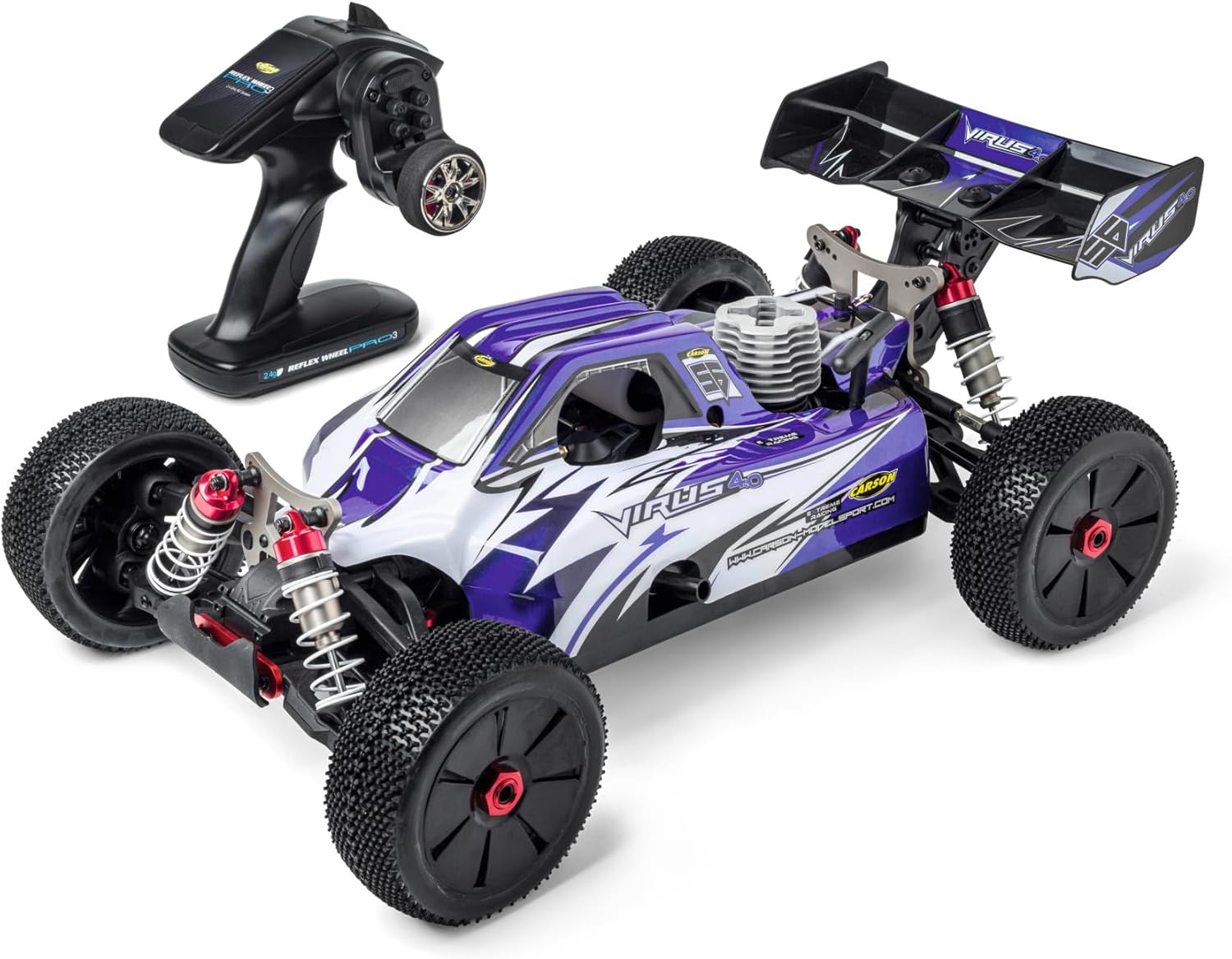
Image: The Carson 1:8 Virus V21 RC Buggy shown with its 2.4 GHz Reflex Wheel remote control.
2. Initial Checks and Preparation
- Remote Control Batteries: Install the required batteries (not included) into the 2.4 GHz Reflex Wheel remote control. Ensure correct polarity.
- Receiver Batteries: Install the receiver batteries (not included) into the RC buggy.
- Fueling: This model uses nitro fuel. Carefully fill the fuel tank with appropriate nitro fuel (not included). Refer to the engine manufacturer's recommendations for fuel type.
- Engine Priming: Before the first start, prime the engine according to the nitro engine manual. This usually involves covering the exhaust and pulling the starter cord a few times until fuel reaches the carburetor.
- Glow Plug: Ensure the glow plug is properly installed and connected to a glow plug igniter (not included).
- Binding (if necessary): If the remote control and receiver are not pre-bound, follow the instructions in the remote control manual to bind them.
Operating Instructions
1. Starting the Engine
- Place the RC buggy on a stable surface.
- Turn on the remote control, then turn on the receiver in the buggy.
- Attach the glow plug igniter to the glow plug.
- Use the pull starter to start the engine. If the engine does not start after a few pulls, check the fuel flow and glow plug.
- Once the engine starts, remove the glow plug igniter.
2. Driving Controls
- Throttle: Use the trigger on the remote control to accelerate (pull) and brake/reverse (push).
- Steering: Use the steering wheel on the remote control to turn left or right.
- Trims: Adjust the steering and throttle trims on the remote control to ensure the buggy drives straight and stops when the throttle is neutral.
3. Driving Tips
- Off-road Driving: The robust chassis and large-diameter oil pressure shock absorbers are designed for challenging off-road conditions. Maintain control on uneven terrain and adjust speed accordingly.
- Asphalt Driving: The buggy can also be driven on asphalt. Adjusting convergence and camber can optimize performance for smoother surfaces.
- Maximum Speed: The Carson Virus V21 can reach speeds of up to 65 km/h. Always be aware of your surroundings and drive responsibly.

Image: The Carson 1:8 Virus V21 RC Buggy in action on a gravel surface, demonstrating its off-road capability.
Video: A demonstration of the Carson 1:8 King of Dirt Buggy 4S RTR in action, showcasing its off-road capabilities and durability. This video is from the brand and illustrates similar product performance.
Maintenance
Regular maintenance is crucial for the longevity and performance of your Carson Virus V21 RC Buggy.
1. General Cleaning
- After each use, especially in dusty or muddy conditions, clean the buggy thoroughly. Use a soft brush or compressed air to remove dirt and debris.
- Avoid using water directly on electronic components. If necessary, use a damp cloth and ensure all parts are dry before next use.
2. Engine Maintenance (Nitro Engine)
- After-Run Oil: Apply after-run oil to the engine after each running session to prevent corrosion, especially if storing for extended periods.
- Air Filter: Regularly clean and re-oil the air filter to protect the engine from dust and dirt.
- Glow Plug: Inspect the glow plug periodically and replace it if it shows signs of wear or damage.
- Carburetor Settings: Refer to the engine manual for proper carburetor tuning. Incorrect settings can lead to poor performance or engine damage.
3. Component Checks
- Bearings: The vehicle is fully ball-bearing mounted. Check bearings for smooth operation and replace if they feel rough.
- Differentials: The buggy features three steel differentials. Inspect them for wear and ensure they are properly lubricated.
- Shock Absorbers: Check the large-diameter oil pressure shock absorbers for leaks or damage. Ensure they provide consistent damping.
- Servos: Verify that the 9kg steering and throttle/brake servos operate smoothly and respond accurately to remote control inputs.
- Chassis and Suspension: Regularly inspect the aluminum chassis, solid wishbones, and pivot ball suspension for any damage or loose connections.
Troubleshooting
This section addresses common issues you might encounter with your RC buggy.
| Problem | Possible Cause | Solution |
|---|---|---|
| Engine won't start | No fuel, faulty glow plug, incorrect carburetor settings, dead receiver/remote batteries. | Check fuel level, replace glow plug, adjust carburetor, replace batteries. |
| Loss of control/erratic behavior | Low remote/receiver battery, interference, loose wiring, damaged servo. | Replace batteries, check for interference sources, inspect wiring, check servo connections. |
| Poor performance/lack of power | Incorrect engine tuning, dirty air filter, worn engine components. | Adjust carburetor, clean/replace air filter, inspect engine for wear. |
| Vehicle not moving | No power to motor, transmission issue, remote not bound. | Check battery connections, inspect drivetrain, re-bind remote. |
If you encounter issues not listed here, please consult the detailed engine manual or contact Carson customer support.
Specifications
| Feature | Detail |
|---|---|
| Model Number | 500204036 |
| Scale | 1:8 |
| Engine | Nitro Force 3.5 ccm (1.9 HP) |
| Remote Control System | 2.4 GHz Reflex Wheel |
| Maximum Speed | 65 km/h |
| Chassis | Competition Aluminum Chassis (3 mm extra-flat) |
| Drive System | Three Steel Differentials |
| Clutch | Hardened Solid Steel Clutch |
| Servos | Powerful 9kg servo for steering and throttle/brake |
| Suspension | Large-diameter Oil Pressure Shock Absorbers with Aluminum Thread, Pivot Ball Suspension |
| Dimensions (L x W x H) | 495 mm x 305 mm x 205 mm |
| Weight | 3235 g (approx. 4.66 kg packaged) |
| Material | Plastic (body), Aluminum (chassis), Steel (differentials, clutch) |
| Recommended Age | 14 years and up |
Warranty and Support
Carson products are known for their quality. For warranty claims or technical support, please refer to the contact information provided with your product packaging or visit the official Carson website. Keep your proof of purchase for any warranty-related inquiries.
As a specialist in remote-controlled vehicles, Carson has been guaranteeing exceptional quality and product safety for 30 years.
Related documentsVirus V21


Ask a question about this manual
Ask about setup, troubleshooting, compatibility, parts, safety, or missing instructions. Manuals+ will review the question and use this page’s manual context to help answer it.