
1. Introduction
Thank you for purchasing the Farberware 0.7 Cu. Ft. 700W Countertop Microwave Oven. This manual provides essential information for the safe and efficient operation, maintenance, and troubleshooting of your new appliance. Please read all instructions carefully before use and retain this manual for future reference.
This compact and powerful microwave oven is designed for convenience, featuring 700 watts of cooking power, various auto cook settings, and a sleek stainless steel finish, making it ideal for small kitchens, apartments, dorms, or office break rooms.
2. Important Safety Instructions
When using electrical appliances, basic safety precautions should be followed, including the following:
- Read all instructions before using the appliance.
- Do not operate any appliance with a damaged cord or plug, or after the appliance malfunctions or has been damaged in any manner.
- Do not use the microwave for purposes other than its intended use.
- Close supervision is necessary when any appliance is used by or near children.
- Do not heat liquids or other foods in narrow-necked containers as they may explode.
- Always ensure the turntable and turntable ring are correctly positioned before operating.
- Do not attempt to operate this oven with the door open.
- Do not attempt to tamper with or make any adjustments or repairs to the door, control panel, safety interlock switches, or any other part of the oven.
- Always ensure food is thoroughly cooked to avoid foodborne illness.
3. Setup and Installation
3.1 Unpacking
Carefully remove the microwave oven and all packing materials from the carton. Ensure all plastic coverings and tape are removed from the unit, including the protective film on the control panel and door.
3.2 Placement
- Place the microwave on a flat, stable surface that can support its weight and the heaviest food item likely to be cooked in it.
- Ensure adequate ventilation. Maintain a minimum of 3.0 inches (7.6 cm) of free space from the top, 1.0 inch (2.5 cm) from the rear, and 3.0 inches (7.6 cm) from the sides of the microwave to allow for proper airflow.
- Do not place the microwave near heat sources or in areas with high humidity.
3.3 Turntable Assembly
- Place the turntable support ring on the center of the microwave oven cavity floor.
- Carefully place the glass turntable plate on top of the support ring, ensuring it sits securely on the center hub.

Image: Interior view of the microwave with the glass turntable and roller ring correctly placed. The turntable ensures even heating of food.
4. Operating Instructions
4.1 Control Panel Overview
The control panel features a digital display, number pads (0-9), and various function buttons for easy operation.

Image: The intuitive control panel with clearly labeled buttons for various cooking functions.
4.2 Basic Microwave Cooking
- Place food in a microwave-safe container on the turntable.
- Close the microwave door securely.
- Enter the desired cooking time using the number pads.
- Press the START/+30SEC button to begin cooking.
- To add 30 seconds during cooking, press the START/+30SEC button.
4.3 Auto Cook Menus
This microwave features one-touch auto cook menus for common food items:
- Popcorn: For quick popcorn preparation.
- Potato: Ideal for baking potatoes.
- Pizza: Reheat or cook pizza slices.
- Beverage: Heat drinks to the perfect temperature.
- Frozen Vegetable: Cook frozen vegetables with ease.
- Dinner Plate: Reheat a full dinner plate.
To use, simply press the corresponding auto cook button. The microwave will automatically set the optimal cooking time and power level.
4.4 Defrost Options
The microwave offers two defrost modes:
- Weight Defrost: Enter the weight of the food, and the microwave will calculate the defrost time.
- Time Defrost: Manually set the desired defrost time.
4.5 Power Levels
Adjust the cooking intensity with 10 power levels. Press the POWER button repeatedly to cycle through the power levels (P100 to P10).
4.6 Child Safety Lock
To activate the child safety lock, press and hold the STOP/CLEAR button for 3 seconds. The display will show "LOCK". To deactivate, repeat the process.
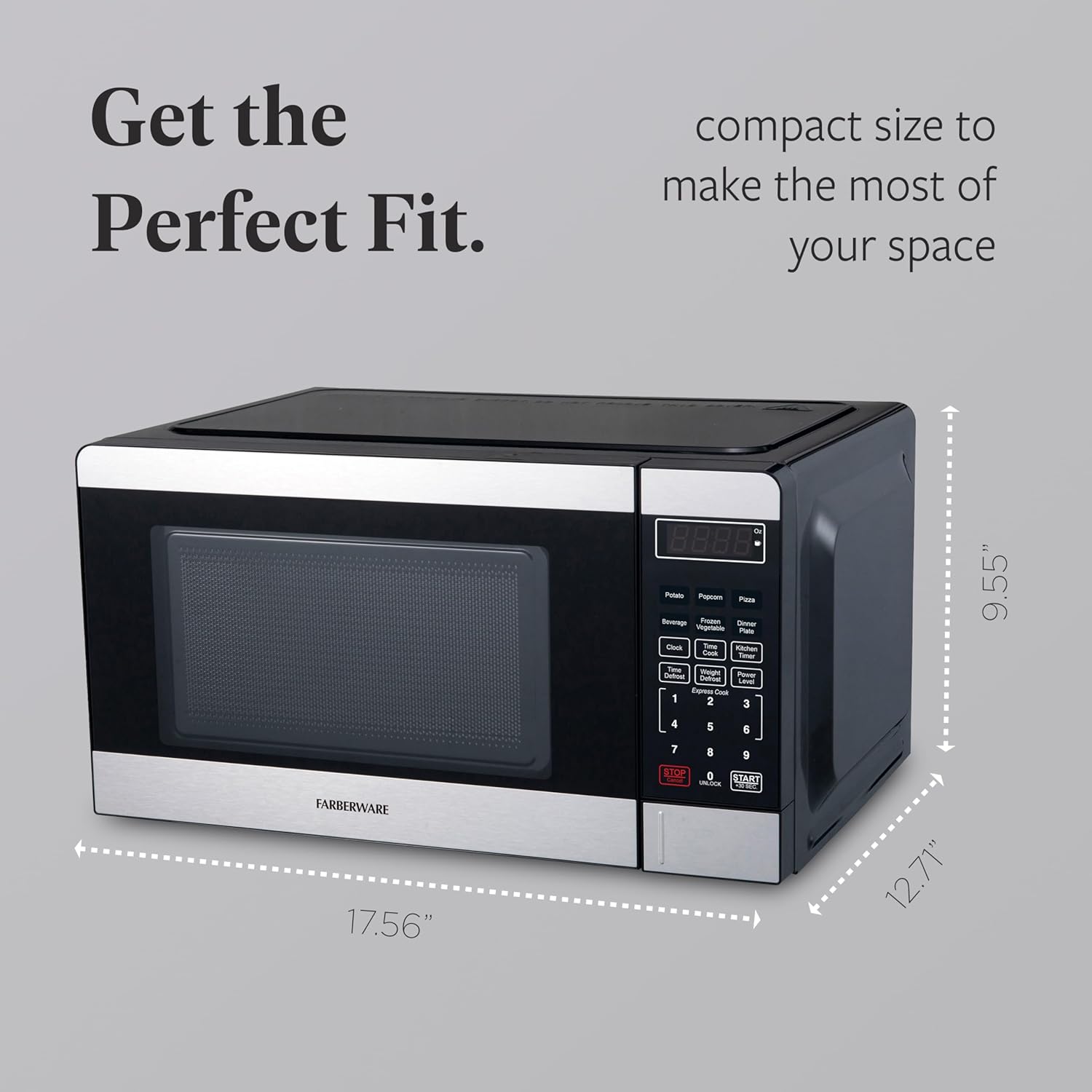
Image: The control panel features a child safety lock to prevent unintended operation.
5. Maintenance and Cleaning
Regular cleaning and maintenance will ensure the longevity and optimal performance of your microwave oven.
- Interior: Wipe the interior cavity with a damp cloth after each use. For stubborn stains, use a mild detergent. Do not use abrasive cleaners.
- Exterior: Clean the exterior with a soft, damp cloth. Avoid spraying cleaners directly onto the control panel.
- Turntable and Roller Ring: The glass turntable and roller ring can be washed in warm, soapy water or in the dishwasher. Ensure they are completely dry before placing them back in the microwave.
- Door Seal: Keep the door seal clean to ensure proper closure and efficient operation.

Image: The easy-to-clean interior design simplifies maintenance.
6. Troubleshooting
If you encounter any issues with your microwave oven, please refer to the following common problems and solutions:
| Problem | Possible Cause | Solution |
|---|---|---|
| Microwave does not start. | Door not closed properly; Power cord unplugged; Fuse blown or circuit breaker tripped. | Ensure door is firmly closed; Plug in power cord; Check household fuse/circuit breaker. |
| Food not heating evenly. | Food not stirred or rearranged; Turntable not rotating. | Stir or rearrange food during cooking; Check turntable assembly for proper placement. |
| Unusual noises during operation. | Turntable or roller ring not correctly positioned; Foreign object in cavity. | Re-position turntable and roller ring; Remove any foreign objects. |
| Child lock activated. | Child lock feature is engaged. | Press and hold STOP/CLEAR for 3 seconds to deactivate. |
7. Specifications
| Brand: | Farberware |
| Model: | FMO07GZBKSS |
| Capacity: | 0.7 Cubic Feet |
| Wattage: | 700 Watts |
| Voltage: | 120 Volts |
| Product Dimensions: | 17.56"W x 12.71"D x 9.55"H |
| Item Weight: | 23.2 pounds |
| Color: | Stainless Steel |
| Material: | Stainless Steel |
| Special Features: | Child Safety Lock, Digital Control, Programmable |
8. Product Videos
Product Overview Video
Video: A brief overview of the Farberware Countertop Microwave Oven, showcasing its features and compact design. This video highlights the 0.9 cu ft capacity, 10 power levels up to 900 watts, custom cook settings, easy-to-read LED display, interior light, and express cook buttons for quick meal preparation.
9. Warranty and Support
This Farberware microwave oven comes with a 1-year limited warranty. For warranty claims, technical support, or service inquiries, please refer to the contact information provided in your product packaging or visit the official Farberware website.
For service, please e-mail us at INTERNET@EMERSONRADIO.COM or call 1-800-898-9020.


