
Product Overview
The ZENTALITY B220 is a compact 2G keypad mobile phone designed for essential communication. It features dual-SIM capability, a 2.4-inch display, a basic camera, and a wireless FM radio. This manual provides instructions for setting up, operating, and maintaining your device.
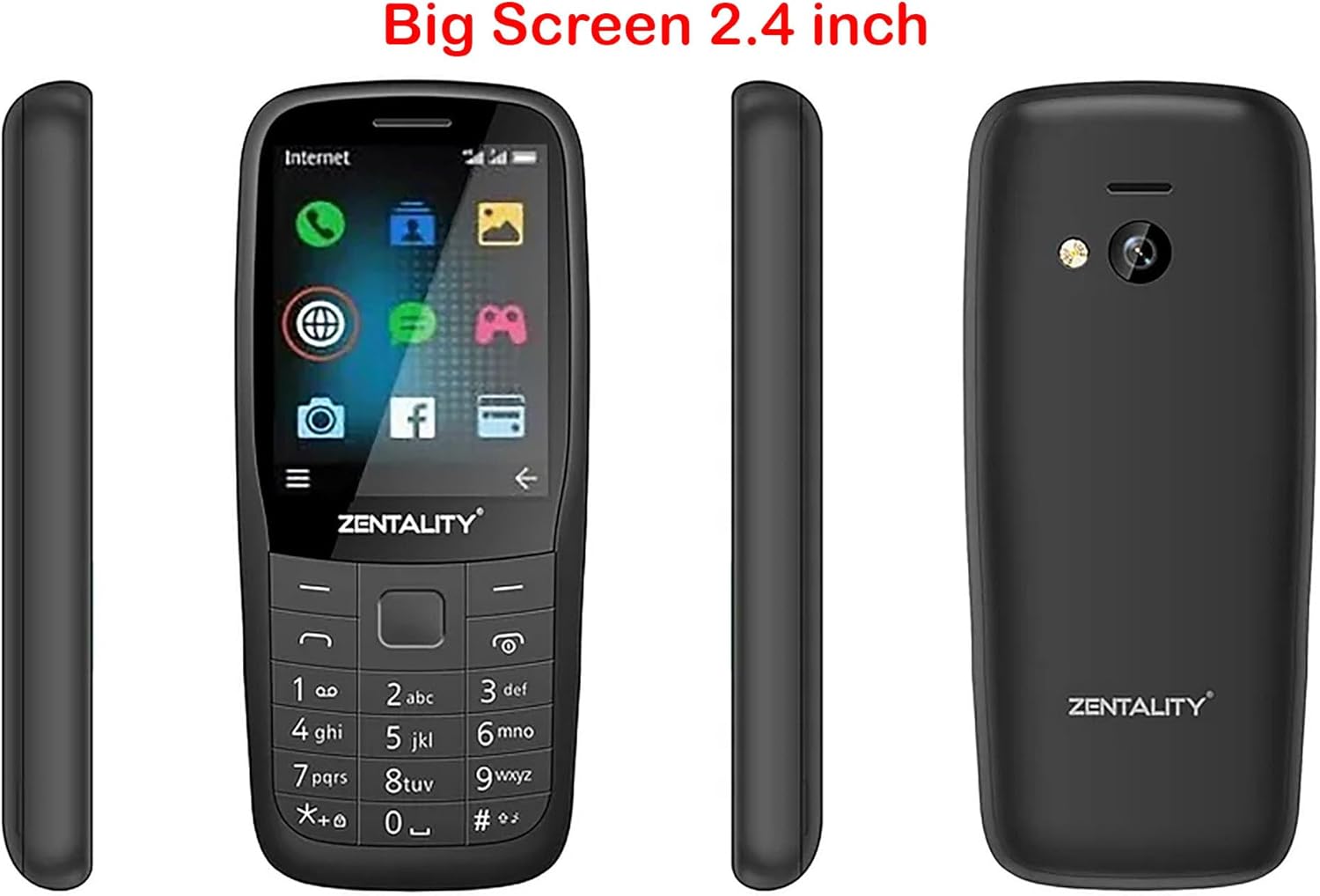
Figure 1: ZENTALITY B220 Mobile Phone - Multiple Views. This image displays the front, back, and side profiles of the ZENTALITY B220 mobile phone, illustrating its compact design and 2.4-inch screen.
1. Setup
1.1 Package Contents
Ensure your package contains the following items:
- ZENTALITY B220 Mobile Phone
- Battery
- Charger
- User Manual (this document)
1.2 Installing the SIM Card(s) and Battery
- Remove the Back Cover: Gently pry open the back cover of the phone using the notch provided, typically at the bottom or side.
- Insert SIM Card(s): Locate the SIM card slots. This phone supports dual SIM cards. Carefully insert your standard or micro SIM card(s) into the designated slots with the gold contacts facing down, ensuring they are correctly oriented as indicated by the diagrams on the phone.
- Insert Micro SD Card (Optional): If you wish to expand storage, insert a Micro SD card (up to 16GB) into its dedicated slot.
- Insert Battery: Align the battery contacts with the phone's terminals and gently press the battery into place.
- Replace Back Cover: Align the back cover and press firmly around the edges until it clicks securely into place.

Figure 2: ZENTALITY B220 Back View. This image shows the rear of the phone, including the camera lens and flashlight, where the back cover can be removed for SIM and battery installation.
1.3 Charging the Battery
Before first use, fully charge the phone's battery.
- Connect the charger to the Micro 5pin USB port on the phone.
- Plug the charger into a standard power outlet.
- The charging indicator on the phone will typically show charging status.
- Once fully charged, disconnect the charger.
A full charge provides approximately 12 hours of talk time or 22 hours of standby time.
2. Operating Instructions
2.1 Power On/Off
- To Power On: Press and hold the Power/End Call button (usually marked with a red phone icon) until the screen lights up.
- To Power Off: Press and hold the Power/End Call button until the power-off options appear, then select "Power Off" or confirm.
2.2 Basic Navigation
Use the keypad and navigation keys to interact with the phone.
- Directional Pad: Use the up, down, left, and right keys to navigate through menus and options.
- Center Key: Typically used to select an option or confirm an action.
- Soft Keys: The keys directly below the screen (left and right) perform functions indicated by the text on the screen above them.
- Call Key: Press the green phone icon to make a call or answer an incoming call.
- End Call/Power Key: Press the red phone icon to end a call or power the phone on/off.

Figure 3: ZENTALITY B220 Front View. This image displays the phone's screen and physical keypad, illustrating the layout for navigation and input.
2.3 Making and Receiving Calls
- To Make a Call: Enter the phone number using the keypad and press the Call key.
- To Answer a Call: When the phone rings, press the Call key.
- To End a Call: Press the End Call key.
2.4 Contacts
The phone supports storing up to 2000 contacts.
- Adding a Contact: Navigate to the "Contacts" menu, select "Add New Contact," enter the name and number, then save.
- Searching Contacts: In the "Contacts" menu, use the search function or scroll through the list.
2.5 Messaging
Access the "Messages" menu to send and receive SMS text messages.
- New Message: Select "Write Message," enter the recipient's number or select from contacts, type your message, and send.
2.6 Camera
The phone is equipped with a 0.08 Megapixel camera.
- Taking Photos: Navigate to the "Camera" application. Frame your shot and press the center key to capture.
- Flashlight: The phone includes a built-in flashlight. Access it through the shortcuts or utilities menu.
2.7 FM Radio
Enjoy wireless FM radio without needing a headset.
- Activating FM Radio: Go to the "FM Radio" application. The phone will automatically scan for available stations.
- Listening: Use the navigation keys to tune to different stations.
2.8 Headphone Jack
A 3.5mm headphone jack is provided for private listening of music or radio.
3. Maintenance
3.1 Cleaning Your Device
To maintain the phone's appearance and functionality:
- Use a soft, dry cloth to wipe the screen and body.
- Avoid using liquid cleaners, aerosols, or harsh chemicals.
- Keep ports free of dust and debris.
3.2 Battery Care
- Avoid extreme temperatures, which can reduce battery life.
- Do not puncture or damage the battery.
- If the phone will not be used for an extended period, charge it to about 50% before storing.
3.3 Storage
Store the phone in a cool, dry place away from direct sunlight and moisture when not in use.
4. Troubleshooting
If you encounter issues with your ZENTALITY B220, refer to the following common solutions:
| Problem | Possible Solution |
|---|---|
| Phone does not power on | Ensure the battery is correctly inserted and fully charged. Try charging the phone for at least 30 minutes. |
| No network signal | Check if the SIM card is correctly inserted. Ensure you are in an area with 2G network coverage. Restart the phone. |
| Cannot make or receive calls | Verify network signal. Check if your SIM card is active and has sufficient balance/credit. Ensure call barring is not enabled. |
| Battery not charging | Check the charger and USB cable for damage. Ensure the charging port is clean. Try a different power outlet. |
| Screen is unresponsive or frozen | Remove and reinsert the battery to perform a hard reset. |
If the problem persists after trying these solutions, please contact customer support.
5. Specifications
| Feature | Detail |
|---|---|
| Model | B220 |
| Display | 2.4-inch QQVGA LCD (128x160 pixels) |
| SIM Support | Dual SIM |
| Network | 2G (GSM 850/900/1800/1900MHz) |
| Camera | 0.08 Megapixel |
| Flashlight | Yes |
| FM Radio | Wireless FM (no headset required) |
| Contacts Capacity | Up to 2000 contacts |
| RAM | 32 MB |
| Expandable Storage | Micro SD card up to 16GB |
| Battery Life | Up to 12 hours talk time / 22 hours standby time |
| Connectivity | 3.5mm headphone jack, Micro 5pin USB |
| Dimensions | 113 x 49.5 x 15.1 mm |
6. Warranty and Support
6.1 Warranty Information
The ZENTALITY B220 Mobile Phone comes with an International Warranty. For specific terms, conditions, and duration of your warranty, please refer to the warranty card included with your product or contact your retailer. Keep your purchase receipt as proof of purchase.
6.2 Customer Support
For further assistance, technical support, or service inquiries, please contact the retailer where you purchased the device or the ZENTALITY customer service department. Contact information can typically be found on the product packaging or the manufacturer's official website.
Note: As per product information, if tax issues arise, please contact KzaMiza-Technology, not Amazon.