
1. Product Overview
This RATION carburetor is designed as a replacement component for various Briggs & Stratton small engines. It is engineered to provide proper fuel-air mixing, which is essential for engine ignition, consistent power output, and overall operational efficiency. This kit includes the carburetor and necessary gaskets for installation.
What's in the Box:
- 1 x RATION Carburetor
- Associated Gaskets and Seals
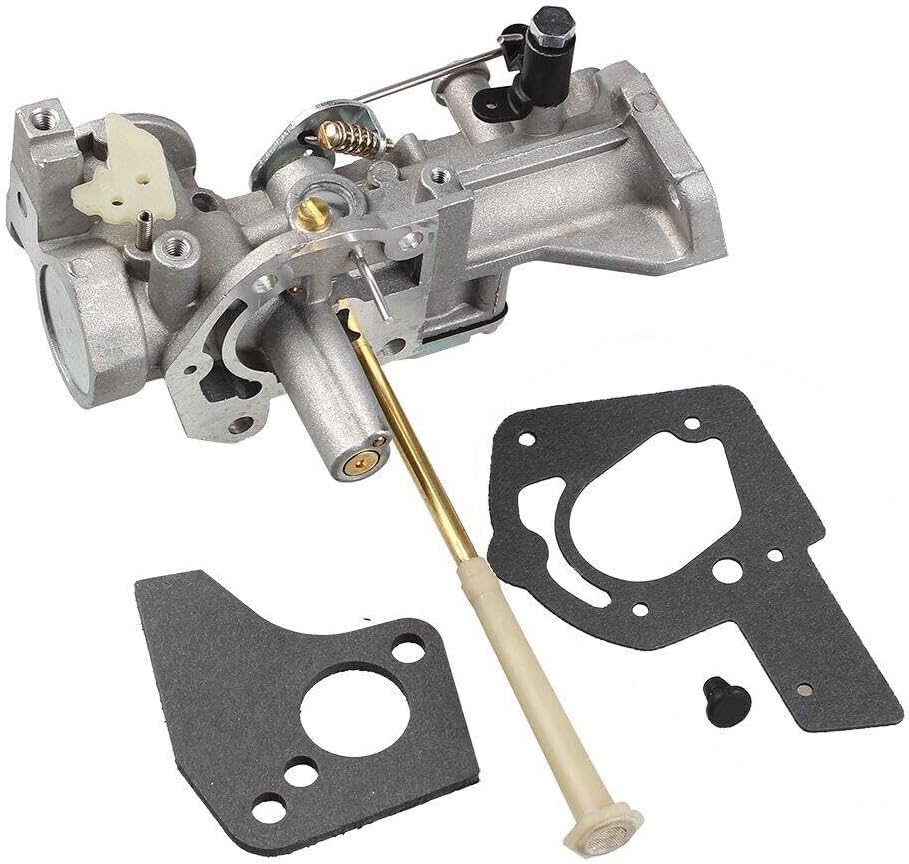
Image 1.1: The RATION carburetor assembly, including the main body, fuel inlet, choke mechanism, and accompanying gaskets for installation.
2. Compatibility
This carburetor is compatible with the following Briggs & Stratton engine models:
- Briggs & Stratton Model 135232
- Briggs & Stratton Model 135237
- Briggs & Stratton Model 135252
- Briggs & Stratton Model 135292
Always verify your engine's model number before attempting installation to ensure proper fitment and function.
3. Setup and Installation
Safety First: Before beginning any installation or maintenance, ensure the engine is turned off, cooled down, and the spark plug wire is disconnected to prevent accidental starting. Wear appropriate personal protective equipment, such as gloves and eye protection.
General Installation Steps:
- Drain Fuel: Safely drain all fuel from the fuel tank and fuel lines into an approved container.
- Remove Air Filter Assembly: Disconnect and remove the air filter housing and any associated components to gain access to the carburetor.
- Disconnect Linkages and Fuel Line: Carefully disconnect the throttle and choke linkages from the old carburetor. Pinch off or drain the fuel line before disconnecting it from the carburetor.
- Remove Old Carburetor: Unbolt and remove the old carburetor from the engine. Note the orientation of any spacers or gaskets.
- Install New Carburetor: Install the new RATION carburetor using the provided new gaskets. Ensure all mounting bolts are tightened to the manufacturer's specifications (refer to your engine's service manual for torque values).
- Reconnect Components: Reattach the fuel line, throttle, and choke linkages. Ensure all connections are secure and move freely.
- Reinstall Air Filter Assembly: Reassemble the air filter housing and any other components removed earlier.
- Refill Fuel: Refill the fuel tank with fresh, clean fuel appropriate for your engine.
If you are unsure about any step, it is recommended to consult a qualified service technician or refer to your engine's specific service manual for detailed instructions.

Image 3.1: A side view of the carburetor, highlighting the throttle and choke linkages, which require careful connection during installation.
4. Operating Instructions
After successful installation of the RATION carburetor, follow your engine manufacturer's standard operating procedures for starting and running the equipment. The carburetor is designed to deliver the correct fuel-air mixture for optimal engine performance.
- Initial Start-up: After installation, it may take a few pulls or cranks for the fuel system to prime and for the engine to start.
- Choke Usage: Use the choke as recommended by your engine manufacturer for cold starts.
- Warm-up: Allow the engine to warm up briefly before applying full load.
If the engine does not start or runs poorly, refer to the Troubleshooting section of this manual or your engine's specific operating guide.
5. Maintenance
Proper maintenance of your carburetor and fuel system is crucial for long-term engine performance and reliability.
- Fuel Quality: Always use fresh, clean fuel. Stale or contaminated fuel is a primary cause of carburetor issues. Consider using a fuel stabilizer, especially during storage.
- Fuel Filter: Regularly inspect and replace the fuel filter according to your engine manufacturer's recommendations. A clogged fuel filter can restrict fuel flow to the carburetor.
- Air Filter: Ensure the air filter is clean and properly installed. A dirty air filter can cause a rich fuel mixture and poor engine performance.
- Storage: Before long-term storage, either run the engine until it runs out of fuel or drain the fuel system completely to prevent fuel degradation and gumming in the carburetor.
- Cleaning: If performance issues arise due to fuel contamination, the carburetor may require cleaning. This typically involves disassembling the carburetor and cleaning jets and passages with carburetor cleaner. This task is best performed by experienced individuals or a professional.
6. Troubleshooting
If your engine experiences issues after carburetor replacement, consider the following common troubleshooting steps:
| Symptom | Possible Cause | Solution |
|---|---|---|
| Engine will not start | No fuel, clogged fuel filter, incorrect choke setting, spark plug issue, air leak at carburetor gasket | Check fuel level, replace fuel filter, adjust choke, inspect spark plug, re-check carburetor mounting and gaskets |
| Engine runs rough or stalls | Dirty fuel, clogged carburetor jet, air filter restriction, incorrect idle adjustment | Use fresh fuel, clean carburetor (professional recommended), clean/replace air filter, adjust idle screw (if applicable) |
| Engine lacks power | Fuel restriction, dirty air filter, carburetor not properly tuned | Check fuel flow, clean/replace air filter, ensure carburetor is correctly installed and linkages are free |
| Fuel leaks from carburetor | Damaged float, stuck needle valve, loose fuel line, damaged gasket | Inspect float and needle valve, tighten fuel line, replace gaskets |
For persistent issues, consult your engine's service manual or seek assistance from a qualified technician.
7. Specifications
| Feature | Detail |
|---|---|
| Brand | RATION |
| Compatible Engine Models | Briggs & Stratton 135232, 135237, 135252, 135292 |
| OEM Part Number (Reference) | 135232, 135237, 135252, 135292 |
| Product Dimensions | Approximately 2 x 2 x 2 inches |
| Item Weight | Approximately 5 pounds |
| UPC | 670293874758 |
8. Warranty and Support
For information regarding product warranty, please refer to the purchase documentation or contact the seller directly. For technical support or further assistance, please reach out to the RATION customer service department through the contact information provided at the point of purchase.