
1. Introduction
Thank you for choosing the EZVALO Wireless Under Cabinet LED Motion Sensor Light. This manual provides essential information for the safe and efficient operation of your new lighting product. This rechargeable light features 98 LEDs, three color temperatures, and a 1900mAh battery, designed for versatile indoor use in areas such as kitchens, closets, and staircases.

Image 1.1: Overview of the EZVALO Under Cabinet LED Motion Sensor Lights, showing three light bars and charging cables.
2. Safety Information
- Do not expose the device to extreme temperatures or direct sunlight.
- Avoid contact with water or high humidity. This product is not water-resistant.
- Do not attempt to disassemble or modify the light. This may void the warranty and pose a safety risk.
- Keep out of reach of children.
- Use only the provided or certified charging cables and adapters.
- If the product is damaged, discontinue use immediately.
3. Package Contents
Please check the package for the following items:
- EZVALO Under Cabinet LED Motion Sensor Light(s)
- USB Charging Cable(s)
- 3M Adhesive Tape
- Built-in Magnets (pre-installed)
- User Manual (this document)
4. Setup and Installation
The EZVALO light offers two convenient installation methods:
4.1 Magnetic Installation
The light has built-in magnets, allowing it to attach directly to any metal surface without additional tools.
4.2 Adhesive Installation
For non-metallic surfaces, use the provided 3M adhesive tape:
- Attach the iron plate (with 3M adhesive) to the back of the light.
- Peel off the protective film from the 3M adhesive tape.
- Firmly press the light onto the desired flat surface.

Image 4.1: Visual guide for attaching the light using the magnetic strip and 3M adhesive tape.
The removable design allows for easy detachment for charging or repositioning.
5. Operation
The EZVALO light features touch control and motion sensing capabilities.
5.1 Touch Control Functions

Image 5.1: Diagram illustrating the PIR motion sensor and touch control actions.
- Single Press: Cycles through ON, Color Temperature (Warm White, Natural, Cool White), and OFF.
- Double Press: Activates "Always ON" mode.
- Triple Press: Turns the light OFF.
- Long Press: Adjusts brightness from 10% to 100%. Release and long press again to adjust in the opposite direction.
5.2 Motion Sensor Modes
The light can operate in various motion-activated modes:

Image 5.2: Illustration of the motion sensor's 120° wide angle and 10-foot detection range.
- AUTO Mode: Detects motion within a 120° angle and 9-12 feet. The light turns OFF automatically after 20 seconds of no activity.
- Night Mode: Motion detection works only in dark environments.
- Day Mode: Motion detection works in both bright and dark environments.
- Always On Mode: The light stays lit, but will turn OFF after 30 minutes if no motion is detected to conserve power.
5.3 Color Temperature Adjustment
The light offers three distinct color temperatures:
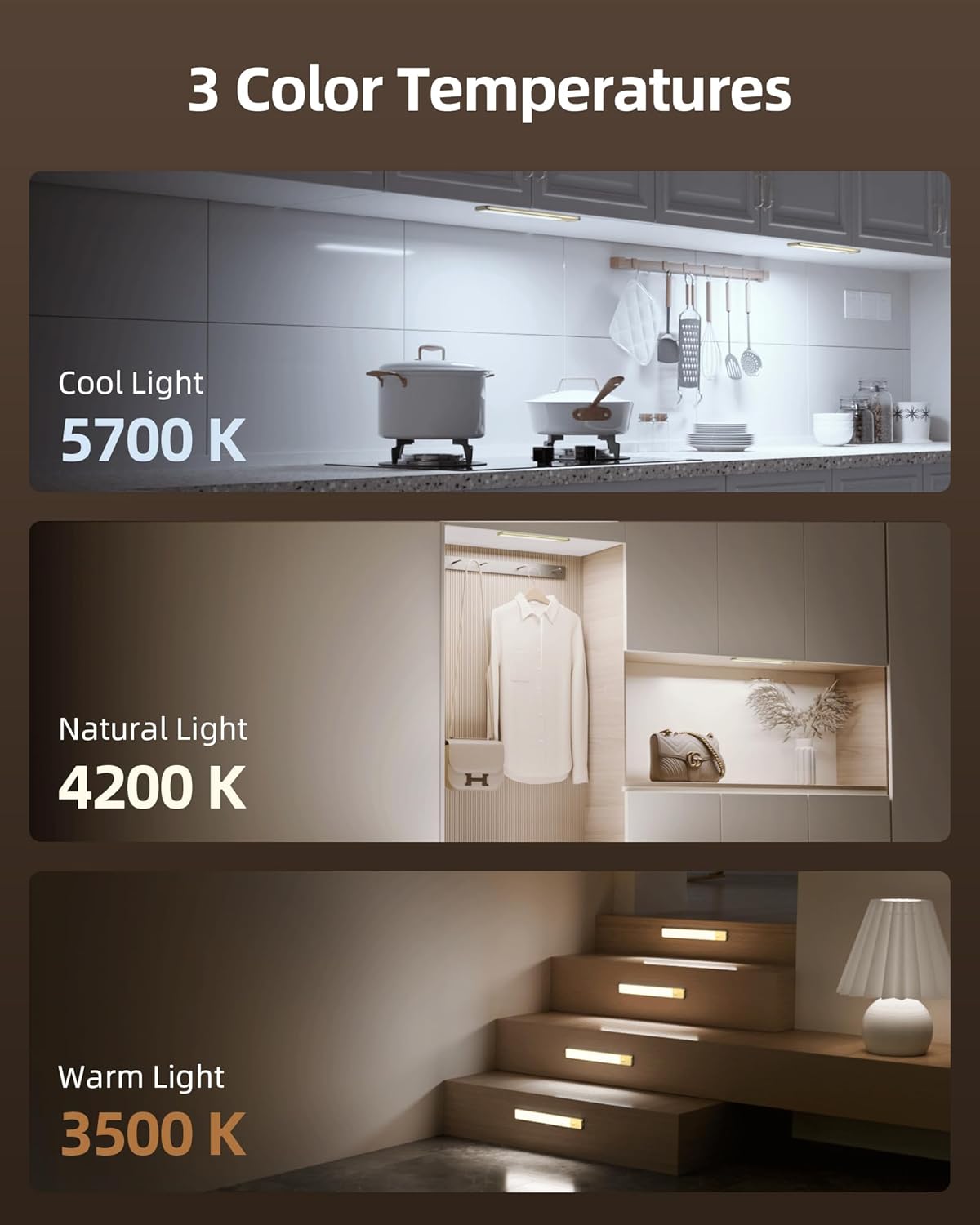
Image 5.3: Examples of Cool Light (5700K), Natural Light (4200K), and Warm Light (3500K) in various settings.
- Warm White (3500K): For a cozy and inviting atmosphere.
- Natural (4200K): Ideal for everyday lighting and general tasks.
- Cool White (5700K): Provides bright, clear light for focus and clarity.
Cycle through these options with a single press of the control button.
6. Charging and Battery Life
The EZVALO light is equipped with a 1900mAh rechargeable battery.

Image 6.1: Close-up view of the light bar showing the 1900mAh battery and USB-C charging port.
- Battery Capacity: 1900mAh.
- Battery Life (Auto Mode): 15-45 days (based on 10-20 activations daily for 20 seconds each).
- Battery Life (Always-On Mode): Approximately 6 hours at 100% brightness.
- Charging: Use the provided USB cable to charge the light. A full charge is recommended before first use.
- Charging Indicator: Please refer to the product for specific indicator behavior (e.g., red for charging, green for full).
7. Specifications
| Feature | Specification |
|---|---|
| Brand | EZVALO |
| Model Number | e5cf078a-e8c0-4719-a091-8ea1ea4e37ae |
| Light Source Type | LED (98pcs) |
| Battery Capacity | 1900mAh |
| Color Temperatures | 3500K (Warm White), 4200K (Natural), 5700K (Cool White) |
| Control Method | Touch, Motion Sensor |
| Motion Sensor Range | 120° angle, 9-12 ft distance |
| Auto-Off Time (Motion) | 20 seconds (no activity) |
| Auto-Off Time (Always On) | 30 minutes (no motion) |
| Material | Metal, Plastic |
| Indoor/Outdoor Usage | Indoor |
| Water Resistance Level | Not Water Resistant |
8. Maintenance
- Cleaning: Wipe the light with a soft, dry cloth. Do not use abrasive cleaners or solvents.
- Storage: If storing for an extended period, ensure the battery is partially charged (around 50%) and store in a cool, dry place. Recharge every 3-6 months to maintain battery health.
- Battery Care: Avoid fully discharging the battery frequently to prolong its lifespan.
9. Troubleshooting
| Problem | Possible Cause | Solution |
|---|---|---|
| Light does not turn on. | Battery is depleted. | Charge the light using the provided USB cable. |
| Motion sensor not working. | Incorrect mode selected (e.g., Night Mode in bright conditions). Obstruction blocking sensor. | Ensure the correct motion sensor mode (Night/Day) is selected. Clear any obstructions from the sensor. Ensure the light is charged. |
| Light turns off too quickly. | No continuous motion detected. | The light is designed to turn off after 20 seconds of no motion in AUTO mode to save power. If you need it on longer, use "Always ON" mode. |
| Brightness or color temperature cannot be adjusted. | Incorrect touch gesture. | For brightness, use a long press. For color temperature, use a single press to cycle through options. |
| Light flickers or is dim. | Low battery. | Recharge the light fully. |
10. Warranty and Support
EZVALO is committed to providing excellent customer service. If you have any questions, concerns, or require assistance with your under cabinet lighting, please do not hesitate to contact us. We will do everything we can to ensure your satisfaction.
Please refer to your purchase documentation or the EZVALO official website for specific warranty terms and contact information.