
1. Introduction
This manual provides essential information for the installation, operation, and maintenance of the Blütezeit DC24V Sliding Gate Opener Control Board, model ME-GO-PCB-DC. This control board is designed as a replacement part for specific Blütezeit DC24V sliding gate openers.
1.1. Product Overview
The Blütezeit DC24V Control Board is a critical component for the automated operation of compatible sliding gate systems. It manages motor functions, remote control signals, and safety features. This board is available in two versions: 24-bit and 32-bit, which determine remote control compatibility.
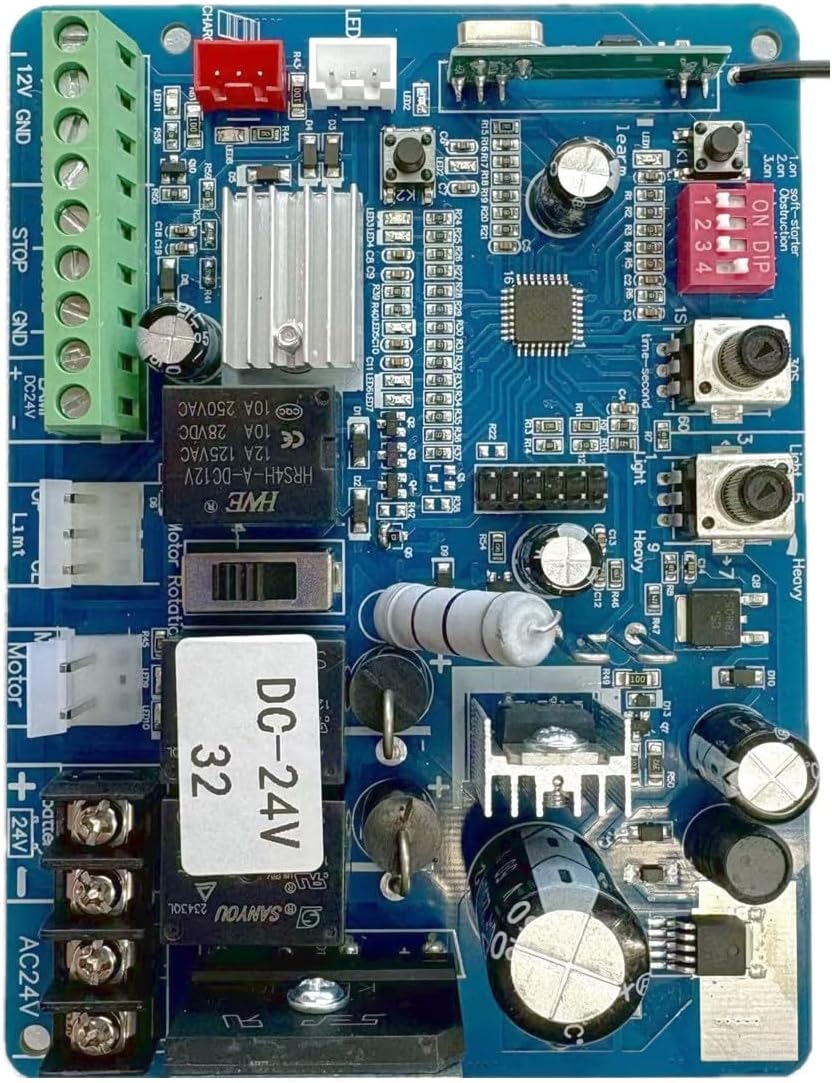
Figure 1: Blütezeit DC24V Sliding Gate Opener Control Board (Model ME-GO-PCB-DC).
1.2. Compatibility
This control board is exclusively compatible with Blütezeit DC24V Sliding Gate Openers, specifically models ME-GO-600, ME-GO-600-R1, ME-GO-600-S1, and ME-GO-600-RS1 series. It is crucial to confirm the model, brand, and version (24-bit or 32-bit) of your existing gate opener before purchasing or installing this replacement board. The WiFi module is not included with this control board.
Important Note: The 24-bit and 32-bit versions of this PCB are not interchangeable regarding remote control compatibility. Ensure you select the correct version to avoid issues with your existing remote controls.
2. Setup and Installation
Installation of the control board should be performed by individuals with appropriate technical knowledge. Always disconnect power to the gate opener before beginning any installation or replacement procedures.
2.1. Identifying Your Control Board Version
Before installation, identify whether your existing control board is a 24-bit or 32-bit version. This can often be determined by a label on the board itself or by the type of remote controls you use.
- 24-bit PCB: Compatible with SILVER remote controls.
- 32-bit PCB: Compatible with BLUE-film remote controls.

Figure 2: Example of a 24-bit PCB and compatible silver remote controls.

Figure 3: Example of a 32-bit PCB and compatible blue-film remote controls.
2.2. Installation Steps (General Guidelines)
- Power Disconnection: Ensure the main power supply to the gate opener is completely disconnected before proceeding.
- Access Control Box: Open the control box housing the existing PCB.
- Document Connections: Carefully photograph or diagram all existing wiring connections to the old board. This is crucial for correct re-connection.
- Remove Old Board: Disconnect all wires and mounting screws securing the old control board.
- Install New Board: Mount the new Blütezeit control board in the same position.
- Reconnect Wiring: Reconnect all wires to the new board according to your documentation from step 3. Pay close attention to polarity and terminal labels.
- Secure Connections: Ensure all wire connections are secure and properly insulated.
- Close Control Box: Securely close the control box.
- Power Reconnection: Reconnect the main power supply to the gate opener.
- Initial Testing: Perform initial tests as per the gate opener's main instruction manual to ensure proper function and safety.
For detailed wiring diagrams and specific installation instructions, refer to the original instruction manual for your Blütezeit DC24V Sliding Gate Opener model.
3. Operating Instructions
This control board operates on a 433MHz fixed code system. It is not compatible with rolling code motors or gate openers from other brands.
3.1. Remote Control Pairing
After installing the new control board, you will need to pair your remote controls. The pairing process typically involves pressing a "Learn" button on the control board and then activating a button on your remote control. Refer to your gate opener's main instruction manual for the exact steps for remote control pairing specific to your model and board version.
- 24-bit PCB: Use SILVER remote controls.
- 32-bit PCB: Use BLUE-film remote controls.
Ensure that the remote controls you are attempting to pair match the bit version of the installed PCB.
4. Maintenance
The Blütezeit DC24V Control Board is designed for reliable operation with minimal maintenance. However, periodic checks of the overall gate opener system are recommended.
- Visual Inspection: Periodically inspect the control board and its connections for any signs of damage, corrosion, or loose wiring.
- Cleanliness: Ensure the control box remains free of dust, debris, and moisture, which can affect electronic components.
- System Checks: Regularly test the gate opener's functionality, including safety features like photo-eye sensors, to ensure they are working correctly.
Always disconnect power before performing any maintenance inside the control box.
5. Troubleshooting
If you encounter issues after replacing the control board, consider the following common troubleshooting steps:
- No Power: Check all power connections, circuit breakers, and fuses. Ensure the power supply is correctly connected to the board.
- Remote Controls Not Working:
- Verify that the control board version (24-bit or 32-bit) matches your remote controls (silver for 24-bit, blue-film for 32-bit).
- Attempt to re-pair the remote controls following the instructions in your gate opener's main manual.
- Check remote control batteries.
- Gate Not Moving:
- Ensure all wiring connections are secure and correct.
- Check for any obstructions in the gate's path.
- Verify that safety sensors (e.g., photo-eyes) are aligned and functioning correctly.
- Erratic Operation: Loose connections or interference can cause erratic behavior. Inspect all wiring and ensure the 433MHz fixed code system is not experiencing external interference.
For persistent issues, consult the comprehensive troubleshooting guide in your Blütezeit DC24V Sliding Gate Opener's main manual or contact customer support.
6. Specifications
The following are the technical specifications for the Blütezeit DC24V Sliding Gate Opener Control Board (ME-GO-PCB-DC):
| Feature | Detail |
|---|---|
| Brand | Blütezeit |
| Model Number | ME-GO-PCB-DC |
| Compatible Processors | 24-bit, 32-bit |
| Operating Frequency | 433MHz (Fixed Code System) |
| Item Weight | 6.4 ounces |
| Product Dimensions | 5.12 x 4.33 x 1.57 inches |
| Included Components | 1 x DC PCB (24-bit or 32-bit) |
| Batteries Required | Yes (for remote controls, not included with PCB) |
7. Customer Support
Blütezeit is committed to providing reliable customer support. If you have questions regarding compatibility, installation, operation, or require assistance with your Blütezeit DC24V Sliding Gate Opener Control Board, please contact our support team. We are available to help ensure a smooth replacement process and optimal performance of your gate opener system.
For contact information, please refer to the official Blütezeit website or your product packaging.