
Introduction
This manual provides essential information for the installation, operation, and maintenance of your Richmat HJC18 PN 200-0007 Control Box, designed as a replacement part for Leggett and Platt adjustable bed bases. Please read this manual thoroughly before proceeding with installation to ensure proper function and safety.
Product Overview

Figure 1: Top View of Control Box. This image shows the top surface of the control box, featuring a barcode label with the part number 200-0007 and serial number SN18C241211530. A "SYNC" button is visible, along with two indicator icons, likely for head and foot adjustments.

Figure 2: Bottom View with Specifications. This view displays the underside of the control box, which includes a detailed product label. The label lists critical information such as the Part Number (PN: 200-0007), Item Number (HJC18), Input Voltage (DC 24-30V), IP rating (IP20 8A Max.), Duty Cycle (10% max, 2mins/18mins), and Software Part Number (SW P/N: A 1219C18M0001). It also indicates "Made in China" and features various certification marks.
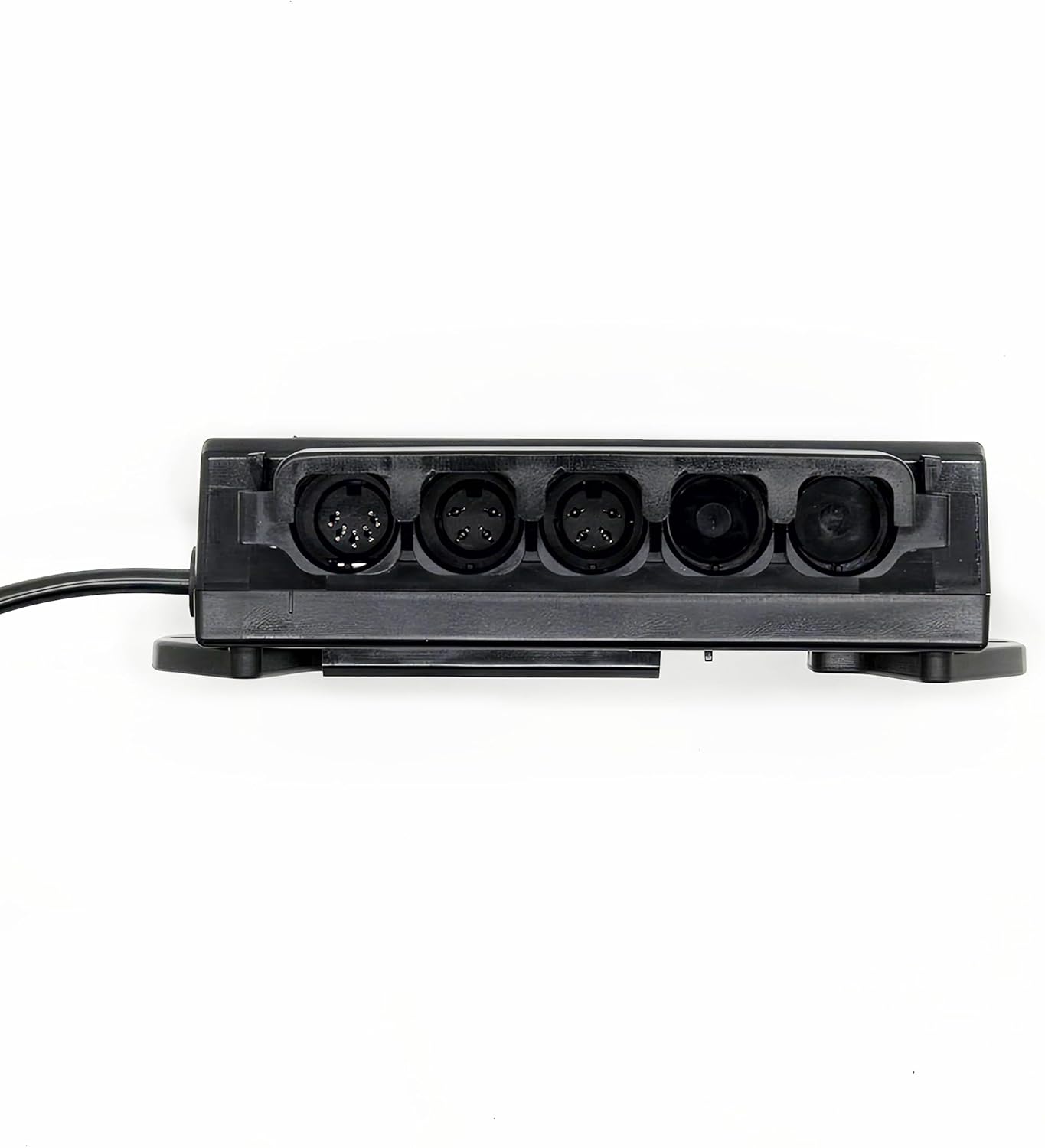
Figure 3: Front View of Motor Ports. This image highlights the front edge of the control box, revealing four circular ports. These ports are designed for connecting the various motors of the adjustable bed base, such as those for head lift, foot lift, and potentially massage functions.

Figure 4: Side View of Auxiliary Ports. This side view of the control box shows two additional ports: an RJ45 (Ethernet-style) port and a standard audio jack. These ports may be used for connecting a wired remote, external accessories, or for diagnostic purposes.
Setup and Installation
- Compatibility Check: Before installation, ensure that your existing control box's ports match those on the HJC18 PN 200-0007. Incompatibility may prevent proper pairing and function. This control box is specifically designed for adjustable beds with Richmat branded motors.
- Power Disconnection: Unplug the adjustable bed from the main power outlet before attempting any installation or replacement.
- Remove Old Control Box: Carefully disconnect all cables from the old control box and unmount it from the bed frame. Note the position and type of each connection.
- Mount New Control Box: Securely mount the new HJC18 PN 200-0007 control box to the bed frame using the existing mounting points. Refer to Figure 2 for mounting bracket details.
- Connect Cables:
- Connect the motor cables to the circular ports on the front of the control box (refer to Figure 3). Ensure each cable is firmly seated.
- Connect the power cable to the designated power input port.
- If applicable, connect any auxiliary cables (e.g., for wired remote, USB charging, LED lighting) to the side ports (refer to Figure 4).
- Power On: Once all connections are secure, plug the adjustable bed back into the main power outlet.
- Remote Pairing (if applicable): If your adjustable bed uses a wireless remote, you may need to pair it with the new control box. Locate the "SYNC" button on the top of the control box (Figure 1). Press and hold the SYNC button, then follow the pairing instructions specific to your remote control. Note that the remote control typically requires 2 x AAA batteries, which are not included with this control box.
Operating Instructions
The HJC18 PN 200-0007 control box enables the full functionality of your adjustable bed base. Once installed and paired with your remote, you can operate the following features:
- Head and Foot Lift: Use your remote control to independently raise or lower the head and foot sections of the bed.
- Vibrating Massage: If your bed base is equipped, activate and adjust the intensity of the massage function via the remote.
- LED Lighting: Control any integrated under-bed LED lighting.
- USB Charging Port: Utilize the USB charging port (if present on your bed base and connected to the control box) to charge compatible devices.
Refer to your adjustable bed's original remote control manual for specific button functions and advanced features.
Maintenance
- Cleaning: Disconnect power before cleaning. Wipe the control box with a dry, soft cloth. Do not use liquid cleaners or abrasive materials.
- Environment: Ensure the control box is kept in a dry environment, away from direct sunlight, excessive heat, and moisture.
- Cable Management: Periodically check all connected cables for signs of wear or damage. Ensure cables are not pinched or tangled.
- Unauthorized Access: The control box is not designed to be opened by unauthorized personnel. Tampering with the internal components may void any applicable warranty and could lead to malfunction.
Troubleshooting
| Problem | Possible Cause | Solution |
|---|---|---|
| Bed not responding to remote |
|
|
| Motors not moving smoothly or making unusual noises |
|
|
| LED lights or USB port not working |
|
|
Specifications
- Model: HJC18 PN 200-0007
- Brand: Richmat
- Compatibility: Leggett and Platt adjustable bed bases with Richmat branded motors.
- Input Voltage: DC 24-30V
- Max Current: 8A
- IP Rating: IP20
- Duty Cycle: 10% max, 2 minutes on / 18 minutes off
- Software Part Number: A 1219C18M0001
- Country of Origin: China
Warranty and Support
For warranty information or technical support regarding your Richmat HJC18 PN 200-0007 Control Box, please contact the seller or manufacturer directly. Keep your purchase receipt and product serial number (SN18C241211530) readily available when seeking assistance.
For general inquiries or to find more information about Richmat products, you may visit the official Richmat website or the product page on Amazon: HJC18 PN 200-0007 Control Box on Amazon.