Introduction
This manual provides comprehensive instructions for the safe and effective use of your NEBO SLYDE King 4K Rechargeable Flashlight and Work Light. Please read this manual thoroughly before operating the device and retain it for future reference.

Image 1: The NEBO SLYDE King 4K, a versatile rechargeable flashlight and work light.
Safety Information
To ensure safe operation, always follow these guidelines:
- Do not look directly into the LED light. The intense light output can cause temporary vision impairment.
- Keep out of reach of children.
- Do not disassemble the unit. This will void the warranty and may cause damage.
- Use only the provided USB-C charging cable or a certified equivalent.
- Do not expose the battery to extreme temperatures or fire.
- Ensure the charging port cover is securely closed when not charging to maintain water resistance.
Package Contents
Verify that all items are present in your package:
- NEBO SLYDE King 4K Flashlight and Work Light
- USB-C to USB Charging Cable
- Lanyard
- Instruction Manual (this document)
Setup
Initial Charge
Before first use, fully charge the NEBO SLYDE King 4K. The device comes with a pre-installed rechargeable lithium-ion battery.
- Locate the USB-C charging port on the flashlight. It is typically covered by a rubber flap to protect against water and dust.
- Open the rubber flap and insert the small end of the USB-C charging cable into the port.
- Connect the larger USB-A end of the cable to a powered USB port (e.g., computer, wall adapter, power bank).
- The power button will illuminate to indicate charging status. A red light indicates charging, and a blue light indicates a full charge.
- Charging typically takes 4 to 8 hours for a full charge.
- Once fully charged, disconnect the cable and securely close the rubber flap over the charging port.

Image 2: The NEBO SLYDE King 4K connected to a USB-C charging cable.
Attaching the Lanyard
Attach the included lanyard to the designated loop on the flashlight's tail cap for added security and ease of carrying.
Operating Instructions
Power Button Functions
The power button controls all light modes and power functions.
- Press and Release: Cycles through flashlight modes (High, Low).
- Double Press: Activates the work light (COB).
- Press and Hold: Activates dimming function for current mode.
- Direct-to-Red: When the work light is active, press and hold to switch to red light mode.
Flashlight Operation
The front-facing LED flashlight offers powerful illumination and adjustable focus.
- Turn On/Off: Press the power button once to turn on the flashlight. Press again to cycle through modes or turn off after a few seconds in a single mode.
- Modes: The flashlight has High (4000 lumens) and Low (400 lumens) modes.
- Zoom Function: Twist the head of the flashlight to adjust the beam from a wide floodlight to a focused spotlight (4X zoom).

Image 3: The NEBO SLYDE King 4K flashlight in use, demonstrating its powerful beam.

Image 4: Illustrates the 4X zoom capability, switching between floodlight and spotlight modes.
Work Light (COB) Operation
The COB work light provides broad area illumination and features a unique slide-to-reveal design.
- Activate: Slide the body of the flashlight downwards to reveal the COB work light. The work light will automatically turn on.
- Modes: The work light has High (1000 lumens) and Low (100 lumens) white light modes.
- Red Light Mode: From the white work light mode, press and hold the power button to switch to Red High (40 lumens), Red Low (4 lumens), and Red Flashing (40 lumens) for emergency signaling or preserving night vision.
- Turn Off: Slide the body upwards to conceal the COB work light, which will turn it off. Alternatively, cycle through modes until off, or press and hold the power button.
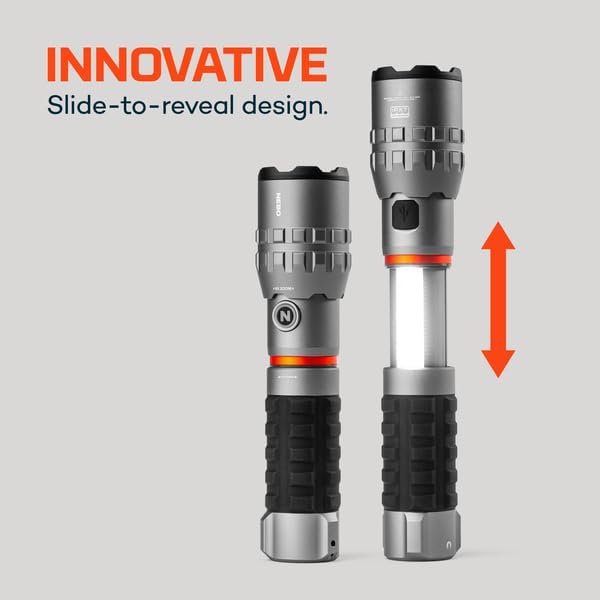
Image 5: The innovative slide-to-reveal design of the NEBO SLYDE King 4K, exposing the COB work light.

Image 6: The COB work light in operation, providing wide-area illumination.
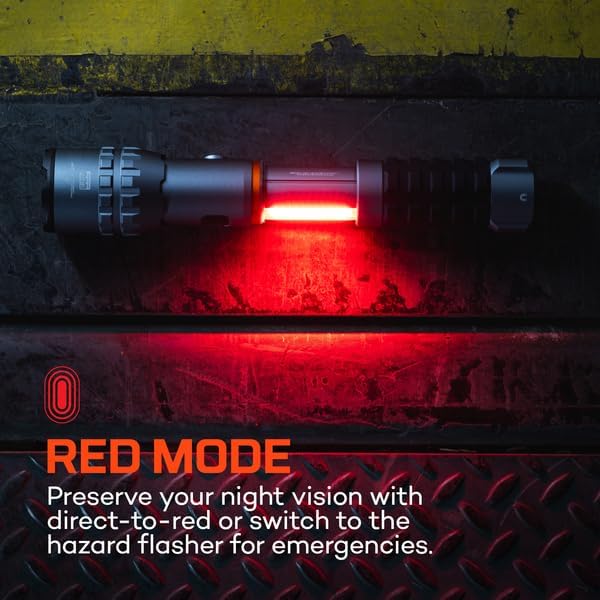
Image 7: The work light operating in red mode, useful for night vision preservation or signaling.
Magnetic Base
The powerful magnetic base allows for hands-free operation by attaching the flashlight to metallic surfaces.

Image 8: The magnetic base securely holding the flashlight to a metal surface for hands-free use.
Power Memory
The SLYDE King 4K features power memory, which means it will remember the last used light mode (flashlight or work light, and its intensity) when turned back on, provided it was off for more than 8 seconds.
Maintenance
- Cleaning: Wipe the flashlight with a soft, damp cloth. Do not use abrasive cleaners or solvents.
- Charging Port: Keep the USB-C charging port clean and free of debris. Ensure the rubber flap is sealed when not charging to maintain water resistance.
- Battery Care: For optimal battery life, avoid fully discharging the battery frequently. Recharge regularly. If storing for an extended period, charge the battery to approximately 50% every 3-6 months.
- Storage: Store the flashlight in a cool, dry place away from direct sunlight and extreme temperatures.
Troubleshooting
| Problem | Possible Cause | Solution |
|---|---|---|
| Flashlight does not turn on. | Battery is depleted. | Charge the flashlight using the USB-C cable. |
| Light output is dim. | Low battery level. | Recharge the battery. |
| Work light does not activate. | Not fully slid open. | Ensure the body is fully slid down to reveal the COB light. |
| Charging indicator light is not working. | Cable not properly connected or faulty. | Ensure the USB-C cable is securely connected to both the flashlight and the power source. Try a different USB port or cable. |
| Water ingress after exposure. | Charging port flap not sealed. | Always ensure the rubber flap covering the USB-C port is securely closed when not charging to maintain IPX7 water resistance. |
Specifications
| Feature | Detail |
|---|---|
| Model Number | NEB-WLT-0031 |
| Light Output (Flashlight High) | 4000 Lumens |
| Light Output (Flashlight Low) | 400 Lumens |
| Light Output (Work Light High) | 1000 Lumens |
| Light Output (Work Light Low) | 100 Lumens |
| Light Output (Red High) | 40 Lumens |
| Light Output (Red Low) | 4 Lumens |
| Light Output (Red Flashing) | 40 Lumens |
| Battery Type | Rechargeable Lithium-Ion (2600 mAh, 3.7V) |
| Charging Time | 4-8 hours via USB-C |
| Material | Anodized Aircraft-Grade Aluminum |
| Water Resistance | IPX7 (Submersible up to 1 meter for 30 minutes) |
| Impact Resistance | Yes |
| Dimensions (Compact) | 20.7 cm (8.15 inches) Length, 4.5 cm (1.77 inches) Diameter |
| Dimensions (Extended) | 25.9 cm (10.2 inches) Length |
| Weight | 548.85 g (1.21 lbs) |
| Included Components | USB-C Charging Cable, Lanyard |

Image 9: Detailed specifications for each light mode, including output, runtime, and beam distance.
Warranty and Support
For warranty information and customer support, please refer to the official NEBO website or contact their customer service directly. Keep your purchase receipt as proof of purchase.
Online Support: Visit NEBO Support Page
Manufacturer: NEBO
Manufacturer Part Number: NEB-WLT-0031


