
1. Introduction
Thank you for choosing the FUNLOGY Speaker. This manual provides essential information for the proper setup, operation, and maintenance of your new 14W Stereo PC Speakers. Designed for optimal sound delivery and broad compatibility, these speakers offer a compact audio solution for various devices.
Product Overview
The FUNLOGY Speaker is a USB-powered stereo speaker system delivering 14W total output. It features dual 48mm full-range drivers and passive radiators for clear audio with enhanced bass. The unique 30-degree upward-facing tilt design directs sound towards your ears, optimizing the listening experience while conserving desk space. These speakers are compatible with a wide range of devices including desktop PCs, laptops, monitors, smartphones, and gaming consoles, requiring only USB for power and a 3.5mm audio jack for connection. FUNLOGY is a Japanese brand recognized for quality and design.
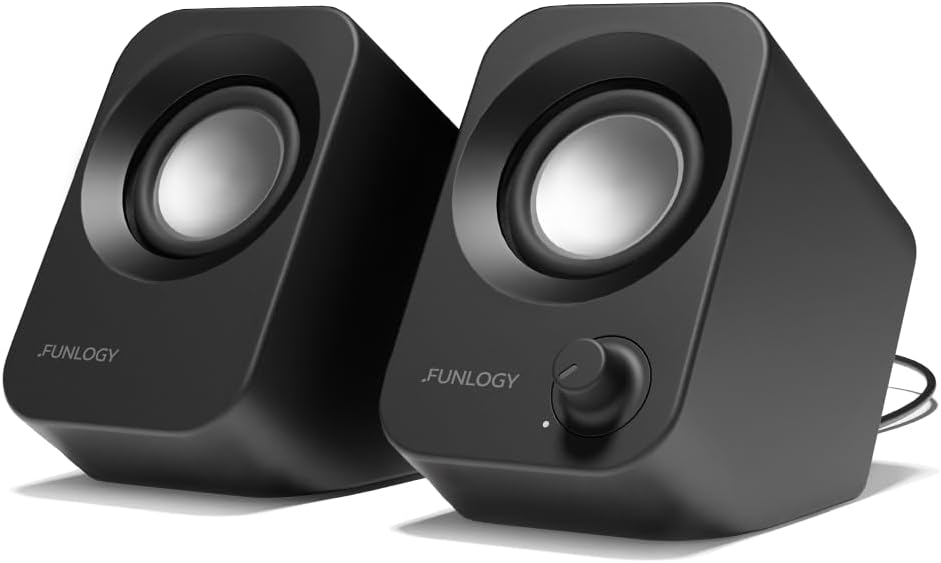
Figure 1.1: FUNLOGY Speaker System. This image shows the two compact black speakers, highlighting their sleek design and the volume control knob on one unit.
Key Features
- Compact, Powerful Sound: Delivers 14W total output with clear mids, crisp highs, and punchy bass from dual 48mm full-range drivers and passive radiators.
- Smart 30° Tilt Design: Optimizes sound delivery directly to your ears for an immersive experience and efficient desk space usage.
- Easy Setup, Broad Compatibility: Simple plug-and-play with USB for power and 3.5mm for audio, compatible with various devices without driver installation.
- Noise-Reducing Audio Design: Features premium audio components and a gold-plated AUX input to minimize signal noise and static.
Video 1.1: FUNLOGY Speaker Introductory Video. This video provides a brief visual overview of the speaker's design and features.
2. Setup Instructions
Setting up your FUNLOGY Speakers is a straightforward process. No special drivers or software installations are required.
2.1 Package Contents
- FUNLOGY Stereo PC Speakers (2 units)
- Integrated USB Power Cable
- Integrated 3.5mm Audio Cable
- Warranty Card
2.2 Connection Steps
- Position the Speakers: Place the two speakers on your desktop or desired surface. Ensure they are positioned to direct sound towards your listening area, taking advantage of the 30-degree tilt. The cable connecting the two speakers allows for flexible placement.
- Connect USB for Power: Plug the USB-A connector of the integrated cable into an available USB port on your computer, laptop, monitor, or a USB wall adapter (5V-1.0A to 3.0A). This provides power to the speakers.
- Connect 3.5mm Audio Jack: Plug the 3.5mm audio jack into the headphone output or audio out port of your device (e.g., computer, smartphone, gaming console).
- Power On: Turn the volume dial on the front of the right speaker clockwise to power on the speakers. A small LED indicator will illuminate.
- Adjust Volume: Begin playing audio on your device and adjust the volume using the speaker's volume dial.

Figure 2.1: Quick Setup. This image illustrates the simple connection of the speakers to a laptop using the USB and 3.5mm audio cables.

Figure 2.2: Broad Compatibility. This diagram highlights the versatility of the speakers, showing their compatibility with a wide range of audio sources.
3. Operating Instructions
The FUNLOGY Speakers are designed for simple and intuitive operation.
3.1 Power On/Off and Volume Control
- Power On: Rotate the volume dial on the front of the right speaker clockwise until you hear a click and the LED indicator illuminates.
- Adjust Volume: Continue rotating the dial clockwise to increase volume and counter-clockwise to decrease volume.
- Power Off: Rotate the volume dial counter-clockwise until you hear a click and the LED indicator turns off.

Figure 3.1: Seamless Volume Control. This image demonstrates the easy-to-use volume dial for adjusting audio output.
3.2 Audio Playback
Once connected and powered on, the speakers will play audio from your connected device. Ensure the volume on your source device is also adequately adjusted.
Video 3.1: Speaker Sound Demonstration. This video showcases the audio quality of the FUNLOGY speakers during playback.
4. Maintenance
To ensure the longevity and optimal performance of your FUNLOGY Speakers, follow these simple maintenance guidelines:
- Cleaning: Use a soft, dry cloth to wipe the exterior of the speakers. Avoid using abrasive cleaners, solvents, or sprays, as these can damage the finish.
- Placement: Place speakers on a stable, flat surface to prevent accidental falls. Avoid placing them near heat sources, direct sunlight, or in excessively humid environments.
- Cable Care: Do not pull on the cables forcefully. Handle connections gently to prevent damage to the ports or wiring.
- Storage: If storing the speakers for an extended period, disconnect them from power and audio sources, and store them in a cool, dry place.
5. Troubleshooting
If you encounter any issues with your FUNLOGY Speakers, please refer to the following common troubleshooting steps:
- No Sound:
- Ensure the USB power cable is securely plugged into a working USB port and the speakers are powered on (LED indicator lit).
- Verify the 3.5mm audio jack is fully inserted into the audio output of your device.
- Check the volume levels on both the speakers and your source device. Increase both gradually.
- Try connecting the speakers to a different USB port or audio source to rule out device-specific issues.
- Distorted Sound:
- Reduce the volume on both the speakers and your source device.
- Ensure the audio cable is not damaged or loosely connected.
- Test with a different audio source to determine if the distortion originates from the source device.
- Static Noise:
- Ensure all connections are secure.
- Move the speakers away from other electronic devices that might cause interference.
- Try a different USB power source, as some ports might introduce noise.
If these steps do not resolve the issue, please contact FUNLOGY customer support for further assistance.
6. Specifications

Figure 6.1: Product Specifications. This image displays a detailed table of the speaker's technical specifications.
| Feature | Detail |
|---|---|
| Model Name | FUNLOGY Speaker |
| Speaker Type | Bookshelf |
| Color | Black |
| Product Dimensions | 5.2"D x 2.71"W x 4.3"H |
| Item Weight | 0.62 Kilograms (1.37 pounds) |
| Speaker Maximum Output Power | 14 Watts |
| Connectivity Technology | Auxiliary (3.5mm) |
| Power Input | 5V-1.0A to 3.0A (USB Type-A) |
| Mounting Type | Tabletop Mount |
| Material | Plastic/Metal (Enclosure), High-Quality Components |
| Manufacturer | FUNLOGY |
7. Warranty and Support
FUNLOGY stands behind the quality of its products. Your FUNLOGY Speaker comes with a 1-year warranty from the date of purchase, covering manufacturing defects and workmanship.
Please retain your purchase receipt and the included Warranty Card as proof of purchase. For warranty claims, technical support, or any inquiries regarding your product, please contact FUNLOGY customer support through the official channels provided at the time of purchase or on the manufacturer's website.


