
econtrolly DG11J1-05, DG11J1-01, DG11J1-72, DG11J1-04, APC09, APC12, APH12, AP-10CR1SEPS, AP-13HR1SEJS00, APC092236F, AP-08CR1SEJS,
econtrolly Replacement AC Remote Control User Manual
Model Compatibility: Hisense AC Units
Introduction
This user manual provides detailed instructions for the econtrolly replacement infrared remote control, designed for various Hisense Air Conditioner (AC) models. This remote control is pre-programmed and does not require additional setup for compatible units. It displays temperature exclusively in Celsius.

Image: Front view of the econtrolly replacement remote control, showing the LCD screen and button layout.
Setup
1. Battery Installation
The remote control requires two AAA alkaline batteries (not included). Do not use rechargeable batteries.
- Locate the battery compartment cover on the back of the remote control.
- Slide the cover downwards to open the compartment.
- Insert two AAA alkaline batteries, ensuring the positive (+) and negative (-) terminals align correctly with the markings inside the compartment.
- Slide the battery compartment cover back into place until it clicks securely.
2. Initial Use
This remote control is pre-programmed for compatible Hisense AC models. No additional programming or pairing is required. Simply insert the batteries and point the remote towards your AC unit to begin operation.
Operating Instructions
Familiarize yourself with the buttons and their functions. The remote displays temperature in Celsius only.

Image: Angled view of the remote control, highlighting the various function buttons.
| Button | Function |
|---|---|
| ON/OFF | Powers the AC unit on or off. |
| MODE | Cycles through operating modes (e.g., Cool, Dry, Fan, Heat, Auto). |
| FAN | Adjusts fan speed (e.g., Low, Medium, High, Auto). |
| ▲ / ▼ | Adjusts temperature settings up or down. |
| SWING | Controls the vertical swing of the air deflector. |
| SLEEP | Activates or deactivates sleep mode for quiet operation and energy saving. |
| SUPER | Activates rapid cooling or heating mode. |
| SMART | Automatically adjusts settings based on room conditions. |
| IFEEL | Measures temperature at the remote's location for more precise control. |
| DIMMER | Adjusts the brightness of the AC unit's display. |
| TIMER ON | Sets a timer for the AC unit to turn on. |
| TIMER OFF | Sets a timer for the AC unit to turn off. |
| CLOCK | Sets the current time on the remote control. |
Maintenance
Battery Replacement
Replace batteries when the remote's response becomes sluggish or the display fades. Always replace both batteries simultaneously with new AAA alkaline batteries. Do not mix old and new batteries, or different types of batteries.
Cleaning
Wipe the remote control with a soft, dry cloth. Do not use liquid cleaners, abrasive cleaners, or chemical solvents, as these may damage the remote's surface or internal components.
Storage
If the remote control will not be used for an extended period, remove the batteries to prevent leakage and potential damage to the remote.
Troubleshooting
| Problem | Possible Cause | Solution |
|---|---|---|
| Remote not responding. | Dead or incorrectly inserted batteries. Obstruction between remote and AC unit. Remote out of range. | Replace batteries with new AAA alkaline batteries, ensuring correct polarity. Remove any obstructions. Move closer to the AC unit. |
| Display is dim or blank. | Low battery power. | Replace batteries. |
| AC unit does not respond to commands. | Remote not compatible with AC model. AC unit power issue. | Verify your AC model is listed as compatible. Check if the AC unit is powered on and functioning correctly. |
Specifications
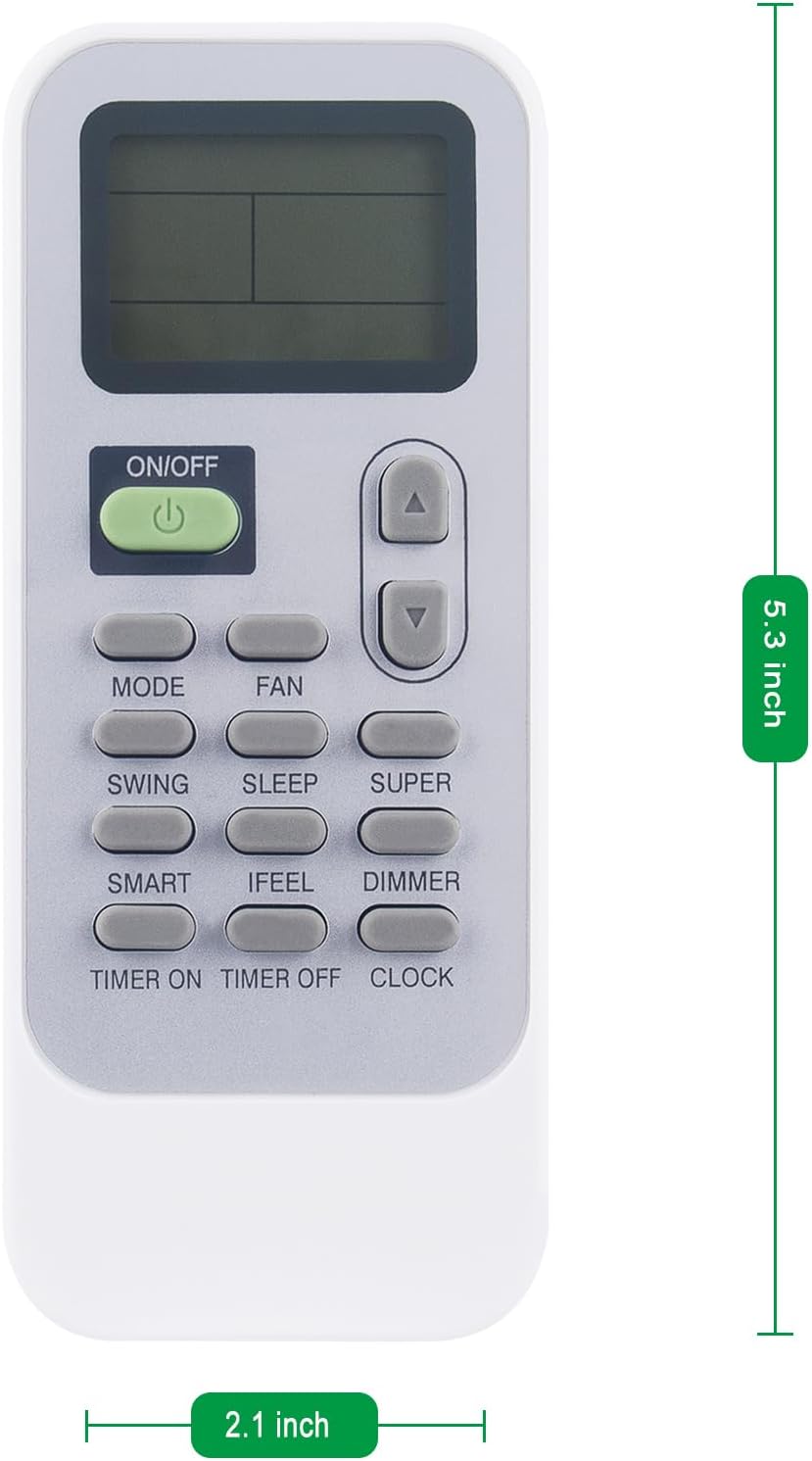
Image: Dimensions of the remote control, approximately 5.3 inches in length and 2.1 inches in width.
- Brand: econtrolly
- Manufacturer: Shengxingwang Factory
- Product Type: Electronics
- Compatible Appliances: Air Conditioner (Hisense AC models: DG11J1-05, DG11J1-01, DG11J1-72, DG11J1-04, APC09, APC12, APH12, AP-10CR1SEPS, AP-13HR1SEJS00, APC092236F, AP-08CR1SEJS, AP08CR1W, APC12F3010F, AP-10CR1SEJS, AP-14DR1SFJS2, AP-12CR1SEJS, AP-12CR1SEPS)
- Special Features: Pre-programmed
- Number of Units: 1
- Batteries Included: No
- Battery Type: AAA Alkaline (2 required)
- Connection Technology: Infrared (IR)
- User Input: Buttons
- Rechargeable Battery: No
- Color: White
- Product Weight: 50 g (approx. 0.11 lbs)
- Product Dimensions: 10 x 4 x 1.5 cm (approx. 3.9 x 1.6 x 0.6 inches)
Warranty and Support
Standard product warranty information is not provided in this manual. For details regarding any manufacturer's warranty, please refer to the product packaging or contact the seller directly.
Extended warranty options may be available through your purchase platform. Please check the product listing on Amazon.com.br for more information on extended protection plans.
For technical support or further assistance, please contact the econtrolly customer service via the platform where the product was purchased.
Related documentsDG11J1-05, DG11J1-01, DG11J1-72, DG11J1-04, APC09, APC12, APH12, AP-10CR1SEPS, AP-13HR1SEJS00, APC092236F, AP-08CR1SEJS,

Ask a question about this manual
Ask about setup, troubleshooting, compatibility, parts, safety, or missing instructions. Manuals+ will review the question and use this page’s manual context to help answer it.