
1. Important Safety Instructions
To reduce the risk of electric shock, fire, and serious injury, read all instructions before using this equipment. Keep this manual for future reference.
- Always place the treadmill on a flat, stable surface.
- Ensure adequate clearance around the treadmill (at least 2 feet on sides, 6 feet at rear).
- Keep children and pets away from the treadmill during operation.
- Do not operate the treadmill if it has a damaged cord or plug, or if it is not working properly.
- Wear appropriate athletic footwear. Do not use barefoot or in socks.
- Do not exceed the maximum user weight capacity of 300 lbs (136 kg).
- Unplug the treadmill from the power outlet when not in use or before cleaning/maintenance.
- Use the safety key (if applicable) during operation.
- Consult a physician before starting any exercise program.
2. Product Overview
The ANCHEER Walking Pad Under Desk Treadmill is designed for walking and light jogging in home or office environments. It features a compact design, a powerful motor, and an LED display for tracking workout metrics.
Key Features:
- Motor: 2.5 HP (Peak 3.0HP) quiet motor.
- Speed Range: 0.5 - 4.0 MPH.
- Running Surface: 16" x 40" (40.6 cm x 101.6 cm).
- Weight Capacity: Up to 300 lbs (136 kg).
- Display: LED display showing time, speed, distance, and calories.
- Control: Remote control for speed adjustment and start/stop.
- Portability: Integrated transport wheels for easy movement and storage.
- Shock Absorption: Multi-layer anti-slip and shock-absorbing belt surface.

Figure 2.1: The ANCHEER Walking Pad Under Desk Treadmill in its operational state, showing a user walking on it. This image highlights the compact design and the LED display.
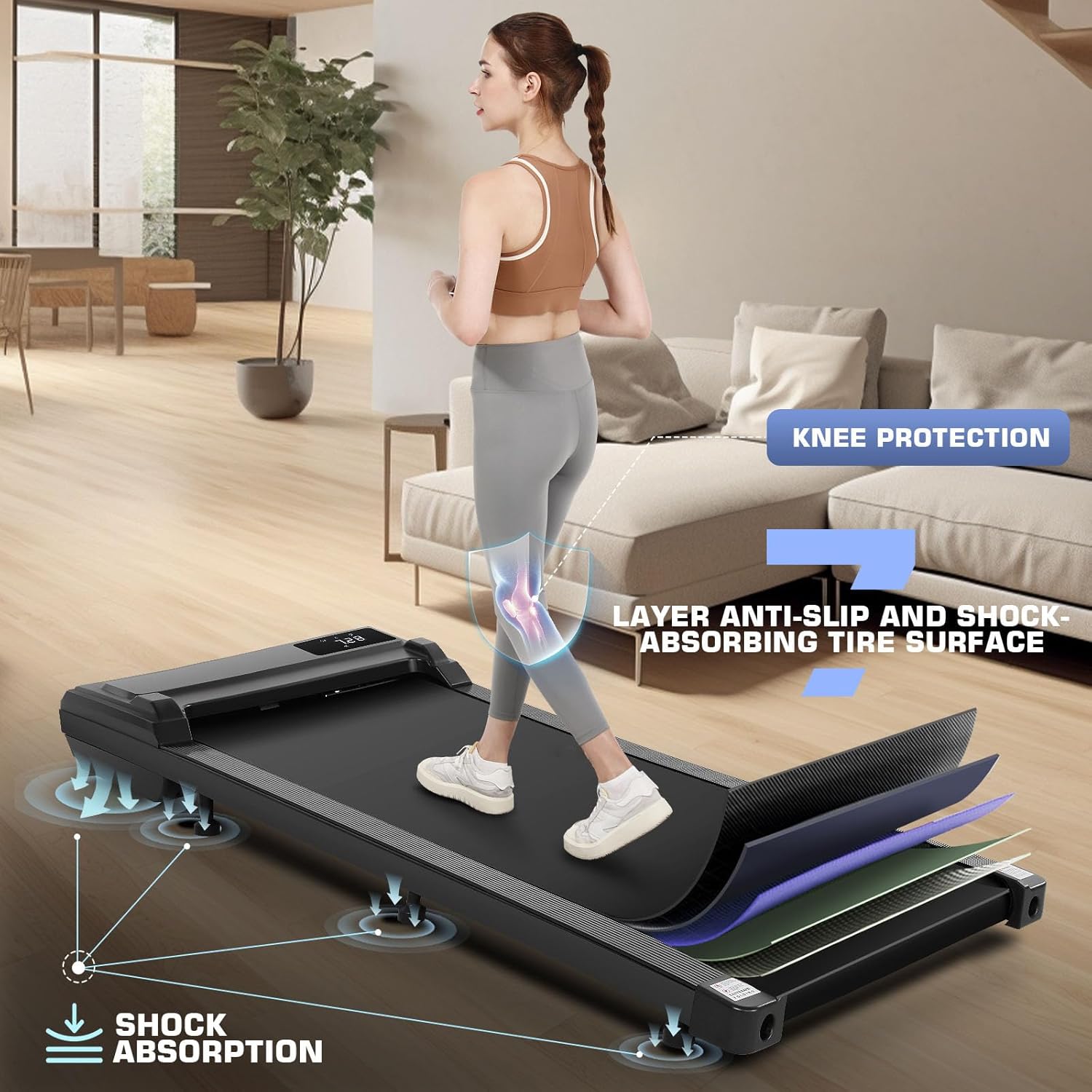
Figure 2.2: An illustration of the treadmill's multi-layer belt system, emphasizing shock absorption and knee protection features.
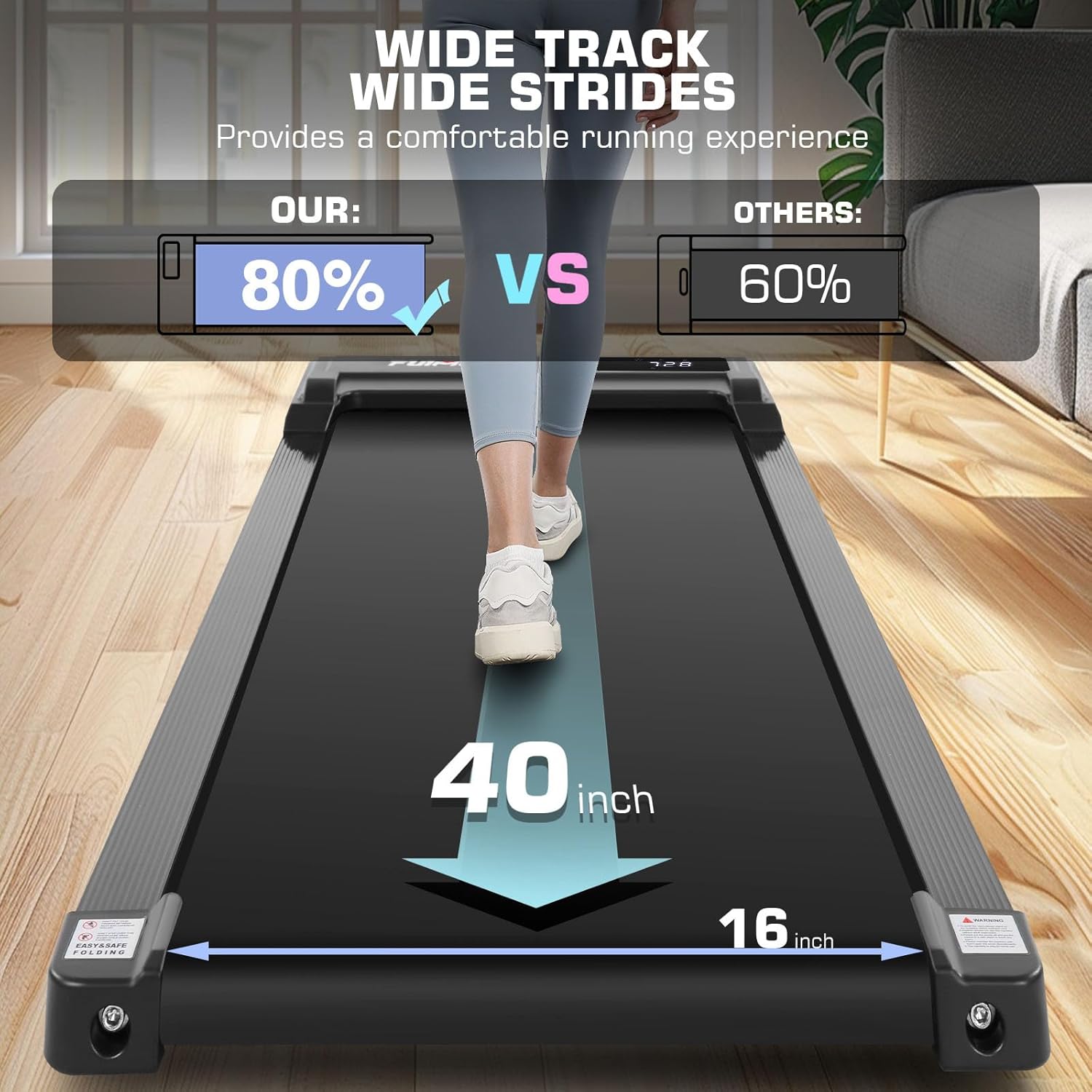
Figure 2.3: A visual comparison highlighting the wide track of the ANCHEER treadmill, designed for comfortable and unrestricted movement.

Figure 2.4: The treadmill featuring integrated transport wheels for easy movement and demonstrating its compact storage capabilities, such as under furniture or upright.
3. Setup and Initial Use
3.1 Unpacking
- Carefully remove the treadmill from its packaging.
- Place the treadmill on a flat, level surface.
- Remove all packing materials and inspect the treadmill for any damage. Contact customer support if any damage is found.
3.2 Remote Control Battery Installation
- Locate the battery compartment on the back of the remote control.
- Insert the required button cell battery (typically CR2032, included) with the correct polarity.
- Close the battery compartment securely.
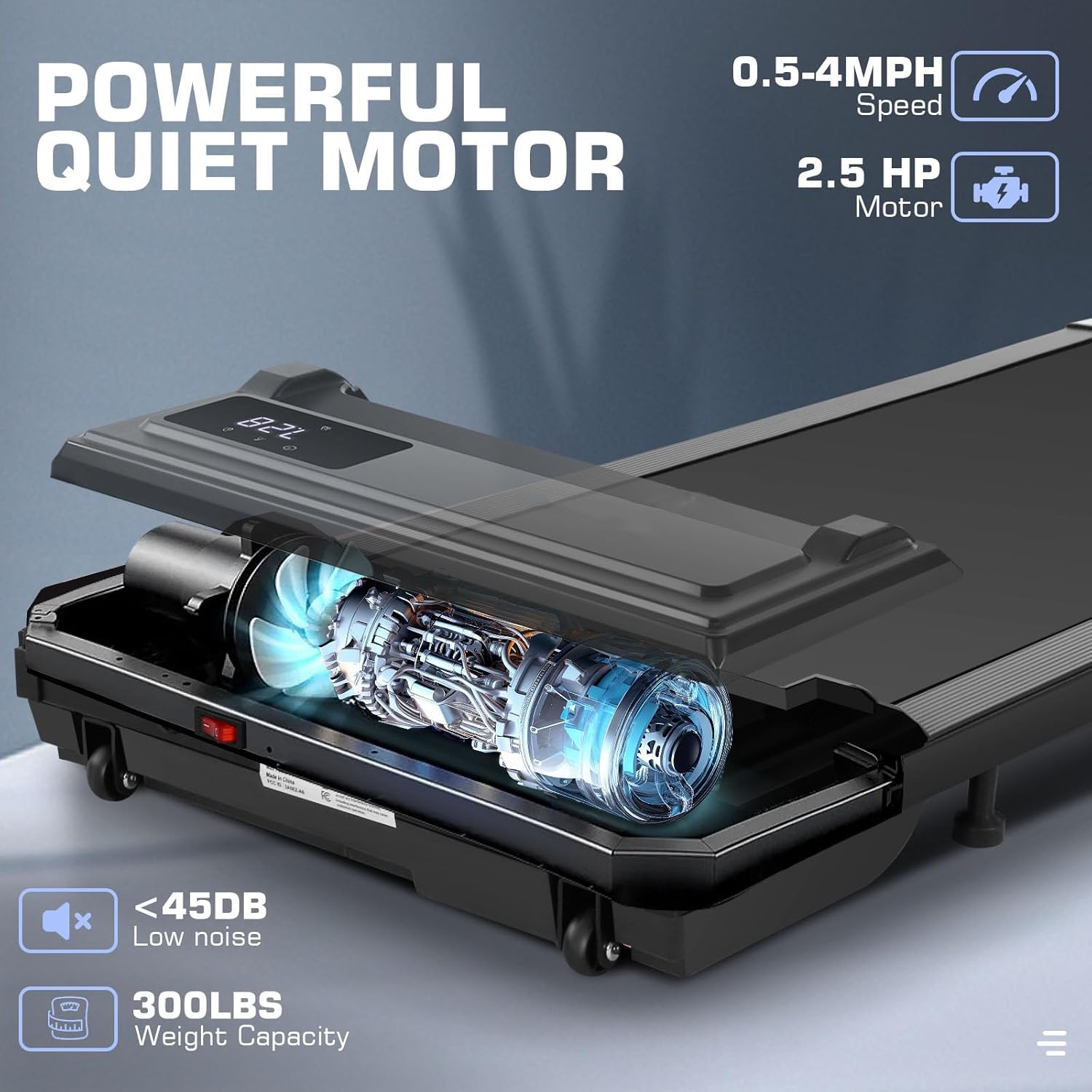
Figure 3.1: The remote control with labeled buttons for Start, Speed+, Speed-, and Stop. This remote is essential for operating the treadmill.
3.3 Power Connection
- Plug the power cord into the treadmill's power input port.
- Plug the other end of the power cord into a grounded electrical outlet.
- Turn on the main power switch, usually located near the power cord input.
4. Operating Instructions
4.1 Starting the Treadmill
- Ensure the treadmill is powered on and the safety key (if present) is in place.
- Stand on the side rails of the treadmill, not directly on the belt.
- Press the "Start" button on the remote control. The treadmill will typically start at a low speed after a brief countdown.
4.2 Adjusting Speed
- Use the "Speed+" button on the remote to increase the walking speed.
- Use the "Speed-" button on the remote to decrease the walking speed.
- The current speed will be displayed on the LED screen.
4.3 Stopping the Treadmill
- To stop the treadmill, press the "Stop" button on the remote control. The belt will gradually slow down and come to a complete stop.
- In an emergency, pull the safety key (if applicable) to immediately stop the treadmill.
4.4 Display Functions
The LED display cycles through various workout metrics:
- Time: Duration of your workout.
- Speed: Current walking/jogging speed in MPH.
- Distance: Total distance covered during the workout.
- Calories: Estimated calories burned.

Figure 4.1: The LED display on the treadmill, illustrating how workout metrics like time, speed, distance, and calories are shown.
4.5 Usage Modes
The treadmill supports various usage scenarios:
- Working/Walking Desk Mode: Speeds typically 0.5-1.5 MPH, ideal for light activity while working.
- Walking Mode: Speeds typically 1.5-2.5 MPH, suitable for a brisk walk.
- Jogging Mode: Speeds typically 2.5-4.0 MPH, for light jogging.

Figure 4.2: Visual representation of different speed ranges for walking, working, and jogging on the treadmill.
5. Maintenance
Regular maintenance ensures the longevity and optimal performance of your treadmill. Always unplug the treadmill before performing any maintenance.
5.1 Cleaning
- Wipe down the treadmill surface with a damp cloth after each use to remove sweat and dust.
- Do not use abrasive cleaners or solvents, as they may damage the finish.
- Periodically vacuum under the treadmill to prevent dust buildup from affecting motor performance.
5.2 Belt Lubrication
The walking belt requires periodic lubrication to reduce friction and extend its lifespan. Refer to the specific instructions provided with your treadmill for the type of lubricant and application frequency (typically every 3-6 months depending on usage).
5.3 Belt Adjustment
If the walking belt starts to slip or drift to one side, it may need adjustment. Consult the detailed instructions in your product's specific manual for proper belt tensioning and centering procedures. Incorrect adjustment can damage the belt or motor.
6. Troubleshooting
This section addresses common issues you might encounter. For problems not listed here, please contact customer support.
| Problem | Possible Cause | Solution |
|---|---|---|
| Treadmill does not start. | Power cord unplugged, main switch off, safety key not in place, remote battery dead. | Check power connection, turn on main switch, ensure safety key is inserted, replace remote battery. |
| Belt slips or hesitates. | Belt too loose, insufficient lubrication, motor overload. | Adjust belt tension, lubricate belt, reduce user weight or speed. |
| Unusual noise during operation. | Loose components, foreign object, motor issue. | Inspect for loose parts, remove any obstructions, contact support if noise persists. |
| Remote control not responding. | Dead battery, out of range, interference. | Replace remote battery, ensure remote is close to the treadmill, minimize interference. |
7. Product Specifications
| Feature | Detail |
|---|---|
| Brand | ANCHEER |
| Model | B0DTYHRV9V |
| Motor Power | 2.5 HP (Peak 3.0HP) |
| Speed Range | 0.5 - 4.0 MPH |
| Running Surface | 16" W x 40" L (40.6 cm x 101.6 cm) |
| Max User Weight | 300 lbs (136 kg) |
| Product Dimensions (LxWxH) | 52" x 23" x 6" (132 cm x 58.4 cm x 15.2 cm) |
| Noise Level | Less than 45dB |
| Display | LED (Time, Speed, Distance, Calories) |
| Control Method | Remote Control |
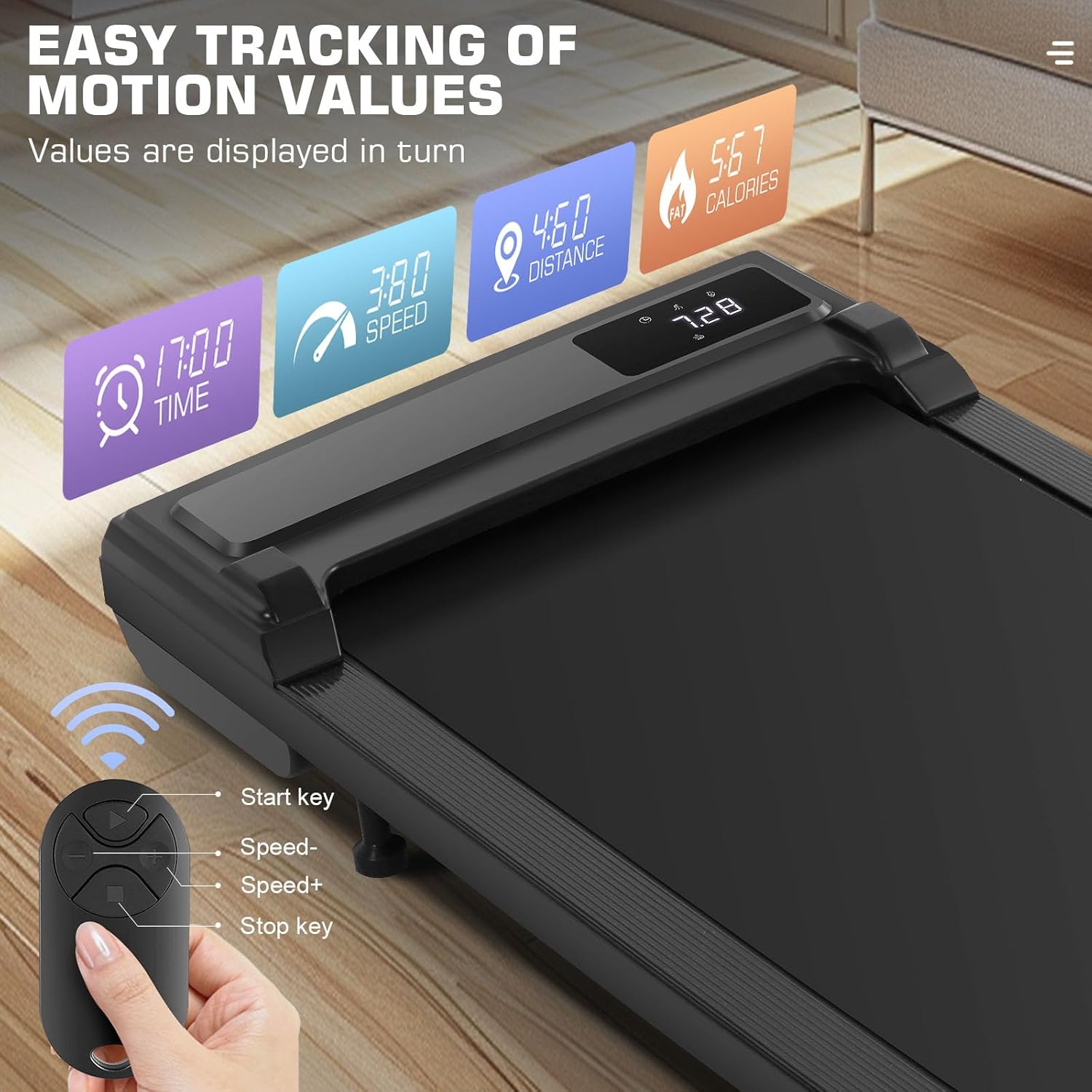
Figure 7.1: An internal view highlighting the powerful and quiet 2.5 HP motor, along with key specifications like speed range and weight capacity.
8. Warranty and Customer Support
ANCHEER products are designed for quality and durability. For specific warranty details, please refer to the warranty card included with your purchase or visit the official ANCHEER website. Keep your proof of purchase for warranty claims.
Customer Support:
If you have any questions, require technical assistance, or need to report a problem, please contact ANCHEER customer support through the following channels:
- Website: Visit the official ANCHEER website for FAQs and contact information.
- Email: Refer to your product packaging or warranty card for the customer service email address.
- Phone: Refer to your product packaging or warranty card for customer service phone numbers.
When contacting support, please have your product model (B0DTYHRV9V) and purchase date ready.