Important Safety Information
Please read and understand all instructions before assembly and use. Keep this manual for future reference.
- Always lock the casters on the trundle when the bed is in use to prevent unintended movement.
- Exercise caution around sharp edges during assembly and use to prevent injury.
- Do not exceed the maximum weight capacity of 300 pounds for the daybed.
- Ensure all connections are securely fastened before use. Periodically check and tighten hardware.
- Keep small parts away from children during assembly to avoid choking hazards.
Setup Instructions
1. Unpacking and Component Check
Carefully unpack all components from the packaging. It is recommended to lay out all parts on a clean, soft surface to prevent scratches. Verify that all parts listed in the included hardware and parts list are present. If any parts are missing or damaged, do not proceed with assembly. Contact customer support immediately.
2. Assembly
The ANCTOR Daybed with Trundle is designed for straightforward assembly. All parts are clearly labeled, and detailed instructions are provided in the separate assembly guide included with your product. Follow the step-by-step instructions carefully.

The sturdy metal frame and clear assembly points ensure a reliable structure.

Refer to the dimensions diagram for proper placement and space planning.
3. Trundle Wheel Installation
Ensure the lockable casters on the trundle are installed correctly, with the locking mechanism facing outwards for easy access. This allows for smooth movement and secure positioning.

Detail of the safety handrail, mattress slide stops, and lockable wheels for stability and convenience.
Operating Instructions
1. Trundle Bed Operation
The trundle bed is designed to slide out smoothly from underneath the main daybed. To deploy, unlock the casters and gently pull the trundle frame outwards. To store, push the trundle back into place and lock the casters to secure it.
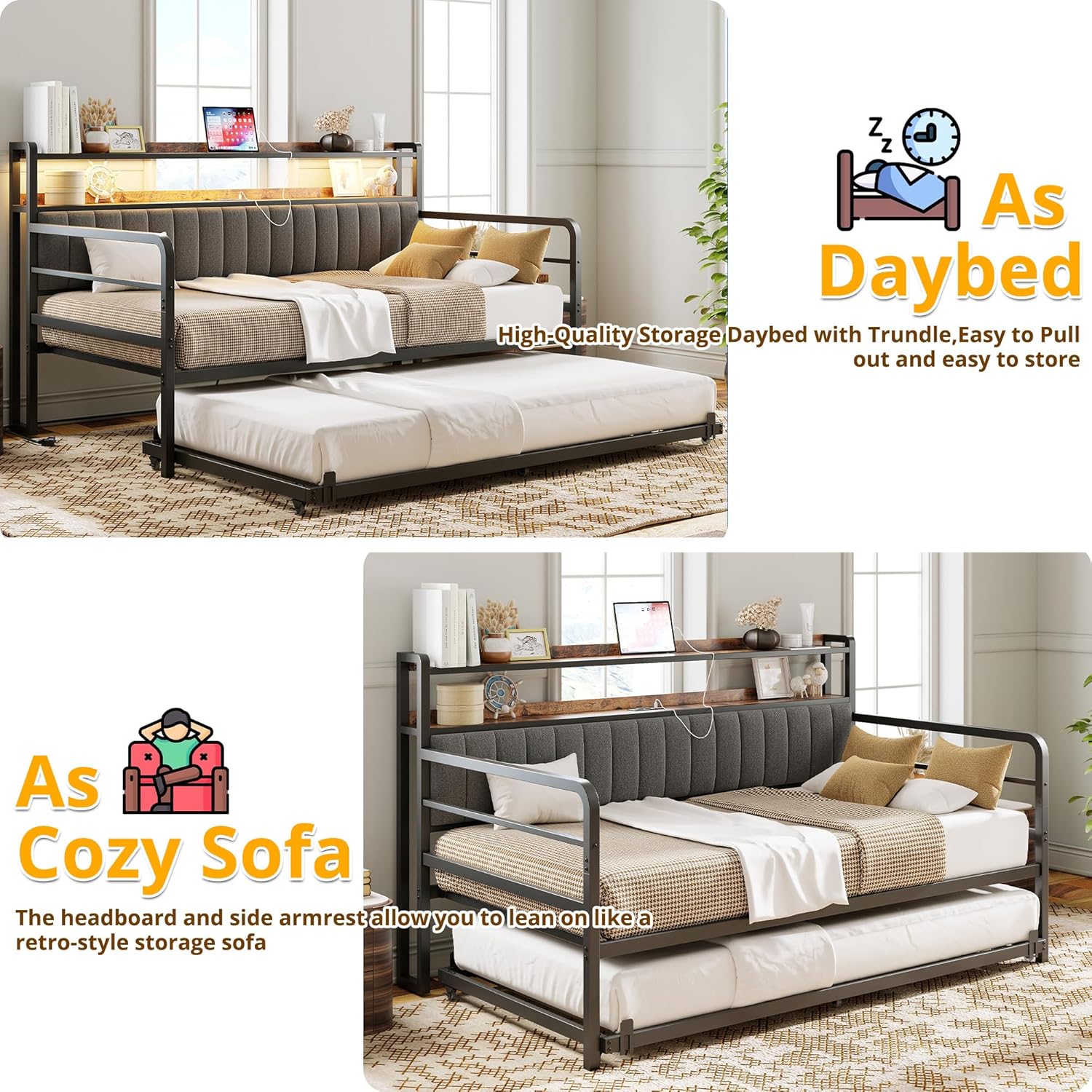
The daybed transitions from a sofa to two single beds with ease.
2. LED Lighting System
The integrated LED lights offer over 60,000 DIY color options. Control the lighting using the included remote control or a compatible smartphone application. Refer to the separate LED light instruction manual for detailed pairing and operation of the remote and app.

Control the LED lights with the remote or smartphone app for customizable ambiance.
Video demonstrating the ANCTOR Daybed with Trundle, highlighting its design and features.
3. Charging Station Usage
The daybed includes a built-in power outlet with 2 USB ports and 2 standard AC outlets. Connect your electronic devices to the charging station for convenient power access. Ensure the power cord is properly plugged into a wall outlet.
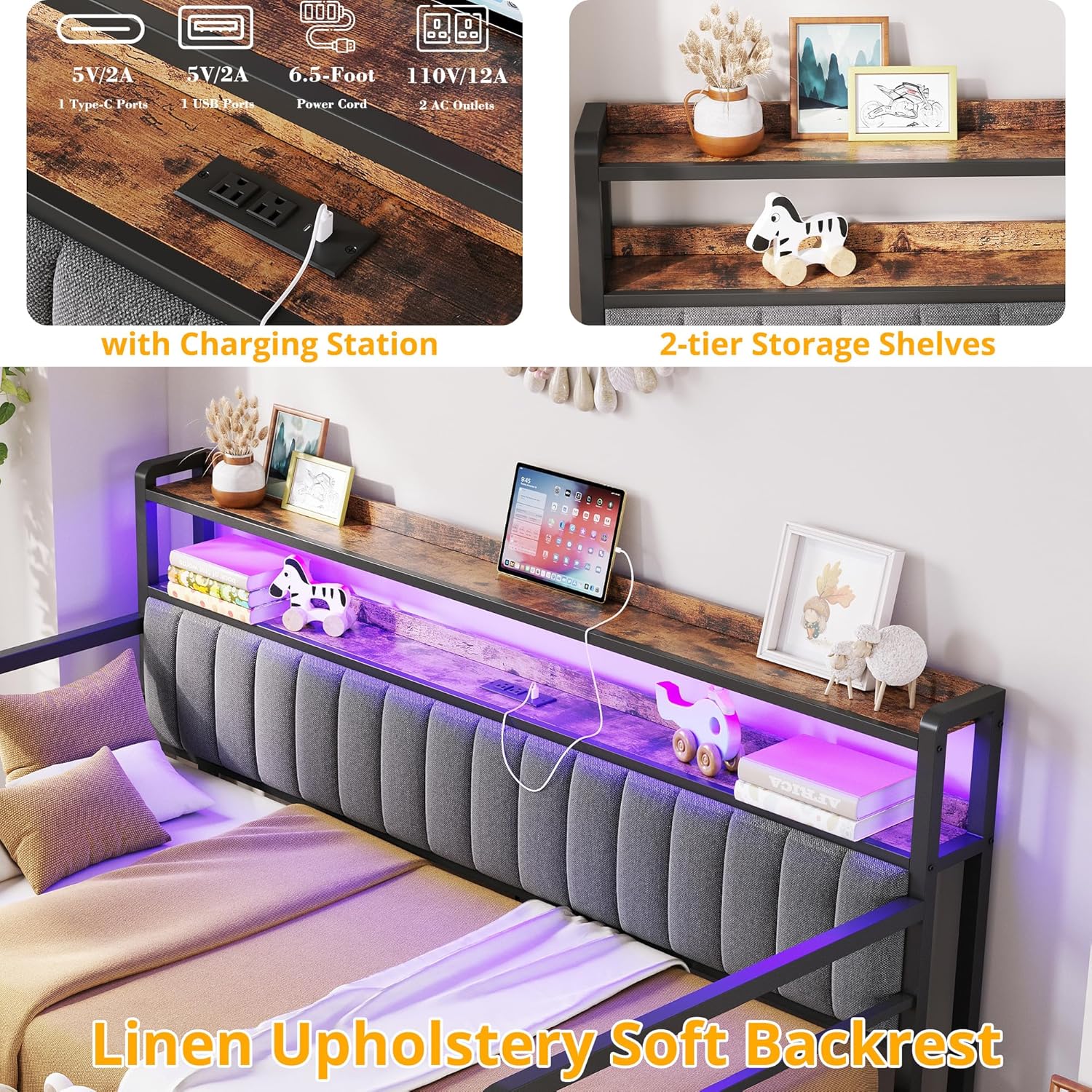
The charging station provides convenient power for devices, complemented by two-tier storage shelves.
Video showcasing the ANCTOR daybed, including its design and features.
Maintenance
1. Cleaning
- Metal Frame: Wipe the metal frame with a soft, damp cloth. Avoid abrasive cleaners or harsh chemicals that could damage the finish.
- Upholstered Headboard: For the upholstered headboard, use a soft brush or vacuum cleaner with an upholstery attachment to remove dust. For spills, blot immediately with a clean, dry cloth. For stubborn stains, consult a professional upholstery cleaner.
- Wooden Shelves: Wipe with a dry or slightly damp cloth. Avoid excessive moisture.
2. General Care
- Periodically check all bolts and screws to ensure they remain tight. Re-tighten as necessary to maintain stability and prevent squeaking.
- Avoid dragging the daybed or trundle across the floor; lift and move if repositioning is required.
- Do not place excessively heavy items on the storage shelves.
Troubleshooting
| Problem | Possible Cause | Solution |
|---|---|---|
| Bed squeaks | Loose hardware; metal-on-metal friction. | Tighten all bolts and screws. Apply a small amount of lubricant (e.g., silicone spray) to metal-on-metal contact points if necessary. |
| Trundle does not slide smoothly | Casters are locked; obstruction; dirty casters. | Ensure casters are unlocked. Check for any objects blocking the path. Clean casters if debris is present. |
| LED lights not working | Power connection issue; remote/app not paired; faulty LED strip. | Check power connection to the LED strip. Ensure the remote or app is correctly paired (refer to LED manual). Contact support if the issue persists. |
| Charging station not providing power | Power cord not plugged in; wall outlet issue; device cable issue. | Verify the daybed's power cord is securely plugged into a working wall outlet. Test the wall outlet with another device. Try a different charging cable for your device. |
| Mattress slides on the frame | Mattress slide stops not installed or adjusted. | Ensure the four mattress slide stops are correctly installed and positioned to hold the mattress in place. |
Product Specifications
- Brand: ANCTOR
- Model: B0DTYCJ3C4
- Size: Twin
- Product Dimensions: 77.2"L x 45.3"W x 44.8"H
- Color: Black
- Finish Type: Painted
- Material: Metal (Frame), Fabric (Headboard)
- Special Features: LED Lights, Charging Station (2 USB, 2 AC outlets), 2-Tier Storage Shelves, Upholstered Headboard
- Compatible Mattress Size: Twin
- Assembly Required: Yes
- UPC: 791137754491
Warranty Information
This product comes with a manufacturer's warranty. For specific details regarding warranty coverage, duration, and claims process, please refer to the warranty card included in your product packaging or contact ANCTOR customer support directly.
Customer Support
For assistance with assembly, missing parts, troubleshooting, or any other inquiries, please contact ANCTOR customer support.
- Brand: ANCTOR
- Online Store: Visit the ANCTOR Store on Amazon
- Please have your model number (B0DTYCJ3C4) and purchase date available when contacting support.

